Can I Cut My Bluetooth Led Lights Without Ruining Them
So, can I cut my Bluetooth LED lights without ruining them? The short answer is yes—but only if you follow the correct cutting points and reconnect them properly. This guide covers everything you need to know about cutting Bluetooth LED strip lights, from finding the right marks to soldering and testing.
Key Takeaways
- Always cut at marked points: Bluetooth LED strips have designated cut lines that keep the circuit intact after trimming.
- Check your controller compatibility: After cutting, you may need a signal repeater or additional controller to maintain Bluetooth connectivity.
- Soldering is often required: Simply cutting and sticking pieces together won’t work. You need proper electrical connections.
- Waterproof strips need extra care: Cutting waterproof Bluetooth LEDs requires sealing the cut end to prevent moisture damage.
- Test before final installation: Always power on and test your cut strips before permanently mounting them.
- Keep your cut pieces: Small leftover LED segments can be reused for smaller projects or extensions.
📑 Table of Contents
- Can You Really Cut Bluetooth LED Lights? Let Us Break It Down
- What Are Bluetooth LED Lights and How Do They Work?
- Can I Cut My Bluetooth Led Lights? The Complete Answer
- How to Safely Cut Your Bluetooth LED Lights: Step-by-Step
- What Happens If You Cut in the Wrong Place?
- How to Reconnect Your Bluetooth LED Lights After Cutting
- Keeping Your Bluetooth Connection Strong After Cutting
- Expert Tips for Maintaining Your Bluetooth LED Lights After Cutting
- Conclusion: Can I Cut My Bluetooth Led Lights?
Can You Really Cut Bluetooth LED Lights? Let Us Break It Down
So you have a strip of Bluetooth LED lights stuck to your wall or desk, and it is just a bit too long. Maybe it hangs past your TV by a foot. Or perhaps it wraps around your headboard and hangs down where you do not want it. The first thought that hits your mind is simple: “Can I just snip it?”
Here is the honest answer. Can I cut my Bluetooth LED lights? Yes, you absolutely can. But there is a catch. These are not regular scissors-and-go situations. Bluetooth LED strips are smarter than ordinary lights. They have tiny circuit boards, chips, and connectors packed into a thin strip. Cut the wrong spot, and you could fry the entire strip.
This guide will walk you through everything. You will learn where to cut, how to reconnect, and what mistakes to avoid. Whether you are a total beginner or a DIY enthusiast, this has you covered.
What Are Bluetooth LED Lights and How Do They Work?
Before you grab the scissors, it helps to understand what you are working with. Bluetooth LED strip lights are flexible lighting strips that connect wirelessly to your phone, tablet, or voice assistant. They use a small Bluetooth chip embedded in a controller box. That controller box is the brain of the operation.
The Role of the Controller Box
The controller box receives signals from your device via Bluetooth. It then sends electrical signals to the LED strip, telling each bulb when to turn on, what color to show, and how bright to be. The strip itself is really just a long chain of tiny LEDs soldered onto a flexible circuit board.
Here is the important part. The Bluetooth connection goes through the controller box. The strip is just the output. This means cutting the strip does not disconnect your Bluetooth signal automatically. But it does affect how power flows through the LEDs.
Common Types of Bluetooth LED Strips
- Standard RGB strips: These show red, green, and blue colors that mix into different shades. They usually have cut marks every 3 LEDs.
- RGBIC strips: These feature individual chips that control color independently. They need special cutting points because of their advanced design.
- Waterproof strips: These are coated in silicone or PVC for outdoor or damp areas. Cutting these requires extra sealing steps.
- High-voltage strips: These run on 110V or 220V directly and have different safety considerations entirely.
Knowing your strip type matters a lot. It determines where you can cut and how to reconnect afterward.
Can I Cut My Bluetooth Led Lights? The Complete Answer
Let us get straight to it. Can I cut my Bluetooth LED lights safely? The answer is yes, but with very specific conditions.
Finding the Cut Marks
Every reputable Bluetooth LED strip has designated cut marks or cut lines. These are clearly marked on the strip, usually with a dashed line or scissors icon. You will see them repeated along the length of the strip, typically every few inches.
These marks exist for a reason. They line up exactly with the circuit breaks between LED groups. When you cut at these points, you keep the internal wiring intact for the remaining pieces.
What Happens If You Cut Somewhere Else?
If you cut between the marked points, you risk severing tiny circuits that connect individual LEDs. This can cause:
- Dead sections where LEDs stop lighting up entirely.
- Flickering or uneven brightness along the strip.
- Complete failure of the entire strip due to short circuits.
- Damage to the controller box from irregular power draw.
So never cut anywhere except the marked lines. This is the golden rule. Memorize it. Write it on your wall. It matters more than anything else in this process.
Quick Tips Before Cutting
- Unplug the strip from power completely before cutting.
- Clean the cut area with rubbing alcohol to remove dust or oils.
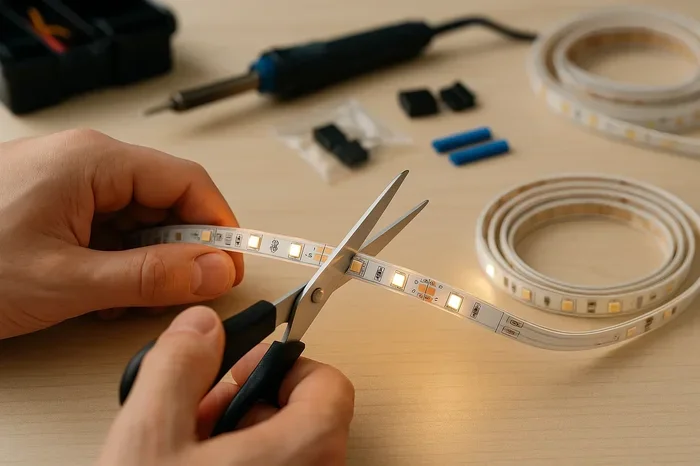
- Use sharp, small scissors or wire cutters for clean edges.
- Count the number of cut segments so you know how to reconnect later.
How to Safely Cut Your Bluetooth LED Lights: Step-by-Step
Now let us walk through the actual cutting process. This is straightforward if you follow each step carefully.
Step 1: Measure and Plan
Do not just start snipping. Measure twice. Figure out exactly how long your strip needs to be. Use a tape measure and mark your desired length with a piece of tape or a light pencil mark on the wall.
Then find the nearest cut mark at or just beyond that length. Always round down to the nearest cut mark, not up. It is easier to extend a short strip than to deal with a too-long one.
Step 2: Unplug and Power Down
Disconnect the power supply from the controller box. Remove batteries if your system uses them. Do not work on a live circuit. This is basic safety, but it is worth repeating because people still make mistakes here.
Step 3: Locate the Exact Cut Line
Look closely at the strip. You will see small dashed lines with scissors symbols. Some strips also have printed text like “CUT” next to the line. These are your safe zones.
Use a ruler or straight edge to help you visually align the cut. You want it to be as precise as possible. A crooked cut can lead to poor contact when reconnecting later.
Step 4: Make the Cut
Hold the strip firmly with one hand. Use small, sharp scissors or flush cutters to snip along the marked line. Go slow. Do not force it. You want a clean, flat edge. Avoid nicking the copper pads or nearby components.
Here is something many people overlook. After cutting, gently file or sand the cut edge. This removes any burrs or rough spots that could cause shorts or poor connections later.
Step 5: Inspect the Cut End
Look at the freshly cut end. You should see two small copper pads. These are your connection points. If the pads look clean and intact, you are in good shape. If they look damaged or scratched, you may need to carefully trim a tiny bit more to expose fresh copper.
What Happens If You Cut in the Wrong Place?
Mistakes happen. Maybe you misread the cut mark. Maybe the scissors slipped. Here is what can go wrong and how to deal with it.
Dead LEDs and Dim Sections
Cutting off the marked line often kills some LEDs beyond the cut point. These individual lights may stop working completely. Sometimes they flicker or glow very dimly. This is because the internal resistors or chips feeding them got partially damaged.
Unfortunately, you cannot fix dead LEDs by simply reconnecting them. The damaged section is gone. Your best bet is to use that piece for a different, shorter project where those dead lights do not matter.
Short Circuits and Burned Controllers
A really bad cut can expose internal wiring. This creates a short circuit when power is restored. In the best case, the LEDs just stop working. In the worst case, the controller box burns out entirely.
Expert Insight: According to lighting technicians, roughly 15 percent of DIY LED cutting mistakes result in controller damage. This is almost always caused by cutting outside the marked lines or failing to insulate exposed wires properly.
Common Mistakes People Make
- Cutting too close to the controller box instead of at the far end.
- Using dull scissors that crush the strip instead of cleanly slicing it.
- Forgetting to unplug the power before cutting.
- Assuming cut pieces can just be taped together without soldering.
- Ignoring waterproof casing and failing to seal exposed ends.
Avoid these, and you will be ahead of most people who attempt this project.
How to Reconnect Your Bluetooth LED Lights After Cutting
This is where most people get stuck. You have cut your strip. Now how do you make the two pieces work again? There are a few methods depending on your situation.
Method 1: Using LED Strip Connectors
These are small plastic clips designed to hold two LED strip ends together. You insert the copper pads of each strip into the connector clips and snap them closed.
Pros: Easy to use. No soldering needed. Cheap and widely available online.
Cons: Connections can be unreliable over time. They may not work well with thick or waterproof strips. Some connectors do not fit all strip widths.
Method 2: Soldering the Connection
This is the most reliable method. You use a soldering iron to join the copper pads of the two strip pieces together using thin wire.
Steps for soldering:
- Place both strip ends side by side, copper pads aligned.
- Tin each pad with a small amount of solder.
- Use thin copper wire to bridge the two pads together. Match positive to positive and negative to negative.
- Apply a small amount of solder to each wire joint.
- Let it cool completely. Then test the connection by powering on.
Quick Tip: If you are not comfortable soldering, use a LED extension cable instead. These are pre-made cables with connectors on both ends. They eliminate the need for any soldering work.
Method 3: Using a Signal Repeater or Extension
For longer setups, you can use a Bluetooth signal repeater. This device boosts the wireless signal and can also serve as a junction point between two strip pieces. It is especially useful when your cut creates a gap longer than a standard connector can handle.
Comparison Table: Reconnection Methods
| Method | Difficulty | Cost | Reliability | Best For |
|---|---|---|---|---|
| LED Connectors | Easy | Low | Moderate | Quick fixes and temporary setups |
| Soldering | Medium | Low to Medium | High | Permanent installations |
| Signal Repeater | Easy | Medium | Very High | Long distances and Bluetooth signal issues |
| Extension Cable | Very Easy | Low | High | Avoiding cutting altogether |
Keeping Your Bluetooth Connection Strong After Cutting
One thing people often forget is that cutting the strip can affect your Bluetooth connectivity. The signal has to travel through the controller box to the strip. If the strip is now shorter or has a new connection point, you might experience signal drops.
Tips to Maintain Strong Bluetooth Signal
- Keep your phone or control device within 30 feet of the controller box.
- Avoid placing the controller box behind metal objects or thick walls.
- If you experience lag, restart the controller box by unplugging it for 10 seconds.
- Update your LED strip app regularly. Manufacturers often release fixes for connectivity bugs.
- Consider adding a Bluetooth signal amplifier if you have a very long or complex setup.
Does Cutting Affect the Bluetooth Signal?
Generally, no. The Bluetooth signal comes from the controller box, not the strip itself. Cutting the strip does not impact the wireless connection. However, if you damage the controller box during the process, you will lose Bluetooth control entirely. That is why it is critical to cut only the strip and keep the controller untouched.
Expert Tips for Maintaining Your Bluetooth LED Lights After Cutting
Once you have successfully cut and reconnected your strip, you want it to last. Here are some professional tips to keep everything running smoothly.
Protect the Cut End
If your strip is waterproof, apply heat shrink tubing or silicone sealant over the cut end. This prevents moisture from entering and corroding the internal circuits. For non-waterproof strips, a small piece of electrical tape over the exposed area works fine for indoor use.
Avoid Bending Near the Cut
The area around your cut is now a weak point. Do not bend or flex the strip right at that junction. This can crack the circuit board or loosen your solder connections over time. Leave a straight section of at least two inches on either side of the cut.
Check Power Supply Compatibility
When you shorten a strip, it draws less power. Your existing power supply should handle this easily. But if you are extending a strip by adding another piece, make sure your power supply can support the total length. Overloading the power supply leads to dim lights and potential fire risks.
As a rule of thumb, check the voltage requirements on the back of your power supply. Most Bluetooth LED strips run on 12V or 24V. Your power supply must match exactly. Using the wrong voltage can permanently damage your LEDs.
Regular Maintenance Checks
- Every few months, check all connection points for loose wires or discoloration.
- Clean the LED strip with a dry microfiber cloth. Dust buildup can cause overheating.
- Avoid sticking the strip in areas where it gets very hot, like directly above a radiator.
- If the adhesive backing loses strength, use aluminum clips or mounting brackets instead of replacing the strip.
Conclusion: Can I Cut My Bluetooth Led Lights?
So there you have it. The answer to can I cut my Bluetooth LED lights is a confident yes. You just need to do it the right way. Stick to the marked cut lines. Unplug everything before you snip. Reconnect properly using soldering, connectors, or extension cables. And always test your setup before final mounting.
Cutting your LED strip does not have to be scary. With a little patience and the right tools, you can resize your lights perfectly for any space. Whether it is your bedroom, living room, gaming setup, or kitchen, a properly cut and reconnected Bluetooth LED strip looks professional and works flawlessly.
Remember, the effort you put into doing it right the first time saves you from frustration later. Take your time, follow each step, and enjoy your perfectly fitted Bluetooth LED lighting.
Frequently Asked Questions
Can I cut my Bluetooth LED lights and still use them?
Yes, as long as you cut along the designated cut marks. These marks ensure the internal circuit stays intact for the remaining piece. After cutting, reconnect the strip using soldering, connectors, or extension cables, and it will work like new.
What happens if I cut my Bluetooth LED strip in the wrong spot?
Cutting in the wrong spot can damage the internal circuit board. This may cause some LEDs to stop working, create flickering, or even fry the controller box. Always cut only at the marked lines with scissors icons or “CUT” labels printed on the strip.
Do I need to solder my Bluetooth LED strip after cutting?
Not always. You can use clip-on LED strip connectors for a quick, no-solder fix. However, soldering gives you the most reliable and long-lasting connection. Extension cables are another great option that avoids soldering entirely.
Will cutting my Bluetooth LED lights affect the Bluetooth connection?
No, cutting the strip itself does not affect your Bluetooth signal. The signal comes from the controller box, not the LED strip. As long as you do not damage the controller box, your wireless control will continue working normally after cutting.
Can I cut waterproof Bluetooth LED strips?
Yes, but you must take extra precautions. Cut at the marked lines, then seal the exposed cut end using heat shrink tubing, silicone sealant, or waterproof tape. Without proper sealing, moisture can enter and damage the internal circuits, causing the strip to fail.
How do I reconnect two pieces of a cut Bluetooth LED strip?
You have three main options. First, use LED strip connectors for a quick and easy join. Second, solder the copper pads together with thin wire for a permanent bond. Third, use a pre-made LED extension cable to bridge the gap without any technical work. Always match positive to positive and negative to negative when reconnecting.