Can Samsung Tv Connect To Bluetooth Speaker Like Magic
Yes, Samsung TV can connect to Bluetooth speaker with ease. Most Samsung Smart TVs come with built-in Bluetooth, making it simple to pair wireless speakers for better sound. This guide covers every step from initial pairing to fixing common issues. You will learn how to boost your TV audio quality in just minutes. Samsung TV Bluetooth speaker setup is easier than you think.
Can Samsung TV connect to Bluetooth speaker? The short answer is yes. If you have been sitting on your couch, frustrated by weak TV sound, you are not alone. Many Samsung TV owners want better audio without spending a fortune on sound systems. The good news is that connecting a Bluetooth speaker to your Samsung TV is simple and works like a charm.
This guide walks you through everything you need to know. You will learn how to pair your devices, fix common problems, and choose the best speaker for your setup. Whether you watch movies, play games, or stream shows, better audio makes everything more fun. Let us dive in and get your sound working the way it should.
Key Takeaways
- Samsung TVs support Bluetooth: Most models from 2016 onward have built-in Bluetooth for wireless speaker connections.
- Pairing takes minutes: The process is simple and does not require any extra tools in most cases.
- A Bluetooth adapter helps older models: If your TV lacks Bluetooth, a cheap adapter solves the problem fast.
- Audio lag is fixable: A few settings tweaks can reduce or eliminate sound delay during movies and shows.
- Not all speakers work the same: Some speakers pair better with Samsung TVs than others.
- Sound quality improves greatly: A good Bluetooth speaker makes a big difference in your viewing experience.
📑 Table of Contents
Can Samsung TV Connect To Bluetooth Speaker?
The answer is a clear yes. Most Samsung TVs made after 2016 come with Bluetooth connectivity built right in. This means you can pair your wireless speaker directly to the TV without any extra equipment. Samsung has made this process easy for years, and it keeps getting better with each new model.
However, not every Samsung TV is the same. Older models from 2015 and earlier may not have Bluetooth at all. Some budget models also skip this feature. But even if your TV does not have built-in Bluetooth, there is still a way to make it work. We will cover that later in this guide.
What Bluetooth Versions Do Samsung TVs Use?
Samsung TVs typically use Bluetooth 4.0 or higher. Newer models may support Bluetooth 5.0 or even 5.2. The version matters because it affects wireless audio range and stability. Bluetooth 5.0 gives you a stronger connection and less audio drop. If your TV has a newer Bluetooth version, you will enjoy a smoother experience.
Here is a quick look at what to expect:
- Bluetooth 4.0: Works well for most setups. Range is about 30 feet.
- Bluetooth 5.0: Better range and less lag. Great for larger rooms.
- Bluetooth 5.2: The latest standard. Offers the best stability and sound quality.
Samsung Smart TV Bluetooth Features
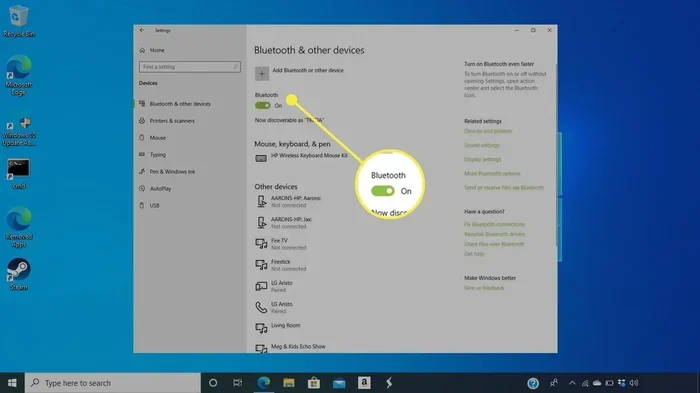
Samsung Smart TVs have a dedicated Bluetooth settings menu. You can find it in the general settings. From there, you can scan for nearby devices and pair them quickly. The TV also remembers paired devices, so you do not have to set things up every time.
Another great feature is the ability to connect multiple Bluetooth devices. Some Samsung TVs let you pair two speakers at once. This is perfect if you want stereo sound or louder volume in your living room.
How To Connect Your Samsung TV To A Bluetooth Speaker
Setting up your Samsung TV Bluetooth speaker connection is straightforward. Follow these steps and you will be listening to great sound in no time.
Step-by-Step Pairing Process
Here is the simple process to connect your speaker to your Samsung TV:
- Turn on your Bluetooth speaker and put it in pairing mode. Most speakers have a button or indicator light for this.
- Grab your Samsung TV remote and press the Home button.
- Go to Settings, then select General.
- Choose Bluetooth from the menu.
- Select Scan for Devices. Your TV will search for nearby Bluetooth devices.
- Find your speaker in the list and select it.
- Wait for the connection. You will hear a confirmation sound on your speaker.
That is it! Your Samsung TV is now connected to your Bluetooth speaker. Try playing a video or some music to test the sound. If it works, you are all set.
Using A Bluetooth Adapter For Older Samsung TVs
If your Samsung TV does not have built-in Bluetooth, do not worry. A Bluetooth adapter is an easy and affordable fix. These small devices plug into your TV’s USB port or audio output. They add Bluetooth connectivity to any TV, even older models.
Here is how a Bluetooth adapter works:
- Plug the adapter into your TV’s USB port or 3.5mm audio jack.
- Turn on the adapter and put it in pairing mode.
- Go to your TV’s Bluetooth settings and scan for devices.
- Pair your speaker with the adapter just like you would with built-in Bluetooth.
Bluetooth adapters cost between $10 and $30. They are a great option if you want to upgrade your audio without buying a new TV. Look for adapters that support aptX or AAC codecs for better sound quality.
Quick Tips For Smooth Pairing
Sometimes the first pairing attempt does not go smoothly. Here are some quick tips to make it easier:
- Keep your speaker close to the TV during pairing. Once connected, you can move it farther away.
- Turn off other Bluetooth devices nearby. Too many signals can cause interference.
- Restart both devices if the connection fails. A simple reboot often fixes the problem.
- Check for firmware updates on both your TV and speaker. Updates can fix bugs and improve performance.
- Remove old pairings from both devices. This clears the way for a fresh connection.
Best Bluetooth Speakers For Samsung TV
Not all Bluetooth speakers are the same. Some work great with Samsung TVs, while others may cause issues. Choosing the right speaker makes a big difference in your wireless audio experience.
Comparison Table: Top Bluetooth Speakers For Samsung TV
| Speaker | Bluetooth Version | Battery Life | Price Range | Best For |
|---|---|---|---|---|
| JBL Flip 6 | 5.2 | 12 hours | $100-$130 | Great sound quality |
| Sony SRS-XB23 | 5.2 | 12 hours | $80-$100 | Bass-heavy audio |
| Anker Soundcore 3 | 5.0 | 24 hours | $40-$60 | Budget-friendly option |
| Bose SoundLink Flex | 5.1 | 12 hours | $120-$150 | Clear dialogue and vocals |
| Tribit StormBox Blast | 5.0 | 20 hours | $80-$100 | Loud volume for large rooms |
What To Look For In A Samsung TV Bluetooth Speaker
When choosing a speaker for your Samsung TV, keep these factors in mind:
- Bluetooth version: Go for 5.0 or higher for better range and less lag.
- Audio codec support: Look for speakers that support aptX or AAC. These reduce audio delay.
- Battery life: A longer battery life means less charging hassle.
- Speaker size: Larger speakers generally produce richer sound.
- Water resistance: If you plan to place the speaker near water or in a humid room, look for an IP rating.
- Pairing memory: Speakers that remember multiple devices make switching between TV and phone easy.
Troubleshooting Common Connection Issues
Even with the best setup, you might run into problems. Bluetooth connectivity issues are common but usually easy to fix. Here are the most frequent problems and how to solve them.
Audio Lag And Latency Problems
Audio lag happens when the sound does not match the picture. You see lips move, but the sound comes a split second later. This is one of the most common complaints with wireless audio setups.
Here is how to fix audio lag:
- Use a speaker with aptX Low Latency. This codec reduces delay significantly.
- Move the speaker closer to the TV. Shorter distance means faster signal transfer.
- Reduce interference. Keep your speaker away from Wi-Fi routers and other wireless devices.
- Check for TV software updates. Samsung often releases updates that improve Bluetooth performance.
- Turn off other Bluetooth devices temporarily. Multiple devices can slow down the connection.
When The Speaker Will Not Pair
If your Samsung TV and speaker refuse to connect, try these steps:
- Turn off Bluetooth on both devices and turn it back on.
- Reset the speaker by holding the power button for 10 seconds.
- Forget the device on your TV and try pairing again from scratch.
- Check the speaker battery. Low battery can cause pairing failures.
- Move the speaker closer to the TV. Bluetooth range is usually about 30 feet.
- Factory reset your TV’s Bluetooth settings if nothing else works.
Speaker Keeps Disconnecting
A speaker that keeps dropping the connection is annoying. This usually happens because of distance or interference. Try these fixes:
- Keep the speaker within 10 feet of the TV for the most stable connection.
- Avoid placing the speaker behind walls or large furniture.
- Update the speaker firmware. Manufacturers often release fixes for connection issues.
- Reduce the number of Bluetooth devices in your home. Too many signals can cause conflicts.
Tips For Better Audio Experience
Connecting a Bluetooth speaker is only half the battle. To get the best sound from your Samsung TV Bluetooth speaker setup, you need to tweak a few settings.
Adjusting Your TV Sound Settings
Your Samsung TV has several sound settings that can improve your experience:
- Turn on Bluetooth Audio: Go to Settings, then Sound, and select Bluetooth Speaker List. Choose your paired speaker.
- Adjust the equalizer: Samsung TVs have a built-in equalizer. Boost the bass or treble to match your preferences.
- Use the Surround Sound feature: This setting makes audio feel wider and more immersive.
- Turn off TV speakers: Once your Bluetooth speaker is connected, go to Sound Output and select the speaker as the default. This stops sound from playing through the TV speakers too.
Quick Tips For The Best Sound
Small changes can make a big difference in sound quality:
- Place the speaker at ear level when you are seated. This gives the best sound balance.
- Keep the speaker in the open. Walls and corners muffle sound.
- Use the speaker’s volume controls along with your TV remote for easy adjustments.
- Experiment with the equalizer settings until you find the sound you love.
Common Mistakes To Avoid
Here are mistakes that many people make when setting up a Samsung TV Bluetooth speaker:
- Pairing too far away: Always pair devices close together first, then move them to your preferred positions.
- Ignoring firmware updates: Old firmware can cause bugs and compatibility issues.
- Using low-quality adapters: Cheap Bluetooth adapters often cause audio lag and dropouts.
- Forgetting to turn off TV speakers: This creates echo and doubles the sound output.
- Overloading the Bluetooth channel: Too many connected devices slow everything down.
Samsung TV Bluetooth Speaker: Expert Insights
Wireless Audio Trends In 2024
The world of wireless audio is growing fast. Samsung TVs are keeping up with the latest trends. Newer models now support advanced Bluetooth codecs like aptX Adaptive and LC3. These codecs deliver better sound quality and lower latency than older standards.
Many users are also switching from traditional soundbars to Bluetooth speakers. Speakers offer more flexibility and portability. You can take your speaker to the kitchen, the patio, or on a trip. A soundbar stays in one place. This flexibility is a big reason why Bluetooth speakers are so popular.
Expert Tips From Audio Professionals
Audio experts recommend a few things for the best Samsung TV Bluetooth speaker setup:
- Choose a speaker with a dedicated pairing button. This makes the setup process faster and more reliable.
- Test the connection with different content. Music, movies, and dialogue all test different aspects of sound quality.
- Consider a speaker with multipoint pairing. This lets you connect to two devices at once, like your TV and phone.
- Keep your devices cool. Overheating can cause Bluetooth dropouts and reduced performance.
Final Thoughts
Connecting a Bluetooth speaker to your Samsung TV is one of the best upgrades you can make. The process is simple, the cost is low, and the results are impressive. Whether you use a cheap portable speaker or a premium wireless model, you will notice the difference right away.
Can Samsung TV connect to Bluetooth speaker? Absolutely yes. With the steps in this guide, you can set up your wireless audio in under 10 minutes. If you run into any issues, the troubleshooting tips above will help you get back on track. Enjoy your improved sound and make every movie night feel like a cinema experience.
Take a few minutes today to try the pairing process. You will wonder how you ever watched TV without better audio. Your Samsung TV and Bluetooth speaker work together like magic, and once you set it up, you will never want to go back to tinny TV speakers again.
Frequently Asked Questions
Can all Samsung TVs connect to Bluetooth speakers?
Most Samsung TVs made after 2016 have built-in Bluetooth. However, some older or budget models may not support it. If your TV does not have Bluetooth, you can use a Bluetooth adapter to add this feature. Check your TV’s settings or user manual to confirm Bluetooth support.
Why is there a delay between the video and audio on my Samsung TV?
Audio delay, also called latency, is common with Bluetooth connections. It happens because Bluetooth transmits data wirelessly, which takes a fraction of a second. Using a speaker that supports aptX Low Latency can significantly reduce this delay. Moving the speaker closer to the TV also helps.
Can I connect two Bluetooth speakers to my Samsung TV at once?
Some Samsung TV models support dual Bluetooth connections. This feature lets you pair two speakers for stereo sound or louder volume. Check your TV’s Bluetooth settings to see if this option is available. If not, you may need a Bluetooth transmitter that supports multi-device pairing.
Do Bluetooth adapters work well with Samsung TVs?
Yes, Bluetooth adapters work well with Samsung TVs that lack built-in Bluetooth. They plug into USB ports or audio jacks and add wireless connectivity. Choose an adapter that supports modern Bluetooth versions and audio codecs for the best results. Avoid very cheap adapters as they may cause audio lag.
What is the best Bluetooth speaker for Samsung TV dialogue clarity?
Speakers with clear vocal reproduction work best for TV dialogue. The Bose SoundLink Flex and JBL Flip 6 are both excellent choices. Look for speakers with built-in dialogue enhancement features. A speaker with a dedicated mid-range driver will produce clearer voices than one focused only on bass.
How far can my Bluetooth speaker be from the Samsung TV?
Bluetooth range is typically about 30 feet in open spaces. Walls, furniture, and other obstacles can reduce this distance. For the most stable connection, keep the speaker within 10 to 15 feet of the TV. Bluetooth 5.0 and newer versions offer better range and stronger signal penetration.
=== CONCLUSION ===
Can Samsung TV connect to Bluetooth speaker? Yes, and it is easier than most people think. Whether your TV has built-in Bluetooth or needs an adapter, the process is simple and the results are rewarding. Better audio transforms your viewing experience. Movies sound richer, dialogue is clearer, and music sounds fuller.
Follow the steps in this guide to connect your Bluetooth speaker today. Use the troubleshooting tips if you run into any issues. And remember, choosing the right speaker makes all the difference. With the right setup, your Samsung TV and Bluetooth speaker work together perfectly.
Take action now. Your ears will thank you. Upgrade your Samsung TV audio with a Bluetooth speaker and enjoy every moment of your favorite shows and movies.