Can Sonos Be Wireless Everything You Need to Know Now
Yes, Sonos can be completely wireless. You can set up your entire Sonos system without a single cable connecting your speakers to your router or to each other. Sonos wireless speakers use your home Wi-Fi network and a mesh network to deliver multi-room audio throughout your house. This guide covers everything you need to know about Sonos wireless setup, range, best speakers, and common troubleshooting tips.
Can Sonos be wireless? The short answer is a resounding yes. Sonos was built from the ground up to deliver wireless audio without the hassle of cords and cables cluttering your living space. Whether you want a single room setup or a whole-home multi-room audio system, Sonos speakers connect wirelessly to your Wi-Fi network and to each other.
But how does it all work? What do you need to know before you dive in? This guide breaks down everything about Sonos wireless technology, from setup to range to the best speakers you can buy today. You will learn practical tips, avoid common mistakes, and walk away with the confidence to build your own wireless music system at home.
Key Takeaways
- Full Wireless Setup: Sonos speakers connect wirelessly to your Wi-Fi network and to each other using a built-in mesh network.
- No Cables Needed Between Speakers: Sonos wireless speakers can talk to each other without physical connections, making whole-home audio easy.
- Wi-Fi Is the Best Connection: While Bluetooth is an option, Wi-Fi delivers superior range, stability, and multi-room sync for Sonos systems.
- Range Depends on Your Home: A strong Wi-Fi signal and proper speaker placement ensure the best wireless performance.
- Easy Setup Through the Sonos App: The Sonos app walks you through the entire wireless setup process in minutes.
- Some Models Offer Bluetooth: Select Sonos speakers include Bluetooth as a backup or alternative wireless connection method.
📑 Table of Contents
What Is Sonos and How Does Wireless Work?
Sonos is a leading brand in wireless home audio. The company designs speakers and soundbars that connect to your home network without wires. But the technology behind it is more impressive than most people realize.
When you set up a Sonos speaker, it joins your Wi-Fi network. From there, it can communicate with other Sonos speakers in your home. This communication happens through a mesh network. A mesh network means each speaker acts as a signal booster for the others. The more Sonos speakers you have, the stronger and more stable your wireless connection becomes.
How the Sonos Wireless Mesh Network Works
Here is how the mesh network magic happens. When you add a second Sonos speaker to your system, it does not just connect to your router. It also connects to your first speaker. Both speakers then share the load of the wireless signal. This creates a web of connections that covers more area and stays more reliable than a single router signal alone.
This is one of the biggest advantages of Sonos wireless technology. You do not need expensive range extenders or powerline adapters. The speakers themselves create a smart, self-healing network. If one speaker loses its connection to the router, it can route the signal through another speaker to stay online.
Wi-Fi vs Bluetooth for Sonos
Most Sonos speakers rely on Wi-Fi for their primary connection. Wi-Fi gives you better range, higher audio quality, and the ability to sync multiple speakers perfectly. But what about Bluetooth? Some Sonos models include Bluetooth as a secondary feature.
Bluetooth is great for quick connections from your phone or tablet. It works well for casual listening in a single room. However, Bluetooth has limitations. The range is shorter. You cannot sync multiple speakers over Bluetooth the way you can with Wi-Fi. For a true wireless music system, Wi-Fi is the way to go with Sonos.
Setting Up Sonos Wireless in Your Home
Setting up your Sonos wireless system is surprisingly simple. You do not need to be a tech expert. The Sonos app guides you through every step. Here is how the process works and what you can expect.
What You Need Before You Start
Before you begin your Sonos setup, make sure you have a few things ready. First, you need a stable Wi-Fi network. Your router should be in good working condition and placed in a central location. Second, you need a smartphone or tablet with the Sonos app installed. Third, make sure your Wi-Fi network uses a 2.4 GHz band. Most Sonos speakers work best on 2.4 GHz, though some newer models support 5 GHz as well.
Quick Tips for a Smooth Setup:
- Place your router in a central, open area of your home.
- Keep your phone close to the speaker during initial setup.
- Make sure your Wi-Fi password is handy.
- Restart your router before starting the setup process.
- Update the Sonos app to the latest version on your phone.
Step-by-Step Wireless Setup Process
Once you have everything ready, the setup takes about 10 to 15 minutes. Open the Sonos app on your phone. Tap the Add Product button. Follow the on-screen instructions. The app will search for your speaker and connect it to your Wi-Fi network automatically.
After your first speaker is connected, you can add more speakers one by one. Each new speaker joins the same wireless network. The app makes it easy to name each speaker and assign it to a room. Soon you will have a full Sonos wireless system playing music throughout your home.
Common Setup Mistakes to Avoid
Even with a simple process, people sometimes make mistakes. One common error is placing the router too far from the first speaker. Another is using a weak Wi-Fi signal in the setup room. A third mistake is not giving the system enough time to fully connect before adding more speakers. Take your time, follow the app instructions, and your wireless setup will go smoothly.
Best Sonos Speakers for Wireless Audio
Sonos offers a wide range of wireless speakers for different needs and budgets. Whether you want a compact smart speaker or a powerful home theater soundbar, there is a Sonos model that fits. Here are some of the best options for a wireless audio experience.
Sonos One
The Sonos One is a compact smart speaker that delivers surprisingly rich sound for its size. It supports voice assistants like Amazon Alexa and Google Assistant. The Sonos One connects wirelessly to your Wi-Fi network and can pair with another Sonos One for stereo sound. It is an excellent choice for bedrooms, kitchens, and smaller rooms.
Sonos Five
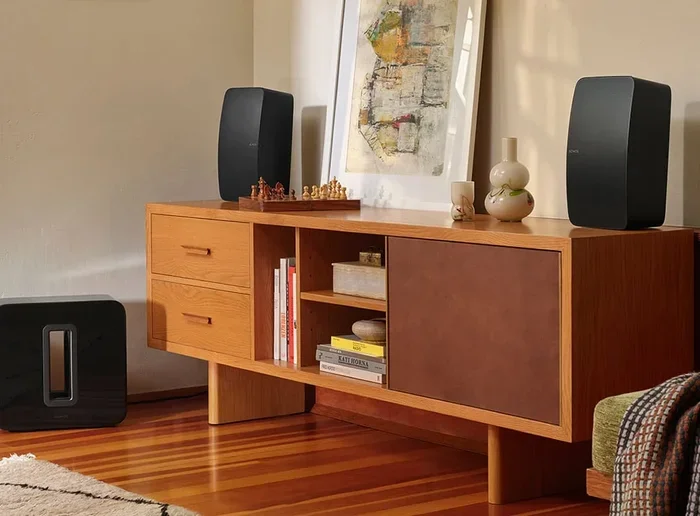
The Sonos Five is a larger speaker with deep, room-filling bass and clear highs. It is perfect as a standalone speaker in a living room or as part of a multi-room system. The Sonos Five offers both Wi-Fi and Bluetooth connectivity. It is one of the most popular choices for people building a wireless home audio setup.
Sonos Beam
The Sonos Beam is a soundbar designed for your TV. It brings wireless surround sound to your living room without messy cables. The Beam connects to your TV via HDMI or optical cable, but the audio streams wirelessly from your Sonos system. It supports both Wi-Fi and Bluetooth. The Sonos Beam is a great entry point into wireless home theater audio.
Comparison Table: Sonos Wireless Speakers
| Speaker Model | Wi-Fi | Bluetooth | Best For | Price Range |
|---|---|---|---|---|
| Sonos One | Yes | No | Smart speaker, small rooms | Mid-range |
| Sonos Five | Yes | Yes | Standalone listening, living room | Premium |
| Sonos Beam | Yes | Yes | TV soundbar, home theater | Mid-range |
| Sonos Port | Yes | No | Connecting existing speakers wirelessly | Mid-range |
| Sonos Roam | Yes | Yes | Portable wireless speaker | Mid-range |
Wireless Range and Connectivity Tips
One of the most common questions about Sonos wireless is about range. How far can your speakers be from your router? The answer depends on several factors, but in most homes, you can place speakers up to 30 to 50 feet from your router without issues.
Maximizing Your Wireless Range
Want the best wireless performance from your Sonos system? Follow these tips. Place your router in a central location in your home. Avoid placing speakers in basements or far corners where the Wi-Fi signal is weak. If you have a large home, add more Sonos speakers. Remember, each speaker strengthens the mesh network. This is a clever way to extend your wireless coverage without buying extra equipment.
Dealing with Wi-Fi Interference
Wi-Fi interference can weaken your Sonos wireless connection. Microwaves, baby monitors, and even neighboring networks can cause disruptions. If you notice dropouts or buffering, try moving your router or your speakers. Switching to a less crowded Wi-Fi channel can also help. The Sonos app includes a built-in tool to test your wireless network and suggest improvements.
Expert Insight: The Power of the Mesh Network
According to audio technology experts, the Sonos mesh network is one of the most reliable wireless systems in the consumer audio market. Unlike traditional Wi-Fi setups where every device connects directly to the router, Sonos speakers talk to each other. This peer-to-peer connection creates a more stable and far-reaching wireless network. It is one of the reasons Sonos has built such a loyal following among wireless audio enthusiasts.
Sonos Wireless vs Wired: What Is the Difference?
Many people wonder whether they should go fully wireless or stick with wired connections. Both options have their merits. Let us compare them side by side.
Advantages of Sonos Wireless
- No visible cables: Your living space stays clean and clutter-free.
- Easy placement: Move speakers anywhere without worrying about outlet proximity.
- Multi-room sync: Wireless speakers sync effortlessly across your home.
- Mesh network strength: More speakers mean a stronger, more stable connection.
- Quick setup: No drilling holes or running cables through walls.
When Wired Connections Make Sense
There are situations where a wired connection is still useful. If you want the absolute best audio quality and your speakers are very close to your router, an Ethernet cable can provide a more stable connection. The Sonos Port allows you to connect wired speakers to your Sonos system. Some audiophiles prefer the consistency of a wired backhaul for their wireless Sonos speakers.
For most people, though, the Sonos wireless experience is more than good enough. The convenience and flexibility far outweigh the minor benefits of a wired connection.
Common Wireless Issues and How to Fix Them
Even the best wireless speakers can occasionally have connection issues. Here are the most common problems and their solutions.
Speaker Not Connecting to Wi-Fi
If a Sonos speaker will not connect to your wireless network, start by checking your Wi-Fi password. Make sure you are entering it correctly. Restart both your speaker and your router. If the problem persists, move the speaker closer to the router and try again. The Sonos app has a helpful diagnostic tool that can identify connection problems and suggest fixes.
Audio Dropouts or Buffering
Intermittent audio issues are often caused by weak Wi-Fi signals. Try moving your router to a more central location. Reduce the number of devices competing for bandwidth on your network. You can also add a Sonos speaker between your router and the problematic speaker to strengthen the mesh network signal.
Slow App Response
If the Sonos app is slow or unresponsive, it may be a network issue rather than a speaker problem. Check your internet speed. Restart your router. Make sure your Sonos app is up to date. Sometimes simply restarting your phone or tablet fixes the problem.
Quick Tips for Troubleshooting
- Restart your speaker by unplugging it for 30 seconds.
- Restart your router by unplugging it for one minute.
- Use the Sonos app network test tool.
- Update the Sonos software through the app.
- Move speakers away from walls and metal objects.
Building Your Ideal Wireless Sonos System
Now that you know how Sonos wireless works, it is time to think about building your own system. The beauty of Sonos is that you can start small and grow over time. You do not need to buy everything at once.
Start with one speaker in the room where you listen to music the most. Add more speakers in other rooms as your budget allows. The Sonos app makes it easy to group speakers together and control them all from one place. You can play the same song in every room or different songs in different rooms. This level of control is what makes a Sonos wireless system so appealing.
Think about how you use music in your home. Do you want background music in the kitchen? A dedicated speaker in the bedroom? A powerful soundbar for movie nights? Each Sonos speaker serves a purpose. Mix and match models to create the perfect wireless music system for your lifestyle.
The Sonos ecosystem is designed to work together seamlessly. Whether you choose the compact Sonos One, the powerful Sonos Five, or the versatile Sonos Beam, every speaker connects to the same wireless network. They all respond to the same app. They all share the same music services. This integration is what sets Sonos apart from other wireless speaker brands.
One final tip: keep your Sonos system updated. Sonos regularly releases software updates that improve wireless performance, add new features, and fix bugs. The Sonos app will notify you when updates are available. Keeping your speakers updated ensures the best possible wireless audio experience.
In short, Sonos wireless technology is mature, reliable, and incredibly convenient. You can enjoy high-quality music streaming throughout your home without a single cable between your speakers. Whether you are a casual listener or an audiophile, a Sonos wireless system delivers the freedom and sound quality you deserve.
Frequently Asked Questions
Can all Sonos speakers connect wirelessly?
Yes, all Sonos speakers connect wirelessly to your Wi-Fi network. Some models also include Bluetooth as a secondary wireless option. Every Sonos speaker is designed for a wireless setup right out of the box.
Do I need a special router for Sonos wireless speakers?
No, you do not need a special router. Any standard Wi-Fi router will work with Sonos speakers. However, a dual-band router (supporting both 2.4 GHz and 5 GHz) can provide a more stable connection. Make sure your router is in good working condition for the best wireless performance.
How far can Sonos wireless speakers be from the router?
In most homes, Sonos speakers work well up to 30 to 50 feet from your router. The mesh network feature allows speakers to relay the signal to each other, extending the range. If you have a large home, adding more speakers can help strengthen the wireless connection throughout.
Can I use Sonos speakers without Wi-Fi?
Most Sonos speakers require Wi-Fi for full functionality. However, some models like the Sonos Roam and Sonos Five support Bluetooth, which allows you to connect without Wi-Fi. Keep in mind that Bluetooth limits range and does not support multi-room audio.
Is a wireless Sonos system as good as a wired one?
For most people, a Sonos wireless system provides excellent sound quality and far more convenience than a wired setup. The difference in audio quality is minimal for everyday listening. Wired connections may offer a slight edge in stability, but the wireless mesh network is highly reliable.
How many Sonos wireless speakers can I connect together?
You can connect up to 32 Sonos speakers in a single system. This makes it possible to fill a large home or even an outdoor area with wireless music. The Sonos app lets you group speakers by room or zone for easy control.
=== CONCLUSION ===
Can Sonos be wireless? Absolutely. Sonos was designed to deliver a wireless audio experience that is simple, reliable, and incredibly versatile. From the initial Sonos setup to daily use, the wireless technology works seamlessly behind the scenes. You get high-quality sound, multi-room sync, and the freedom to place speakers anywhere in your home without worrying about cables.
The Sonos wireless ecosystem continues to grow and improve. New models bring better sound, longer battery life, and stronger wireless connections. Whether you are building a small bedroom setup or a whole-home wireless music system, Sonos has the tools to make it happen.
Start with one speaker. Explore the app. Add more as your needs grow. The beauty of a Sonos wireless system is that it evolves with you. So go ahead, unplug those old speakers, and embrace the freedom of wireless home audio. Your ears will thank you.