Are Usb Data Blockers Safe To Use On Public Chargers
USB data blockers are small, affordable adapters that let you charge your devices safely on public USB chargers without risking data theft or malware attacks. They work by blocking the data pins inside a USB cable, allowing only power to flow through. Using a USB data blocker is one of the simplest and most effective ways to protect your personal information when charging on the go.
You are sitting in an airport terminal. Your phone battery is at 3 percent. You spot a row of public charging stations just a few steps away. Your hand reaches for your cable, but then you stop. Is this public charger safe? Could someone be watching your data while your phone charges?
This is a real worry that more and more travelers face every day. The answer is USB data blockers, and they might just be the small device that saves you from a big headache. In this guide, we will break down everything you need to know about USB data blockers, how they work, whether they are truly safe, and why they should be a must-have accessory for anyone who charges their devices away from home.
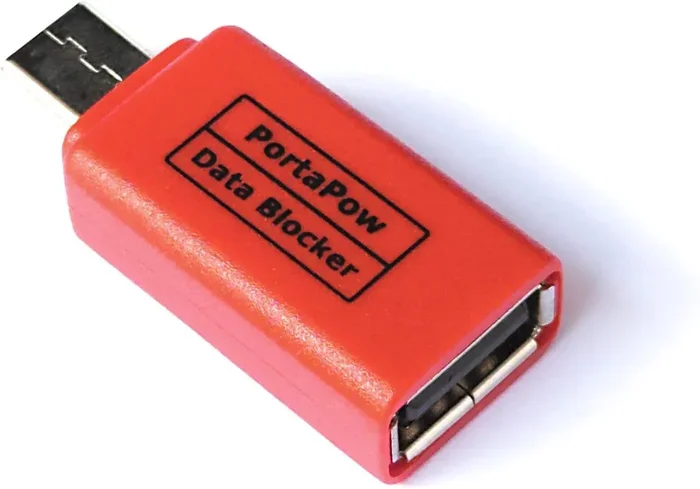
USB data blockers are tiny adapters that sit between your charging cable and a public USB port. They allow electricity to flow through to your device but block any data transfer. Think of them as a bouncer for your USB connection. They let power in but keep data threats out. These little gadgets have become increasingly popular as cybersecurity concerns grow around public charging stations.
Key Takeaways
- USB data blockers prevent data theft: They physically block the data pins in a USB connection so no information can be transferred.
- They are safe and easy to use: Simply plug the blocker between your cable and the public charger, and your device charges normally.
- Juice jacking is a real threat: Cybercriminals can exploit public USB ports to install malware or steal sensitive data from your device.
- They are compact and portable: Most USB data blockers are tiny and fit easily in your wallet or travel bag.
- Not all blockers are equal: Look for reputable brands, proper certifications, and positive user reviews before buying.
- They work with most devices: USB data blockers are compatible with phones, tablets, and laptops that use standard USB charging.
- They complement other security practices: Using a data blocker alongside strong passwords and updated software gives you layered protection.
📑 Table of Contents
- What Exactly Is a USB Data Blocker?
- What Is Juice Jacking and Why Should You Care?
- Are USB Data Blockers Actually Safe?
- How to Choose the Right USB Data Blocker
- Common Mistakes People Make When Using Public Chargers
- Expert Tips for Safe Charging on the Go
- Who Should Use a USB Data Blocker?
- The Bottom Line: Are USB Data Blockers Worth It?
What Exactly Is a USB Data Blocker?
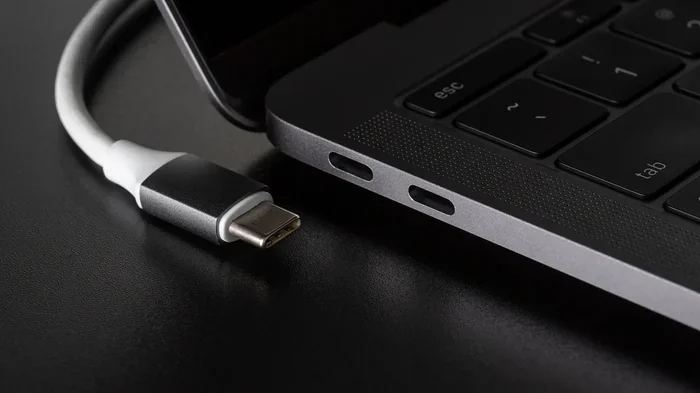
A USB data blocker is a small hardware device, sometimes called a “USB condom,” that sits between your charging cable and a USB power source. Its job is simple but important. It allows electrical power to pass through while physically blocking the data pins inside the USB connection.
Here is how it works in plain terms. A standard USB cable has several pins inside it. Two of those pins carry power. Two other pins carry data. When you plug your cable directly into a public charger, all four pins are active. This means the charging station can potentially send data to your device or read data from it.
A USB data blocker sits in the middle of this connection. It bridges the power pins but leaves the data pins disconnected. Your device still charges normally, but no data can flow in either direction. It is a physical barrier that requires no software, no apps, and no technical knowledge to use.
How USB Data Blockers Protect Your Device
The protection mechanism is straightforward. When you plug a USB data blocker into a public charging port, it creates what security experts call a “data-free” charging session. Your phone or tablet sees a power source, but it does not see a computer or any other data-capable device on the other end.
This is important because many modern devices automatically try to establish a data connection when they detect a USB port. They may ask to trust the connected device, share files, or accept a charge. A USB data blocker prevents all of that from happening. It removes the data pathway entirely, so your device simply charges in power-only mode.
Some advanced USB data blockers also include built-in chips that mimic the behavior of a standard power adapter. This means your device does not show any warning messages or behave differently than it would when plugged into your wall charger at home. The experience is seamless and invisible.
What Is Juice Jacking and Why Should You Care?
The term “juice jacking” might sound like something from a sci-fi movie, but it is a very real cybersecurity threat. Juice jacking happens when a criminal modifies a public USB charging station to steal data from or install malware on devices that connect to it.
The concept is simple and alarming. A public USB port is essentially an open door. When you plug your phone into it, your device communicates with the charging source. A compromised port can exploit this communication to access your personal files, copy your data, or even install harmful software. All of this can happen in seconds, often without you noticing anything unusual.
How Juice Jacking Actually Works
When your device connects to a USB port, it follows a standard protocol. It identifies the source and requests power. But during this handshake, data can also be exchanged if both sides allow it. A compromised public USB charger can use this handshake to push malicious code onto your device.
Some forms of juice jacking are designed to silently copy your contacts, photos, messages, and login credentials. Others install keyloggers or tracking software that monitors everything you type and do on your device. The worst part is that you might not realize it has happened until it is too late.
This threat is not just theoretical. Security researchers have demonstrated juice jacking attacks at major conferences and public events. The US government even issued warnings about the risks of using free public charging stations. The Federal Communications Commission and the FBI have both advised travelers to carry their own chargers and use USB data blockers when public charging is the only option.
Where Juice Jacking Can Happen
You might think this only happens in sketchy locations, but that is not the case. Juice jacking can occur at:
- Airport terminals and train stations
- Shopping malls and retail stores
- Hotels and resorts
- Coffee shops and restaurants
- Conference centers and convention halls
- Hospitals and medical facilities
- Public libraries and government buildings
Anywhere there is a public USB port, there is a potential risk. This is why USB data blockers have become essential travel accessories for millions of people worldwide.
Are USB Data Blockers Actually Safe?
The short answer is yes. USB data blockers are safe to use and are specifically designed to enhance your security when charging on the go. They do not introduce any new risks. In fact, they reduce risk by eliminating the data pathway that could be exploited.
However, like any tech accessory, not all USB data blockers are created equal. The safety of your device depends on the quality of the blocker you choose. A poorly made blocker might not properly block all data pins, or it could introduce connectivity issues. This is why buying from reputable manufacturers matters.
Why USB Data Blockers Are a Trusted Security Tool
USB data blockers have been tested and verified by cybersecurity professionals around the world. They work at a hardware level, which means they do not rely on software that could be buggy or outdated. There is no app to download, no setting to configure, and no battery to charge in the blocker itself.
Because they operate passively, USB data blockers cannot be hacked or compromised by malware. There is nothing electronic inside them that can fail or be exploited. They are simply a physical barrier between your device and an unknown charging source. This makes them one of the most reliable security tools available for everyday device users.
Security experts consistently recommend using a USB data blocker whenever you need to charge your device using a public or unfamiliar USB port. They are endorsed by cybersecurity firms, travel advisors, and technology publications alike.
Potential Concerns About USB Data Blockers
While USB data blockers are generally very safe, there are a few things to keep in mind. First, a very cheap or counterfeit blocker might not have properly disconnected the data pins. This is why you should always buy from trusted brands and check for certifications.
Second, a USB data blocker only protects against data theft through the USB connection. It does not protect you from other threats, such as shoulder surfing (someone looking over your shoulder) or insecure WiFi networks. Think of a data blocker as one layer in a broader security strategy.
Third, some users worry that using a blocker might slow down charging. In most cases, this is not true. A good quality USB data blocker passes power at the same rate as a direct connection. However, very cheap or damaged blockers might reduce charging speed slightly.
How to Choose the Right USB Data Blocker
Not all USB data blockers offer the same level of protection or convenience. Here are the key factors to consider when shopping for one.
Look for Proper Certification
Reputable USB data blockers will have undergone testing and certification by recognized organizations. Look for products that mention compliance with USB standards and have been tested for data isolation. Certifications from organizations like the USB Implementers Forum (USB-IF) are a good sign of quality.
Check Compatibility
Make sure the USB data blocker you choose works with your devices. Most blockers support standard USB-A and USB-C connections. Some also support newer formats like Thunderbolt or Micro-USB. Check the product specifications before buying to ensure it fits your charging needs.
Consider Build Quality
A USB data blocker should feel sturdy and well-built. Avoid products that feel flimsy or cheaply made. The internal connections need to be precise to properly block data pins while allowing full power flow. Brands with good customer reviews and a track record of quality are your safest bet.
Portability Matters
One of the best things about USB data blockers is how small they are. Most are about the size of a small USB flash drive. You can easily carry one on your keychain, in your wallet, or in your laptop bag. Some models even come with built-in cables, making them even more convenient for travel.
Price vs. Protection
You do not need to spend a lot of money on a USB data blocker, but you should avoid the absolute cheapest options. A quality blocker typically costs between 5 and 15 dollars. This small investment can save you from the potentially devastating consequences of data theft or malware infection.
| Feature | Budget Blocker | Mid-Range Blocker | Premium Blocker |
|---|---|---|---|
| Price Range | $3 – $7 | $8 – $12 | $13 – $20 |
| Build Quality | Basic plastic | Durable plastic or metal | Premium materials |
| Data Isolation | May be inconsistent | Reliable | Verified and certified |
| Compatibility | USB-A only | USB-A and USB-C | Multiple connector types |
| Warranty | Usually none | Limited warranty | Extended warranty |
| Best For | Occasional use | Regular travelers | Heavy users and professionals |
Common Mistakes People Make When Using Public Chargers
Even with a USB data blocker, there are mistakes that can undermine your security. Here are some common pitfalls to avoid.
Using a Damaged or Counterfeit Blocker
A cracked or worn-out USB data blocker might not provide proper data isolation. Always inspect your blocker before each use. If it looks damaged or feels loose in the port, replace it immediately. Buying from authorized sellers helps ensure you get a genuine product.
Forgetting to Use One When You Need It
The most common mistake is simply forgetting to carry your USB data blocker. Make it a habit to keep one in your travel bag, car, or desk drawer at work. Some people keep two or three so they always have one available.
Relying Solely on the Blocker
A USB data blocker is a great tool, but it is not a complete security solution. Combine it with other practices like keeping your device software updated, using strong passwords, and enabling device encryption. Think of it as part of a layered approach to device security.
Assuming All USB Ports Are Equal
Not all public USB ports are created equal. A port in a busy airport terminal is more likely to be monitored than one in a well-maintained hotel room. But the safest approach is to treat every public port as a potential risk and use your USB data blocker every single time.
Ignoring Device Warnings
If your device shows a warning message when connected to a USB port, do not ignore it. Even with a USB data blocker, some devices may display notifications about the connection type. Pay attention to these warnings and take them seriously.
Expert Tips for Safe Charging on the Go
Cybersecurity experts recommend several best practices for staying safe when you need to charge your devices away from home. Here are some tips that complement the use of a USB data blocker.
Tip 1: Carry your own wall adapter. Instead of using a public USB port, plug your own wall adapter into a standard electrical outlet. This completely eliminates the USB data risk. A USB data blocker is your backup plan when wall outlets are not available.
Tip 2: Use a portable power bank. A good quality power bank lets you charge your devices without ever touching a public port. This is the safest option of all. Pair a power bank with a USB data blocker for maximum flexibility and security.
Tip 3: Keep your device locked while charging. Even with a USB data blocker, it is good practice to keep your device locked and avoid interacting with it while it charges. This adds an extra layer of protection.
Tip 4: Update your device software regularly. Software updates often include security patches that fix vulnerabilities. A USB data blocker prevents attacks at the hardware level, but keeping your software updated protects you from software-based threats.
Tip 5: Enable USB debugging only when needed. If your device has USB debugging enabled, disable it when you are not actively using it for development. This prevents unauthorized data access through USB connections.
Tip 6: Be aware of your surroundings. When charging in public, stay alert. Watch for anyone who seems to be paying unusual attention to your device or the charging station. A USB data blocker protects your data, but awareness protects your physical device too.
Who Should Use a USB Data Blocker?
The honest answer is: everyone. But certain groups benefit even more from using a USB data blocker. Frequent travelers, business professionals, students, and anyone who regularly uses public charging stations should make this a standard part of their routine.
If you work in healthcare, finance, or any industry that handles sensitive data, a USB data blocker is not just a recommendation. It is a necessity. Protecting client and patient data starts with the simplest security measures, and a data blocker is one of the easiest to implement.
Parents should also consider getting USB data blockers for their children. Kids often charge their devices in public places like schools, libraries, and friends’ houses. A data blocker adds a layer of protection without requiring any technical knowledge.
The Bottom Line: Are USB Data Blockers Worth It?
The evidence is clear. USB data blockers are safe, effective, and affordable tools that protect your personal data from a very real threat. The risk of juice jacking is not something to take lightly. A single connection to a compromised public charger could expose your personal photos, banking information, passwords, and more.
A USB data blocker costs very little compared to the potential damage of a data breach. It is a small investment that provides significant peace of mind. Whether you are traveling for work, taking a family vacation, or just running errands around town, carrying a USB data blocker is one of the smartest things you can do for your digital security.
Make it a habit. Keep one in your travel bag, your car, and your office drawer. Once you start using a USB data blocker, you will wonder how you ever charged your device in public without one. Stay safe, stay charged, and stay protected.
Frequently Asked Questions
What does a USB data blocker do?
A USB data blocker sits between your charging cable and a public USB port. It allows electrical power to flow through to your device but physically blocks the data pins inside the USB connection. This means your device charges normally, but no data can be transferred in or out, protecting you from data theft and malware.
Are USB data blockers safe for all devices?
Yes, most USB data blockers are safe for all devices that charge via standard USB connections. They work with smartphones, tablets, and many laptops. Just make sure the blocker you buy is compatible with your device’s charging port, whether that is USB-A, USB-C, or Micro-USB.
Can juice jacking really happen to me?
Yes, juice jacking is a documented cybersecurity threat. While it is not the most common form of cyberattack, it is a real risk that has been demonstrated by security researchers. Using a USB data blocker on any public charging station is one of the best ways to protect yourself from this threat.
How much does a USB data blocker cost?
A good quality USB data blocker typically costs between 5 and 15 dollars. While you can find cheaper options online, investing in a reputable brand ensures proper data isolation and reliable performance. The small cost is well worth the protection it provides.
Will a USB data blocker slow down my charging speed?
In most cases, no. A quality USB data blocker passes power at the same rate as a direct connection. However, very cheap or poorly made blockers might slightly reduce charging speed. Look for blockers that support fast charging and are rated for the power output your device needs.
Do I still need a USB data blocker if I use a wall adapter?
If you use your own wall adapter plugged into a standard electrical outlet, you do not need a USB data blocker for that specific charging session. Wall outlets do not pose the same data theft risk as public USB ports. However, carrying a data blocker is still a good backup plan for situations where only a USB port is available.
=== CONCLUSION ===
USB data blockers are safe, practical, and essential tools for anyone who charges their devices on the go. They provide a simple, hardware-level defense against juice jacking and data theft without requiring any technical expertise. By blocking the data pins in a USB connection, they ensure that your device only receives power and nothing else.
The threat of compromised public charging stations is real, and it is growing as more public spaces install USB ports for convenience. A USB data blocker is your best line of defense in this environment. It is small, affordable, and easy to use. There is no reason not to make one a standard part of your travel kit.
Take a few minutes today to pick up a USB data blocker and add it to your bag. Your personal data is valuable, and protecting it should be a priority. Stay safe, stay informed, and always charge smart.