Are Usb Plugs Being Phased Out Or Are They Here To Stay
USB plugs are not being phased out anytime soon. While new USB Type-C designs and wireless charging are changing the game, the universal serial bus remains the backbone of device connectivity. This guide covers why USB plugs still matter, what upgrades are coming, and what it means for your devices.
Key Takeaways
- USB plugs are staying: The universal serial bus is evolving, not disappearing. New standards make older ones faster and more versatile.
- USB Type-C is the future: Its reversible connector and fast data transfer speeds are replacing older designs like USB-A and USB-B.
- USB power delivery is a game changer: Fast charging through a single cable is now standard across phones, laptops, and tablets.
- Wireless tech complements but doesn’t replace USB: Wireless charging and Bluetooth are handy extras, but they don’t match USB for speed and power.
- Legacy devices still need USB plugs: Many peripherals, medical devices, and industrial tools rely on USB ports for stable connections.
- Device compatibility matters: Always check what USB standard your devices support before buying cables or adapters.
📑 Table of Contents
- Are USB Plugs Being Phased Out Or Are They Here To Stay
- Why USB Plugs Are Not Going Away
- How USB Technology Is Changing
- Where USB Plugs Are Still Essential
- Wireless Charging vs USB Plugs: What Wins?
- Common Myths About USB Plugs Being Phased Out
- What the Future Holds for USB Plugs
- Quick Tips for Choosing the Right USB Plug
- Common Mistakes People Make with USB Plugs
- Final Thoughts
Are USB Plugs Being Phased Out Or Are They Here To Stay
You might have noticed something. More and more devices are switching to USB Type-C. Your new phone uses it. Your laptop uses it. Even some gaming consoles now use it. So it is natural to wonder, are USB plugs being phased out? The short answer is no. But the longer answer is much more interesting.
The universal serial bus has been around since the mid-1990s. It survived decades of tech changes. From floppy disks to cloud storage, from wired mice to wireless ones, USB plugs kept showing up. And they are not going anywhere. Instead, they are evolving. The USB connector designs are getting better, faster, and more powerful. So while the shape and speed are changing, the core technology remains essential.
In this article, we will break down everything you need to know. We will look at why USB plugs are not disappearing, what changes are happening, and how new standards like Thunderbolt and USB power delivery are shaping the future. Whether you are a tech enthusiast or just someone who charges a phone every night, this guide has you covered.
Why USB Plugs Are Not Going Away
The idea that USB plugs are dying comes from a few trends. Wireless charging is getting popular. Bluetooth has replaced many wired connections. And some laptops now ship with no USB-A ports at all. But these trends do not mean the end of the universal serial bus. They mean the usb is adapting.
The Universal Serial Bus Is Too Important
Think about how many devices use a USB port. Your keyboard. Your mouse. Your printer. Your external hard drive. Your phone charger. Even some peripheral devices like scanners and webcams rely on USB connections. The USB cable is the most universal connector in the world. No other plug comes close to matching that reach.
Here are some reasons why USB plugs remain essential:
- Wide device support: Almost every computer, tablet, and phone supports some form of USB.
- Data transfer capability: USB handles both power and data, which wireless tech still struggles to match.
- Backward compatibility: New USB standards work with older devices using adapters.
- Cost effective: USB cables and ports are cheap to manufacture and widely available.
- Proven reliability: Decades of use have made USB one of the most trusted connection types.
USB Connectors Are Evolving, Not Disappearing
The USB connector landscape has changed a lot over the years. The original USB-A shape is still everywhere. The USB-B port is still used in printers and scanners. But now USB Type-C is taking over as the go-to design for modern devices. And the latest USB standard, USB4, builds on the Type-C shape to deliver incredible speeds.
So the plug is not going away. It is just getting a makeover. The reversible connector design of USB-C, for example, solves one of the biggest complaints about older USB plugs. You never have to flip the cable again. That small change made a huge difference in daily use.
How USB Technology Is Changing
The universal serial bus is not standing still. New versions bring faster speeds, more power, and better features. Understanding these changes helps you see why USB plugs are actually more relevant than ever.
USB Type-C: The New Standard Shape
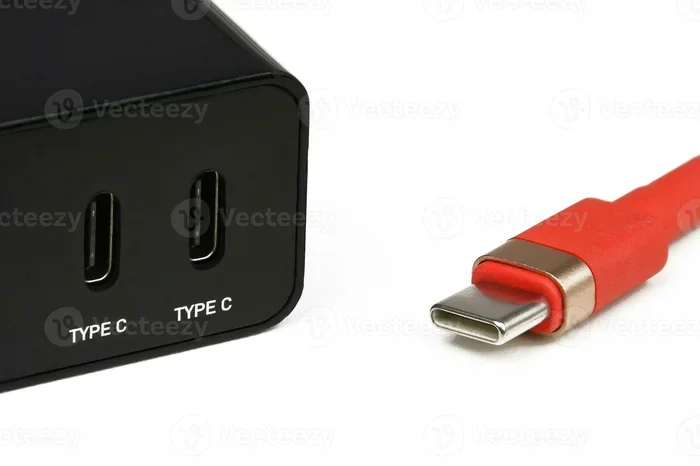
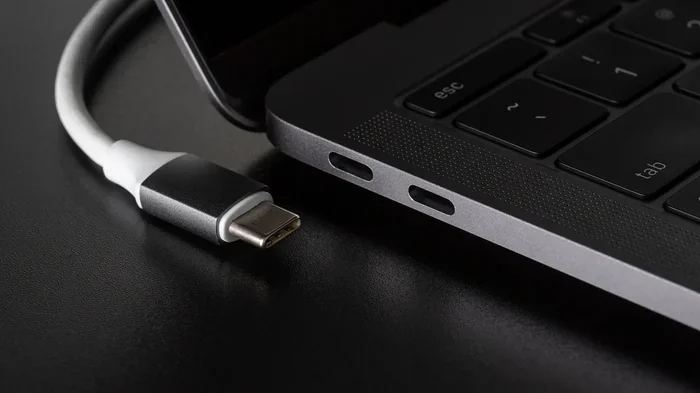
USB Type-C has become the face of modern USB technology. It is small, reversible, and supports the latest USB power delivery standards. You can find it on phones, laptops, tablets, and even some desktop computers.
Here is what makes USB-C special:
- Reversible design: No more flipping the cable to get the right orientation.
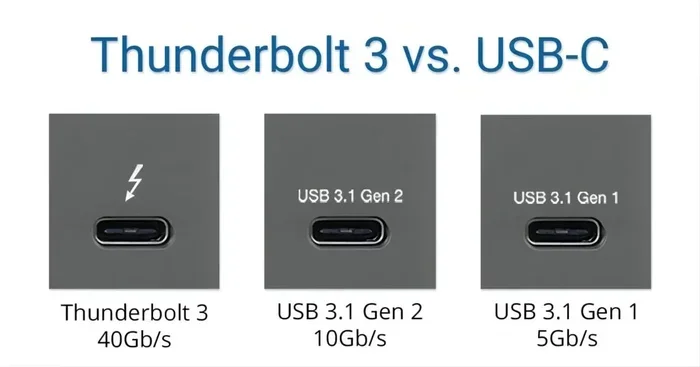
- High data transfer speeds: USB 3.2 Gen 2 and USB4 can move data at 10 to 40 Gbps.
- Power delivery up to 240W: USB-C can now charge laptops, monitors, and even some desktops.
- Video output: Many USB-C ports support DisplayPort and HDMI alt modes.
- Compact size: The small form factor fits slim devices easily.
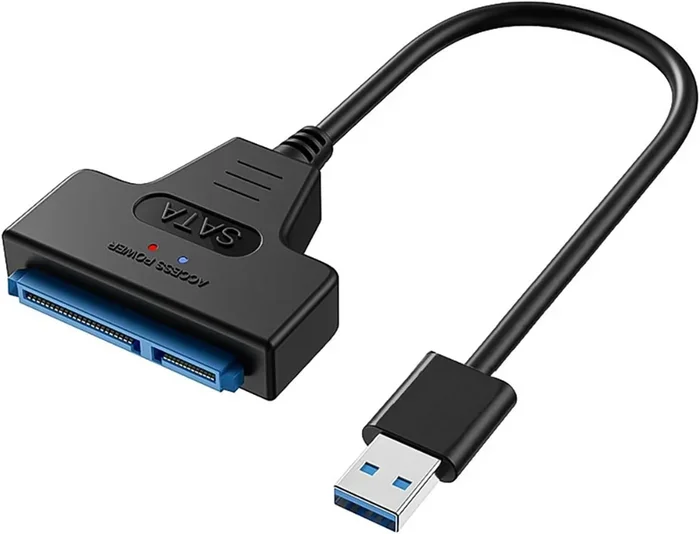
Because of these benefits, many people think USB-C means the old USB-A is dead. But that is not true. USB-A is still widely used in desktops, TVs, gaming consoles, and many peripheral devices. Both shapes coexist, and adapters make them work together seamlessly.
USB4 and Thunderbolt: The Speed Race
Thunderbolt and USB4 represent the cutting edge of USB plug technology. Thunderbolt 4, developed by Intel, uses the USB-C shape and delivers up to 40 Gbps of bandwidth. USB4, backed by the USB Implementers Forum, also reaches 40 Gbps and is becoming more common in laptops and tablets.
These technologies are not replacing USB plugs. They are supercharging them. A single USB cable can now carry data, video, and power all at once. This is why docking stations and hubs built around USB-C are so popular. One plug replaces a tangle of cables.
For professionals who work with large files, video editing, or data transfer heavy workflows, USB4 and Thunderbolt are a big deal. But regular users also benefit. Faster charging, smoother video output, and quicker file transfers make everyday use better.
Where USB Plugs Are Still Essential
Some people believe the world is going fully wireless. And wireless tech has come a long way. But there are many areas where USB plugs remain irreplaceable. Let us look at where they matter most.
Medical Devices and Healthcare
Computers play a huge role in modern medicine, and many of those systems rely on USB ports for connectivity. From patient monitoring devices to diagnostic equipment, the USB cable provides a stable and reliable connection that wireless alternatives cannot match. Medical peripheral devices like USB-connected sensors, scanners, and data loggers depend on consistent USB power delivery.
In hospitals and clinics, reliability is everything. A wireless connection dropping for even a second can be dangerous. A USB connector provides a steady, interference-free link. That is why USB plugs are deeply embedded in healthcare technology. You can learn more about how computers are used in medicine by reading our detailed guide on the topic.
Desktop Computers and Motherboards
Desktop computers still use a lot of USB plugs. The motherboard in your PC has multiple USB ports built right in. These ports connect keyboards, mice, external drives, webcams, and countless other peripheral devices. The internal USB header on a motherboard lets manufacturers add front-panel ports for easy access.
If you are curious about what components are on your motherboard and how USB ports fit into the bigger picture, check out our article on the five main components found on a motherboard. Understanding your hardware helps you make better choices about cables, ports, and upgrades.
Industrial and Manufacturing Equipment
Factories and warehouses use USB plugs for programming, data logging, and device control. Industrial machines often have USB ports for firmware updates and diagnostic connections. The durability and simplicity of a USB cable make it ideal for harsh environments where wireless signals can be unreliable.
Wireless Charging vs USB Plugs: What Wins?
Wireless charging has grown in popularity. Qi charging pads are common on desks and nightstands. Many new phones support wireless charging out of the box. It is convenient and cable-free. But does that mean USB plugs are becoming obsolete?
The answer is no. Wireless charging and USB power delivery serve different purposes. Here is a quick comparison:
| Feature | USB Plugs | Wireless Charging |
|---|---|---|
| Speed | Fast (up to 240W with USB PD) | Slower (typically 5W to 15W) |
| Data Transfer | Yes (up to 40 Gbps with USB4) | No |
| Device Compatibility | Nearly universal | Limited to Qi-compatible devices |
| Distance | Cable length (up to several meters) | Very short (must be on pad) |
| Reliability | Very high | Can be affected by alignment and interference |
| Convenience | Good (especially with USB-C) | Excellent (just place the device) |
As you can see, wireless charging is great for convenience. But it cannot handle data transfer or high-power delivery. USB plugs do both, and they do it better. The two technologies work together, not against each other.
Common Myths About USB Plugs Being Phased Out
Let us clear up some misconceptions. These myths make it seem like USB plugs are on their way out, but the facts tell a different story.
Myth 1: No USB-A Ports Means USB Is Dead
Many new laptops remove USB-A ports to save space and push USB-C adoption. But removing one shape does not kill the universal serial bus. USB-C is still a USB plug. The standard is alive and well. Plus, USB-A cables and adapters are still widely sold and used.
Myth 2: Wireless Technology Will Replace USB
Wireless tech is improving, but it cannot match USB for speed and power. A USB4 connection transfers data at 40 Gbps. No wireless standard comes close. And USB power delivery can push 240 watts through a single cable. Wireless charging maxes out at around 15 watts for most devices.
Myth 3: Only New Devices Use USB Plugs
Older devices still use USB plugs every day. Printers, scanners, external hard drives, and many peripheral devices from the last 15 years still rely on USB-A or USB-B connections. The universal serial bus has incredible backward compatibility. That is one reason it has lasted so long.
What the Future Holds for USB Plugs
The future of USB plugs looks bright. The USB standard continues to evolve with each new version. USB4 Version 2.0 promises even faster speeds. USB power delivery is expanding to support more device types. And the USB-C shape is becoming the universal connector for almost everything.
Here are some trends to watch:
- Broader USB-C adoption: More devices will switch to the reversible connector for consistency.
- Higher power limits: USB PD is pushing beyond 240W for laptops and monitors.
- Faster data speeds: Future USB standards will push data transfer rates even higher.
- Smarter power management: USB plugs will support more intelligent charging profiles for different devices.
- Longer cable lengths: New USB cables will maintain high speeds over longer distances.
The universal serial bus has survived 30 years of tech revolutions. It adapted from USB 1.0 to USB 4. It survived the rise of Bluetooth, Wi-Fi, and wireless charging. If anything, USB plugs are more important now than ever before. They are the common language that devices use to talk to each other.
Quick Tips for Choosing the Right USB Plug
Not all USB cables are created equal. Here are some quick tips to help you pick the right one:
- Check the USB standard: Look for USB 3.2, USB4, or Thunderbolt markings for the best speeds.
- Match the connector type: Make sure you have the right shape (USB-A, USB-B, or USB-C) for your device.
- Look for USB PD support: If you need fast charging, ensure the cable supports USB power delivery.
- Buy from reputable brands: Cheap cables can damage your devices or charge slowly.
- Consider cable length: Longer cables can reduce speed. Keep it as short as practical.
- Check for e-marker chips: High-quality USB-C cables have e-markers that tell devices their capabilities.
Common Mistakes People Make with USB Plugs
Even tech-savvy people make mistakes with USB plugs. Here are some to avoid:
- Using cheap cables: They may not support the speeds or power your device needs.
- Forcing a connector: If it does not fit, do not force it. You may be using the wrong type.
- Ignoring USB-C capabilities: Many people use USB-C cables for charging only and miss out on fast data transfer and video output.
- Assuming all USB-C cables are the same: They are not. Some only support data, some only support power, and some support both.
- Not checking device compatibility: Always verify what USB standard your device supports before buying a cable or hub.
Final Thoughts
The question of whether USB plugs are being phased out is easy to answer. They are not. The universal serial bus is one of the most successful technologies in computing history. It has adapted and improved for over three decades. And it is still going strong.
New shapes like USB Type-C are replacing older designs, but the underlying standard remains the same. Faster speeds, more power, and smarter features keep USB plugs relevant in a world that loves wireless tech. From your phone to your desktop to medical equipment, the USB cable is still the most reliable connection you can use.
So the next time someone tells you USB plugs are dying, you can set the record straight. They are not going away. They are just getting better. And that is great news for all of us who rely on our devices every single day.
Frequently Asked Questions
Are USB-A plugs being discontinued?
No, USB-A plugs are not being discontinued. Many devices still use them, and they remain widely available. However, USB-C is becoming the preferred shape for new devices. You can still buy USB-A cables and adapters easily.
Can USB-C replace all other USB plug types?
USB-C is becoming the dominant shape, but it will not fully replace USB-A or USB-B in the near term. Many printers, scanners, and legacy devices still use older connector types. Adapters bridge the gap for now.
Is wireless charging replacing USB plugs?
Wireless charging is a convenient alternative for powering devices, but it cannot replace USB plugs. USB handles both power and data transfer, while wireless charging only handles power. The two technologies work well together.
How fast is USB4 compared to older USB standards?
USB4 can reach speeds of 40 Gbps, which is much faster than USB 3.0 (5 Gbps) and USB 2.0 (480 Mbps). This makes USB4 ideal for large file transfers, video editing, and high-speed data transfer tasks.
Do all USB-C cables support fast charging?
No, not all USB-C cables support fast charging or high data speeds. Look for cables that explicitly mention USB power delivery support and check for e-marker chips. Cheap or unmarked cables may limit performance.
Will USB plugs exist in 10 years?
Yes, USB plugs will almost certainly exist in 10 years. The universal serial bus has proven its staying power for over 30 years. Future versions will be faster and smarter, but the core USB standard will remain a key part of device connectivity.
=== CONCLUSION ===
USB plugs are not being phased out. They are evolving. The universal serial bus continues to adapt with new shapes, faster speeds, and more power. USB Type-C is leading the way, but older connectors like USB-A and USB-B still have a place in our devices. From desktop computers to medical equipment, the USB port remains a reliable and essential connection.
Wireless technology is a great addition, but it does not replace what a USB cable can do. Data transfer, power delivery, and device compatibility make USB plugs indispensable. As long as we keep connecting devices, the universal serial bus will be there.
Embrace the changes. Upgrade to USB-C where you can. Keep your older cables for legacy devices. And remember, the USB plug you have in your drawer today is not becoming obsolete. It is part of a technology that is here to stay.