Are There Different Types Of Hdmi Cables And Connectors
Yes, there are several different types of HDMI cables and connectors, and choosing the right one matters for your display setup. From Standard to Ultra High Speed, each HDMI cable type supports different resolutions, refresh rates, and features. Understanding these differences helps you avoid overspending and ensures your devices perform at their best.
Have you ever stood in front of a shelf full of HDMI cables and felt completely confused? You are not alone. The truth is that there are different types of HDMI cables and connectors, and picking the wrong one can mean poor picture quality or missing features altogether.
Whether you are setting up a home theater, connecting a gaming console, or just hooking up a monitor to your laptop, the right HDMI cable makes a big difference. In this guide, we will walk through every type of HDMI cable and connector you might come across. We will also help you figure out which one you actually need.
HDMI stands for High-Definition Multimedia Interface. It is the most common cable used to carry both audio and video from one device to another. Since its introduction in the early 2000s, HDMI has gone through several upgrades. Each upgrade brought better resolution support, faster data transfer, and new features. Let us break it all down in simple terms.
Key Takeaways
- Multiple HDMI cable types exist: Standard, High Speed, Premium High Speed, and Ultra High Speed cables each serve different needs.
- Connector types vary: Standard, Mini, Micro, and Type B connectors fit different devices and ports.
- HDMI versions matter: HDMI 1.4 through HDMI 2.1 support different features like 4K, 8K, HDR, and eARC.
- Bandwidth determines performance: Higher bandwidth cables handle more data, which means better picture and sound quality.
- Choosing the right cable is simple: Match your cable to your device’s output and your display’s resolution needs.
📑 Table of Contents
What Are HDMI Cables and Why Do Types Matter?
An HDMI cable connects your source device to your display. The source could be a laptop, a Blu-ray player, or a game console. The display could be a TV, a monitor, or a projector. The cable carries uncompressed video and audio signals between these devices.
Not all HDMI cables are created equal. The different types of HDMI cables support different resolutions, refresh rates, and extra features. For example, a basic cable might handle 1080p just fine. But if you want to watch content in 4K resolution or even 8K, you need a faster cable with more bandwidth.
Using the wrong cable can lead to frustrating problems. You might see a blank screen, flickering images, or no sound at all. In some cases, the cable might physically fit but still not support the features your device offers. That is why understanding the different types of HDMI cables is so important.
The Role of HDMI in Modern Devices
Almost every modern display device uses HDMI in some form. Smart TVs, computer monitors, gaming consoles like the PlayStation 5 and Xbox Series X, and streaming devices like Apple TV all rely on HDMI connections. Even some laptops and tablets include HDMI ports for external displays.
The importance of HDMI extends to professional settings too. Medical imaging equipment and digital signage systems use HDMI for high-quality video output. If you want to learn more about how computers are used in medicine, check out our article on 10 Ways Computers Are Used In Medicine.
Because HDMI carries both audio and video in a single cable, it has become the go-to connection for most home entertainment setups. It replaces the need for multiple cables and keeps your setup clean and simple.
The Different Types of HDMI Cables
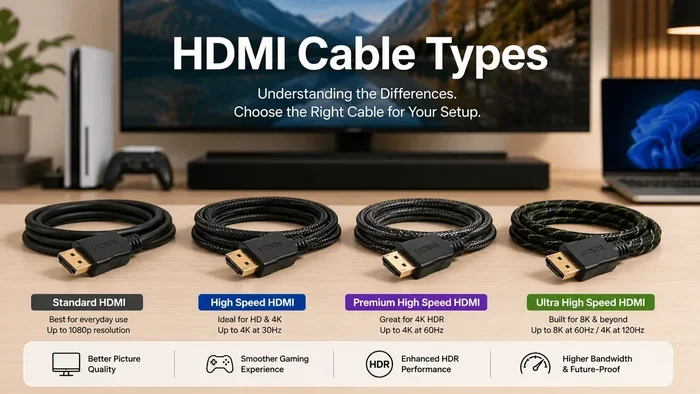
The HDMI Forum and HDMI Licensing group have defined four main categories of HDMI cables. Each category is designed for a specific range of performance. Let us look at them one by one.
Standard HDMI Cable
The Standard HDMI Cable is the most basic type. It supports resolutions up to 1080p, which is also known as Full HD. These cables have a bandwidth of up to 4.95 Gbps. They work well for older devices and basic setups.
You will find Standard HDMI cables useful for connecting a DVD player to an older TV or hooking up a desktop computer to a 1080p monitor. They are affordable and widely available. However, they cannot handle 4K content or higher refresh rates.
High Speed HDMI Cable
A High Speed HDMI Cable supports resolutions up to 4K at 30Hz. It has a bandwidth of 10.2 Gbps. This type of cable is a big step up from the Standard cable and is suitable for most modern devices.
Most people will find that a High Speed HDMI Cable meets their everyday needs. It handles 4K video at 30 frames per second, which is enough for movies and casual gaming. If you have a 4K TV but do not need the highest refresh rates, this cable is a solid choice.
Premium High Speed HDMI Cable
The Premium High Speed HDMI Cable supports 4K resolution at 60Hz and includes support for HDR (High Dynamic Range). It has a bandwidth of 18 Gbps. This cable is certified to handle the demands of modern 4K content.
If you watch a lot of HDR content on Netflix or Disney Plus, you need a Premium High Speed cable. HDR delivers richer colors and better contrast. A standard or basic High Speed cable cannot pass through HDR signals properly. The premium certification ensures the cable meets strict quality standards.
Ultra High Speed HDMI Cable
The Ultra High Speed HDMI Cable is the newest and most powerful type. It supports 4K at 120Hz, 8K at 60Hz, and even 10K resolutions. The bandwidth reaches up to 48 Gbps. It also supports the latest HDMI 2.1 features.
This cable is ideal for serious gamers and home theater enthusiasts. The PlayStation 5 and Xbox Series X benefit greatly from the higher refresh rates that Ultra High Speed cables provide. If you have an 8K TV or want the best gaming experience, this is the cable to get.
| Cable Type | Max Resolution | Bandwidth | Best For |
|---|---|---|---|
| Standard HDMI | 1080p | 4.95 Gbps | Basic setups, older devices |
| High Speed HDMI | 4K at 30Hz | 10.2 Gbps | Everyday 4K viewing |
| Premium High Speed | 4K at 60Hz + HDR | 18 Gbps | HDR content, modern TVs |
| Ultra High Speed | 8K at 60Hz | 48 Gbps | Gaming, 8K displays |
HDMI Connector Types and Form Factors
HDMI connectors come in several physical shapes and sizes. Each type fits different devices and use cases. Let us explore the main connector types you will encounter.
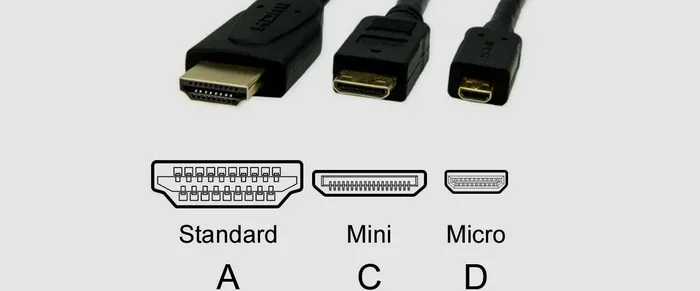
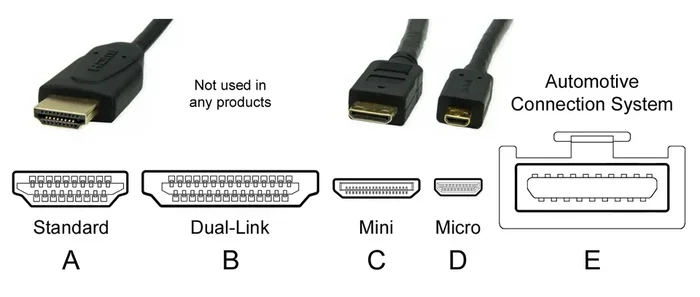
Type A (Standard HDMI)
The Type A connector is the most common HDMI connector. It is the full-size port you see on TVs, monitors, and most devices. It has 19 pins and measures about 13.9mm by 4.45mm. Almost everyone has seen this connector before.
Standard HDMI connectors are found on the back of most televisions and home theater receivers. They are sturdy and reliable. If you are buying a cable for your living room TV, it will almost certainly use a Type A connector on both ends.
Type C (Mini HDMI)
The Mini HDMI connector, also known as Type C, is a smaller version of the standard connector. It has the same 19 pins but in a more compact form factor. You will find Mini HDMI ports on some tablets, DSLRs, and action cameras.
Mini HDMI cables are useful for connecting portable devices to larger screens. For example, you might use a Mini HDMI cable to connect a Canon DSLR camera to a monitor for reviewing photos. These cables are less common than Standard HDMI but still widely available.
Type D (Micro HDMI)
The Micro HDMI connector, or Type D, is even smaller than the Mini version. It also has 19 pins but in a much tinier package. You will find Micro HDMI ports on some smartphones and action cameras like GoPro models.
Micro HDMI cables are great for mobile devices where space is limited. They allow you to connect your phone directly to a TV or monitor for sharing photos, videos, or even streaming content. Keep in mind that these cables are less common, so you may need to shop a bit more to find them.
Type B (Dual Link HDMI)
The Type B connector, or Dual Link HDMI, is rare but worth mentioning. It has 29 pins and was designed for very high-resolution displays. However, it was never widely adopted and you will rarely see it in consumer products today.
Most users will never need a Type B connector. The standard, mini, and micro types cover the vast majority of use cases. If you are shopping for cables, focus on Type A, C, or D depending on your devices.
Specialized HDMI Connectors
Beyond the main types, there are a few specialized HDMI connectors. Some devices use right-angle HDMI connectors to save space. Automotive HDMI cables are designed to withstand vibrations and temperature changes. There are also HDMI adapters that let you convert between different connector types.
If you are curious about what other components live inside your device and share space with HDMI ports, our article on 5 Components That Are Found On The Motherboard provides great insights into the inner workings of your devices.
HDMI Versions Explained
HDMI versions refer to the specification that the cable and devices support. Each version brings new capabilities and improvements. Here is a breakdown of the major HDMI versions you should know about.
HDMI 1.4
HDMI 1.4 was a significant update that introduced 4K support at 30Hz. It also added the ARC (Audio Return Channel) feature, which lets audio travel back through the HDMI cable to a soundbar or receiver. Ethernet over HDMI was another addition, allowing devices to share an internet connection.
Many devices from the mid-2010s support HDMI 1.4. If you have an older 4K TV, it likely uses this version. While it is outdated by today’s standards, it still handles basic 4K content and ARC audio return well.
HDMI 2.0
HDMI 2.0 boosted the bandwidth to 18 Gbps. This allowed for 4K resolution at 60Hz and full HDR support. It also introduced support for up to 32 audio channels and the 21:9 ultrawide aspect ratio.
Most modern 4K TVs and monitors support HDMI 2.0. If you have a Premium High Speed HDMI cable, you can take full advantage of HDMI 2.0 features. This version is the sweet spot for most home entertainment setups.
HDMI 2.1
HDMI 2.1 is the latest major version and a game-changer for both gaming and home theater. It supports up to 48 Gbps of bandwidth, enabling 8K at 60Hz and 4K at 120Hz. It also introduces features like Variable Refresh Rate (VRR), Auto Low Latency Mode (ALLM), and Dynamic HDR.
If you own a gaming console from the current generation or a high-end PC setup, HDMI 2.1 is essential. The Ultra High Speed HDMI Cable is designed specifically for HDMI 2.1 devices. It ensures you get the full benefit of higher frame rates and better visual quality.
How to Choose the Right HDMI Cable
Choosing the right HDMI cable does not have to be complicated. You just need to match the cable to your devices and what you want to do with them.
Start by checking what your devices support. Look at the HDMI ports on your TV, monitor, or console. Check the manual or the manufacturer’s website for the version and features supported. Then choose a cable that meets or exceeds those requirements.
For casual viewing and older devices, a Standard or High Speed HDMI Cable works fine. For 4K HDR content and modern TVs, go with a Premium High Speed cable. For gaming at high refresh rates or 8K displays, invest in an Ultra High Speed HDMI Cable.
Keep in mind that longer cables can sometimes lose signal quality. If you need a cable longer than 10 feet, consider an active HDMI cable or a fiber optic HDMI cable. These use technology to boost the signal over longer distances.
Another tip is to buy from reputable brands. Look for cables that are certified by the HDMI Forum. Certified cables have been tested to meet specific performance standards. This gives you confidence that the cable will work as advertised.
Quick Tips for Buying HDMI Cables
- Check your device specs first. Know what resolution and features your source and display support.
- Do not overpay. Expensive cables do not always mean better performance. Certified cables from reputable brands offer great value.
- Consider cable length carefully. Longer cables may need signal boosting technology.
- Look for certifications. HDMI-certified cables have been tested for reliability.
- Buy from trusted retailers. Avoid cheap, uncertified cables from unknown sellers.
Common HDMI Cable Mistakes to Avoid
Even with the right cable, people make mistakes that cause problems. Here are some common pitfalls to watch out for.
Buying the wrong cable type. This is the most common mistake. If your TV supports 4K at 60Hz but you use a Standard HDMI Cable, you will not get the best picture. Always match your cable to your device’s capabilities.
Assuming all 4K cables are the same. Not every cable that claims to support 4K is created equal. Some only handle 4K at 30Hz, while others support 4K at 60Hz or higher. Check the specifications carefully before buying.
Ignoring cable quality. Cheap, uncertified cables may have poor shielding or low-quality conductors. This can lead to signal interference, flickering, or audio dropouts. Investing in a quality cable saves you from these headaches.
Using adapters carelessly. Adapters can sometimes cause signal loss or compatibility issues. Use high-quality adapters and keep cable runs as short as possible when using adapters.
Overlooking firmware updates. Sometimes display issues are not about the cable at all. Updating your TV or console firmware can resolve HDMI-related problems. It is a simple step that many people skip.
Frequently Asked Questions
Can I use any HDMI cable for 4K TV?
Not all HDMI cables support 4K equally. A Standard or basic High Speed cable may only handle 4K at 30Hz. For the best 4K experience, especially with HDR content, use a Premium High Speed or Ultra High Speed HDMI Cable. Always check the cable specifications before purchasing.
What is the difference between HDMI 2.0 and HDMI 2.1 cables?
HDMI 2.0 cables support up to 18 Gbps of bandwidth, which handles 4K at 60Hz. HDMI 2.1 cables support up to 48 Gbps, enabling 4K at 120Hz and 8K at 60Hz. HDMI 2.1 also adds features like Variable Refresh Rate and Auto Low Latency Mode, which are great for gaming.
Do expensive HDMI cables sound or look better?
For most setups, a certified mid-range cable performs just as well as an expensive one. The digital signal either works perfectly or it does not. You pay more for premium build quality, better shielding, and longer lifespan rather than better picture or sound quality.
Can I plug a Micro HDMI into a Standard HDMI port?
Not directly. You will need an adapter or a cable with a Micro HDMI connector on one end and a Standard HDMI connector on the other. These adapters are widely available and affordable. Just make sure to get a quality adapter to avoid signal loss.
Does HDMI cable length affect quality?
Yes, longer cables can experience signal degradation, especially at higher resolutions and refresh rates. For runs under 10 feet, standard cables work fine. Beyond that, consider an active HDMI cable or a fiber optic HDMI cable that maintains signal quality over longer distances.
What is an HDMI ARC port?
ARC stands for Audio Return Channel. It allows your TV to send audio back to a soundbar, receiver, or home theater system through the same HDMI cable. This eliminates the need for a separate audio cable. You need both the TV and the audio device to support ARC for it to work.
Final Thoughts
The world of HDMI cables and connectors is not as confusing as it seems once you understand the basics. Each type of cable serves a specific purpose, from basic 1080p connections to cutting-edge 8K gaming setups. The key is to match your cable to your devices and your needs.
Start by identifying what your source devices and displays support. Then choose the appropriate HDMI cable category. A Standard cable works for older setups. A High Speed or Premium High Speed cable handles most modern 4K needs. And an Ultra High Speed cable unlocks the full potential of HDMI 2.1 for gaming and future-proof displays.
Do not overlook the importance of connector types either. Whether you need a Standard, Mini, or Micro HDMI connector, having the right physical fit ensures a reliable connection every time.
Remember that a good HDMI cable is a small investment that makes a big impact on your viewing and gaming experience. Take the time to choose wisely, and your setup will reward you with crisp visuals and clear sound for years to come. The right cable is out there, and now you have the knowledge to find it.