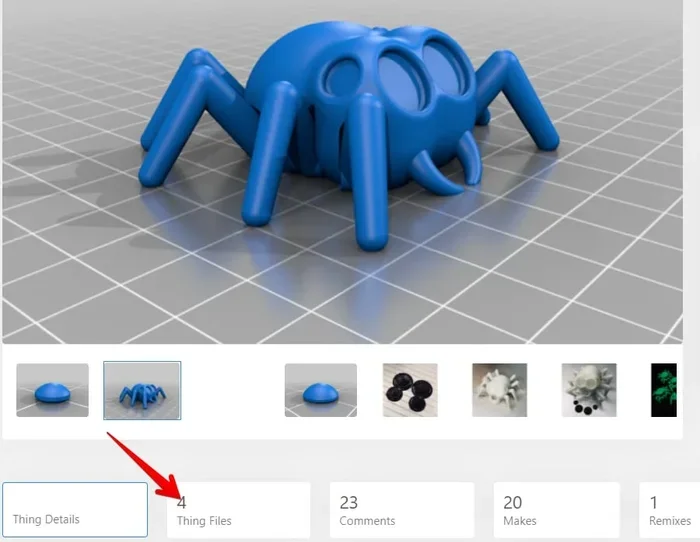
Are There Free 3d Printer Files You Can Download Now
Yes, there are plenty of free 3D printer files available for download, and you can start printing today without spending a dime. From beginner-friendly STL repositories to advanced open-source design libraries, the world of free 3D printer files is vast and growing. Whether you want simple accessories or complex functional parts, this guide shows you exactly where to look and how to get started.
Key Takeaways
- Free 3D printer files are widely available on reputable websites like Thingiverse, Printables, and MyMiniFactory.
- Understanding file formats like STL, OBJ, and 3MF helps you choose the right model for your printer.
- Quality varies across sites, so always check reviews, file ratings, and user comments before downloading.
- Free 3D printing extends into medicine, where open-source models help create affordable medical tools and aids.
- Checking file compatibility with your printer and slicer software saves time and prevents failed prints.
- Community-driven platforms offer the best support, updates, and modifications for free 3D models.
📑 Table of Contents
- What Are Free 3D Printer Files?
- Top Websites to Download Free 3D Printer Files
- How to Find the Right Free 3D Printer Files
- What Is Inside a 3D Printer? Understanding the Hardware
- Free 3D Printing in Medicine and Real-World Applications
- Common Mistakes When Downloading Free 3D Files
- Tips for Getting the Best Free 3D Printer Files
- Conclusion
What Are Free 3D Printer Files?
If you have been curious about 3D printing, you might wonder where to find files to print. The good news is that free 3D printer files are everywhere online. These digital blueprints tell your printer exactly what shape to build, layer by layer. You do not need to design anything yourself to get started.
Most free files come in formats like STL, OBJ, or 3MF. Each format stores the 3D shape data differently. STL is the most common and works with nearly every slicer program. OBJ files can hold color information, and 3MF is a newer format that packs more data into smaller files. Understanding these basics makes your search much easier.
People share these files for many reasons. Some want to help others learn. Others build portfolios. Many just love the 3D printing community spirit of giving designs away for free. Whatever the reason, you benefit from it.
Why Free Files Matter for Beginners
Starting out with a new hobby can feel overwhelming. You do not want to spend money before you know if you enjoy it. Free 3D printer files remove that barrier completely. You can download a simple keychain or a phone stand and test your printer right away.
Beginners also learn a lot by printing other people’s designs. You pick up tips about orientation, support structures, and infill settings. Every print teaches you something new. And when something goes wrong, you can try the same file again with different settings. That is the beauty of having printable 3D files at your fingertips.
Top Websites to Download Free 3D Printer Files
The internet is packed with sites offering free 3D printing designs. But not all sites are equal. Some have huge libraries, while others focus on quality. Here are the best places to find free 3D models right now.
Thingiverse: The Granddaddy of 3D Printing
Thingiverse has been around since 2008 and remains one of the largest 3D model repositories in the world. It hosts over two million free files. You can find everything from replacement parts to elaborate art pieces. The site is run by Ultimaker, a well-known 3D printing accessories brand, which gives it strong credibility.
Searching on Thingiverse is straightforward. You type in what you want, and the site shows matching results. User ratings and comments help you pick the best files. It is a great starting point for anyone looking for free 3D printer files.
Printables: The Rising Star
Printables is a newer platform backed by Prusa, another major name in the 3D printing community. It has grown fast because of its clean interface and active user base. The site organizes files by categories like functional, decorative, and artistic. This makes browsing much easier than on older platforms.
One standout feature is the built-in slicer preview. You can see how a model will look before you even download it. This saves a lot of trial and error. If you want 3D printing projects that are well-organized and easy to find, Printables is a top choice.
MyMiniFactory and Other Notable Sites
MyMiniFactory focuses on quality over quantity. Every file goes through a review process before it is published. This means fewer broken or low-quality downloads. The site also has a “Verified Printable” badge that helps you trust what you download.
Other notable sites include GrabCAD, which leans toward engineering and mechanical designs, and Sketchfab, which hosts both free and paid models. Each site has its strengths. Mixing a few sources gives you the best selection of digital 3D models for any project.
How to Find the Right Free 3D Printer Files
Finding files is one thing. Finding the right files takes a bit more effort. A great file on paper can still fail to print well. Here is how you make sure you get good ones.
Searching Effectively for Models
Use specific keywords when you search. Instead of typing “chair,” try “ergonomic chair 3D print.” The more specific you are, the better the results. Many sites also let you filter by file type, popularity, and date added.
Pay attention to the file format listed. If your slicer only supports STL, download STL files. Some modern slicers handle 3MF files better because they carry more metadata. Always double-check the format before you download.
Checking File Compatibility
Not every model works on every printer. The size of the model matters. If a file is designed for a large-format printer, it will not fit on a small desktop machine. Check the dimensions of the model against your printer’s build volume.
Also look at the recommended settings in the file description. Some creators list the ideal layer height, infill percentage, and print speed. These tips are gold. They help you avoid failed prints and wasted filament. Following these guidelines is one of the best 3D printing tips you can get for free.
What Is Inside a 3D Printer? Understanding the Hardware
While software files drive the print, the hardware makes it happen. A 3D printer is a complex machine with many working parts. Knowing what is inside helps you appreciate how those free files turn into real objects.
At the heart of every printer is the motherboard. This circuit board acts as the brain of the machine. It processes the G-code instructions that come from your slicer software and sends signals to the motors, heaters, and sensors. Without a properly functioning motherboard, even the best free 3D printer files would be useless.
The motherboard connects to all the key components on the printer. It controls the stepper motors that move the print head, the heated bed that keeps the print surface warm, and the extruder that melts and deposits the filament. Each of these parts works together in a precise dance guided by the digital file.
If you want to learn more about the specific components that make up a printer’s motherboard, check out our guide on the 5 components found on the motherboard. Understanding these parts helps you troubleshoot issues and choose better hardware for your 3D printing setup.
The Role of the Extruder and Hotend
The extruder feeds filament into the hotend, where it melts and gets deposited onto the build plate. The hotend temperature must match the filament type. PLA prints at around 200°C, while ABS needs higher temperatures near 230°C. Getting this right is essential for a clean, strong print.
Free 3D Printing in Medicine and Real-World Applications
3D printing has moved far beyond hobbyist garages. It now plays a serious role in healthcare and professional fields. Free 3D printer files have made this technology accessible to hospitals, researchers, and educators around the world.
Medical Uses of 3D Printed Models
Doctors and researchers use 3D printing technology to create patient-specific models for surgical planning. They can print a replica of a patient’s organ based on scan data. Surgeons practice complex procedures on these models before operating on the real thing. This reduces risk and improves outcomes.
Free 3D models also help create affordable prosthetics and assistive devices. In many parts of the world, traditional prosthetics are too expensive. A 3D-printed alternative costs a fraction of the price. Organizations share these designs online for free so anyone can access them.
Computers play a huge role in this process, from designing the models to operating the printers. To understand how computers are used in medicine more broadly, including imaging, diagnostics, and treatment planning, you can explore our detailed article on 10 ways computers are used in medicine. The intersection of computing and 3D printing is transforming healthcare every day.
Educational and DIY Applications
Schools use free 3D printing accessories files to teach students about design, engineering, and problem-solving. Students can print historical artifacts, molecular models, or custom tools for science projects. The possibilities are limited only by imagination.
On the DIY front, people print replacement parts for household items, custom phone cases, and organizers for their workshops. A single 3D printer file can save you from buying an expensive replacement part. That is one of the biggest practical benefits of this technology.
Common Mistakes When Downloading Free 3D Files
Even experienced 3D printing enthusiasts make mistakes when downloading files. Avoiding these common errors saves you time, filament, and frustration.
Skipping the Reviews
Many people download the first file they see and start printing. This is a mistake. Always read the comments and check the ratings. A file with hundreds of successful prints is much safer than one with no reviews. Look for comments that mention print quality, needed adjustments, and any known issues.
Ignoring File Scaling
Some files are designed at a scale that does not match real-world dimensions. This is especially common with decorative models. Always check the dimensions before you slice the file. Scaling a model up or down in your slicer software is easy, but doing it incorrectly can weaken the print or ruin the proportions.
Downloading from Unverified Sources
Not every website is trustworthy. Some free file sites host models without checking them for quality or safety. Stick to well-known platforms like Thingiverse, Printables, and MyMiniFactory. These sites have active communities that flag problematic files. Downloading from verified sources protects both your printer and your time.
Tips for Getting the Best Free 3D Printer Files
Getting great results from free 3D printer files is easier when you follow a few smart strategies. These tips help you find better models and print them successfully.
Build a Personal Library
Create a folder system on your computer for downloaded files. Organize them by category: functional parts, decorative items, tools, and art. This makes it easy to find what you need later. You will also avoid re-downloading the same files by accident.
Join the Community
The 3D printing community is one of the most helpful groups online. Join forums, Discord servers, and Reddit threads dedicated to 3D printing. Members share tips, recommend files, and help troubleshoot problems. Being part of this community accelerates your learning curve dramatically.
Modify and Customize
Once you find a file you like, try modifying it. Many free models are shared under open-source licenses that allow you to edit them. You can change the size, add text, or combine multiple models into one. This is where 3D printing gets really fun. You go from being a consumer to a creator.
Keep Your Slicer Updated
Slicer software like Cura, PrusaSlicer, and OrcaSlicer gets regular updates. These updates improve print quality, add new features, and fix bugs. Keeping your slicer current ensures you get the best results from every 3D printer file you download.
Start Simple and Build Up
Do not jump straight into complex mechanical parts. Start with simple objects like a benchy boat or a name tag. These small prints teach you the fundamentals. Once you are comfortable, move on to more challenging 3D printing projects. Building skills gradually leads to better results and fewer failed prints.
Conclusion
The world of free 3D printer files is wide open and ready for you. From massive repositories like Thingiverse and Printables to niche sites for specialized projects, there has never been a better time to start 3D printing. You do not need expensive software or fancy hardware. A basic printer and a free file are all you need to create something real.
Remember to check file compatibility, read user reviews, and start with simple models as you build your skills. The 3D printing community is generous and supportive, and there is always something new to learn. Whether you want practical tools, artistic pieces, or educational models, free 3D printer files give you the power to bring your ideas to life without spending a penny.
Start downloading today. Your next great project is just one file away.
Frequently Asked Questions
Where can I find the best free 3D printer files?
Thingiverse, Printables, and MyMiniFactory are widely considered the best sources for free 3D printer files. Each site has a large library, active user reviews, and reliable file quality. These platforms are trusted by millions of 3D printing enthusiasts worldwide.
Are free 3D printer files safe to download?
Yes, files from reputable platforms are generally safe. Stick to well-known sites and always read user comments before downloading. Avoid obscure websites that do not verify their files. Using trusted sources protects your computer and your printer.
What file format should I look for when downloading free 3D models?
STL is the most common and widely supported format. 3MF is a newer format that offers better metadata and color support. OBJ files work well for models that include color data. Check what your slicer software supports before downloading.
Can I modify free 3D printer files?
Most files on major platforms are shared under open-source licenses that allow modification. You can resize, combine, or edit models using free software like Blender or Tinkercad. Always check the specific license for each file to be sure.
Do I need an expensive printer to use free 3D files?
No, many free 3D printing designs work perfectly on budget-friendly printers. Entry-level machines can handle most beginner and intermediate models. The quality of your print depends more on settings and technique than on printer price.
How do I know if a file will fit my printer?
Check the model dimensions listed in the file description and compare them to your printer’s build volume. Most slicer programs let you scale models if needed. This simple step prevents wasted filament and failed prints.
=== CONCLUSION ===
Free 3D printer files are abundant, accessible, and ready for you to explore. Whether you are a complete beginner or a seasoned maker, the right 3D model download can spark creativity and save money. Start with the trusted platforms mentioned in this guide, follow the tips for finding compatible files, and join the vibrant 3D printing community for ongoing support and inspiration. Your next project is waiting, and it costs nothing to start.