Can A Network Switch Go Bad
Yes, a network switch can absolutely go bad over time due to overheating, power surges, or simple wear and tear. Understanding the signs of a failing switch helps you avoid costly network downtime and frustrating connectivity problems. This guide covers every symptom, cause, and fix you need to know.
Have you ever been in the middle of something important online, and suddenly your internet just stops working? You check your router. It looks fine. You restart your computer. Nothing changes. Then you notice the little lights on your network switch are acting strange. Maybe some are off. Maybe they are all blinking randomly. It is a frustrating moment, and your mind starts racing with one big question: can a network switch go bad?
The short answer is yes. A network switch can absolutely fail, and it happens more often than most people realize. These small boxes sit quietly in a closet or on a desk, working hard every day to move data between your devices. Over time, the heat, power fluctuations, and general wear can take a toll. When a switch starts to go bad, it can cause slow internet, dropped connections, and all sorts of annoying problems. The good news is that figuring out what is wrong is usually straightforward. In this article, we will walk you through every sign, cause, and fix related to switch failure. By the end, you will know exactly what to look for and how to get your network back on track.
Key Takeaways
- Network switches do fail: They have a finite lifespan and can degrade over time just like any electronic device.
- Overheating is the #1 killer: Poor ventilation and dust buildup cause most switch failures.
- Port failures are common: Individual ports can die while the rest of the switch keeps working.
- Power supply issues matter: A bad power adapter or surge can kill your switch instantly.
- Firmware problems cause weird behavior: Outdated or corrupted firmware leads to random disconnections.
- Replacement is often cheaper than repair: Most switches are affordable and easy to swap out.
- Regular maintenance extends life: Simple cleaning and proper ventilation can add years to your switch.
📑 Table of Contents
- What Does It Mean When a Network Switch Goes Bad?
- Why Do Network Switches Fail?
- How to Tell If Your Network Switch Is Going Bad
- Can You Fix a Bad Network Switch?
- How to Prevent Your Network Switch from Going Bad
- Managed vs. Unmanaged Switches: Which Lasts Longer?
- Quick Tips for Extending Switch Life
- Common Mistakes That Shorten Switch Life
- Expert Insights: What Networking Professionals Say
- When Should You Call a Professional?
- Key Takeaways
- Frequently Asked Questions
- Final Thoughts
What Does It Mean When a Network Switch Goes Bad?
When people say a network switch has gone bad, they mean it is no longer working the way it should. A healthy switch moves data packets between your computers, printers, and other devices without any hiccups. A failing switch struggles to do this job. Sometimes it fails completely. Other times it works part of the time. The behavior can be unpredictable, which makes network switch troubleshooting tricky.
A switch can fail in different ways. One port might stop working while the others keep going. The whole unit might freeze up and need a restart every few hours. In worst-case scenarios, the switch stops working entirely and none of your devices can connect to the network. Each type of failure points to a different cause, which we will explore in detail below.
Common Symptoms of a Failing Switch
Your switch usually gives you warning signs before it completely dies. Here are the most common symptoms to watch for:
- Slow network speeds: Files take forever to transfer, and streaming videos keep buffering.
- Random disconnections: Devices drop off the network without warning and reconnect randomly.
- Port not working: One or more ports stop recognizing connected devices entirely.
- Blinking LED lights behave oddly: Lights that normally stay solid start flashing rapidly or go dark.
- Overheating: The switch feels hot to the touch or the fan (if it has one) runs loudly constantly.
- Frequent reboots: The switch turns itself off and on at random intervals.
- Packet loss: Data fails to reach its destination, causing choppy video calls and lag in online games.
If you notice any of these issues, your switch might be on its way out. But before you rush to buy a replacement, let us look at the reasons why switches fail in the first place.
Why Do Network Switches Fail?
Switches are built to last, but they are not indestructible. Several factors can shorten their lifespan or cause sudden hardware failure. Understanding these causes helps you prevent problems before they start.
Overheating and Poor Ventilation
Heat is the enemy of electronics. A network switch generates heat every time it processes data. When the switch sits in a closed cabinet or is packed tightly against other devices, that heat has nowhere to go. Over time, the internal components start to break down. Capacitors dry out. Circuit boards warp. The switch overheating problem is the number one cause of premature failure in most homes and offices.
Dust buildup makes this worse. Dust acts like insulation, trapping heat inside the switch. After a year or two of sitting in a dusty closet, even a quality switch can start to struggle.
Power Surges and Electrical Issues
A sudden power spike can fry a switch instantly. Lightning strikes, faulty wiring, or even just plugging too many devices into the same power strip can cause power supply failure. The damage might not be immediate. Sometimes a small surge weakens the switch gradually, and it starts failing weeks or months later.
Cheap power adapters also wear out over time. If your switch uses an external power brick, that brick could be the weak link. Replacing the adapter is a lot cheaper than replacing the whole switch.
Wear and Tear Over Time
Every electronic device has a lifespan. A well-maintained network switch typically lasts between five and ten years. But heavy use can shorten that timeline. If you run a busy home office or small business with dozens of devices connected around the clock, your switch works harder and wears out faster. The switch lifespan depends heavily on how much you use it and how well you care for it.
Firmware and Software Problems
Not all switch failures are physical. Sometimes the problem is software-based. Outdated firmware can cause compatibility issues, random crashes, and security vulnerabilities. Managed switches especially need regular firmware updates to perform at their best. A corrupted firmware update can also brick a switch, leaving it completely unresponsive.
Port Damage from Cables
The physical ports on a switch take a beating over time. Cables get plugged in and pulled out hundreds of times. Eventually, the contacts inside a port wear out. A bent or broken pin inside the port can also prevent a solid connection. This type of port failure is very common in high-traffic environments like schools, labs, and busy offices.
How to Tell If Your Network Switch Is Going Bad
Diagnosing a failing switch takes a bit of detective work. You do not want to replace a perfectly good switch, but you also do not want to ignore a failing one. Here is a step-by-step approach to figure out what is going on.
Step 1: Check the LED Indicators
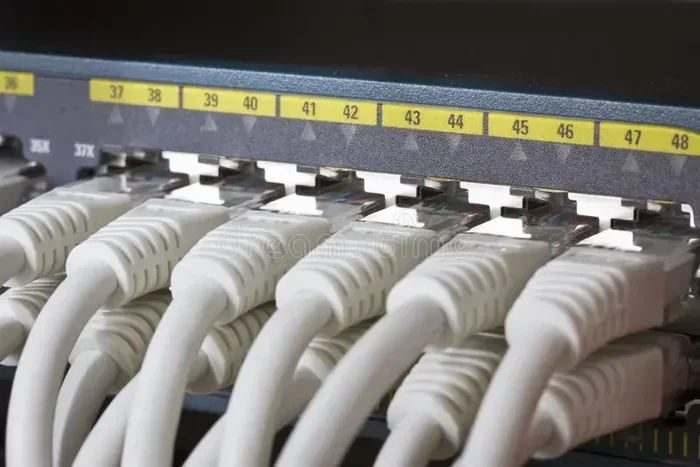
Most switches have small LED lights on each port. These lights tell you the status of each connection. A solid green light usually means a good connection. A blinking light means data is flowing. If a light is off, the port is not detecting a device. If a light is amber or red, there is a problem with the link. Pay close attention to these signals because they give you an immediate snapshot of your switch health.
Step 2: Test Each Port Individually
Unplug a cable from a working port and plug it into the port that seems problematic. If the connection works on a different port but not the original one, that port has likely failed. This simple test helps you isolate whether the problem is one port or the whole switch.
Step 3: Monitor the Temperature
Touch the switch carefully. Does it feel unusually hot? Is the fan making loud noises? An overheated switch will throttle performance or shut down unexpectedly. Good airflow around the switch is essential for long-term reliability.
Step 4: Check for Firmware Updates
If you have a managed switch, log into its admin panel and check the firmware version. Compare it to the latest version from the manufacturer. Updating the firmware can fix bugs and improve stability. This is one of the easiest network switch maintenance tasks you can do.
Step 5: Run a Network Diagnostic
Use tools like ping tests or traceroute to check for data packet loss and latency. High packet loss or inconsistent ping times often point to a failing switch. These diagnostics take just a few minutes and can save you hours of guesswork.
Can You Fix a Bad Network Switch?
The answer depends on what is wrong. Some problems are easy to fix. Others mean it is time for a replacement.
Simple Fixes You Can Try at Home
Before you spend money on a new switch, try these quick fixes:
- Restart the switch: Unplug it, wait 30 seconds, and plug it back in. This clears temporary glitches and resets the connection.
- Clean the vents: Use compressed air to blow out dust from the fan and ventilation holes. Do this every few months to prevent buildup.
- Replace the power adapter: Try a different power supply with the same voltage and amperage ratings. A failing adapter can mimic switch failure.
- Update the firmware: For managed switches, a firmware update can resolve many software-related issues.
- Move the switch: Relocate it to a well-ventilated area away from direct sunlight and other heat sources.
When to Replace Instead of Repair
Sometimes the damage is too severe to fix. Here are signs that replacement is your best option:
- The switch is more than seven years old and multiple ports have failed.
- The internal fan is dead and the switch overheats constantly.
- There is visible physical damage, such as a cracked case or burnt smell.
- Firmware updates do not resolve the issues.
- The cost of repair exceeds the cost of a new switch.
Replacing a switch is usually simple and affordable. Basic unmanaged switches cost as little as $15 to $30. Managed switches run higher, but they offer more features and better performance for demanding setups.
How to Prevent Your Network Switch from Going Bad
Prevention is always better than cure. A few simple habits can dramatically extend the life of your switch and keep your network connection running smoothly.
Keep It Cool
Place your switch in an open area with good airflow. Do not stack other equipment on top of it. If the switch is in a cabinet, consider adding small fans to improve circulation. Keeping the temperature below 75 degrees Fahrenheit is a good rule of thumb.
Dust Regularly
Dust is a silent killer of electronics. Use compressed air to clean your switch every two to three months. If you live in a dusty area or have pets, you might need to clean it more often. A can of compressed air costs just a few dollars and can add years to your switch life.
Use a Surge Protector
Plug your switch into a quality surge protector. This protects it from power spikes that can cause gradual or sudden damage. A surge protector is one of the cheapest and most effective pieces of network equipment maintenance you can invest in.
Keep Firmware Updated
For managed switches, check for firmware updates every few months. Manufacturers release updates to fix bugs, improve security, and boost performance. Setting a calendar reminder for this task takes just a couple of minutes.
Handle Cables Gently
Avoid yanking cables from ports. Pull gently from the connector, not the cord. This prevents wear on the port contacts and reduces the risk of port failure over time.
Managed vs. Unmanaged Switches: Which Lasts Longer?
When shopping for a new switch, you will encounter two main types: managed and unmanaged. Both can go bad, but they differ in features, complexity, and longevity.
| Feature | Unmanaged Switch | Managed Switch |
|---|---|---|
| Price Range | $15 – $50 | $50 – $300+ |
| Ease of Use | Plug and play | Requires configuration |
| Firmware Updates | None or very rare | Regular updates available |
| Monitoring Tools | Limited or none | Full monitoring and alerts |
| Lifespan | 5 – 8 years | 7 – 10+ years |
| Best For | Home use, small setups | Businesses, heavy usage |
| Failure Risk | Lower (fewer moving parts) | Slightly higher (more features = more complexity) |
Unmanaged switches are simpler and have fewer points of failure. They work right out of the box with no setup required. Managed switches offer more control and better performance, but they also have more software components that can fail. For most home users, an unmanaged switch is more than enough. For businesses or power users, a managed switch provides the tools needed to keep a network running smoothly and troubleshoot issues quickly.
Quick Tips for Extending Switch Life
Here are some fast, actionable tips to keep your network switch healthy for as long as possible:
- Restart your switch monthly: A simple reboot clears memory and refreshes connections.
- Label your cables: This makes troubleshooting port issues much faster.
- Keep spare switches on hand: A cheap backup switch can save you from network downtime during a failure.
- Avoid daisy-chaining switches: Connecting one switch to another can create loops and performance bottlenecks.
- Check cable quality: Damaged cables can mimic switch problems. Replace old or frayed cables regularly.
- Use the right switch for your needs: A small home network does not need an expensive managed switch, and a busy office will suffer with an unmanaged one.
Common Mistakes That Shorten Switch Life
Many people unknowingly shorten the life of their switches with simple mistakes. Here are the most common ones to avoid:
- Blocking ventilation: Tucking the switch into a tight drawer or behind a heavy desk cuts airflow and causes overheating.
- Ignoring warning signs: Intermittent disconnections and slow speeds are often early symptoms. Ignoring them lets the problem get worse.
- Using the wrong power adapter: A mismatched power supply can deliver too much or too little voltage, damaging internal components.
- Skipping firmware updates: On managed switches, outdated firmware can lead to bugs, crashes, and security issues.
- Overloading ports: Running too many devices through a single switch can push it beyond its capacity, causing strain on the internal processor.
Expert Insights: What Networking Professionals Say
IT professionals who deal with network hardware every day have seen every type of switch failure. Here are some insights from the field:
“Most people wait until the switch completely dies before replacing it,” says a network technician with over 15 years of experience. “By that point, they have already lost hours of productivity. Catching the early signs, like intermittent port failures or unusual heat, saves a lot of headache.”
Another expert adds that regular maintenance is the single biggest factor in switch longevity. “A five-minute cleaning session every few months and a quarterly firmware check can add three to five years to a switch’s life. It is amazing how much difference basic care makes.”
Professionals also emphasize the importance of matching your switch to your actual needs. “People buy expensive managed switches for simple home setups, or cheap unmanaged switches for busy offices. Neither choice is ideal. Match the switch to the workload, and it will last much longer,” they advise.
When Should You Call a Professional?
Most switch problems are easy to diagnose and fix on your own. But there are times when calling in a professional makes sense:
- The switch is under warranty and you want a replacement or repair.
- You are dealing with a complex network setup with multiple switches and VLANs.
- You suspect the failure caused damage to other network equipment.
- You are not comfortable opening the switch or accessing its admin panel.
- You need help designing a more reliable network setup going forward.
A professional can diagnose issues you might miss and help you build a more resilient network. For small businesses or home offices with valuable equipment, this investment is well worth it.
Key Takeaways
- Network switches do fail: They have a finite lifespan and can degrade over time just like any electronic device.
- Overheating is the #1 killer: Poor ventilation and dust buildup cause most switch failures.
- Port failures are common: Individual ports can die while the rest of the switch keeps working.
- Power supply issues matter: A bad power adapter or surge can kill your switch instantly.
- Firmware problems cause weird behavior: Outdated or corrupted firmware leads to random disconnections.
- Replacement is often cheaper than repair: Most switches are affordable and easy to swap out.
- Regular maintenance extends life: Simple cleaning and proper ventilation can add years to your switch.
Frequently Asked Questions
How long does a network switch typically last?
A well-maintained network switch usually lasts between five and ten years. The exact lifespan depends on usage, environment, and the quality of the switch. Regular cleaning and proper ventilation can push the lifespan toward the upper end of that range.
Can a network switch fail without any warning signs?
Yes, it is possible but rare. Most switches give clear warning signs like slow speeds, port failures, or overheating before they completely die. Sudden failures are more common with power surges or lightning strikes that cause immediate hardware failure.
Is it safe to use a switch that is overheating?
No, you should not. An overheating switch can damage itself further and potentially affect other devices on the network. Turn it off, let it cool down, and address the ventilation issue. Continuing to use an overheated switch can lead to permanent damage and even pose a fire risk in extreme cases.
Can a bad switch damage other network equipment?
In most cases, a failing switch will not damage other equipment. However, power-related failures or electrical surges that affect the switch can sometimes spread to connected devices through the Ethernet cables. Using a surge protector greatly reduces this risk.
Do I need to replace the whole switch if one port fails?
Not necessarily. If only one port is dead and the rest work fine, you can often just avoid using that port. However, if multiple ports fail or the switch shows other symptoms, replacement is the better long-term solution. A new basic switch is quite affordable these days.
How can I tell the difference between a bad switch and a bad router?
Try connecting a device directly to your router and see if the internet works. If it does, the problem is likely the switch or the cables between them. If the router itself has no connection, the issue is with the router or your internet service provider. Network troubleshooting this way helps you isolate the problem quickly.
Final Thoughts
The question can a network switch go bad comes up a lot, and the answer is a clear yes. Switches are not immortal. They face heat, dust, power issues, and simple wear over time. But with the right care, you can keep your switch running strong for many years. Watch for the warning signs we covered, keep the switch cool and clean, and do not ignore small problems. A little attention goes a long way toward keeping your network connection fast and reliable. If your switch has truly reached the end of its life, replacing it is quick, easy, and affordable. Your network will thank you for it.