Can Alexa Be Used As Bluetooth Speaker to Play Music
Yes, you can use Alexa as a Bluetooth speaker to play music from your phone or other devices. Amazon Echo devices support Bluetooth pairing, allowing you to stream audio wirelessly. This guide covers everything you need to know about using Alexa as a Bluetooth speaker, from setup to troubleshooting.
Can Alexa be used as a Bluetooth speaker to play music? The short answer is yes. Amazon Echo devices are not just smart assistants. They also work as capable Bluetooth speakers that can stream audio from your phone, tablet, or laptop. Whether you want to play your favorite playlist, take a call, or watch a video with better sound, Alexa has you covered.
In this guide, we will walk you through everything you need to know. You will learn how to pair your device, improve audio quality, fix common problems, and get the most out of your Alexa speaker. Let us dive in.
Key Takeaways
- Alexa doubles as a Bluetooth speaker: Most Echo devices can connect to external gadgets via Bluetooth.
- Setup is simple: Pairing takes just a few minutes through the Alexa app.
- Audio quality varies: Higher-end Echo models deliver better sound for music playback.
- Multiple devices can connect: You can manage Bluetooth connections and switch between them easily.
- Common issues are fixable: Most Bluetooth problems have straightforward solutions.
- Alexa adds smart features: You get voice control and smart home integration along with speaker functionality.
📑 Table of Contents
- What Is Alexa and How Does It Work as a Bluetooth Speaker?
- How to Pair Alexa as a Bluetooth Speaker
- Can You Use Any Device with Alexa as a Bluetooth Speaker?
- How Good Is the Audio Quality?
- Common Problems and How to Fix Them
- Alexa as a Bluetooth Speaker vs. a Regular Bluetooth Speaker
- Tips to Get the Best Experience
- Can Alexa Be Used As a Bluetooth Speaker for Calls?
- Expert Insights: Getting the Most from Alexa Bluetooth
- Frequently Asked Questions
- Conclusion
What Is Alexa and How Does It Work as a Bluetooth Speaker?
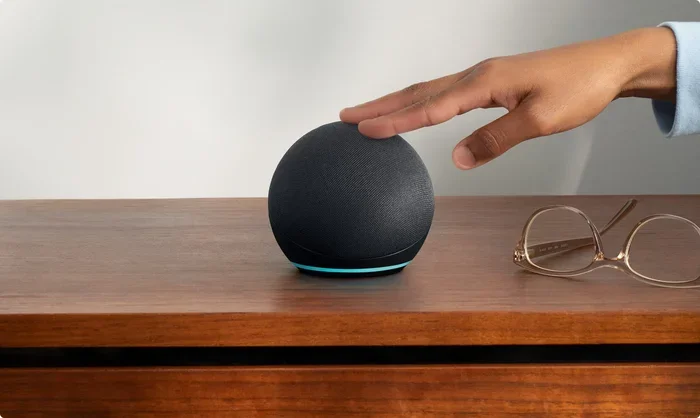
Alexa is Amazon’s voice-controlled assistant. It lives inside devices like the Echo Dot, Echo Show, Echo Studio, and many others. These devices come with built-in speakers and Bluetooth capabilities. This means they can do two things at once. They listen to your voice commands and also act as a wireless speaker.
When you use Alexa as a Bluetooth speaker, you are essentially turning it into a wireless audio output device. Your phone or tablet sends audio signals through a Bluetooth connection. The Alexa device receives those signals and plays the sound through its built-in speaker. It works just like pairing any two Bluetooth devices.
Which Alexa Devices Support Bluetooth?
Most modern Alexa devices support Bluetooth connectivity. Here is a quick list of popular options:
- Echo Dot: Compact and affordable. Great for small rooms.
- Echo (3rd Gen and newer): Good all-around sound quality.
- Echo Plus: Improved bass and richer audio output.
- Echo Studio: Premium sound with deep bass and spatial audio.
- Echo Show: Adds a screen to the Bluetooth speaker experience.
- Echo Flex: Small plug-in device with basic Bluetooth support.
Almost every Echo device released in the last several years can connect as a Bluetooth speaker. The sound quality depends on the model. A basic Echo Dot will sound different from an Echo Studio. But all of them can receive Bluetooth audio streams.
How to Pair Alexa as a Bluetooth Speaker
Setting up your Alexa device as a Bluetooth speaker is easy. You do not need any special equipment. Just follow these simple steps.
Step-by-Step Pairing Guide
Here is how to connect your phone or tablet to Alexa using Bluetooth:
- Turn on your Alexa device. Make sure it is plugged in and powered on.
- Open the Alexa app on your phone or tablet.
- Go to Devices. Tap the Devices icon at the bottom of the screen.
- Select your Echo device. Choose the specific Alexa device you want to pair.
- Tap Bluetooth Devices. This option is usually found in the device settings.
- Select “Pair a New Device.” Your Alexa device will now be visible to other Bluetooth devices.
- On your phone or tablet, go to Bluetooth settings and find your Echo device.
- Tap to connect. The pairing should happen within a few seconds.
That is it. Your Alexa is now connected as a Bluetooth speaker. You can start playing music right away.
Quick Tips for Pairing
- Make sure your phone and Alexa device are within 30 feet of each other.
- Turn off Bluetooth on other nearby devices to avoid confusion.
- If pairing fails, restart both devices and try again.
- You can also say “Alexa, pair my device” to start the process using voice commands.
Can You Use Any Device with Alexa as a Bluetooth Speaker?
Yes. Alexa can connect with a wide range of devices. It works with smartphones, tablets, laptops, and even some smart TVs. As long as the device has Bluetooth capability, you can send audio to your Alexa speaker.
Compatible Devices
- iPhone and Android phones: Both work seamlessly with Alexa Bluetooth.
- iPads and Android tablets: Great for streaming videos with better sound.
- Windows and Mac laptops: Useful for video calls and music playback.
- Smart TVs: Some TVs can connect to Alexa for enhanced audio.
- Gaming consoles: Certain consoles support Bluetooth output to Alexa.
The beauty of using Alexa as a Bluetooth speaker is its flexibility. You are not locked into one device. You can switch between your phone, tablet, and laptop whenever you want. Just disconnect from one device and pair with another.
How to Switch Between Paired Devices
Alexa can remember multiple paired Bluetooth devices. Switching between them is simple. You can say “Alexa, disconnect” to end the current connection. Then say “Alexa, pair” or go to the Bluetooth settings in the app. Choose the new device you want to connect. This makes it easy to share your Alexa speaker with family members or switch between your own devices.
How Good Is the Audio Quality?
The sound quality of Alexa as a Bluetooth speaker depends on the model you own. A basic Echo Dot produces clear sound for casual listening. It works well for podcasts, audiobooks, and background music. The Echo Studio, on the other hand, delivers a much richer and more immersive listening experience.
Comparing Audio Quality Across Models
- Echo Dot: Good for small spaces. Clear mids and highs. Limited bass.
- Echo (standard): Balanced sound. Suitable for most music genres.
- Echo Plus: Stronger bass. Fills medium-sized rooms well.
- Echo Studio: Premium audio. Deep bass, crisp highs, and 3D sound support.
If you are using Alexa as a Bluetooth speaker for music, the model matters a lot. A basic Echo Dot is fine for kitchen background music. But if you want to use Alexa for serious music listening, consider a higher-end model like the Echo Studio.
Factors That Affect Bluetooth Audio Quality
Several things can influence how your music sounds when streamed through Alexa:
- Bluetooth version: Newer versions offer better range and audio quality.
- Distance from the source device: Staying within 30 feet helps maintain a strong connection.
- Wi-Fi interference: Other wireless signals can sometimes affect Bluetooth performance.
- Audio source quality: The quality of the music file or stream matters too.
- Room acoustics: Hard surfaces can cause echo, while soft surfaces absorb sound.
Common Problems and How to Fix Them
Like any Bluetooth device, Alexa can sometimes experience connection issues. The good news is most problems are easy to fix.
Alexa Won’t Connect to Bluetooth
If your Alexa device refuses to pair, try these steps:
- Restart your Alexa device by unplugging it for 30 seconds.
- Turn Bluetooth off and on again on your phone.
- Make sure your Alexa device is not already connected to another device.
- Check that your phone is within range.
- Update the Alexa app to the latest version.
Poor Audio Quality or Intermittent Sound
If the sound keeps cutting out or sounds muffled, try these fixes:
- Move closer to the Alexa device.
- Remove other Bluetooth devices from the area.
- Check for Wi-Fi interference and move the router if needed.
- Restart both the source device and Alexa.
- Forget the Bluetooth device on both sides and re-pair.
Alexa Connects but No Sound Plays
This is a rare but frustrating issue. Here is what you can do:
- Check that the volume is turned up on both devices.
- Make sure the source device is not muted.
- Verify that the correct audio output is selected on your source device.
- Try playing a different audio file or app.
Alexa as a Bluetooth Speaker vs. a Regular Bluetooth Speaker
You might wonder how Alexa compares to a regular portable Bluetooth speaker. Both can play music wirelessly, but they have key differences.
| Feature | Alexa as Bluetooth Speaker | Regular Bluetooth Speaker |
|---|---|---|
| Voice Control | Yes | No |
| Smart Home Integration | Yes | No |
| Hands-Free Calling | Yes | Limited or None |
| Portability | Varies by model | Usually more portable |
| Audio Quality | Varies by model | Varies by model |
| Price Range | $30 to $200+ | $15 to $150+ |
| Requires Power Outlet | Usually yes | Often battery powered |
The main advantage of using Alexa as a Bluetooth speaker is the added smart features. You get voice control, smart home management, and hands-free calling. A regular Bluetooth speaker focuses only on audio output. Your choice depends on what you value more. If you want smart features, Alexa wins. If you want portability and battery life, a dedicated Bluetooth speaker might be better.
Tips to Get the Best Experience
Want to make the most of Alexa as a Bluetooth speaker? Here are some practical tips:
Place Your Alexa Device Strategically
Position your Echo device in an open area. Avoid placing it in corners or behind furniture. Good placement helps the sound travel better and improves Bluetooth connectivity.
Use Voice Commands to Control Playback
One of the best things about Alexa is voice control. You can say:
- “Alexa, play my workout playlist.”
- “Alexa, pause the music.”
- “Alexa, volume up.”
- “Alexa, next track.”
- “Alexa, shuffle my songs.”
These commands work even when Alexa is connected via Bluetooth. You do not need to touch your phone at all.
Keep Your Devices Updated
Regular updates keep your Alexa device running smoothly. Check for firmware updates in the Alexa app. Updates often fix bugs and improve Bluetooth performance.
Explore Music Streaming Options
Alexa supports many music services. You can link Spotify, Amazon Music, Apple Music, and others. This gives you more options for streaming through your Bluetooth connection.
Can Alexa Be Used As a Bluetooth Speaker for Calls?
Yes. Alexa can handle hands-free calling through its Bluetooth connection. You can make and receive phone calls using the Alexa app. The Echo device acts as a speakerphone. This is handy when your phone battery is low or when you are busy with other tasks.
You can also use Alexa to call other Alexa devices in your home. This is called Drop In. It lets you talk to family members in other rooms. It works even if the other person is not near their phone. This feature makes Alexa more than just a Bluetooth speaker. It becomes a communication tool for your household.
Expert Insights: Getting the Most from Alexa Bluetooth
Many users do not realize the full potential of Alexa as a Bluetooth speaker. Here are some expert tips that can elevate your experience.
First, consider using Alexa in multi-room setups. You can group multiple Echo devices together. This creates a whole-home audio system. Each device acts as a Bluetooth speaker in its own room. You can play the same music everywhere or different music in different rooms.
Second, take advantage of Alexa routines. You can set up a routine that automatically connects your phone to Alexa when you arrive home. This removes the need to manually pair every time. Small automations like this make the experience seamless and enjoyable.
Third, explore third-party integrations. Alexa works with many smart home devices. You can control lights, thermostats, and other gadgets using voice commands while music plays. This combination of audio and smart control is what sets Alexa apart from a regular Bluetooth speaker.
If you are curious about how technology like this is used in other fields, you might enjoy learning about 10 ways computers are used in medicine. It shows how connected devices like Alexa are part of a larger tech ecosystem that impacts many areas of our lives.
Frequently Asked Questions
Can Alexa be used as a Bluetooth speaker without Wi-Fi?
Yes. Bluetooth pairing does not require Wi-Fi. You can connect your phone directly to Alexa using Bluetooth even if your internet is down. However, some features like music streaming from cloud services may need an internet connection.
How many devices can Alexa remember for Bluetooth?
Alexa can remember up to 10 paired Bluetooth devices. You can easily switch between them using voice commands or the Alexa app. This makes sharing the speaker with family members very convenient.
Can I use Alexa as a Bluetooth speaker for a TV?
Yes. If your TV has Bluetooth, you can pair it with Alexa. This works well for improving TV audio. Some smart TVs also support Alexa as a built-in speaker. Check your TV’s Bluetooth settings to see if this option is available.
Does using Alexa as a Bluetooth speaker drain its battery?
Most Echo devices need to stay plugged in. They do not have long-lasting batteries. So using Alexa as a Bluetooth speaker will not cause battery drain issues. The device will simply draw power from the outlet as it plays audio.
Can I connect two Alexa devices together for stereo sound?
Yes. Amazon supports stereo pairing for compatible Echo devices. You can pair two Echo speakers of the same model to create a left and right channel setup. This works over Wi-Fi rather than Bluetooth. It delivers a much richer and more immersive sound experience.
Is the Bluetooth range the same for all Alexa devices?
Most Alexa devices have a Bluetooth range of about 30 feet. However, the actual range can vary based on the model and your environment. Walls, furniture, and other electronic devices can reduce the effective range. Staying within a clear line of sight gives the best results.
Conclusion
Can Alexa be used as a Bluetooth speaker to play music? Absolutely. It is one of the most useful features of any Amazon Echo device. Whether you have a tiny Echo Dot or a premium Echo Studio, Alexa can connect to your phone, tablet, or laptop and stream audio wirelessly. The setup is quick, the voice control is convenient, and the smart features add real value.
You now know how to pair, troubleshoot, and optimize your Alexa Bluetooth speaker experience. You understand the differences across models. You know how to switch devices and fix common problems. You also see how Alexa compares to regular Bluetooth speakers.
The best part is that Alexa does so much more than play music. It manages your smart home, answers questions, sets reminders, and connects you with family. Using it as a Bluetooth speaker is just the beginning. Try it today and see how it fits into your daily routine. You will wonder how you ever lived without it.