Are All USB Chargers The Same Here Is What You Need To Know
Are all USB chargers the same? The short answer is no. Different USB chargers come with varying power outputs, connector types, and charging standards. Using the wrong charger can slow down your charging or even damage your device.
Key Takeaways
- USB chargers are not universal: They differ in connector type, power output, and charging protocol.
- USB-C and USB-A are not the same: Each connector serves different devices and charging needs.
- Charging speed depends on wattage: Higher wattage means faster charging, but your device must support it.
- Cheap chargers can be risky: Low-quality chargers may damage your device or battery over time.
- USB Power Delivery (PD) is a game changer: It allows devices to negotiate the right power level automatically.
- Always match your charger to your device: Check voltage, amperage, and connector type before buying.
📑 Table of Contents
- Are All USB Chargers the Same? Here Is What You Need to Know
- What Makes USB Chargers Different From Each Other
- Understanding USB Standards and Protocols
- Why Using the Wrong Charger Can Damage Your Device
- How to Choose the Right USB Charger for Your Devices
- Common Myths About USB Chargers
- The Bottom Line
Are All USB Chargers the Same? Here Is What You Need to Know
You have probably grabbed a charger from a drawer and wondered if it would work with your phone. The truth is that not all USB chargers are the same. They come in different shapes, sizes, and power levels. Some charge your device fast while others take forever.
Using the wrong charger can cause slow charging or even damage your battery. This guide will help you understand the differences. You will learn about connector types, charging speeds, and how to pick the right one. Let us break it down in simple terms.
USB chargers look similar on the outside, but they are very different on the inside. The power output, cable quality, and charging protocol all matter. Whether you are charging a phone, tablet, or laptop, the right charger makes a big difference. Keep reading to find out everything you need to know about USB charging.
What Makes USB Chargers Different From Each Other
At first glance, most USB chargers look the same. They have a plug on one end and a cable on the other. But underneath, there are many differences. These differences affect how fast your device charges and how safe it is.
Let us look at the main factors that set USB chargers apart.
Connector Types: USB-A vs USB-C
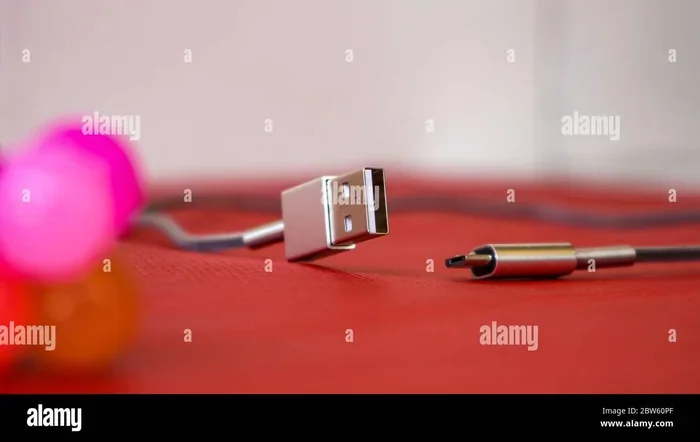
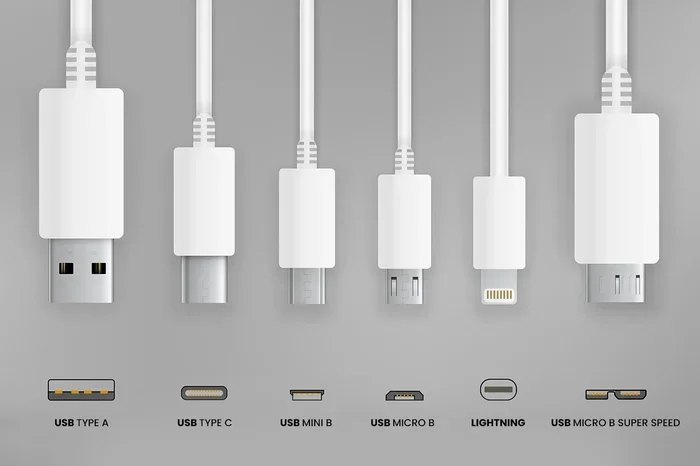
The connector is the part that plugs into your device. The two most common types are USB-A and USB-C. USB-A is the older, rectangular shape. You see it on many wall chargers and computers. USB-C is smaller, oval-shaped, and reversible.
USB-C has become the new standard. Most modern phones, laptops, and tablets use it. It supports faster data transfer and higher power delivery. USB-A still works fine for older devices. But if you have a newer phone, you likely need a USB-C charger.
There is also the older Mini-USB and Micro-USB connectors. You still find these on some budget devices and accessories. These are becoming less common as USB-C takes over.
Charging Speed and Wattage
Not all chargers deliver the same amount of power. Charging speed depends on wattage, which is the product of voltage and amperage. A charger with higher wattage charges your device faster.
For example, a standard 5W charger takes longer to charge your phone than a 20W charger. If your device supports fast charging, it will only charge fast with a compatible charger. Using a low-power charger means waiting a long time for a full battery.
Here is a simple comparison of common charger types:
- Standard charger (5W): Slow charging. Good for overnight use.
- Fast charger (18W to 20W): Charges most phones in about an hour.
- Premium charger (30W to 65W): Can charge laptops and tablets quickly.
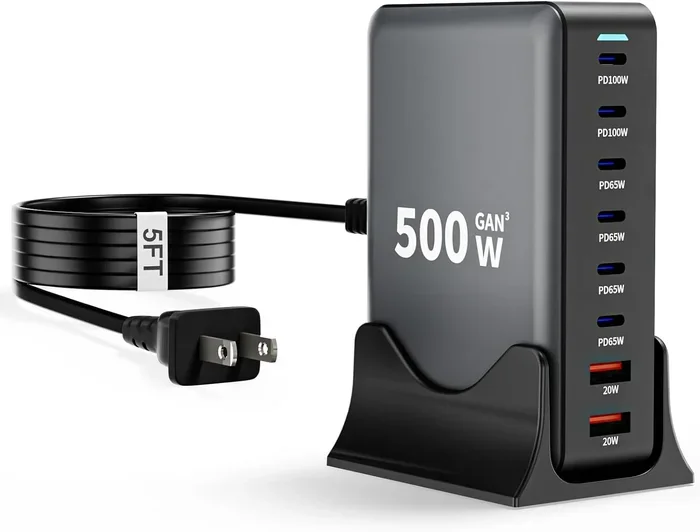
- GaN charger (30W to 100W): Compact and powerful. Uses gallium nitride technology.
Cable Quality Matters Too
People often forget about the cable. A cheap cable can limit your charging speed no matter how good your charger is. Thick cables with proper wiring support higher current. Thin cables may not deliver the full power your device needs.
Always use cables that match your charger’s capabilities. A USB-C cable rated for 60W will charge much faster than one rated for 10W. Look for cables that are certified by the USB Implementers Forum (USB-IF). These cables meet safety and performance standards.
Understanding USB Standards and Protocols
USB standards have evolved a lot over the years. Each new version brings faster speeds and better power delivery. Understanding these standards helps you choose the right charger.
USB 2.0, USB 3.0, and USB 4
USB 2.0 is the oldest standard still in wide use. It supports data transfer up to 480 Mbps and basic charging. USB 3.0 is much faster with data speeds up to 5 Gbps. It also supports higher charging currents.
USB 4 is the newest standard. It offers data transfer speeds up to 40 Gbps and supports up to 100W of power delivery. Most modern USB-C cables are built to handle these speeds. However, your device must also support the standard for it to work.
Inside your computer, the 5 components that are found on the motherboard include USB controllers that manage these connections. These controllers determine how much power and data your USB ports can handle. So the motherboard plays a big role in your charging experience.
USB Power Delivery (USB PD)
USB Power Delivery is a protocol that allows devices to negotiate the right amount of power. This means your phone and charger talk to each other. The charger delivers exactly the power your device needs.
USB PD can deliver up to 240W of power. This is enough for laptops, monitors, and even some desktop computers. It also makes charging safer because the device controls the power draw. You do not have to worry about overloading your battery.
USB PD works with both USB-A and USB-C connectors. But it is most common and powerful with USB-C. If your device supports USB PD, you can use a compatible charger from different brands.
Qualcomm Quick Charge and Other Proprietary Standards
Some brands use their own fast charging technologies. Qualcomm Quick Charge is one of the most popular. It works with many Android phones and charges them faster than standard USB charging.
Other brands have their own standards too. Samsung has Adaptive Fast Charging. OnePlus has Warp Charge. Apple uses USB PD for iPhones. These proprietary standards often require a specific charger or cable to work at full speed.
Here is a quick comparison of popular fast charging standards:
- USB Power Delivery: Universal standard. Works with most modern devices.
- Qualcomm Quick Charge: Common on Android phones. Requires a QC-compatible charger.
- Samsung Adaptive Fast Charging: Optimized for Samsung Galaxy devices.
- Apple USB PD: Used on iPhones and iPads. Works with USB-C to Lightning cables.
Why Using the Wrong Charger Can Damage Your Device
Using the wrong charger is more risky than most people think. It can cause slow charging, battery degradation, or even hardware failure. Let us look at why this happens.
Overcharging and Undercharging Risks
When you use a charger with too low wattage, your device charges slowly. It may also drain faster than it charges if you are using the phone while charging. This puts extra stress on the battery.
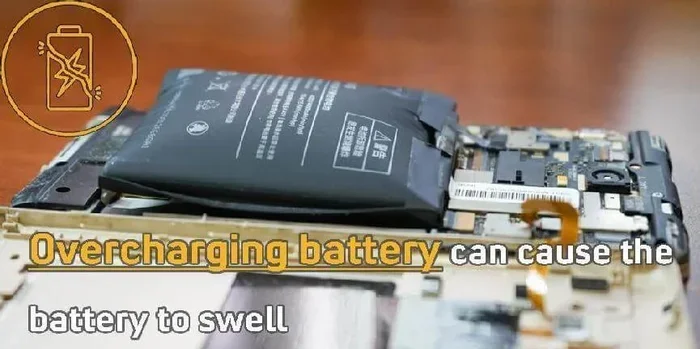
On the other hand, a charger with too high wattage is usually safe. Modern devices with USB PD will only draw the power they need. But cheap or uncertified chargers may not regulate power properly. This can lead to overheating or battery damage.
Over time, using the wrong charger can shorten your battery lifespan. Your battery may hold less charge after a year or two. This is why matching your charger to your device matters so much.
Cheap vs Quality Chargers
Not all chargers are created equal. A cheap, unbranded charger might seem like a great deal. But it often cuts corners on safety and performance. These chargers may lack proper voltage regulation and overheating protection.
Quality chargers from reputable brands include safety features. They regulate temperature, control current flow, and protect against short circuits. They also tend to last longer and charge more consistently.
When buying a charger, look for certifications. USB-IF certification is a good sign. So are UL or CE marks. These show the charger has been tested for safety and performance.
How to Choose the Right USB Charger for Your Devices
Choosing the right charger does not have to be complicated. A few simple checks can save you money and protect your devices.
Match Charger to Device Needs
Start by checking your device’s charging requirements. Look at the original charger that came with your device. It will list the voltage and amperage. For example, a phone might say 5V/2A or 9V/2A. This means it needs a charger that can deliver at least 10W or 18W.
If you buy a replacement charger, match these numbers. A charger with higher wattage is usually fine. But one with lower wattage will charge slowly. Always check the connector type too. USB-C and USB-A are not interchangeable without an adapter.
For people who carry multiple devices, a multi-port charger is a great option. These chargers have two or more ports. You can charge your phone, tablet, and earbuds all at once. Just make sure the total wattage is enough for all devices.
Quick Tips for Safe Charging
Here are some simple tips to keep your devices safe and charging efficiently:
- Use certified cables and chargers: Look for USB-IF or UL certification.
- Avoid charging in extreme heat: High temperatures can damage your battery.
- Unplug devices when fully charged: This helps preserve battery health over time.
- Do not use damaged cables: Frayed or bent cables can cause short circuits.
- Buy from reputable brands: Anker, Belkin, Apple, and Samsung are reliable choices.
- Check compatibility before buying: Make sure the charger supports your device’s fast charging protocol.
Common Myths About USB Chargers
There are many myths floating around about USB chargers. Let us clear up some of the most common ones.
Myth 1: All USB-C chargers are the same. Not true. USB-C chargers vary widely in power output and protocol support. Some deliver 15W while others deliver 100W. Always check the specs.
Myth 2: Using a non-brand charger will ruin your device. This is mostly false. As long as the charger is certified and meets the right standards, it will work safely. The brand name does not matter as much as the quality and certification.
Myth 3: Overnight charging damages your battery. Modern devices have built-in battery management. They stop charging once the battery reaches 100%. However, keeping your device plugged in all night can cause slight battery stress over time due to heat.
Myth 4: Wireless chargers are slower than wired chargers. This used to be true, but not anymore. Many wireless chargers now support fast charging speeds comparable to wired options. The key is to use a compatible wireless charger rated for your device.
Myth 5: You should always use the charger that came with your device. The original charger is a safe choice, but it is not the only one. Any charger that meets your device’s power requirements and connector type will work. Just make sure it is from a reputable brand.
The Bottom Line
So, are all USB chargers the same? No, they are not. They differ in connector type, power output, charging protocol, and cable quality. The right charger depends on your device and your needs.
If you want fast and safe charging, invest in a quality charger with the right specs. Look for USB-C connectors and USB Power Delivery support for the best experience. Avoid cheap, uncertified chargers that may put your devices at risk.
USB charging technology continues to improve. USB4 and even newer standards are bringing faster speeds and more power. Staying informed helps you make better choices. The next time you buy a charger, check the details before you click “add to cart.”
Your devices work hard for you every day. Give them the right charger and they will reward you with reliable, long-lasting performance. A small investment in the right charger goes a long way.
In the medical field, 10 ways computers are used in medicine include powering portable diagnostic equipment and patient monitoring devices. These devices rely on stable and safe USB charging to function correctly. This shows how important proper charging is across many industries, not just consumer electronics.
Take a few minutes to understand your charging needs. Your future self will thank you when your devices are always ready to go.
Frequently Asked Questions
Can I use any USB charger for my phone?
You can use any USB charger, but it may not charge your phone at full speed. Check that the charger matches your phone’s voltage and amperage requirements. Using a charger with USB Power Delivery support is the safest and fastest option.
Is USB-C faster than USB-A for charging?
USB-C supports higher power delivery and faster charging than USB-A. Most modern phones and laptops use USB-C for this reason. However, the actual speed also depends on the charger’s wattage and your device’s capabilities.
Can a wrong charger damage my battery?
Yes, using an uncertified or incompatible charger can damage your battery over time. It may cause overheating, slow charging, or reduced battery lifespan. Always use chargers from reputable brands with proper safety certifications.
Do all USB-C cables support fast charging?
No, not all USB-C cables support fast charging. Some cables are only rated for low power. Look for cables that are USB-IF certified and rated for the wattage you need. A good cable is just as important as a good charger.
What is the difference between USB 2.0 and USB 3.0 charging?
USB 3.0 supports higher charging currents than USB 2.0. This means devices can charge faster with USB 3.0. USB 3.0 also offers faster data transfer speeds. Most modern chargers and cables use USB 3.0 or newer standards.
How do I know if my device supports fast charging?
Check your device manual or the manufacturer’s website. Look for terms like fast charging, quick charge, or USB Power Delivery. Your original charger usually indicates fast charging support on its label.
=== CONCLUSION ===
Are all USB chargers the same? Now you know the answer is no. USB chargers vary in connector type, power output, and charging protocol. Choosing the right one makes a real difference in charging speed and device safety.
Take the time to understand your device’s charging needs. Look for USB-C connectors, USB Power Delivery support, and proper certifications. A good charger is a small investment that protects your devices and saves you time.
Share this guide with friends and family who might be confused about USB chargers. The right knowledge helps everyone charge smarter and safer. Happy charging!
=== META TITLE ===
Are All USB Chargers The Same? Here Is What You Need to Know
=== URL SLUG ===
are-all-usb-chargers-the-same