Are All Usb C Chargers Compatible With Every Device
Not all USB C chargers are compatible with every device, even though the connector looks the same. USB Power Delivery standards, wattage differences, and charger quality all affect whether your device charges properly. This guide explains USB C compatibility, charging speed factors, and how to choose the right USB C charger for your gadgets.
You have probably noticed something frustrating. You plug a USB C charger into your laptop, and nothing happens. Or your phone charges slowly even though you used a new cable. The truth is, not all USB C chargers are compatible with every device, even though the connector looks identical across the board.
The USB C connector has become the standard for laptops, phones, tablets, and even some motherboard components and peripherals. But universal shape does not mean universal compatibility. USB Power Delivery standards, charger wattage, cable quality, and device-specific protocols all play a role. In this guide, we break down everything you need to know about USB C charger compatibility. By the end, you will never buy the wrong charger again.
Whether you are charging a smartphone, a USB C laptop, or a tablet, understanding how power delivery works saves time, money, and frustration. Let us dive in.
Key Takeaways
- USB C is not universal: The connector shape is the same, but power delivery and compatibility vary across devices.
- USB Power Delivery (PD) matters: Devices negotiate power levels, and not all chargers support the same wattage.
- Cable quality affects charging: Cheap or damaged USB C cables can cause slow charging or damage.
- Check your device specs: Always verify voltage and amperage requirements before buying a charger.
- Fast charging needs matching hardware: Both the charger and device must support the same fast charging protocol.
- Thunderbolt USB C is different: Thunderbolt cables offer more bandwidth but are not always needed for charging.
- Universal compatibility is improving: Newer USB C standards are making cross-device charging more reliable.
📑 Table of Contents
- What Is USB C and Why Does Compatibility Matter?
- How USB C Charging Actually Works
- Why Not All USB C Chargers Work With Every Device
- Can You Use One USB C Charger for Multiple Devices?
- Common USB C Charging Mistakes to Avoid
- How to Choose the Right USB C Charger
- The Future of USB C Charging
- Final Thoughts
What Is USB C and Why Does Compatibility Matter?
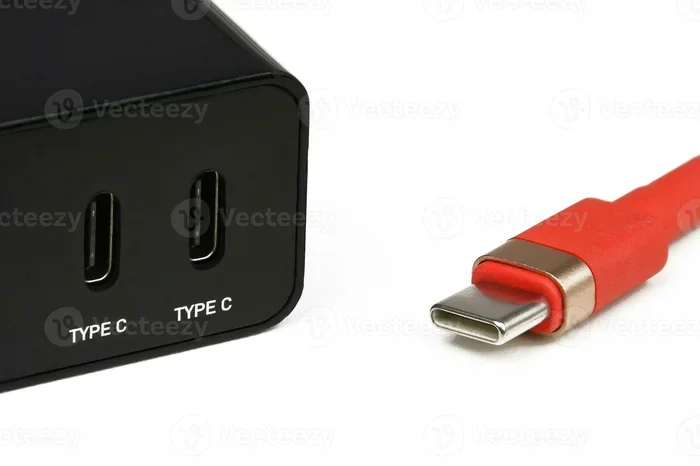
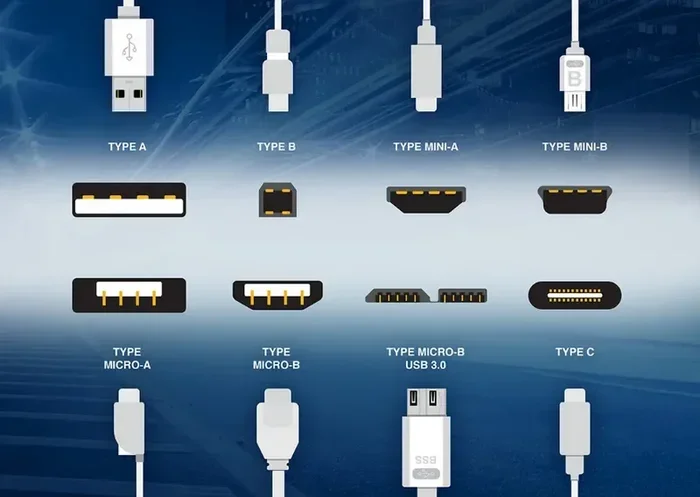
USB C is a connector type, not a power standard. It is a small, reversible plug that fits into a port regardless of which way you flip it. This design made it popular across phones, laptops, and accessories. But the connector shape is only one piece of the puzzle.
USB C compatibility depends on what the device and charger can do behind the scenes. Two devices might share the same port, but their power needs can be completely different. A phone might need 15 watts, while a laptop needs 100 watts. If you use the wrong charger, you get slow charging or no charging at all.
The USB C Connector vs. USB C Power Standard
Many people confuse the physical connector with the power standard. The USB C connector is just the shape of the plug. The USB Power Delivery standard determines how much power flows through it. Think of it like a water pipe. The connector is the pipe size, and the power standard is the water pressure. Both matter for getting the right flow.
Here is a quick breakdown:
- USB C connector: The physical shape of the plug and port.
- USB Power Delivery (PD): A protocol that negotiates power between charger and device.
- USB BC 1.2: An older charging standard that only supports up to 5 watts.
- USB PD 3.0: Supports up to 100 watts and dynamic power negotiation.
- USB PD 3.1: The latest standard, supporting up to 240 watts.
So when you ask, “Are all USB C chargers compatible,” the answer depends on which charging protocol your device supports.
How USB C Charging Actually Works
USB C charging is not a simple plug-and-play process. It involves a conversation between the charger and your device. This conversation is called power negotiation. Both devices share their capabilities, and they agree on a safe power level.
The Power Negotiation Process
When you plug in a USB C charger, the device and charger exchange information. The charger tells the device what power levels it can provide. The device says what it needs. They agree on a middle ground. This is why some chargers charge some devices slowly, and others charge them fast.
Here is how it works in simple steps:
- The charger detects that a USB C device is connected.
- The charger and device exchange capability data.
- The device requests a specific voltage and current.
- The charger delivers the requested power.
- If the device needs less power later, the negotiation adjusts.
This process is why USB C PD chargers are so versatile. They can power everything from earbuds to monitors. But not every charger supports every power level. A basic 5-watt charger cannot negotiate for 60 watts. Your device will only get what the charger can offer.
Wattage and Voltage: What the Numbers Mean
Wattage is the total power a charger delivers. Voltage is the electrical pressure. Current (measured in amps) is the flow rate. The formula is simple: Watts = Volts x Amps. A charger that provides 5 volts at 3 amps delivers 15 watts.
Different devices need different wattage levels:
- Earbuds and smartwatches: 5 to 10 watts
- Smartphones: 15 to 30 watts
- Tablets: 20 to 45 watts
- Laptops: 45 to 100 watts (or more)
If you use a low-wattage charger on a high-power device, charging will be painfully slow. And in some cases, the device may not charge at all while in use.
Why Not All USB C Chargers Work With Every Device
Now that you understand the basics, let us look at the specific reasons why USB C charger compatibility varies. Several factors determine whether a charger will work with your device.
Different USB C Standards and Protocols
Not all USB C chargers follow the same standard. Some only support basic USB BC 1.2 charging at 5 watts. Others support USB Power Delivery at much higher levels. Here is a comparison of common standards:
| Standard | Max Power | Fast Charging | Common Devices |
|---|---|---|---|
| USB BC 1.2 | 5W | No | Basic peripherals |
| USB PD 2.0 | 100W | Yes | Laptops, tablets |
| USB PD 3.0 | 100W | Yes | Most modern devices |
| USB PD 3.1 | 240W | Yes | High-power laptops, monitors |
| Qualcomm Quick Charge | 100W+ | Yes | Android phones |
| USB PD + PPS | 100W | Yes | Samsung phones, Pixel phones |
As you can see, the charging protocol matters a lot. A charger that only supports USB BC 1.2 will not fast-charge a modern laptop, even if the plug fits.
Cable Quality and Its Impact on Compatibility
Even with the right charger, a bad cable can ruin everything. USB C cable quality affects both charging speed and data transfer. Cheap cables often have thin wires that cannot handle high wattage. They may also lack the proper resistor for power negotiation.
Here are common cable problems:
- Undersized wires: Cause heat buildup and slow charging.
- Missing E-Marker chip: Prevents the cable from supporting high-power USB PD.
- Damaged connectors: Create intermittent connections that disrupt charging.
- Non-compliant cables: May not support data transfer or proper voltage.
Always use cables that are USB-IF certified or from reputable brands. A good USB C cable costs a few dollars more but saves you from headaches.
Device-Specific Charging Requirements
Every device has unique charging needs. Some devices use proprietary fast charging that only works with specific chargers. For example, some Android phones use Qualcomm Quick Charge or VOOC charging. These require a charger that supports the same protocol.
Apple devices use USB PD for fast charging. Most modern Android phones also support USB PD, but some need PPS (Programmable Power Supply) for the fastest speeds. PPS allows the charger to adjust voltage in small increments, which reduces heat and improves efficiency.
Before buying a charger, check your device’s charging requirements. Look for the recommended wattage and protocol on the manufacturer’s website or the original charger label.
Can You Use One USB C Charger for Multiple Devices?
The short answer is yes, but with caveats. A high-quality USB C PD charger can power many different devices. However, the charging speed will vary depending on each device’s needs.
Multi-Device Charging With USB C PD
USB Power Delivery was designed to be universal. A 65-watt USB PD charger can charge a laptop at full speed, a tablet at medium speed, and a phone at fast speed. The charger and device negotiate the right power level for each gadget.
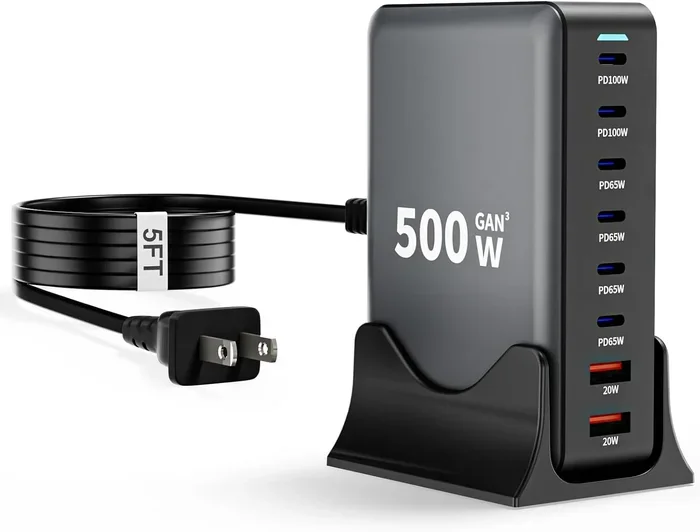
This is why many people love USB C GaN chargers (Gallium Nitride). These compact chargers deliver high wattage in a small size. A single GaN charger can replace multiple bulky adapters you used to carry.
Here are some tips for multi-device charging:
- Get a charger with multiple ports: Look for 2 or 3 USB C ports to charge several devices at once.
- Check total wattage output: If you charge two devices at once, the total power splits between them.
- Use GaN technology: These chargers are smaller, cooler, and more efficient.
- Match wattage to your highest-need device: If you charge a laptop, get at least a 65-watt charger.
When One Charger Is Not Enough
There are situations where a single charger will not cut it. Very power-hungry devices like gaming laptops or USB C monitors may need 100 watts or more. In these cases, a lower-wattage charger will either charge slowly or not charge at all while the device is in use.
Also, some devices use non-USB PD charging protocols. If your device relies on proprietary fast charging, a generic USB C charger may not support it. Always double-check protocol support before relying on a single charger for everything.
Interestingly, USB C technology is used in many fields beyond consumer electronics. For instance, computers are used in medicine in ways that rely on reliable USB C connectivity for charging and data transfer. You can learn more about that in our article on 10 Ways Computers Are Used in Medicine.
Common USB C Charging Mistakes to Avoid
Even with the right charger, people make mistakes that hurt their devices. Here are the most common USB C charging errors you should avoid.
Using Random Cheap Chargers
It is tempting to grab the cheapest USB C charger online. But cheap chargers often cut corners on safety and power regulation. A poor-quality charger can deliver inconsistent voltage, which may damage your device over time. Always buy from reputable brands or certified sellers.
Ignoring Cable Ratings
People often focus on the charger and forget about the cable. A 100-watt charger paired with a cheap 3-amp cable will only deliver 15 watts. The cable becomes the bottleneck. Make sure your cable supports the wattage your charger provides.
Charging Through Unpowered Hubs
Some USB C hubs do not pass through power properly. If you plug your charger into a hub and then connect your device, the hub might block or reduce the power. This is a common reason for slow or failed charging.
Assuming All USB C Ports Are Equal
Not every USB C port on your laptop or device delivers the same power. Some ports only support 5 watts. Others support 100 watts or more. Check your device manual to know which ports can handle high-power charging.
Overlooking Heat During Charging
If your device gets very hot while charging, something is wrong. It could be an incompatible charger, a damaged cable, or a faulty port. Heat degrades battery health over time, so address charging heat issues promptly.
How to Choose the Right USB C Charger
Buying the right USB C charger does not have to be confusing. Follow these simple steps to find a charger that works with your devices.
Step 1: Check Your Device Requirements
Look at the label on your original charger or check the manufacturer’s website. Note the voltage, amperage, and wattage. This tells you the minimum power your charger must deliver.
Step 2: Look for USB Power Delivery Support
USB PD is the most widely supported fast charging standard today. A USB PD charger will work with most modern phones, laptops, and tablets. It also negotiates power safely, so you do not have to worry about overloading your device.
Step 3: Consider GaN Technology
GaN chargers use gallium nitride semiconductors instead of traditional silicon. They are smaller, more efficient, and produce less heat. A 65-watt GaN charger can be as small as a phone charger, which is amazing considering how much power it delivers.
Step 4: Check Port Count and Power Sharing
If you charge multiple devices, get a charger with more than one port. Make sure the charger supports intelligent power sharing. Good chargers automatically distribute power to each port based on what is connected.
Step 5: Buy Certified Cables Too
Do not forget the cable. Look for USB-IF certified cables that support the wattage you need. A certified cable ensures safe and reliable power delivery every time.
Quick Tips for the Best USB C Charger
- Buy 65W or higher if you charge laptops.
- Choose a charger with PPS support for Samsung or Pixel phones.
- Avoid chargers under $10 from unknown brands.
- Check for safety certifications like UL or CE markings.
- Replace cables every 1-2 years to maintain safe charging.
The Future of USB C Charging
The future of USB C charging looks bright. The European Union has mandated USB C as the standard charging port for most electronics by 2024. This means more devices will use the same connector and, ideally, the same charging standards.
New regulations are pushing manufacturers toward universal USB C compatibility. This should reduce the confusion around charger compatibility over time. More devices will support USB PD natively, and fewer proprietary protocols will exist.
Wireless charging over USB C is also gaining traction. Some laptops and monitors now support USB C wireless power delivery. While this is still early, it shows where the technology is heading.
One thing is clear. USB C is here to stay. As more devices adopt this connector and standard, the charging experience will become simpler and more reliable. For now, understanding how compatibility works puts you ahead of the curve.
Final Thoughts
So, are all USB C chargers compatible with every device? The honest answer is no, not perfectly. The USB C connector is universal, but the power delivery standards, protocols, and wattage are not. A charger that works beautifully with your phone might charge your laptop slowly or not at all.
The good news is that USB Power Delivery is making USB C compatibility better every year. By choosing a quality USB PD charger, using certified cables, and understanding your device’s needs, you can enjoy reliable fast charging across all your gadgets.
Take a few minutes to check your device specifications. Invest in a good charger. And never worry about compatibility again. Your devices, your battery, and your sanity will thank you.
Frequently Asked Questions
Can I use any USB C charger with my laptop?
Not necessarily. Your laptop needs a charger that supports the right wattage and USB Power Delivery standard. Check your laptop’s charging requirements and match them with a compatible USB C PD charger for the best results.
Why does my USB C charger work with some devices but not others?
This happens because different devices support different charging protocols and power levels. A charger that provides 5 watts will not fast-charge a 65-watt laptop, even if the connector fits perfectly.
Is USB Power Delivery the same as fast charging?
USB Power Delivery is a fast charging standard, but it is not the only one. Some devices use proprietary protocols like Qualcomm Quick Charge or VOOC. USB PD is the most universal standard, but check if your device needs a specific protocol for the fastest speeds.
Can a bad USB C cable damage my device?
Yes, a poor-quality or damaged cable can cause slow charging, overheating, or even long-term battery damage. Always use USB-IF certified cables from reputable brands to ensure safe and reliable charging.
Do all USB C cables support the same wattage?
No, USB C cables have different power ratings. Some support up to 60 watts, while others handle 100 watts or more. Check the cable’s rated wattage and amperage to make sure it matches your charger and device requirements.
Will USB C become completely universal for all devices?
The trend is heading that way. Regulations in the European Union and growing industry adoption are pushing toward universal USB C compatibility. However, power delivery standards and protocols may still vary across devices for the foreseeable future.
=== CONCLUSION ===
USB C charger compatibility is not as simple as plug and play. The connector shape is universal, but the power standards, protocols, and wattage differ across devices. Understanding USB Power Delivery, checking your device requirements, and investing in quality cables and chargers make all the difference. Follow the tips in this guide, avoid common mistakes, and you will enjoy fast, safe charging on every device you own.