Are All Usb Extensions The Same Here Is The Real Truth
No, not all USB extensions are the same. USB extension cables vary in speed, power delivery, signal quality, and connector types. Choosing the wrong one can slow down your devices or even damage them. This guide breaks down everything you need to know about USB extensions so you can make a smart, informed choice.
You plug in a USB extension cable and expect everything to work perfectly. But sometimes your device charges slowly. Or the data transfer takes forever. Or worse, the connection keeps dropping. The problem might not be your device. It might be the cable.
Are all USB extensions the same? The short answer is no. Not even close. USB extension cables come in different shapes, sizes, speeds, and power levels. Some are built for fast data transfer. Others are designed only for charging. And using the wrong one can cause real problems. In this article, we will uncover the truth about USB extensions and help you pick the right one every time.
Whether you are connecting a printer, external hard drive, or charging your phone, the cable you choose makes a huge difference. Let us dive into the details and break down everything you need to know.
Key Takeaways
- USB extensions are not universal: Different types serve different purposes, from data transfer to charging.
- Cable quality matters a lot: Cheap extensions can cause signal loss and slower speeds.
- USB version matters: USB 2.0, USB 3.0, and USB Type-C extensions offer very different performance levels.
- Length affects performance: Longer cables can degrade signal strength and power delivery.
- Active vs passive extensions: Active USB extensions boost signal, while passive ones do not.
- Check compatibility first: Not every extension works with every device or port type.
📑 Table of Contents
- What Exactly Is a USB Extension Cable?
- The Different Types of USB Extensions
- Active vs Passive USB Extensions
- Why Cable Quality Matters
- How Cable Length Affects Performance
- Common Mistakes People Make with USB Extensions
- USB Extensions and Your Devices
- Expert Tips for Choosing the Right USB Extension
- How USB Extensions Fit Into the Bigger Picture
- Final Thoughts on USB Extensions
What Exactly Is a USB Extension Cable?
A USB extension cable is a cable that extends the reach of an existing USB port. It has a connector on one end that plugs into your computer or charger. The other end gives you a new port to plug your device into. Simple, right? But the simplicity ends there.
USB extensions are used in countless situations. You might need to reach a port that is behind your desk. You might want to charge your phone from across the room. Or you might need to connect a peripheral device that is too far from your computer.
Here are some common uses for USB extension cables:
- Extending a port that is hard to reach
- Charging devices from a distance
- Connecting peripherals like keyboards and mice
- Moving a USB port to a more convenient location
- Connecting external storage devices that are far from the computer
Not all of these uses require the same type of cable, though. And that is exactly where people go wrong. They grab any extension cable they find and assume it will work the same way every time. It will not.
The Different Types of USB Extensions
USB extensions are not one-size-fits-all. They come in several types, and each type serves a specific purpose. Understanding these types is the first step toward making a smart purchase.
USB 2.0 Extension Cables
USB 2.0 is the older standard. It was introduced in the early 2000s and is still found on many devices today. A USB 2.0 extension cable can transfer data at speeds up to 480 Mbps. That sounds fast, but compared to newer standards, it is quite slow.
These cables are fine for basic tasks. If you are just charging a phone or connecting a simple mouse, USB 2.0 works well. But if you need to transfer large files, you will notice the delay. These cables are also more prone to signal loss over longer distances.
USB 3.0 Extension Cables
USB 3.0 is a big step up. It supports data transfer speeds of up to 5 Gbps. That is more than ten times faster than USB 2.0. USB 3.0 cables also deliver more power, which means faster charging for compatible devices.
These cables have a blue insert inside the connector, which helps you identify them. If you need to transfer large files or connect external hard drives, a USB 3.0 extension cable is the way to go.
USB Type-C Extension Cables
USB Type-C is the newest and most versatile connector. It is reversible, meaning you can plug it in either way. It also supports higher data speeds and more power delivery than previous USB standards.
USB Type-C extensions are becoming the standard for modern laptops, tablets, and smartphones. They support power delivery of up to 100 watts in some cases, which means they can charge laptops and even power monitors.
USB-A Extension Cables
USB-A is the classic rectangular connector that most people are familiar with. USB-A extension cables are still widely used for printers, scanners, and older devices. They come in USB 2.0 and USB 3.0 versions.
The key thing to remember is that USB-A connectors are not reversible. You have to plug them in the right way. And they do not support the same high-speed data transfer or power delivery as USB Type-C.
Active vs Passive USB Extensions
This is one of the most important distinctions that many people overlook. USB extensions fall into two categories: active and passive. And the difference is huge.
What Is a Passive USB Extension?
A passive extension cable is a simple cable with no built-in electronics. It just carries the signal from one end to the other. Passive cables are cheap and work well for short distances. But they have a major limitation: signal degradation.
As the cable gets longer, the signal weakens. This means slower data transfer, lower charging speed, and potential connection drops. A passive USB extension over 3 meters long is likely to cause problems with most devices.
What Is an Active USB Extension?
An active extension cable has built-in circuitry that boosts the signal. This means the data and power stay strong even over longer distances. Active cables are more expensive, but they are worth it if you need a longer cable.
Active USB extensions are ideal for setups where the device is far from the computer. They are also better for high-speed data transfer and devices that need consistent power delivery.
Here is a quick comparison of the two types:
- Passive extensions: No built-in electronics, cheaper, shorter range, signal degrades over distance
- Active extensions: Built-in signal booster, more expensive, longer range, consistent performance
If you are setting up a workspace where your devices are far from your ports, an active extension is the better choice. For short connections under 1 meter, a passive cable works just fine.
Why Cable Quality Matters
Not all USB extension cables are built the same way. The quality of the cable affects everything from data speed to charging performance. Here is what you should look for.
Cable Gauge and Thickness
The thickness of the cable, known as the gauge, affects how much power it can carry. Thicker cables have lower gauge numbers and can deliver more power. A thin cable may charge your device slowly or not at all if the device needs high power.
For charging devices like tablets and laptops, look for a cable quality that supports the required wattage. A cheap, thin cable will limit your charging speed no matter how powerful your charger is.
Shielding and Interference
Good USB extension cables have proper shielding to protect against interference. Shielding prevents electromagnetic interference from other devices and cables. Without it, you may experience data corruption, slower speeds, or connection drops.
This is especially important in busy workspaces where multiple cables and devices are running at the same time. The bandwidth and signal integrity depend heavily on how well the cable is shielded.
Connector Build Quality
The connectors on a USB extension cable matter too. Cheap connectors wear out quickly and become loose. A loose connection causes intermittent data transfers and unreliable charging. Look for cables with gold-plated connectors, which resist corrosion and provide a more stable connection.
Also, check the strain relief on the connectors. This is the flexible material around the base of the cable that prevents bending damage. Good strain relief extends the life of your cable significantly.
How Cable Length Affects Performance
The length of your USB extension cable is not just a convenience factor. It directly impacts performance. Longer cables mean more resistance, which means weaker signals and slower speeds.
Here are some general guidelines:
- Up to 1 meter: Minimal signal loss. Works well for all USB types and speeds.
- 1 to 3 meters: Slight signal degradation possible with passive cables. USB 3.0 and Type-C handle this better than USB 2.0.
- 3 to 5 meters: Passive cables will likely struggle. Use an active extension for reliable performance.
- Over 5 meters: Only active extensions with signal boosters should be used. Passive cables at this length will almost certainly fail.
When choosing the right length, think about your actual setup. Measure the distance between your device and the USB port. Then add a little extra for cable management. Do not buy a cable that is much longer than you need.
Common Mistakes People Make with USB Extensions
Even though USB extensions are simple devices, people make mistakes with them all the time. Here are the most common ones to avoid.
Buying the Cheapest Option
We have all been there. You need a cable right now, so you grab the cheapest one. But cheap USB extension cables often use poor materials and thin wiring. They may work for a while, but they will degrade over time. Worse, they can damage your devices by delivering inconsistent power.
Investing in a quality USB extension cable from a reputable brand saves you money in the long run. Look for cables from well-known manufacturers or trusted retailers.
Ignoring USB Version Compatibility
One of the biggest mistakes is not checking the USB version. If you plug a USB 2.0 extension into a USB 3.0 port, the connection will default to USB 2.0 speeds. You will not get the faster speeds you paid for.
Always make sure your extension cable matches or exceeds the USB version of your port. If your port is USB 3.0, use a USB 3.0 or USB 3.1 extension cable.
Using the Wrong Connector Type
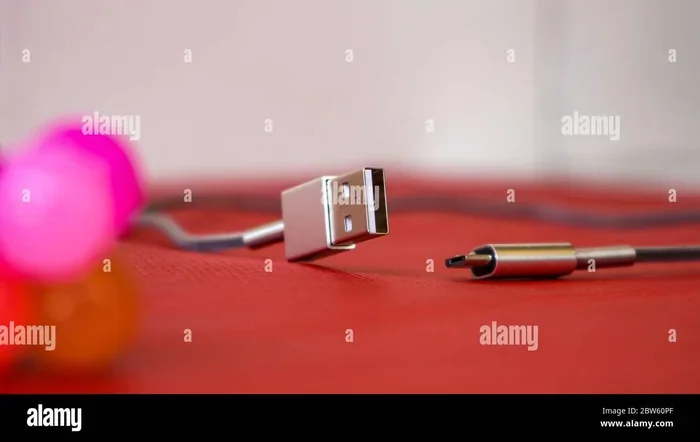
USB-A, USB-C, Micro-USB, and Mini-USB are all different connectors. They are not interchangeable. Using the wrong connector means the cable will not fit or will not work properly.
Before buying an extension, check what connector types your devices use. Many modern devices use USB Type-C, but older devices still use USB-A or Micro-USB.
Stretching the Cable Beyond Its Limits
Every USB extension cable has a maximum reliable length. Going beyond that length means signal loss and poor performance. If you need a longer connection, use an active extension or consider a USB hub instead.
A USB hub can be a great alternative to a long extension cable. It multiplies your available ports and keeps the connections short and reliable.
USB Extensions and Your Devices
The devices you connect to your USB extensions matter just as much as the cables themselves. Different devices have different power and data needs.
Charging Smartphones and Tablets
For charging phones and tablets, you need a cable that supports adequate power delivery. Most modern smartphones use USB Type-C and support fast charging protocols. Using a low-quality extension cable can cut your charging speed in half.
Look for USB Type-C extension cables that support quick charge or power delivery standards. These cables have thicker wiring and better circuitry to handle the power demands of modern devices.
Connecting External Hard Drives
External hard drives need both fast data transfer and stable power. A USB 3.0 or USB 3.1 extension cable is essential for this use case. A USB 2.0 extension will make file transfers painfully slow.
If you are using a large external drive, also consider the cable length. A shorter, high-quality cable will give you the best performance.
Peripherals Like Keyboards and Mice
Basic peripherals like keyboards and mice do not need high-speed data transfer. A USB 2.0 extension cable works perfectly fine for these devices. They also draw very little power, so even a thin cable will handle them well.
These are great use cases for a simple, affordable passive USB extension. You do not need to spend extra on a premium cable for basic peripherals.
Printers and Scanners
Printers and scanners benefit from USB 3.0 extensions for faster data transfer, especially when printing large documents or scanning high-resolution images. A passive USB 3.0 extension up to 2 meters works well for most printer setups.
Keep in mind that printers connected through long or low-quality cables may experience intermittent connection issues. If your printer keeps dropping offline, the extension cable might be the culprit.
Expert Tips for Choosing the Right USB Extension
Still not sure which USB extension to buy? Here are some expert tips that will help you make the right choice.
- Match the USB version: Always choose an extension that matches or exceeds the USB version of your port.
- Go shorter when possible: Shorter cables perform better. Only buy the length you actually need.
- Choose active for long runs: If your cable needs to be longer than 3 meters, go with an active extension.
- Check the power rating: Make sure the cable supports the wattage your device needs for charging.
- Look for certification: Certified cables meet industry standards for quality and safety.
- Read reviews: Other users can tell you a lot about real-world performance. Pay attention to reviews that mention data speed and charging performance.
- Consider your setup: Think about where you will use the cable and what devices you will connect to it.
These tips apply whether you are setting up a home office, a gaming station, or a professional workspace. The right USB extension cable makes all the difference.
How USB Extensions Fit Into the Bigger Picture
USB extensions are just one part of a larger ecosystem of connectivity solutions. They work alongside other components to keep your devices connected and functioning properly. Understanding how they fit in helps you make better decisions about your entire setup.
For example, the components inside your computer, including the 5 components that are found on the motherboard, determine what USB ports and speeds are available to you. Your motherboard has a specific number of USB controllers, and each one supports a certain USB version. Knowing this helps you choose the right extension cable for your needs.
Similarly, USB ports and extensions play a role in many industries beyond personal computing. In fields like healthcare, computers and USB connections are used for medical imaging, patient monitoring, and data management. The reliability of a USB extension cable can directly impact how well these systems perform. The 10 ways computers are used in medicine shows how critical dependable connectivity really is in professional environments.
These examples show that USB extensions are not just simple cables. They are essential links in a chain of technology that powers our daily lives and work.
Final Thoughts on USB Extensions
The truth is clear now. Are all USB extensions the same? Absolutely not. They differ in speed, power delivery, connector type, cable quality, and performance capabilities. The right extension cable depends on what you need it to do.
For basic charging and simple peripherals, a basic USB 2.0 extension works fine. For fast data transfer and modern devices, invest in a USB 3.0 or USB Type-C extension. For longer runs, choose an active extension with a signal booster.
Do not let a cheap, low-quality cable hold back your devices. Take a few minutes to understand your needs, check the specifications, and buy a cable that matches. Your devices will perform better, charge faster, and last longer with the right USB extension.
The next time you need to extend a USB connection, remember what you have learned here. Pick the right cable, and you will notice the difference immediately.
Frequently Asked Questions
Can I use a USB 2.0 extension with a USB 3.0 device?
Yes, you can physically connect a USB 2.0 extension to a USB 3.0 device. However, the connection will fall back to USB 2.0 speeds. You will not get the faster data transfer rates that USB 3.0 offers. Always match the USB version of your extension to your port for the best performance.
How long can a USB extension cable be without losing signal?
For passive USB extension cables, 1 to 2 meters is the safe range. Beyond 3 meters, signal loss becomes a real problem. Active USB extensions can reliably reach 5 meters or more because they have built-in signal boosters. Always check the manufacturer’s recommended maximum length.
Do USB extension cables slow down charging?
Yes, they can. Thin or low-quality extension cables have higher resistance, which reduces the power reaching your device. This means slower charging speeds. Using a thick, high-quality cable with good power delivery support minimizes this effect.
Are USB Type-C extensions better than USB-A extensions?
USB Type-C extensions offer faster data speeds and higher power delivery compared to USB-A extensions. They are also reversible, making them more convenient. However, USB-A extensions still work well for older devices and basic peripherals. The best choice depends on your devices and needs.
What is the difference between a USB extension and a USB hub?
A USB extension simply extends the reach of an existing port. A USB hub adds additional ports to your computer, allowing you to connect multiple devices. Some USB hubs also include extension capabilities. If you need more ports, a hub is the better option.
Can a bad USB extension damage my device?
In rare cases, a very poor-quality USB extension can deliver inconsistent power, which may damage sensitive electronics. Cheap cables without proper shielding can also cause data corruption. Always buy USB extensions from reputable brands that meet safety certifications.
=== CONCLUSION ===
USB extensions are not all the same, and now you know why. From cable type and USB version to quality and length, every detail matters. The right extension cable ensures fast data transfer, reliable charging, and a stable connection every time.
Take the time to understand your needs before buying. Check your device requirements, measure your cable length, and invest in quality. A good USB extension cable is a small purchase that makes a big difference in how your devices perform.
Use the tips and insights from this guide to make confident choices. Your devices deserve the best connection possible. And now you know exactly how to give it to them.