Basic Computer Principles That Will Boost Your Skills
Basic computer principles are the building blocks every user should understand. This guide breaks down how computers process data, how hardware and software work together, and how to get more from your device. You will walk away with practical knowledge that makes technology less confusing and more powerful.
Computers run almost every part of modern life. From checking email to streaming movies, these machines shape our daily routines. But most people never take the time to learn basic computer principles that explain how everything works under the hood.
Understanding basic computer principles does not require a computer science degree. You just need curiosity and a willingness to learn. This guide walks you through the core ideas in simple, everyday language. By the end, you will see your computer in a whole new light.
We will cover hardware, software, data storage, networking, and more. Each section builds on the last, so you can follow along easily. Let us dive in and boost your tech skills today.
Key Takeaways
- Understanding computer fundamentals helps you use any device with confidence and ease.
- Hardware components like the CPU, RAM, and motherboard work together to make your computer run.
- Software basics explain how programs, operating systems, and applications bring your machine to life.
- Data storage and memory concepts help you manage files and keep your computer running smoothly.
- Networking fundamentals teach you how devices communicate and share information.
- Binary code and algorithms are the invisible systems behind every click and command you make.
- Applying these principles in daily use boosts your productivity and digital literacy.
📑 Table of Contents
What Are Basic Computer Principles?
Basic computer principles are the foundational ideas that explain how computers function. Think of them as the rules of the road for computing. Just as you need to know traffic laws before driving, you need to understand these basics before you can truly master your device.
These principles cover several key areas:
- Computer hardware — the physical parts you can touch
- Software fundamentals — the programs and instructions that run on hardware
- Data processing — how computers take in, store, and output information
- Networking basics — how computers talk to each other
- Binary code — the language computers use to function
Each of these areas plays a role in your daily computing experience. When you understand them, troubleshooting becomes easier. You also make better decisions when buying new devices or software. Basic computer principles give you the confidence to explore technology without fear.
Why Learning Computer Fundamentals Matters
Many people avoid learning about computers because it feels intimidating. But the truth is simple. Once you grasp the core concepts, everything else clicks into place faster. You stop feeling lost when something goes wrong.
Here is why computer fundamentals matter for everyone:
- They improve problem-solving skills. You learn to think logically and break problems into smaller steps.
- They boost productivity. Knowing how your system works helps you work faster and smarter.
- They build digital literacy. In today’s world, digital skills open doors in education and careers.
- They save money. You can troubleshoot issues yourself instead of paying for repairs.
When you invest time in learning basic computer principles, you invest in yourself. The payoff is huge, and the effort is small.
How a Computer Processes Information
At its heart, a computer is a powerful information processor. It takes in data, follows instructions, and produces output. This process happens billions of times per second. Let us break it down into simple steps.
The Input-Process-Output Cycle
Every computer follows a cycle called input-process-output. Here is how it works:
- Input: You give the computer data through a keyboard, mouse, touchscreen, or microphone.
- Process: The central processing unit (CPU) takes that data and follows instructions to transform it.
- Output: The computer sends the result to your screen, speakers, or printer.
This cycle happens so fast that you barely notice it. When you type a search query, the computer processes your request and returns results in milliseconds. Basic computer principles teach you to appreciate this incredible speed.
The Role of the CPU
The CPU is often called the brain of the computer. It handles calculations and executes instructions from software. Modern CPUs have multiple cores, which means they can handle several tasks at once. This is called multitasking.
CPU performance depends on clock speed and core count. A faster clock speed means quicker processing. More cores mean better handling of multiple tasks. When shopping for a computer, these numbers matter a lot.
How Memory Supports Processing
While the CPU does the heavy thinking, memory plays a supporting role. Random Access Memory (RAM) holds data temporarily while the computer works on it. Think of RAM as a short-term memory desk. The bigger the desk, the more tasks the computer can juggle at once.
When you close a program, the RAM clears that space for the next task. This is different from permanent storage, which we will cover next. Understanding this distinction is one of the most important basic computer principles to remember.
Computer Hardware Essentials
Computer hardware refers to all the physical components inside and attached to your machine. Each part has a specific job. Together, they create the experience you interact with every day.
Key Hardware Components
Let us look at the main parts of a computer and what they do:
- Motherboard: The main circuit board that connects all components together. It is the backbone of your system.
- CPU: The processor that carries out instructions and performs calculations.
- RAM: Temporary memory that stores data for active tasks.
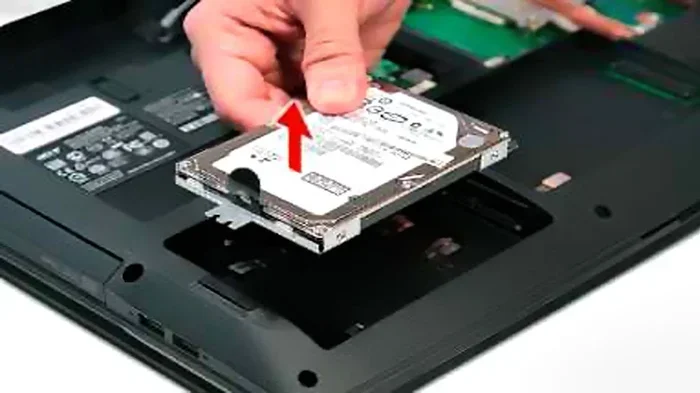
- Hard Drive or SSD: Permanent storage for your files, programs, and operating system.
- Graphics Card (GPU): Handles visual output for games, videos, and design work.
- Power Supply Unit (PSU): Converts electricity from your outlet into power for the components.
- Input/Output Devices: Keyboards, mice, monitors, and speakers that let you interact with the computer.
Hardware vs. Software: A Quick Comparison
Hardware and software work as a team. You cannot have a useful computer with just one or the other. Here is a simple comparison:
| Aspect | Hardware | Software |
|---|---|---|
| What it is | Physical parts you can touch | Programs and code you cannot touch |
| Examples | Monitor, keyboard, CPU | Windows, Chrome, Word |
| Role | Provides the platform | Tells hardware what to do |
| Can it break? | Yes, through damage or wear | Yes, through bugs or errors |
| Upgrades | Replace or add physical parts | Install updates or new programs |
Understanding the difference between hardware and software is one of the most practical basic computer principles. It helps you troubleshoot issues and make smart purchasing decisions.
Quick Tips for Hardware Care
Your hardware lasts longer when you take care of it. Here are some simple tips:
- Keep your computer clean and dust-free to prevent overheating.
- Use a surge protector to guard against power spikes.
- Upgrade RAM or switch to an SSD if your computer feels slow.
- Handle laptops with care to avoid damaging the screen or hinges.
Software Fundamentals You Should Know
If hardware is the body of a computer, software is the mind. Software fundamentals explain how programs and instructions bring your machine to life. Without software, hardware is just a collection of metal and plastic.
System Software vs. Application Software
Software comes in two main categories. Understanding this distinction is essential:
System software manages the computer itself. The operating system is the most important example. It handles tasks like file management, memory allocation, and device communication. Popular operating systems include Windows, macOS, and Linux.
Application software helps you accomplish specific tasks. These include word processors, web browsers, games, and photo editors. When you open Microsoft Word or Google Chrome, you are using application software.
Both types are essential. System software keeps the computer running. Application software makes it useful for your daily needs.
How Programs and Algorithms Work
Every program runs on a set of instructions called an algorithm. An algorithm is simply a step-by-step recipe for solving a problem. When you search the web, algorithms sort through millions of pages to find the best results.
Programmers write code in languages like Python, Java, or C++. This code gets translated into binary code — strings of 1s and 0s — that the computer can understand. Basic computer principles include knowing that every action on your computer starts as a line of code.
Common Software Mistakes to Avoid
Here are some mistakes that hurt your computer’s performance:
- Installing too many programs. Each one takes up storage and system resources.
- Ignoring updates. Updates fix security holes and improve performance.
- Downloading from untrusted sources. This can introduce malware and viruses.
- Not using antivirus software. Protection is essential for safe computing.
Avoiding these mistakes keeps your system running smoothly and your data safe. It is one of the easiest ways to apply basic computer principles in your daily routine.
How Data Is Stored and Managed
Data storage and management are core basic computer principles that affect every user. Every file, photo, and document you create needs a place to live. Understanding how storage works helps you use your computer more efficiently.
Types of Storage
Computers use different types of storage for different purposes:
- Hard Disk Drives (HDD): Traditional storage with spinning disks. They offer large capacity at lower cost but are slower.
- Solid State Drives (SSD): Faster storage with no moving parts. They are more expensive but much quicker.
- Cloud Storage: Online storage services like Google Drive or Dropbox that keep your files on remote servers.
- External Drives: Portable storage devices you can connect via USB for backups and extra space.
Most modern computers use SSDs for the main drive because of their speed. You can add an HDD for extra storage if needed. Choosing the right type of storage is a key computer hardware decision.
Understanding Memory vs. Storage
People often confuse memory and storage. Here is the difference:
- Memory (RAM): Temporary space for active tasks. It clears when you turn off the computer.
- Storage (HDD/SSD): Permanent space for saved files. Data stays even when the computer is off.
This distinction matters because it affects performance. If your computer feels slow when multitasking, you may need more RAM. If you run out of space for files, you need more storage.
Expert Insight: Data Management Best Practices
Professional IT experts recommend a few habits for better data management:
- Organize files into folders. A clear folder structure saves time and reduces frustration.
- Back up important data regularly. Use the 3-2-1 rule: three copies, two different media, one offsite.
- Delete unused files and programs. This frees up space and keeps your system fast.
- Use file names that describe content. Instead of “Document1,” use something like “2024_Tax_Return.pdf.”
These habits may seem small, but they make a big difference over time. Good data storage and management skills are among the most valuable basic computer principles you can learn.
Computer Networking Basics
Networking basics explain how computers communicate with each other. In today’s connected world, networking is everywhere. Whether you are browsing the web or video calling a friend, networking makes it possible.
How Devices Connect
Computers connect to networks in two main ways:
- Wi-Fi: Wireless connections through a router. This is the most common way devices connect at home or in offices.
- Ethernet: A wired connection using a cable. It offers faster and more stable speeds than Wi-Fi.
Both methods have their place. Wi-Fi gives you freedom of movement. Ethernet gives you reliability and speed. Many power users connect their desktop to Ethernet and use Wi-Fi for laptops and phones.
Key Networking Terms
Here are some terms you will encounter when learning about computer networking:
- IP Address: A unique number assigned to each device on a network. Think of it like a mailing address.
- Router: The device that directs traffic between your network and the internet.
- Bandwidth: The maximum speed of your internet connection.
- Firewall: A security system that monitors and controls incoming and outgoing network traffic.
Understanding these terms helps you troubleshoot connection issues and set up your home network with confidence. Basic computer principles include knowing how your device reaches the internet and how to keep that connection safe.
Quick Tips for Better Networking
Want a stronger, faster connection? Try these tips:
- Place your router in a central location for better coverage.
- Keep your router firmware updated for security patches.
- Use a wired connection for devices that need stable, fast speeds.
- Set a strong Wi-Fi password to prevent unauthorized access.
Small changes can make a big impact on your network performance. These tips are easy to implement and require no technical background.
Putting It All Together: Applying Basic Computer Principles Daily
Now that you understand the core areas, let us talk about how to apply basic computer principles in your everyday life. Knowledge alone is not enough. You need to use it to see real results.
Building Better Digital Habits
Good habits make you a more effective and safe computer user. Here are habits worth developing:
- Keep your system updated. Updates patch security flaws and improve performance.
- Organize your desktop and files. A clean workspace helps you find things quickly.
- Learn keyboard shortcuts. They save time and boost your efficiency dramatically.
- Back up your data weekly. Prevention is always better than recovery.
- Stay informed about new technology. Read tech blogs or watch tutorials to keep growing.
These habits form the foundation of strong digital literacy. They apply whether you use a desktop, laptop, or tablet.
Troubleshooting Common Issues
When something goes wrong, your knowledge of basic computer principles becomes your best tool. Before calling for help, try these steps:
- Restart your computer. This clears temporary issues and refreshes the system.
- Check your connections. A loose cable or Wi-Fi drop can cause many problems.
- Free up storage space. A nearly full drive slows down performance.
- Update your software. Bugs are often fixed in the latest versions.
- Run a virus scan. Malware can cause slow performance and strange behavior.
Most common issues have simple solutions. When you know computer fundamentals, you can solve problems on your own instead of waiting for someone else to help.
Why Continuous Learning Matters
Technology changes fast. New devices, software, and trends emerge every year. The best computer users never stop learning. They stay curious and keep updating their skills.
You do not need to become an expert overnight. Start with the basic computer principles covered in this guide. Build from there as your confidence grows. Every small bit of knowledge adds up to significant skill over time.
Common Mistakes People Make When Learning Computer Basics
Even eager learners can stumble. Watch out for these common pitfalls:
- Trying to learn everything at once. Focus on one topic at a time and build gradually.
- Ignoring security practices. Strong passwords and antivirus software are non-negotiable.
- Not asking for help. Online communities and forums are great resources when you get stuck.
- Skipping hands-on practice. Reading alone is not enough. You need to apply what you learn.
Avoiding these mistakes keeps your learning journey smooth and enjoyable. Remember, everyone starts somewhere, and every expert was once a beginner.
Conclusion
Basic computer principles are more than just technical knowledge. They are life skills that empower you in a digital world. From understanding how your CPU processes data to managing files and connecting to networks, each concept builds your confidence and capability.
We have covered the input-process-output cycle, hardware components, software fundamentals, data storage, and networking basics. These are the pillars of computer literacy that serve you in every area of technology use. The beauty of basic computer principles is that they apply to every device you will ever use.
Now it is your turn to put this knowledge into action. Start with one area that feels most relevant to your life. Explore it, practice it, and build from there. The more you understand how your computer works, the more you get out of it. Technology should feel like a tool that serves you, not something that controls you.
Keep learning, keep exploring, and keep growing. Your journey with basic computer principles starts today, and the skills you build will last a lifetime.
Frequently Asked Questions
What are the most important basic computer principles everyone should know?
The most important basic computer principles include understanding how hardware and software work together, knowing the input-process-output cycle, and grasping how data is stored and managed. These fundamentals apply to every computer user, regardless of experience level. They form the foundation for all other tech skills.
How can I improve my digital literacy quickly?
Start by learning one concept at a time, such as how your operating system works or how to manage files. Practice regularly and explore new tools and applications. Online tutorials, courses, and forums are excellent free resources. Consistent, small efforts lead to big improvements in digital literacy over time.
What is the difference between RAM and storage?
RAM is temporary memory used for active tasks, while storage is permanent space for saved files. RAM clears when you turn off your computer, but storage retains your data. If your computer feels slow when multitasking, you may need more RAM. If you run out of space for files, you need more storage.
Do I need to understand networking to use a computer?
You do not need deep networking knowledge to use a computer, but understanding the basics helps. Knowing how Wi-Fi works, what an IP address is, and how to troubleshoot connection issues makes your experience smoother. Basic computer principles in networking also help you stay safe online.
What are some good resources for learning computer fundamentals?
Free resources like Khan Academy, Coursera, and YouTube tutorials offer excellent courses on computer fundamentals. Books like “Computer Basics Absolute Beginner’s Guide” are also great starting points. The best resource is one that matches your learning style and keeps you engaged.
How do basic computer principles apply to everyday tasks?
Every time you open a program, save a file, or connect to the internet, you are applying basic computer principles. Understanding how these actions work helps you troubleshoot problems, choose better software, and use your device more efficiently. These principles turn everyday tech use from guesswork into informed decision-making.