Are Hdmi 2 0 And 2 1 Ports Different From Each Other
HDMI 2.0 and HDMI 2.1 ports are not the same. They differ significantly in bandwidth, resolution support, and advanced features like Variable Refresh Rate and Enhanced Audio Return Channel. Understanding these differences helps you make the right choice for gaming, home theater, or professional use.
You might have noticed that not all HDMI ports look different from each other. They fit the same cable. They share the same shape. Yet underneath that familiar connector lies a world of difference. HDMI 2.0 and HDMI 2.1 ports are not the same, and knowing why matters more than you think.
Whether you are building a home theater, upgrading your gaming setup, or just trying to figure out which cable to buy, understanding the differences between these two versions can save you money and frustration. HDMI 2.0 and 2.1 ports different in ways that directly affect your viewing and gaming experience. Let us break it all down in simple terms.
The world of consumer electronics moves fast. New TVs, monitors, and game consoles keep raising the bar on what our screens can do. And right at the heart of that evolution is the HDMI port sitting on the back of your device. HDMI 2.1 has arrived as the latest standard, but plenty of devices still rely on HDMI 2.0. So what exactly sets them apart? Let us dive in.
Key Takeaways
- HDMI 2.1 offers much higher bandwidth: up to 48 Gbps compared to HDMI 2.0’s 18 Gbps, enabling support for 8K and higher refresh rates.
- HDMI 2.1 includes gaming-focused features: such as Variable Refresh Rate (VRR), Auto Low Latency Mode (ALLM), and Quick Frame Transport (QFT).
- HDMI 2.0 still handles 4K at 60Hz well: making it perfectly fine for most everyday use and moderate gaming setups.
- Backward compatibility is maintained: HDMI 2.1 devices work with older HDMI 2.0 cables and ports, though you lose the advanced features.
- Cable quality matters: Ultra High Speed HDMI cables are required to unlock HDMI 2.1 capabilities.
- HDMI 2.1 is the future standard: with new TVs, monitors, and consoles adopting it as the default connection.
📑 Table of Contents
What Is HDMI and Why Does the Version Matter?
HDMI stands for High-Definition Multimedia Interface. It is the most common way to connect video and audio from a source device to a display. Think of your Blu-ray player, game console, or laptop. They all use HDMI to send picture and sound to your TV or monitor. The version of HDMI determines what your connection can do.
You might wonder why the version number matters so much. The answer is simple. Each new version brings better bandwidth, higher resolution support, and new features. HDMI 2.0 arrived in 2013 and served us well for years. HDMI 2.1 came along in 2017 and completely changed the game. Think of it like a highway. HDMI 2.0 is a two-lane road. HDMI 2.1 is a multi-lane superhighway. Both get you where you need to go. But one can handle a lot more traffic at much higher speeds.
The version of HDMI also affects the type of cable you need. Not all HDMI cables are created equal. A standard cable might work fine for basic tasks. But if you want to push 4K at 120Hz or 8K resolution, you need the right cable and the right port. HDMI 2.1 cables and ports unlock capabilities that HDMI 2.0 simply cannot. This is the core difference we will explore throughout this guide.
One important thing to keep in mind is backward compatibility. HDMI 2.1 devices work with older HDMI 2.0 cables and ports. The connection will still work. You just will not get the new features. Similarly, an HDMI 2.0 device works fine with an HDMI 2.1 cable. The port and cable negotiate the best speed they both support. This makes the transition smoother for most users.
HDMI 2.0: Features and Capabilities
HDMI 2.0 has been around for a long time. It served as the standard for many years and still powers a huge number of devices today. Understanding what HDMI 2.0 can do helps you appreciate what HDMI 2.1 brings to the table.
Bandwidth and Speed
The biggest spec that defines HDMI 2.0 is its bandwidth. HDMI 2.0 supports up to 18 Gbps (gigabits per second). That number sounds impressive, and it is. With 18 Gbps, HDMI 2.0 can handle 4K resolution at 60Hz with ease. For most people watching movies, streaming shows, or playing casual games, this is more than enough.
But 18 Gbps has its limits. It cannot push 4K at 120Hz. It cannot handle 8K resolution at all. And when you try to push higher color depths or wider color gamuts, the bandwidth gets used up fast. HDMI 2.0 was designed for the 4K era, and it delivered. But we have moved past that now.
Resolution and Refresh Rate Support
With HDMI 2.0, you get solid support for the following:
- 4K at 60Hz: This is the sweet spot for most 4K TVs and monitors.
- 1080p at 240Hz: Great for high-refresh-rate gaming monitors.
- 1080p at 120Hz: Smooth gameplay and very responsive visuals.
- 7.1 Channel Audio: Uncompressed surround sound for home theater setups.
These specs made HDMI 2.0 the go-to standard for years. Most 4K TVs released between 2014 and 2019 used HDMI 2.0 ports. Many still do today, especially in budget and mid-range models. If your TV has HDMI 2.0 ports, you can still enjoy great picture quality. You just will not get the latest gaming features.
Audio Features in HDMI 2.0
HDMI 2.0 introduced the Audio Return Channel (ARC). This lets your TV send audio back to your soundbar or receiver through the same HDMI cable. It simplified home theater setups a lot. HDMI 2.0 also supports 32 audio channels and various surround sound formats. For most users, the audio capabilities of HDMI 2.0 are more than sufficient.
However, HDMI 2.0 has a limitation with eARC. Enhanced Audio Return Channel, which supports higher-quality audio formats like Dolby Atmos and DTS:X, is not available in HDMI 2.0. This is one area where HDMI 2.1 makes a clear leap forward.
HDMI 2.1: Features and Capabilities
HDMI 2.1 is the current gold standard. It was designed to handle the demands of modern gaming, 8K content, and advanced home theater setups. HDMI 2.1 brings a massive upgrade in bandwidth and features that make it a true next-generation connection.
Massive Bandwidth Boost
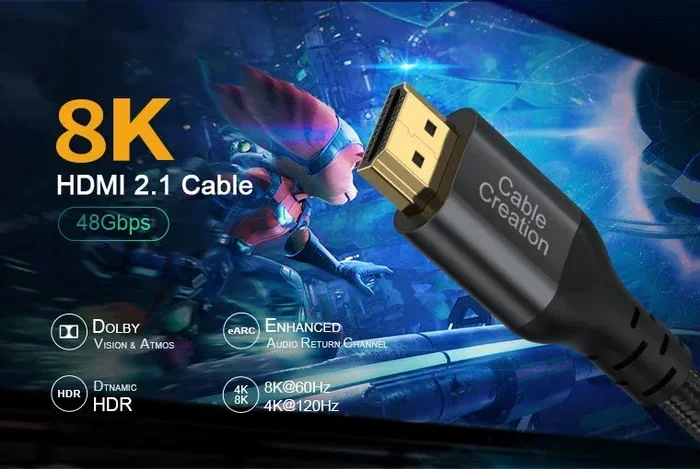
The headline feature of HDMI 2.1 is its bandwidth. HDMI 2.1 supports up to 48 Gbps. That is 2.5 times more than HDMI 2.0. This huge jump in data transfer speed opens the door to resolutions and refresh rates that were impossible before.
With 48 Gbps, HDMI 2.1 can handle:
- 4K at 120Hz: Perfect for next-gen gaming on PlayStation 5 and Xbox Series X.
- 8K at 60Hz: Future-proofing for the newest 8K displays.
- 4K at 240Hz: For ultra-high-refresh-rate gaming monitors.
- 10K resolution: Yes, HDMI 2.1 can even support this, though 10K displays are still rare.
Think about what this means for gaming. If you have a PS5 or Xbox Series X, HDMI 2.1 lets you play games at 4K with 120 frames per second. That is buttery smooth gameplay with stunning detail. HDMI 2.0 would limit you to 4K at 60Hz in most cases. The difference is very noticeable, especially in fast-paced games.
Gaming-Focused Features
HDMI 2.1 was built with gamers in mind. It includes several features that make gaming better and more responsive:
- Variable Refresh Rate (VRR): This syncs your TV or monitor refresh rate with your console or PC. It reduces screen tearing and stuttering. Games look smoother without any extra cost to performance.
- Auto Low Latency Mode (ALLM): This automatically switches your display to low-latency mode when you start gaming. No need to dig through settings. The display just knows.
- Quick Frame Transport (QFT): This reduces the time it takes for a frame to travel from your device to your screen. Lower latency means more responsive gameplay.
- Quick Media Switching (QMS): This eliminates black screens when switching between different content sources. The transition is seamless.
These features are game changers, literally. If you are a serious gamer, HDMI 2.1 is almost a must-have. HDMI 2.0 simply does not offer these capabilities.
Enhanced Audio with eARC
HDMI 2.1 brings Enhanced Audio Return Channel, or eARC. This is a big step up from the ARC in HDMI 2.0. eARC supports uncompressed audio formats like Dolby Atmos and DTS:X. It also supports object-based audio, which creates a more immersive sound experience.
If you are building a home theater system, eARC makes a real difference. You get theater-quality sound without needing multiple cables or complicated setups. The audio travels through the same HDMI cable as the video, keeping things simple and clean.
Dynamic HDR and Other Visual Enhancements
HDMI 2.1 supports Dynamic HDR. Unlike static HDR, which applies the same settings to an entire video, Dynamic HDR adjusts HDR metadata frame by frame. This means better contrast, brighter highlights, and deeper blacks in every scene. Your content looks more lifelike and detailed with Dynamic HDR enabled through HDMI 2.1.
HDMI 2.1 also supports higher color depths and wider color gamuts. This means more colors on screen and smoother gradients. For content creators and professionals, these visual enhancements are very valuable.
HDMI 2.0 vs 2.1: Head-to-Head Comparison
Let us put the two versions side by side. This comparison makes the differences crystal clear.
| Feature | HDMI 2.0 | HDMI 2.1 |
|---|---|---|
| Bandwidth | 18 Gbps | 48 Gbps |
| Max Resolution | 4K at 60Hz | 8K at 60Hz or 4K at 120Hz |
| VRR Support | No | Yes |
| ALLM Support | No | Yes |
| eARC Support | No | Yes |
| Dynamic HDR | No | Yes |
| Quick Frame Transport | No | Yes |
| Cable Type | Standard or Premium High Speed | Ultra High Speed |
| Backward Compatible | Yes (with older versions) | Yes (with HDMI 2.0 and below) |
The table tells a clear story. HDMI 2.1 is the superior version in almost every way. It offers more bandwidth, better resolution support, and features designed for modern gaming and home theater. HDMI 2.0 is still perfectly usable for everyday tasks. But if you want the best experience, HDMI 2.1 is the way to go.
One thing to note is that both versions are backward compatible. You can plug an HDMI 2.1 device into an HDMI 2.0 port. It will work. You just get the features that both the port and the device support. The connection always falls back to the lowest common standard. This is important to understand before you buy new equipment.
Do You Need HDMI 2.1?
This is the question most people ask. And the honest answer is: it depends on your setup and what you do with it.
You Might Still Be Fine with HDMI 2.0 If
- You watch mostly 4K content at 60Hz: Streaming services, Blu-rays, and cable TV all work great on HDMI 2.0.
- You have a soundbar or basic home theater: ARC works fine for most sound systems.
- You are on a budget: HDMI 2.0 devices and cables are still very affordable.
- Your TV or monitor only has HDMI 2.0 ports: No point paying for HDMI 2.1 if your display does not support it.
For casual viewing, family movie nights, and everyday computing, HDMI 2.0 is still a solid choice. It handles 4K beautifully and delivers great audio. Many people will not notice the difference in daily use.
You Should Upgrade to HDMI 2.1 If
- You own a PS5, Xbox Series X, or high-end gaming PC: These devices are built to take advantage of HDMI 2.1 features.
- You want 4K at 120Hz or 8K resolution: HDMI 2.0 simply cannot deliver these frame rates at high resolutions.
- You are serious about gaming performance: VRR, ALLM, and low latency make a huge difference.
- You are building a premium home theater: eARC and Dynamic HDR elevate the experience significantly.
If you are investing in a new TV, monitor, or console, HDMI 2.1 is the smart choice for the future. New devices are adopting it as the standard. Having HDMI 2.1 ports means your setup is ready for whatever comes next.
You might also want to consider the components that are found on the motherboard if you are building a PC, since HDMI ports are often integrated directly into the motherboard. Understanding how these ports connect to your system helps you make better decisions about which HDMI version to prioritize.
Common Mistakes People Make When Choosing HDMI Ports
Even savvy shoppers sometimes make mistakes when it comes to HDMI ports. Here are a few to watch out for.
Assuming All HDMI Ports Are the Same
This is the most common mistake. Just because a port looks the same does not mean it supports the same features. Always check the HDMI version on the back of your TV or monitor. The manual usually lists this information. If you cannot find it, a quick online search for your model number will tell you.
Using the Wrong Cable
HDMI 2.1 features require Ultra High Speed HDMI cables. If you use an older cable, you will not get the full benefits of HDMI 2.1. Look for the Ultra High Speed HDMI certification on the cable packaging. Standard cables may work for basic connections, but they will bottleneck your setup.
Another mistake is buying expensive cables you do not need. If you only use 4K at 60Hz, a Premium High Speed HDMI cable is perfectly fine. You do not need to spend extra on Ultra High Speed cables unless you are pushing higher resolutions and refresh rates.
Ignoring the Number of Ports
Many TVs and monitors have a mix of HDMI 2.0 and HDMI 2.1 ports. For example, a TV might have three HDMI 2.0 ports and one HDMI 2.1 port. If you plug your gaming console into an HDMI 2.0 port, you will not get HDMI 2.1 features. Always check which ports support which version and connect your most demanding devices to the right port.
You might also be interested in how computers are used across different fields, including 10 ways computers are used in medicine, where high-quality display connections like HDMI play an important role in medical imaging and diagnostics.
The Future of HDMI: What Comes After 2.1?
HDMI 2.1 is the current standard, but technology never stops moving. The HDMI Forum has already announced HDMI 2.2, which promises even higher bandwidth and support for emerging display technologies. 8K at 120Hz and beyond are on the horizon.
For now, HDMI 2.1 is more than enough for most users. It handles 8K at 60Hz and 4K at 120Hz with room to spare. Investing in HDMI 2.1 today means your setup stays relevant for years. The features it offers, especially for gaming and home theater, are still cutting edge.
One thing to keep in mind is that display technology continues to evolve. OLED and QLED panels are becoming more affordable. Refresh rates are climbing. Color accuracy is improving. HDMI 2.1 is built to keep up with these advancements. Older versions simply cannot match the same level of performance.
If you are shopping for new equipment, look for devices that support HDMI 2.1. Even if you do not need all the features right now, having them available means you are future-proofing your setup. HDMI 2.1 is not just an upgrade. It is an investment in your entertainment experience for years to come.
Remember that the physical port itself does not change between versions. The HDMI connector is the same shape and size across all versions. The differences are all in the electronics and specifications inside. This is why it is so important to check the version before you buy or connect anything.
Conclusion
HDMI 2.0 and HDMI 2.1 ports are definitely different, even though they share the same physical connector. The differences in bandwidth, resolution support, and advanced features make them suited for very different use cases. HDMI 2.0 remains a reliable choice for everyday viewing and moderate gaming. But HDMI 2.1 opens the door to 4K at 120Hz, 8K resolution, VRR, ALLM, eARC, and Dynamic HDR.
Understanding these differences empowers you to make smarter buying decisions. You will know which ports to use for which devices. You will avoid buying the wrong cables. And you will get the best possible experience from your setup. HDMI 2.1 is the present and the future of display connections. HDMI 2.0 is still here and still useful. But the writing is on the wall.
Take a look at your current devices. Check the HDMI ports on your TV, monitor, and game console. See what version they support. Then decide if an upgrade makes sense for you. The right HDMI connection can transform your viewing and gaming experience in ways you might not expect. Start with the version, and everything else falls into place.
Frequently Asked Questions
Can I use an HDMI 2.0 cable with an HDMI 2.1 port?
Yes, you can. The connection will work, but you will only get the features supported by the HDMI 2.0 cable. To unlock HDMI 2.1 capabilities, you need an Ultra High Speed HDMI cable. Always match your cable to the highest version you want to use.
Do all 4K TVs have HDMI 2.1 ports?
No, not all 4K TVs have HDMI 2.1 ports. Many 4K TVs, especially older models and budget options, still use HDMI 2.0. Always check the specifications before buying if HDMI 2.1 is important to you.
Is HDMI 2.1 backward compatible with HDMI 2.0 devices?
Yes, HDMI 2.1 is fully backward compatible. You can connect an HDMI 2.0 device to an HDMI 2.1 port and it will work perfectly. You simply get the features that both the device and the port support.
What is the main advantage of HDMI 2.1 over HDMI 2.0?
The main advantage is the massive bandwidth increase from 18 Gbps to 48 Gbps. This allows HDMI 2.1 to support higher resolutions like 8K, higher refresh rates like 4K at 120Hz, and advanced gaming features like VRR and ALLM.
Do I need HDMI 2.1 for gaming?
It depends on your setup. If you play on a PS5, Xbox Series X, or high-end PC and want 4K at 120Hz with VRR, then yes, HDMI 2.1 is essential. For casual gaming at 4K 60Hz, HDMI 2.0 is still perfectly fine.
Are Ultra High Speed HDMI cables expensive?
They are more expensive than standard HDMI cables, but prices have come down significantly. A good Ultra High Speed HDMI cable typically costs between $15 and $30. They are a worthwhile investment if you want to take full advantage of HDMI 2.1 features.