Are There Usb C Thumb Drives Worth Buying Right Now
Yes, USB C thumb drives are real, widely available, and faster than ever. These portable storage devices use the reversible USB C connector for ultra-fast data transfer and plug-and-play convenience. Whether you need a USB C flash drive for a laptop, tablet, or phone, there is a perfect option waiting for you.
Have you been hearing about USB C thumb drives everywhere lately? Maybe you just bought a new laptop and noticed it only has USB C ports. Or perhaps your old USB A thumb drive feels painfully slow. Either way, you are not alone. People are asking whether USB C flash drives are worth the upgrade, and the short answer is a strong yes.
In this guide, we will break down everything you need to know. We will cover what makes these drives different, how fast they really are, and which ones actually deserve your money. By the end, you will know exactly what to look for when shopping for a USB C pendrive that fits your life.
Key Takeaways
- USB C thumb drives exist and are the new standard: They offer faster speeds and a reversible connector that makes plugging in foolproof.
- Speed matters a lot: USB 3.2 and USB4 drives deliver blazing fast data transfer compared to older USB A drives.
- Capacity ranges from 16GB to 1TB: You can find a USB C flash drive for any budget and storage need.
- Compatibility is broad: Most modern laptops, tablets, and phones support USB C compatible drives with no extra adapters.
- Buy from trusted brands: SanDisk, Samsung, Kingston, and Corsair lead the market with reliable products.
📑 Table of Contents
- What Exactly Is a USB C Thumb Drive?
- Why USB C Thumb Drives Are Worth Buying
- How Fast Are USB C Thumb Drives Really?
- Top Things to Look for When Shopping
- Common Uses for USB C Thumb Drives
- Common Mistakes People Make with USB C Thumb Drives
- Expert Insights: What the Pros Say
- Are There USB C Thumb Drives Worth Buying Right Now?
What Exactly Is a USB C Thumb Drive?
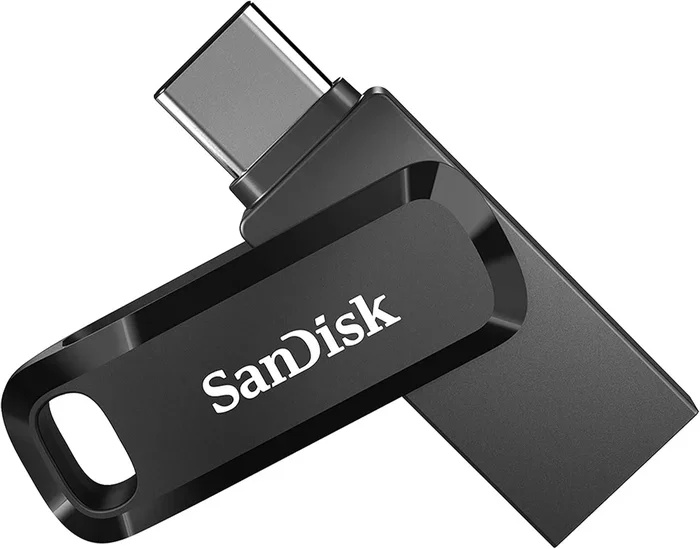
A USB C thumb drive is a small portable storage device that uses the USB C connector instead of the traditional USB A plug. The USB C connector is tiny, reversible, and oval-shaped. You can flip it either way and it will plug in every time. No more flipping your drive three times trying to get the right orientation.
These drives connect directly to modern computers, tablets, and even some smartphones. They are part of the newer USB C compatible ecosystem that has taken over laptops and phones in recent years. If your device has a USB C port, a USB C flash drive will work with it natively.
How Is It Different from a Regular Thumb Drive?
The main difference comes down to the connector shape and speed. A standard thumb drive uses the wide, flat USB A plug. A USB C thumb drive uses the smaller, rounded USB C plug. Beyond the shape, USB C flash drives also tend to support faster data transfer standards like USB 3.1, USB 3.2, and even USB4.
Inside, the flash memory works the same way. The storage chips are identical. The difference is the interface and the speed capabilities that come with it. Think of it like swapping a garden hose for a fire hose. Same water, much better flow.
Why USB C Thumb Drives Are Worth Buying
There are several real reasons to switch to a USB C thumb drive. Let us walk through them one by one so you can see the value clearly.
Speed That Actually Matters
Speed is the biggest reason people make the switch. Older USB A drives top out around USB 3.0 speeds, which max out at about 5 Gbps. A good USB C flash drive with USB 3.2 support can hit 10 Gbps or even 20 Gbps. That means moving a large video file or a folder full of photos takes seconds instead of minutes.
If you work with large files like video edits, design projects, or data sets, this speed difference is huge. You will wonder how you ever waited for files to copy before.
The Reversible Connector Is a Game Changer
Let us be honest. The old USB A plug drives people crazy. You flip it, it does not fit. You flip it the other way, still does not fit. After two tries, you are frustrated. The reversible connector on a USB C thumb drive solves this completely. It goes in either way, every time. It is a small thing that makes a big difference in daily use.
Future-Proof Your Setup
More and more devices are dropping the USB A port entirely. New laptops, tablets, and phones are going USB C only. If you buy a regular USB A drive now, you will need an adapter every time you want to use it. A USB C pendrive works directly with your current gear and will continue to work as devices evolve. This is what we mean by future-proofing your storage setup.
Compact and Portable
USB C flash drives tend to be smaller than their USB A counterparts. The connector is tiny, so the whole drive can be very compact. Many of them are no bigger than a regular car key. You can slip one into your wallet, attach it to a keychain, or keep it in a laptop sleeve without adding bulk.
How Fast Are USB C Thumb Drives Really?
Speed numbers can be confusing. Manufacturers sometimes list theoretical maximums that are hard to reach in real life. Let us break down the actual speeds you can expect from different USB C thumb drives.
| USB Standard | Max Theoretical Speed | Real-World Read Speed |
|---|---|---|
| USB 3.0 | 5 Gbps | 100-150 MB/s |
| USB 3.1 Gen 2 | 10 Gbps | 300-500 MB/s |
| USB 3.2 Gen 2×2 | 20 Gbps | 500-1000 MB/s |
| USB4 | 40 Gbps | 1000+ MB/s |
Most USB C flash drives on the market today fall in the USB 3.1 to USB 3.2 range. You can expect real-world read speeds between 300 and 500 MB/s. That is fast enough to transfer a full HD movie in under a minute.
Keep in mind that write speeds are usually slower than read speeds. This is true for all storage devices. If you need to back up large files regularly, look for drives that advertise both fast read and write speeds.
Top Things to Look for When Shopping
Not all USB C thumb drives are created equal. Here are the key factors that will help you pick the right one.
1. Check the USB Standard
Look for the USB standard listed on the packaging or product page. USB 3.1 and USB 3.2 are the sweet spots right now. They offer great speed without being overpriced. If you see USB4 listed, that is even faster but also more expensive. Make sure your device supports the same standard to get the full speed benefit.
2. Consider Your Storage Needs
USB C flash drives come in sizes ranging from 16GB all the way up to 1TB or more. Here is a quick guide to help you decide:
- 16GB to 32GB: Good for documents, spreadsheets, and a few photos. Budget-friendly option.
- 64GB to 128GB: Great for most users. Handles photos, music, and smaller video files easily.
- 256GB to 512GB: Ideal for professionals who work with large files, video projects, or lots of data.
- 1TB and above: For heavy users, creators, and anyone who wants to carry their entire library on one drive.
3. Brand Reputation Matters
Stick with trusted brands when buying a USB C pendrive. Companies like SanDisk, Samsung, Kingston, and Corsair have long track records of quality. They offer warranties and reliable customer support. Avoid no-name brands that promise huge storage for very low prices. They often use low-quality flash memory that fails quickly.
4. Dual Connector Drives
Some USB C compatible drives also include a USB A connector. These dual-connector drives give you flexibility. You can use them on older devices with USB A ports and new devices with USB C ports. This is a great option if you work across multiple devices or share drives with colleagues.
Common Uses for USB C Thumb Drives
USB C thumb drives are incredibly versatile. Here are some of the most popular ways people use them every day.
Working Professionals
Many professionals carry a USB C flash drive to transfer files between the office and home. Designers, engineers, and writers use them for quick backups and file sharing. The fast transfer speeds mean you spend less time waiting and more time working. If you work in an environment where 5 Components That Are Found On The Motherboard include USB controllers, you already know how important a reliable connection is.
Students and Educators
Students love the compact size of USB C thumb drives. They fit easily in a backpack or pencil case. Teachers use them to share assignments, presentations, and lesson materials. The plug and play nature means no software installs are needed. Just plug it in and go.
Medical and Healthcare Settings
In healthcare, portable storage plays an important role. Medical professionals use USB C flash drives to transfer patient records, imaging files, and research data. As computers are used in medicine more and more every day, having a fast and reliable storage solution becomes essential. The secure and portable nature of these drives makes them valuable tools in clinical environments.
Travel and On-the-Go Use
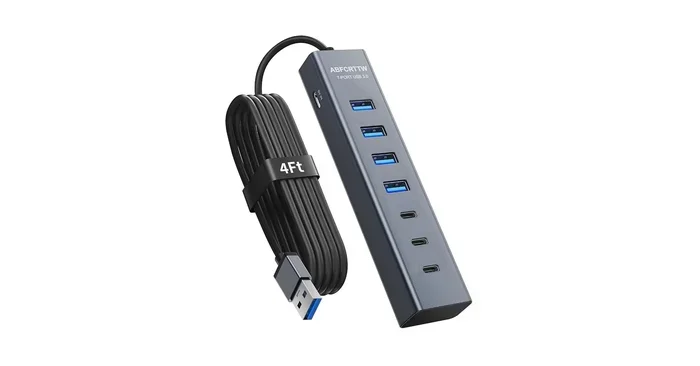
Travelers appreciate how small and lightweight USB C thumb drives are. You can store an entire photo album, important documents, or offline entertainment. Some drives even come with built-in USB C hubs that add extra ports for charging and connecting peripherals while you travel.
Common Mistakes People Make with USB C Thumb Drives
Avoid these pitfalls to get the most out of your USB C flash drive.
- Buying the cheapest option: Ultra-cheap drives often use poor-quality flash memory. They may fail after a few months. Spending a little more on a reputable brand saves you headaches later.
- Ignoring speed ratings: Do not assume all USB C compatible drives are equally fast. Check the actual read and write speeds before buying.
- Forgetting to eject safely: Always use the safe eject option before pulling out your drive. This prevents data corruption and extends the life of the flash memory.
- Not checking device compatibility: Some older computers with USB C ports may not support the fastest speeds. Check your device specs to know what your port can handle.
- Leaving drives unprotected: The small size of USB C pendrives means they are easy to lose. Use a protective case or keep them attached to a keychain.
Expert Insights: What the Pros Say
Tech reviewers and industry experts agree that USB C thumb drives represent the current best choice for portable storage. The shift from USB A to USB C is not a trend. It is a permanent change in how devices connect. Experts recommend buying drives that support at least USB 3.1 for a good balance of speed and price.
Storage analysts also point out that USB C flash drives with built-in encryption are becoming more popular. These drives protect sensitive data with hardware-level security. If you handle confidential files, this feature is worth considering.
Another expert tip is to buy a drive with a cap or a retractable connector. Exposed connectors can collect dust and lint, which affects connection quality over time. A simple cap goes a long way in protecting your investment.
Are There USB C Thumb Drives Worth Buying Right Now?
The answer is a clear yes. USB C thumb drives are faster, more compact, and more convenient than ever before. The reversible connector eliminates the frustration of old-style USB plugs. The speed gains from USB 3.2 and USB4 make real-world file transfers noticeably quicker. And the wide range of capacities means there is a drive for every budget and need.
If you are still using an older USB A drive, now is a great time to upgrade. Your new USB C flash drive will work seamlessly with modern laptops, tablets, and phones. The investment is small compared to the daily convenience and time savings you will enjoy.
Choose a reputable brand, pick the right capacity for your needs, and look for at least USB 3.1 support. With these simple steps, you will find a USB C thumb drive that serves you well for years to come.
Frequently Asked Questions
Do USB C thumb drives work on older computers?
Yes, but you may need an adapter. If your older computer only has USB A ports, a simple USB C to USB A adapter will let you use a USB C thumb drive. Some dual-connector drives include both USB C and USB A plugs, so they work on any device without extra accessories.
Are USB C thumb drives faster than regular thumb drives?
Generally yes. USB C flash drives support newer standards like USB 3.2 and USB4 that offer much faster data transfer speeds. However, the actual speed depends on the drive’s internal components and the USB standard it supports. Always check the specs before buying.
Can I use a USB C thumb drive with my smartphone?
Many modern Android phones and tablets support USB C compatible drives directly. Apple iPhones use Lightning or USB C depending on the model. Check your phone’s specifications to confirm it supports external storage. Most modern devices handle USB C pendrives with no extra setup needed.
How long do USB C thumb drives last?
A good quality USB C flash drive can last many years with normal use. The flash memory inside has a limited number of write cycles, but for everyday use, this is rarely a concern. Keeping your drive in a protective case and ejecting it safely will help extend its lifespan significantly.
What is the best capacity for a USB C thumb drive?
It depends on what you plan to store. For documents and basic files, 32GB to 64GB is usually enough. If you work with photos, videos, or large projects, 128GB to 256GB gives you much more room. Power users and creators may want 512GB or 1TB for maximum flexibility.
Do I need special software to use a USB C thumb drive?
No. USB C thumb drives are plug and play. They work with Windows, macOS, and ChromeOS without installing any software. Just plug the drive into a USB C port, and your computer will recognize it immediately. Some drives may include optional software for backup or encryption, but it is not required.
=== CONCLUSION ===
USB C thumb drives are absolutely worth buying right now. They offer faster speeds, a reversible connector, and a compact design that fits perfectly into modern workflows. Whether you are a student, a professional, or just someone who needs reliable portable storage, a USB C flash drive is a smart investment.
Pick a reputable brand, choose the right capacity, and make sure it supports at least USB 3.1. With these simple tips, you will find the perfect drive for your needs. Upgrade today and enjoy the convenience that USB C thumb drives bring to your everyday tech life.