Can A Projector Be Mounted On A Wall And How To Do It
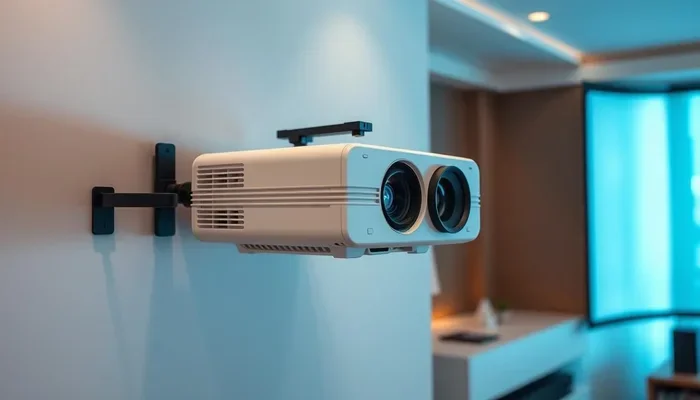
Yes, a projector can absolutely be mounted on a wall. Wall mounting a projector is one of the best ways to create a clean, space-saving home theater setup. With the right projector mounting bracket, proper projector placement, and a few basic tools, you can enjoy a big-screen experience without taking up floor space. This guide walks you through every step, from choosing the right wall mount projector bracket to adjusting your image alignment for a perfect picture.
Key Takeaways
- Wall mounting is possible and popular: A wall mount projector saves space and creates a sleek, cinema-like look in any room.
- The right bracket matters: Choosing the correct projector mounting bracket ensures stability and allows for tilt and swivel adjustments.
- Throw distance affects placement: Your throw distance determines how far the projector needs to be from the projector screen for a clear image.
- Wall studs are essential: Always anchor your mounting hardware into wall studs or use heavy-duty anchors for a secure hold.
- Cable management keeps things clean: Proper projector cable management hides wires and prevents tripping hazards.
- Keystone correction helps with alignment: Use keystone correction to fix image distortion when the projector is not perfectly perpendicular to the wall.
- Ambient light impacts image quality: Consider ambient light in your room when choosing your projector placement and screen type.
📑 Table of Contents
- Can A Projector Be Mounted On A Wall? Yes, And Here Is Why
- Choosing the Right Projector Wall Mount Bracket
- Step-by-Step Guide to Mounting a Projector on a Wall
- Projector Wall Mount vs Ceiling Mount: Which Is Better?
- Common Mistakes to Avoid When Mounting a Projector on a Wall
- Expert Insights on Projector Wall Mounting
- Key Takeaways
- Conclusion
Can A Projector Be Mounted On A Wall? Yes, And Here Is Why
So, can a projector be mounted on a wall? The short answer is a resounding yes. Wall mounting a projector is one of the most popular ways to set up a home theater setup today. It keeps your floor clear, gives you a clean look, and makes the viewing experience feel much more immersive.
People often think projectors belong on a shelf or a ceiling. But a wall mount projector setup works beautifully in many situations. Maybe you have low ceilings. Maybe you rent and cannot drill into a ceiling. Or maybe you just want a cleaner, more minimalist look in your living room.
Whatever your reason, mounting a projector on a wall is totally doable. You just need the right mounting hardware, a little planning, and some basic DIY skills. This guide will show you exactly how to do it, step by step.
Let us start with the basics. A wall mount projector setup involves attaching a bracket to your wall, then securing the projector to that bracket. The bracket holds the projector steady and lets you adjust the angle so the image lands perfectly on your projector screen or wall surface.
Now, before you grab a drill, there are a few things you need to know. Projector placement is not just about finding a spot on the wall. You need to think about throw distance, projector height, ambient light, and how you will manage all those cables. We will cover all of that below.
Why Wall Mounting Works So Well
Wall mounting offers several real advantages. First, it frees up floor space. You do not need a big AV stand or shelf taking up room. Second, it keeps the projector out of reach of kids and pets. Third, a wall-mounted projector simply looks cool. It gives your room that sleek, modern cinema feel.
Another big benefit is image alignment. When you mount a projector on a wall at the right height, you can often avoid tilting the projector too much. Less tilt means less distortion and a better picture. This is especially important if your projector does not have great keystone correction.
Choosing the Right Projector Wall Mount Bracket
Not all projector mounting brackets are the same. Picking the right one is a big deal. The wrong bracket can lead to a shaky setup, poor image quality, or even damage to your projector. Let us break down the options.
Fixed Brackets
A fixed bracket holds the projector in one position. It does not move. This is the simplest and most affordable option. It works great when your projector placement is already perfect and you do not need to adjust the angle often.
Fixed brackets are lightweight and easy to install. They are ideal for smaller projectors or rooms where the throw distance is already dialed in. If you know exactly where the image needs to land, a fixed bracket gets the job done.
Tilting Brackets
A tilting bracket lets you adjust the projector up or down. This is super helpful when the projector is mounted slightly above or below the center of your projector screen. You can tilt it to correct the vertical position without moving the whole unit.
Tilting brackets add a small amount of flexibility. They are a great middle-ground option for most wall mount projector setups. Most people find that a tilting bracket covers their needs perfectly.
Full-Motion Brackets
A full-motion bracket is the most adjustable option. It lets you tilt, swivel, and sometimes even extend the projector away from the wall. This is useful in rooms where you need to fine-tune the image alignment from multiple seating positions.
Full-motion brackets cost more and are bulkier. But they offer the most flexibility. If you are not sure about your exact projector placement, this type of bracket gives you room to experiment.
How to Pick the Right Bracket
Here are the key factors to consider when choosing a projector mounting bracket:
- Projector weight: Check your projector specs. The bracket must support the weight of your unit.
- VESA compatibility: Look for the VESA mounting pattern on the back of your projector. Make sure the bracket matches.
- Throw distance: Consider how far the projector needs to be from the projector screen. A full-motion bracket may push the projector further out.
- Room layout: Think about seating position and projector height. You want the image to hit the screen at the right spot.
- Cable access: Choose a bracket that allows room for projector cable management. You do not want cables pinched or strained.
Step-by-Step Guide to Mounting a Projector on a Wall
Now for the fun part. Let us walk through the actual installation process. Follow these steps carefully and you will have a secure, professional-looking setup in no time.
Step 1: Plan Your Projector Placement
Before you drill anything, plan your projector placement. Grab a tape measure and figure out your throw distance. This is the distance between the projector lens and the projector screen needed to produce a clear, properly sized image.
Check your projector manual or the manufacturer website for the specific throw distance calculation. Some projectors are short throw projectors that can produce a large image from a short distance. Others need more space.
Once you know your throw distance, mark the spot on the wall where the projector will go. Use a pencil and a level. Make sure the spot is centered with your projector screen or wall projection area.
Step 2: Find the Wall Studs
This step is critical. You need to anchor your mounting hardware into wall studs for a secure hold. Use a wall stud finder to locate the studs behind your drywall.
Mark the stud locations with a pencil. If your bracket holes do not line up with the studs, use heavy-duty wall anchors rated for the weight of your projector. Never skip this step. A projector falling off the wall can cause serious damage and injury.
Step 3: Install the Bracket
Hold the bracket against the wall at your marked spot. Use a level to make sure it is straight. Then drill pilot holes through the bracket mounting holes into the wall.
Insert the appropriate anchors or screw directly into the studs. Attach the bracket securely with the provided projector lag bolts or screws. Tighten them firmly but do not overtighten and crack the drywall.
Step 4: Attach the Projector to the Bracket
With the bracket mounted, it is time to attach the projector. Most brackets use a VESA plate that screws onto the back of the projector. Secure the plate to the projector using the correct screws.
Then carefully lift the projector and hook or slide it onto the wall bracket. Make sure it clicks or locks into place. Give it a gentle tug to confirm it is secure. You do not want it wobbling.
Step 5: Manage Your Cables
Nobody likes messy cables. Plan your projector cable management before you power everything on. Run HDMI, power, and any audio cables through the wall if possible. You can use in-wall cable kits or raceways to keep things tidy.
If running cables through the wall is not an option, use cable clips or a cable cover to keep them along the wall and out of the way. Clean cable management makes the whole setup look professional and prevents tripping hazards.
Step 6: Adjust the Image
Power on the projector and project the image onto your projector screen or wall. Use the keystone correction feature on your projector to fix any trapezoid distortion. Many modern projectors also offer digital keystone and even automatic keystone that adjusts the image for you.
If the image is not perfectly square, try adjusting the projector tilt angle on the bracket. Some minor physical adjustments can reduce the amount of digital keystone needed, which preserves image quality.
Quick Tips for a Smooth Installation
- Always use a level when marking and installing the bracket.
- Have a second person help you hold the projector while attaching it.
- Test the image before finalizing the bracket position.
- Label your cables so you know which is which later.
- Keep the projector’s ventilation vents unobstructed by the bracket or wall.
Projector Wall Mount vs Ceiling Mount: Which Is Better?
Both wall mount projector and ceiling mount projector setups have their merits. Let us compare them so you can decide what works best for your space.
| Feature | Wall Mount | Ceiling Mount |
|---|---|---|
| Space savings | Great for wall space | Frees up wall and floor space |
| Installation difficulty | Easier for most people | Requires ceiling access and drilling |
| Image quality | Good, may need keystone | Excellent, perpendicular to screen |
| Cable management | Easy to route down the wall | Requires ceiling drops or conduits |
| Room flexibility | Great for low ceilings | Best for high ceilings |
| Rental friendly | Yes, easy to remove | Harder to remove without damage |
| Cost | Generally lower | Slightly higher for ceiling kits |
A ceiling mount projector is often considered the gold standard. The projector hangs directly above the seating area, projecting straight down onto the screen. This minimizes distortion and reduces the need for keystone correction. But ceiling mounting is not always practical.
That is where a wall mount projector shines. It is simpler to install, works in rooms with low ceilings, and is perfect for renters. The key is to position the projector at the right projector height and use quality mounting hardware to get the best possible image.
Common Mistakes to Avoid When Mounting a Projector on a Wall
Even with the best guide, mistakes happen. Here are the most common errors people make when setting up a wall mount projector, and how to avoid them.
Skipping the Stud Finder
This is the number one mistake. Drilling into drywall without anchors or studs is a disaster waiting to happen. A projector is heavy and the vibrations from the fan can loosen screws over time. Always use a wall stud finder and anchor into studs or use rated heavy-duty anchors.
Ignoring Throw Distance
Many people mount the projector first and then figure out the throw distance. This often leads to the image being too small, too blurry, or not fitting the screen at all. Measure twice, drill once. Know your throw distance before you mount anything.
Forgetting About Ambient Light
Where you mount the projector affects how much ambient light hits the image. Mounting the projector on a wall that faces a window can wash out the picture. Choose a wall that gets minimal direct light for the best projector screen experience.
Poor Cable Management
Loose cables look messy and can be a safety hazard. They can also snag on things or get pulled loose. Plan your projector cable management from the start. Use in-wall kits, cable clips, or raceways to keep everything neat and secure.
Overusing Keystone Correction
Digital keystone correction can fix a skewed image, but it reduces image quality. The more you rely on it, the more pixels are discarded, and the softer the picture becomes. Try to position the projector so the lens is as perpendicular to the screen as possible. Use physical tilt adjustments on the bracket before resorting to digital keystone.
Expert Insights on Projector Wall Mounting
We asked a few AV professionals for their top tips on wall mount projector setups. Here is what they had to say.
Focus on the Projector Height
Most experts agree that the projector lens should be at or slightly below the vertical center of the projector screen. This minimizes the need for tilt and keeps the image quality high. If the projector is mounted too high or too low, you will need more keystone correction, which degrades the picture.
Use Quality Mounting Hardware
Do not cheap out on the mounting hardware. A sturdy bracket made from steel or aluminum will last for years and keep your projector safe. Look for brackets that are specifically rated for your projector model or weight class.
Think About Ventilation
Projectors generate heat. Make sure the wall bracket does not block any ventilation ports on the projector. Good airflow keeps the projector cool and extends its lifespan. Some brackets include built-in spacing for ventilation. Check for this feature when shopping.
Consider a Short Throw Projector
If your room is small, a short throw projector can be a game changer. These projectors produce a large image from a short distance. This means you can mount the projector closer to the projector screen and still get a big, clear picture. It also reduces the need for long cables and complex projector cable management.
Key Takeaways
- Wall mounting is possible and practical: A wall mount projector setup saves space and looks great in any room.
- Choose the right bracket: Fixed, tilting, or full-motion brackets each serve different needs. Match the bracket to your projector placement goals.
- Measure your throw distance carefully: Getting this right before drilling prevents a lot of headaches later.
- Anchor into wall studs: Use a wall stud finder and proper projector lag bolts for a secure, safe installation.
- Manage your cables: Clean projector cable management improves the look and safety of your setup.
- Minimize keystone correction: Position the projector perpendicular to the screen for the best image quality.
- Consider ambient light: Choose a wall that minimizes glare and direct light on the projector screen.
Conclusion
So, can a projector be mounted on a wall? Absolutely. A wall mount projector setup is one of the smartest things you can do for your home theater. It saves space, looks fantastic, and delivers a big-screen experience that rivals any commercial cinema.
The process is straightforward once you have the right mounting hardware and a solid plan. From choosing the perfect projector mounting bracket to managing your cables and adjusting your image alignment, every step is within reach for a motivated DIYer.
Remember to focus on throw distance, projector height, and ambient light. These three factors make the biggest difference in your final image quality. Take your time, measure carefully, and do not rush the installation.
Whether you are a movie lover, a gamer, or someone who just wants a bigger screen, mounting your projector on the wall is a fantastic choice. Grab your tools, pick up a quality projector wall bracket, and get ready to transform your room into an entertainment space you will love.
With the tips and steps in this guide, you have everything you need to succeed. Your home theater setup is just a few measurements and a few screws away. Happy mounting!
Frequently Asked Questions
Do I need special tools to mount a projector on a wall?
You need a drill, a level, a wall stud finder, and the appropriate drill bits. Most projector mounting brackets come with all the screws and anchors you need. A stud finder is the most important tool because it ensures your bracket is anchored securely into the wall structure.
Can any projector be wall mounted?
Most projectors can be wall mounted as long as they have a standard VESA mounting pattern on the back. Check your projector specifications for VESA compatibility. The bracket must match the VESA hole pattern and support the weight of your specific projector model.
What is the best throw distance for a wall-mounted projector?
The best throw distance depends on your projector model and the size of your projector screen. Check your projector manual for the recommended throw ratio. A short throw projector can produce a large image from a shorter distance, which is ideal for smaller rooms.
Will wall mounting affect my projector’s image quality?
Not if you do it correctly. In fact, a well-mounted projector often produces a better image than one sitting on a shelf. The key is to keep the lens perpendicular to the screen and minimize the need for digital keystone correction. Proper image alignment and projector tilt angle adjustments help maintain image sharpness.
Is it hard to remove a wall-mounted projector?
No, it is actually quite easy. Most projector wall brackets use a quick-release system. You simply unhook the projector from the bracket and remove the bracket from the wall. This makes it a great option for renters who want a home theater setup without permanent changes to the walls.
How do I hide projector cables on a wall mount setup?
The best approach is to run cables inside the wall using in-wall cable kits. If that is not possible, use cable raceways, cable clips, or adhesive cable covers to keep wires neat along the wall. Good projector cable management keeps your setup looking clean and professional while preventing tripping hazards.