Can A Brother Laser Printer Print In Color Explained
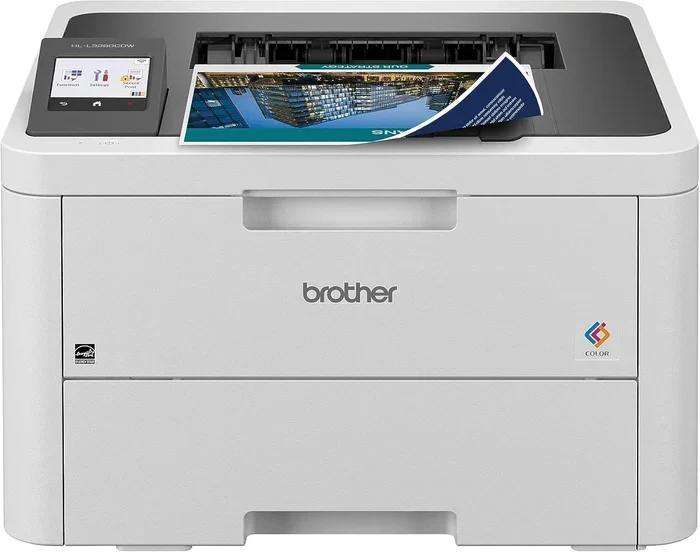
Yes, many Brother laser printers can print in color, but not all models do. Brother offers both monochrome and color laser printers, and choosing the right one depends on your needs, budget, and print volume. This guide explains everything you need to know about Brother color laser printing, from how it works to which models deliver the best results.
Key Takeaways
- Brother makes both color and monochrome laser printers: You must check your specific model to know what it supports.
- Color laser printing uses four toner cartridges: Cyan, magenta, yellow, and black combine to produce full-color output.
- Color Brother laser printers cost more upfront: But they save money on ink compared to inkjet printers over time.
- Print quality varies by model: Higher-end Brother printers offer sharper images and smoother color gradients.
- Regular maintenance keeps color prints vibrant: Replacing toner and cleaning drums extends printer life.
- Wireless and wired options are available: Many Brother color lasers support Wi-Fi, USB, and Ethernet connectivity.
📑 Table of Contents
- Can A Brother Laser Printer Print In Color?
- How Does Color Laser Printing Work?
- Popular Brother Laser Printers That Print in Color
- Brother Laser Printer Color vs Monochrome: Which Should You Choose?
- Tips for Getting the Best Color Prints from Your Brother Laser Printer
- Common Mistakes People Make with Brother Laser Printers
- Expert Insights on Brother Color Laser Printing
- Final Thoughts on Brother Laser Printer Color Printing
Can A Brother Laser Printer Print In Color?
The short answer is yes — but with a big asterisk. Not every Brother laser printer prints in color. Some models are strictly monochrome, meaning they only produce black and white pages. Other Brother printers come packed with color capabilities and can churn out vibrant documents, graphics, and photos.
So how do you know which one you have or which one you should buy? That is exactly what we are going to cover today. Whether you are setting up a home office or managing a small business, understanding your printer’s color options matters a lot. Brother laser printers are popular for good reason. They are reliable, fast, and affordable. But the color question trips up a lot of people.
In this guide, we will walk through everything you need to know. We will look at how color laser printing works, which Brother models support it, and what you can expect in terms of quality and cost. By the end, you will have a clear picture of whether a Brother laser printer fits your color printing needs.
Let us get into it. Color printing with a laser printer is not magic. It is science, engineering, and smart design working together. And Brother has been doing this for decades.
What Makes a Brother Laser Printer Color-Capable?
Every color laser printer needs four toner cartridges. These are cyan, magenta, yellow, and black. Together, they are called CMYK. When these four colors overlap on paper in tiny dots, your eyes see a full range of colors. It is similar to how a television screen mixes red, green, and blue light to create images.
A monochrome Brother printer only has a black toner cartridge. It cannot mix colors because it simply does not have the parts. So before you buy or assume, always check the product listing. Look for words like “color laser” or “multifunction color.” If it just says “laser printer,” it is probably monochrome.
Also, keep in mind that some Brother printers come as all-in-one machines. These include scanning, copying, and faxing features alongside printing. Many of these multifunction models support color. But again, you need to verify the specific model number.
How Does Color Laser Printing Work?
Understanding how a Brother color laser printer works helps you appreciate the technology. It also helps you troubleshoot issues when prints do not look right. The process is fascinating and quite different from inkjet printing.
The Basic Steps of Laser Color Printing
Here is a simple breakdown of what happens inside the printer when you hit print on a color document:
- The printer receives the digital file from your computer or phone.
- A laser beam draws the image onto a rotating drum inside the printer.
- The drum uses electrical charges to attract toner particles.
- Four separate drums or a combined unit handles each of the four colors — cyan, magenta, yellow, and black.
- The toner transfers from the drum onto the paper.
- Heat and pressure fuse the toner permanently into the paper fibers.
- The finished page comes out, dry and ready to handle.
That entire process happens in seconds. Laser printers are known for their speed. A Brother laser printer can print anywhere from 20 to 40 pages per minute, even in color. That is much faster than most inkjet printers.
Why Laser Color Prints Look Different from Inkjet Prints
Laser color prints tend to be sharper on text and solid graphics. They resist smudging and water damage because the toner is melted onto the paper. However, inkjet printers often produce smoother photo gradients and more vivid photo colors.
If you print mostly documents, spreadsheets, and presentations, a Brother color laser printer is an excellent choice. If you print lots of photographs, you might want to consider an inkjet instead. Each technology has its strengths.
It is also worth noting that computers play a big role in how printers function. From sending print jobs to managing color profiles, the relationship between your computer and printer affects output quality. Computers are used in many fields, including medicine, for precise imaging and document handling. The same principle applies to color management in printing.
Popular Brother Laser Printers That Print in Color
Brother offers a wide range of printers. Narrowing down the right model can feel overwhelming. Here are some of the most popular Brother color laser printers that users love.
Brother HL-L3210CW
This is a compact and affordable color laser printer. It prints up to 19 pages per minute in color. It supports wireless printing, so you can print from your phone or laptop without cables. The HL-L3210CW is a great choice for small offices and home use. It uses standard toner cartridges, which keeps replacement costs reasonable.
Brother MFC-L3710CW
This is a multifunction printer, meaning it prints, scans, copies, and faxes. It prints up to 27 pages per minute in color. The MFC-L3710CW has a larger touchscreen and supports Wi-Fi, Ethernet, and USB connections. It handles heavier print volumes well, making it suitable for busy offices.
Brother HL-L8360CDW
This is a high-volume color laser printer. It prints up to 33 pages per minute. It is built for teams and offices that need speed and reliability. The HL-L8360CDW includes a large paper tray and advanced wireless features. It is more expensive but delivers excellent value for heavy users.
| Model | Print Speed (Color) | Connectivity | Functions | Best For |
|---|---|---|---|---|
| HL-L3210CW | 19 ppm | Wi-Fi, USB | Print only | Home, small office |
| MFC-L3710CW | 27 ppm | Wi-Fi, Ethernet, USB | Print, scan, copy, fax | Small to medium office |
| HL-L8360CDW | 33 ppm | Wi-Fi, Ethernet, USB | Print only | High-volume office |
When choosing a model, think about your print volume, budget, and what features matter most to you. Printer connectivity is especially important in 2024 and beyond. Wireless printing lets you send jobs from anywhere in your home or office.
Brother Laser Printer Color vs Monochrome: Which Should You Choose?
This is one of the most common questions people ask. The answer depends entirely on what you print. Let us break it down clearly.
When to Choose a Color Brother Laser Printer
You should invest in a Brother color laser printer if any of these apply to you:
- You print marketing materials, flyers, or brochures.
- You need color charts, graphs, or presentations for work.
- You want professional-looking documents that stand out.
- You run a business that relies on visual branding.
- You print school projects or creative materials at home.
Color printing adds a professional touch. It makes documents more engaging and easier to read. For businesses, branded color materials build trust and credibility.
When a Monochrome Brother Laser Printer Is Enough
On the other hand, a black-and-white Brother laser printer makes sense if:
- You mostly print text documents, emails, and drafts.
- You want lower upfront costs.
- You print in high volumes and want to save on toner.
- Color is rarely or never needed.
- You are printing internal documents that do not need to impress.
Monochrome printers are simpler, cheaper, and faster. They also have fewer parts that can wear out. For many home users and offices, a monochrome Brother laser printer is all they will ever need.
Cost Comparison: Color vs Monochrome Toner
Color toner cartridges cost more than black ones. A single Brother color toner set (cyan, magenta, yellow, and black) can cost between $150 and $300 depending on the model. Monochrome black toner is usually $50 to $100.
However, laser toner lasts a long time. A single cartridge can print between 1,500 and 5,000 pages. When you compare the cost per page, laser printing is significantly cheaper than inkjet printing. Over months and years, the savings add up fast.
Also, keep in mind that computers and printers work as a system. In fields like medicine, computers are used alongside specialized printers for patient records, imaging, and documentation. Similarly, your home or office setup benefits from matching the right printer to the right computing environment.
Tips for Getting the Best Color Prints from Your Brother Laser Printer
Owning a Brother color laser printer is only half the battle. Getting the best results takes a little know-how. Here are practical tips that make a real difference.
Use the Right Paper
Not all paper is created equal. For the best color output, use paper designed for laser printers. Standard 75gsm or 80gsm paper works well for everyday documents. For presentations or marketing materials, try heavier paper around 100gsm to 120gsm. It gives your prints a more polished feel.
Check Your Color Settings
Before you print, open the print settings on your computer. Make sure the color mode is set to “Color” and not “Grayscale” or “Black and White.” This is a simple mistake that many people make. You think you are printing in color, but the printer quietly converts everything to black and white.
Replace Toner Cartridges on Time
Running a toner cartridge too low affects color quality. Colors may look faded or uneven. Brother printers usually display a warning when toner is running low. Replace cartridges promptly to maintain consistent print quality.
Clean the Printer Regularly
Dust and loose toner can affect print quality over time. Most Brother printers have a built-in cleaning cycle. Run this every few weeks, especially if you print frequently. It keeps the internal components in good shape and prevents streaks or spots on your pages.
Update Your Printer Drivers
Printer drivers are the software that tells your computer how to communicate with the printer. Outdated drivers can cause color inaccuracies, slow printing, or connection problems. Visit Brother’s official website regularly to download the latest drivers for your model.
Use Brother’s Color Management Tools
Brother provides software tools that let you fine-tune color output. These tools let you adjust brightness, contrast, and saturation. Playing with these settings can dramatically improve the look of your prints, especially for photos and graphics.
Common Mistakes People Make with Brother Laser Printers
Avoiding common mistakes saves time, money, and frustration. Here are the ones to watch out for.
- Buying the wrong model: Always double-check whether a Brother printer is color or monochrome before purchasing.
- Ignoring toner yield: High-yield cartridges cost more upfront but save money per page. Calculate your print volume first.
- Using wrong paper: Inkjet paper in a laser printer causes poor results and can damage the machine.
- Skipping maintenance: Neglecting cleaning cycles leads to degraded print quality over time.
- Not using genuine Brother toner: Third-party toner may save money but can void your warranty and harm print quality.
- Overlooking connectivity options: Choose a printer with the right connections for your devices — Wi-Fi, Ethernet, or USB.
These mistakes are easy to avoid. A little attention upfront saves a lot of headaches later. Printer maintenance is one of the most overlooked aspects of printer ownership. Taking five minutes every few weeks to run a cleaning cycle or check toner levels goes a long way.
Also, remember that printer drivers play a huge role in how your printer performs. Many color and quality issues stem from outdated or incorrectly installed drivers. Always keep your drivers up to date for the best experience.
Expert Insights on Brother Color Laser Printing
We asked printing professionals what they think about Brother laser printers for color output. Here is what they had to say.
“Brother color laser printers offer outstanding value,” says one industry expert. “They are reliable, fast, and the color quality is impressive for the price point. For small businesses, they are hard to beat.”
Another professional added, “The key to great color laser prints is consistency. Keep your toner fresh, use quality paper, and maintain the printer regularly. Brother machines make this easy with their built-in diagnostics and cleaning tools.”
These insights highlight a common theme: Brother printers deliver reliable color output when used correctly. The technology is mature and proven. Millions of businesses and homes worldwide rely on Brother printers every day.
It is also worth mentioning that printer technology has evolved significantly. Modern Brother printers use advanced color matching and resolution enhancements. Some models print at up to 2400 dots per inch (dpi) in color, producing sharp and detailed output that rivals more expensive brands.
Final Thoughts on Brother Laser Printer Color Printing
So, can a Brother laser printer print in color? Absolutely — as long as you choose a color-capable model. Brother offers an impressive lineup of color laser printers at various price points. From compact home printers to high-volume office machines, there is a Brother color laser printer for nearly everyone.
The key is understanding your needs. Think about how often you print in color, what you print, and how much you are willing to spend. A Brother color laser printer delivers fast, sharp, and cost-effective color output. It is one of the best investments you can make for your home or office.
Remember to maintain your printer, use the right paper, and keep your drivers updated. These simple steps ensure your Brother printer performs at its best for years to come. Color laser printing with Brother is reliable, efficient, and surprisingly affordable.
Take some time today to evaluate your printing needs. Check your current printer model, compare Brother color options, and make a choice that serves you well. The right printer makes a real difference in your daily workflow.
Frequently Asked Questions
Can all Brother laser printers print in color?
No, not all Brother laser printers print in color. Brother makes both monochrome (black and white) and color laser printers. Always check the model name and product description to confirm color capability before purchasing.
How much does a Brother color laser printer cost?
Prices vary by model. Entry-level Brother color laser printers start around $200 to $300. High-volume models can cost $600 or more. The initial cost is higher than monochrome printers, but the long-term savings on toner and maintenance make them worthwhile.
Is Brother color laser print quality good for photos?
Brother color laser printers produce good quality graphics and documents. However, for professional photo printing, inkjet printers generally deliver smoother gradients and more vivid colors. Laser printers excel at text, charts, and business graphics.
How long does a Brother color laser toner cartridge last?
A standard Brother toner cartridge can print between 1,500 and 5,000 pages, depending on the model and coverage. High-yield cartridges last even longer. Actual page yield varies based on how much color and how much black toner each page uses.
Can I print wirelessly from my phone to a Brother color laser printer?
Yes, many Brother color laser printers support wireless printing. You can print from smartphones and tablets using Brother’s iPrint&Scan app or through Wi-Fi Direct. Check your specific model to confirm wireless compatibility.
What is the difference between a Brother laser printer and an inkjet printer?
A laser printer uses toner and heat to fuse images onto paper, while an inkjet printer sprays liquid ink. Laser printers are faster, produce sharper text, and are more cost-effective for high-volume printing. Inkjet printers generally produce better photo quality and smoother color transitions.
=== CONCLUSION ===
Understanding can a Brother laser printer print in color comes down to choosing the right model and using it correctly. Brother offers excellent color laser printing options for every budget and need. From compact home printers to powerful office machines, the Brother lineup covers it all. Color laser printing is faster, sharper, and more cost-effective than many people realize. With the right Brother printer, your documents, presentations, and creative projects will look their best every time. Take action today — explore Brother color laser printers, compare models, and find the perfect fit for your printing needs.