Can Hp Handle Gaming And Still Deliver Great Performance
Can HP handle gaming? Absolutely. HP has built a strong lineup of gaming laptops and desktops that deliver solid performance at every price point. Whether you choose the HP Omen, HP Victus, or HP Pavilion gaming series, you get capable hardware designed for real gaming sessions. In this guide, we break down the specs, performance, and value so you can pick the best HP for your needs.
Let us get one thing straight. Can HP handle gaming? Yes, and it has been doing so for years. HP is not just a printer and office laptop company. It has a serious gaming division that competes with the big names in the industry. From sleek HP Omen machines to budget-friendly HP Victus models, HP offers a range of options for gamers at every level.
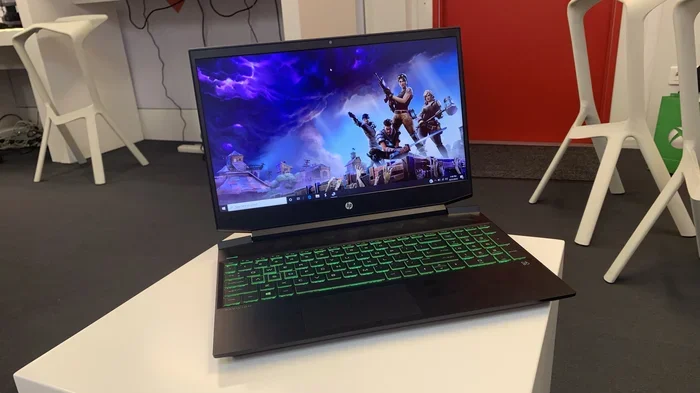
Maybe you are a college student looking for a HP Pavilion gaming laptop that can run Fortnite without lagging. Or perhaps you are a hardcore PC gamer hunting for a desktop rig that crushes every AAA title at max settings. Whatever your situation, this guide covers it all. We will look at the best HP gaming machines, break down the specs that matter, and help you decide if HP is the right choice for your gaming setup.
Key Takeaways
- HP gaming laptops offer strong value: Models like the HP Omen and HP Victus pack capable hardware at competitive prices.
- Gaming performance depends on specs: Your choice of GPU, processor, RAM, and storage determines how well HP handles modern games.
- HP has options for every budget: From affordable Pavilion gaming models to premium Omen desktops, there is an HP setup for every gamer.
- Thermal management matters: HP laptops include cooling features, but proper care keeps your system running smoothly during long sessions.
- Display quality enhances gameplay: High refresh rates and sharp resolution make a real difference in your gaming experience.
- HP desktops match or beat laptops: For raw power, an HP gaming desktop gives you more room to upgrade and customize.
📑 Table of Contents
- Understanding HP’s Gaming Lineup
- Key Specs That Determine Gaming Performance
- Real-World Gaming Performance on HP Machines
- HP Gaming Laptops vs. Desktops: Which Is Right for You?
- Tips to Maximize HP Gaming Performance
- Common Mistakes to Avoid When Buying an HP for Gaming
- Expert Insights: What Reviewers Say About HP Gaming
- Final Verdict: Can HP Handle Gaming?
Understanding HP’s Gaming Lineup
HP divides its gaming products into several distinct series. Each series targets a different type of gamer. Understanding these lines helps you pick the right machine. Here is a quick look at what HP offers.
HP Omen: The Flagship Gaming Series
The HP Omen line is HP’s premium gaming brand. These laptops and desktops are built for serious gamers who want top-tier performance. The Omen series features Intel Core and AMD processors paired with NVIDIA GeForce RTX graphics cards. You get high refresh rate displays, advanced cooling systems, and sleek designs that look great on any desk.
HP Omen laptops typically come with 16GB or more of RAM and fast SSD storage. The displays often run at 144Hz or 240Hz, which means smoother visuals during fast-paced games. If you want the best gaming performance HP offers, the Omen series is where you should look first.
HP Victus: Affordable Gaming Without Compromise
The HP Victus series brings gaming specs to a lower price point. These laptops are designed for casual and mid-range gamers. You still get dedicated graphics cards and solid processors, but at a price that does not hurt your wallet.
HP Victus machines usually feature NVIDIA GeForce GTX or RTX entry-level and mid-range GPUs. They come with 8GB to 16GB of RAM and 512GB SSDs. For games like Rocket League, Minecraft, or Valorant, a Victus laptop handles gaming very well. It is a great starting point for anyone new to PC gaming.
HP Pavilion Gaming: The Budget-Friendly Option
The HP Pavilion gaming line is HP’s most affordable gaming option. These laptops target casual gamers and students who want a machine that doubles as a study tool and a gaming device. Pavilion gaming models come with integrated or entry-level dedicated GPUs.
While they cannot run the heaviest AAA titles at ultra settings, they handle popular esports titles and older games with ease. If your budget is tight and you still want to enjoy HP handle gaming sessions, the Pavilion line is worth considering.
HP Gaming Desktops: Power Without Limits
Do not overlook HP desktops. An HP gaming desktop gives you far more power and upgrade potential than any laptop. You can swap out graphics cards, add more RAM for gaming, and install larger storage drives. HP offers pre-built desktops like the Omen Desktop and the Pavilion Gaming Desktop.
Desktops also run cooler and quieter than laptops. They do not suffer from thermal throttling during extended gaming sessions. If you want maximum frame rate and long-term value, an HP desktop is hard to beat.
Key Specs That Determine Gaming Performance
When you ask, “Can HP handle gaming?” the real answer depends on the specs inside the machine. Not all HP laptops are created equal. Here are the components that matter most.
Graphics Card (GPU)
The dedicated GPU is the single most important part for gaming. HP gaming laptops come with NVIDIA GeForce RTX series cards or AMD Radeon GPUs. The RTX 3050 and RTX 4050 handle 1080p gaming well. The RTX 4060 and RTX 4070 push higher settings and resolutions. If you see an HP laptop with a dedicated GPU, that is a strong sign it can handle modern games.
Processor (CPU)
The processor speed affects how smoothly games run, especially in open-world titles. HP uses Intel Core i5 and i7 processors, as well as AMD Ryzen chips. A faster CPU means better frame rate stability and quicker load times. For most gamers, an Intel Core i5 or AMD Ryzen 5 is the sweet spot.
RAM and Storage
Modern games demand at least 8GB of RAM, but 16GB is the sweet spot for smooth gaming performance. HP Omen and Victus laptops typically come with 16GB. Storage matters too. An SSD storage drive loads games much faster than a traditional hard drive. Most HP gaming machines now include 512GB or 1TB NVMe SSDs.
Display Quality
A great display resolution and high refresh rate make gaming on HP machines feel incredible. Look for Full HD (1080p) panels at 144Hz or higher. Some premium Omen models offer 2K or even 4K displays. A fast refresh rate reduces motion blur and gives you a competitive edge in shooters.
Real-World Gaming Performance on HP Machines
Theory is great, but what does HP handle gaming actually look like in practice? Let us look at some real-world performance scenarios.
Esports Games (Fortnite, Valorant, Apex Legends)
Esports titles are less demanding than AAA games. Even an HP Victus or Pavilion gaming laptop runs these titles smoothly at high settings. You can expect frame rates above 100 FPS on most esports titles with an HP laptop that has a dedicated GPU and a 144Hz display. The gameplay feels buttery smooth and responsive.
AAA Titles (Cyberpunk 2077, Hogwarts Legacy, Alan Wake 2)
Heavy games demand serious hardware. On an HP Omen with an RTX 4060 or higher, you can run these titles at medium to high settings with playable frame rates around 50-60 FPS. Drop to medium settings for stable performance. An HP desktop with an RTX 4070 or better can push these games to high or ultra settings with ease.
Battery Life While Gaming
One thing to keep in mind. Battery life gaming is not great on any laptop. HP gaming laptops typically last 2 to 4 hours during intense gaming sessions. You will want to plug in while you play. Some HP models offer better battery life for lighter games or when you are not pushing the GPU hard.
HP Gaming Laptops vs. Desktops: Which Is Right for You?
Choosing between a laptop and a desktop is one of the biggest decisions for any gamer. Both options have clear strengths.
Portability vs. Power
HP gaming laptops win on portability. You can carry them to class, to a friend’s house, or to a LAN party. But they come with trade-offs. The GPU is less powerful than a desktop equivalent, and thermal limits are tighter. HP desktops, on the other hand, offer raw power and easy upgrade paths. You can swap parts as technology advances.
Price Comparison
Generally, HP gaming desktops deliver more performance per dollar. A desktop with an RTX 4060 costs less than a laptop with the same GPU because laptops need compact, power-efficient components. Here is a simple comparison.
| Feature | HP Gaming Laptop | HP Gaming Desktop |
|---|---|---|
| Portability | Excellent | Poor |
| Raw Power | Good to Great | Great to Excellent |
| Upgradeability | Limited | Excellent |
| Price Range | $600 – $2,500 | $700 – $2,000 |
| Battery Life (Gaming) | 2-4 hours | N/A (plugged in) |
| Cooling | Good | Excellent |
Best Choice by Gamer Type
Choose an HP laptop if you need portability and play games in different locations. Choose an HP desktop if you game in one spot and want maximum gaming performance for the best value. Students who move between classes will love an HP Victus or Pavilion gaming laptop. Home gamers who want to crush every title should strongly consider an HP Omen desktop.
Tips to Maximize HP Gaming Performance
Once you have your HP machine, a few simple steps can make a huge difference. Here are practical tips to get the most out of your HP for gaming.
Keep Your Drivers Updated
NVIDIA and AMD release regular driver updates that improve gaming performance and fix bugs. Use the NVIDIA GeForce Experience app or AMD Adrenalin software to keep your GPU drivers current. HP also releases BIOS and chipset updates through their support site.
Manage Your Thermal Settings
Thermal cooling is critical during long gaming sessions. HP Omen laptops have built-in cooling profiles you can adjust. Use the HP Omen Gaming Hub software to monitor temperatures and fan speeds. Keep your laptop on a hard, flat surface, not a bed or couch, to allow proper airflow.
Optimize Windows for Gaming
Windows has a built-in Game Mode that prioritizes system resources for games. Turn it on in Settings. Disable unnecessary startup programs to free up RAM and CPU power. Set your HP laptop to High Performance mode in the power settings for the best frame rate during gameplay.
Add More RAM if Needed
Many HP gaming laptops allow RAM upgrades. If your machine came with 8GB, adding another 8GB stick can double your memory. This helps with multitasking and keeps your games running smoothly. Check your specific HP model before purchasing RAM to ensure compatibility.
Use an External Monitor for Better Visuals
HP gaming laptops have great screens, but connecting to an external monitor can elevate your experience. A 27-inch 144Hz monitor gives you more screen space and smoother visuals. Many HP Omen models support multiple displays, so you can game on one screen and chat on another.
Common Mistakes to Avoid When Buying an HP for Gaming
Not every HP laptop marketed as “gaming” is created equal. Watch out for these common pitfalls.
Buying Based on Name Alone
Just because a laptop says “HP Pavilion” does not mean it is a gaming machine. Some Pavilion models are regular productivity laptops with no gaming capability. Look for the “Gaming” suffix and check the GPU specs before buying.
Ignoring Thermal Design
A powerful GPU means nothing if the laptop cannot keep it cool. Some budget HP gaming laptops have weak cooling systems that cause thermal throttling. This drops your frame rate during intense moments. Check reviews for thermal performance before making a purchase.
Skimping on RAM and Storage
4GB of RAM will not run modern games well. Always aim for at least 8GB, preferably 16GB. And avoid laptops with only HDD storage. An SSD makes a massive difference in load times and overall system responsiveness.
Overlooking the Display
A powerful GPU paired with a slow 60Hz display wastes potential. For competitive gaming, prioritize a high refresh rate panel. For story-driven games, focus on display resolution and color accuracy. The best HP gaming machines balance both.
Expert Insights: What Reviewers Say About HP Gaming
Tech reviewers consistently praise HP for offering strong gaming value. The HP Omen 16 and HP Victus 15 receive positive marks for balancing performance and price. Reviewers highlight HP’s attention to cooling and display quality as standout features. Many note that HP gaming machines hold their resale value better than some competitors.
Experts also point out that HP’s gaming desktop line offers excellent bang for your buck. The pre-built systems come tested and ready to use, saving you the hassle of assembling a PC yourself. For first-time builders or casual gamers, an HP pre-built desktop is a smart choice.
Final Verdict: Can HP Handle Gaming?
The answer is a clear yes. HP handle gaming very well across its lineup of laptops and desktops. The HP Omen series delivers premium performance for serious gamers. The HP Victus and Pavilion Gaming lines offer excellent entry points for casual and budget-conscious players. And HP desktops provide unbeatable power and upgrade flexibility.
Your choice depends on your budget, your gaming habits, and whether you need portability. No matter which HP machine you pick, you are getting a system designed and tested for real gaming workloads. HP has earned its place in the gaming hardware space, and it continues to push forward with new innovations each year.
So the next time someone asks, “Can HP handle gaming?” you can confidently say yes. Pick the right model, match it to your needs, and enjoy a great gaming experience. HP has you covered.
Frequently Asked Questions
Can HP handle gaming at high settings?
Yes, HP gaming laptops and desktops with dedicated NVIDIA RTX graphics cards can handle high settings in most games. The HP Omen series, in particular, excels at high settings for AAA titles. For the best results, pair a strong GPU with at least 16GB of RAM and a fast SSD.
Is HP good for gaming on a budget?
Absolutely. The HP Victus and HP Pavilion gaming lines offer capable gaming performance at affordable prices. These machines handle popular esports titles and lighter AAA games with ease. You do not need to spend a fortune to enjoy solid gaming on an HP machine.
How long do HP gaming laptops last?
With proper care, an HP gaming laptop lasts 4 to 6 years. Keeping the cooling system clean, updating drivers, and avoiding extreme temperatures helps extend its lifespan. HP builds its gaming machines with durable materials that withstand regular use.
Can I upgrade an HP gaming laptop?
Many HP gaming laptops allow RAM and storage upgrades. Some models also let you replace the Wi-Fi card or add an extra drive. However, the GPU and CPU are usually soldered and cannot be upgraded. Check your specific HP model’s upgradeability before purchasing.
Does HP gaming overheat during long sessions?
HP gaming laptops include advanced cooling systems with dual fans and heat pipes. Most models maintain safe temperatures even during extended gaming sessions. Using a cooling pad and keeping vents unobstructed helps prevent overheating. Avoid using your HP laptop on soft surfaces like beds or blankets.
What is the best HP gaming laptop right now?
The HP Omen 16 is widely regarded as HP’s best gaming laptop for 2024. It offers excellent performance with RTX 40-series GPUs, a high refresh rate display, and strong thermal management. For budget buyers, the HP Victus 15 delivers great value and solid gaming performance.
=== CONCLUSION ===
Can HP handle gaming? The evidence is clear. HP has built a diverse and capable gaming lineup that serves every type of player. Whether you choose a powerful HP Omen laptop, a budget-friendly HP Victus, or a mighty HP gaming desktop, you get reliable performance and solid build quality. The key is matching the right HP model to your gaming needs and budget.
Focus on the specs that matter. Prioritize the GPU, processor, RAM, and storage. Keep your system well-maintained with driver updates and proper cooling. And remember, the best HP for gaming is the one that fits your lifestyle and your wallet. Start exploring HP’s gaming lineup today and find the perfect machine for your next adventure.