Can I Charge My Ipad From Any Usb Port And Find Out
Can I Charge My iPad From Any USB Port? The short answer is yes, but not all ports give your iPad the power it needs. You need the right USB port type, a compatible charger, and enough power output to charge your iPad battery properly. Using the wrong port can lead to slow charging speed or even a charging issue. This guide breaks down everything you need to know in simple terms.
Have you ever been stuck with a low iPad battery and a random USB port nearby? Maybe it is at an airport, a café, or a hotel room. You plug in your cable and wait. But nothing happens. Or it takes forever. This happens to a lot of people. The truth is, you cannot just plug your iPad into any USB port and expect it to work perfectly. The port needs to deliver enough power. The cable needs to be the right type. And the charging adapter matters too. In this guide, we will walk through everything you need to know about charging your iPad from a USB port. We will keep it simple and practical. No jargon. No confusion. Just clear answers you can use right away.
Whether you have an older iPad or the latest iPad Pro charging model, this article covers it all. We will look at different USB port types, explain power delivery, and share tips to avoid common charging issues. By the end, you will know exactly which ports work, which ones do not, and how to get the best charging speed every time. Let us get into it.
Key Takeaways
- Not all USB ports are equal: Some deliver enough power to charge an iPad, while others cannot.
- USB-C ports are best for modern iPads: They support higher power delivery and fast charging.
- USB-A ports often lack sufficient wattage: They may charge your iPad very slowly or not at all.
- Use the right charging cable and wall adapter: This ensures safe and efficient iPad charging.
- A power bank can work too: But it must support the right voltage and amperage.
- Check the power output rating: This tells you if a port can handle your iPad’s charging needs.
- Avoid charging issues by using certified accessories: Cheap cables can damage your device.
📑 Table of Contents
- Understanding USB Ports and How They Work
- Can You Charge an iPad From Any USB Port?
- USB-A vs USB-C: What Is the Difference for Charging?
- How to Know If a USB Port Can Charge Your iPad
- Fast Charging vs Slow Charging: What You Need to Know
- Best Ways to Charge Your iPad Safely and Quickly
- Common Mistakes People Make When Charging Their iPad
- Expert Insights: What Tech Professionals Say About USB Charging
- Key Takeaways
- Conclusion
Understanding USB Ports and How They Work
Before we answer the big question, let us talk about USB ports. Not all USB ports are the same. They come in different shapes, sizes, and power levels. Understanding the basics helps you make better choices. Here is a quick look at the most common types you will encounter.
What Is a USB Port?
A USB port is a connection point on a device or charger. It lets you plug in a cable to transfer data or send power. The term USB stands for Universal Serial Bus. It is a standard that has been around for decades. Over the years, USB technology has improved. Newer versions deliver more power and transfer data faster. But older ports are still out there, and they work differently.
The Main Types of USB Ports
You will mostly run into three types of USB ports when charging an iPad. Each one has its own strengths and limits.
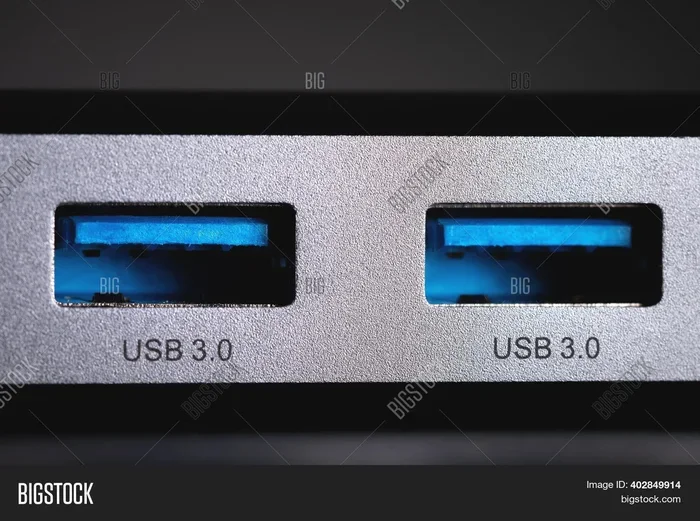
- USB-A Port: This is the classic rectangular port. You find it on older computers, wall adapters, and USB hubs. It is very common but usually delivers lower power.
- USB-C Port: This is the smaller, oval-shaped port. Modern iPads and many laptops use it. It supports higher power delivery and faster charging speed.
- USB-C Power Delivery (USB-PD): This is a protocol, not a physical port. It allows devices to negotiate higher power levels. It is what makes fast charging possible on newer iPads.
Knowing which port you are dealing with is the first step. If you plug your iPad into a USB-A port, the results may surprise you. And if you use a USB-C port with proper power delivery, the experience is completely different.
Can You Charge an iPad From Any USB Port?
So, can you charge an iPad from any USB port? The honest answer is both yes and no. Let us break it down. Any USB port that provides power can technically charge an iPad. But the real question is whether it charges it well. A weak port will give you a trickle charge. Or worse, it will not charge at all under heavy use.
Why Some USB Ports Fail to Charge an iPad
Here is the issue. iPads need a certain amount of wattage to charge properly. A standard USB-A port on a computer usually delivers about 2.5 watts. That is very low. Your iPad needs at least 10 watts for normal charging. Some models need 20 watts or more for fast charging. So when you plug into a weak port, your iPad may show a charging icon but the battery percentage drops instead of rising. This is a very common charging issue.
Another reason is the charging cable. Not all cables handle the same amount of current. A cheap or damaged cable can limit power flow. Even if the port is strong, a bad cable will slow things down or stop charging entirely.
When a USB Port Works Great for iPad Charging
On the flip side, some USB ports are perfect for iPads. A USB-C port on a modern laptop or a dedicated wall adapter with USB-C output can charge your iPad fast. These ports deliver 18 watts or more. They meet or exceed the power needs of most iPad models. If you have a compatible charger and a good cable, you will see the battery icon filling up quickly.
Here are the situations where USB port charging works well:
- You use a USB-C port with a high-wattage wall adapter.
- You use a power bank that supports USB-C and at least 20 watts of output.
- You plug into a USB-C port on a laptop that supports USB power delivery.
- You use a certified charging cable that matches your iPad model.
USB-A vs USB-C: What Is the Difference for Charging?
This is one of the most important comparisons for iPad owners. The type of port you use makes a huge difference in charging speed and reliability.
USB-A Ports and iPad Charging
USB-A ports are the older, larger rectangular connectors. They are still everywhere. You find them on desktop computers, older wall adapters, and many USB hubs. The problem is that most USB-A ports were designed for phones and small devices. They typically output 5 watts or less. That is not enough for an iPad.
If you try to charge an iPad through a USB-A port on a computer, you might notice:
- The battery icon shows a charging symbol but the percentage does not change.
- The iPad slowly loses battery even while plugged in.
- Charging takes many hours to reach even 50 percent.
This does not mean the port is broken. It just means it cannot supply enough power. A standard USB-A port on a computer usually provides about 0.5 to 2.5 watts. An iPad needs at least 10 watts. The gap is clear.
USB-C Ports and iPad Charging
USB-C is the modern standard for iPad charging. It is smaller, reversible, and much more powerful. Most iPads released after 2018 use USB-C. The latest iPad Pro models use USB-C with USB power delivery support. This means they can accept up to 20 watts or more from a proper wall adapter.
Here is why USB-C is better for iPad charging:
- It supports higher power delivery wattage.
- It enables fast charging on compatible models.
- It works with a wider range of compatible chargers.
- It handles data transfer and power at the same time.
If you want the best charging speed, always use a USB-C port with a proper charging adapter. It makes a world of difference.
How to Know If a USB Port Can Charge Your iPad
Not sure if a port will work? You can check a few things before you plug in. This saves time and prevents frustration.
Check the Port Shape
Look at the port on the device or charger. Is it the wide, flat rectangle? That is USB-A. Is it the small oval shape? That is USB-C. If you have a USB-A port, it may not charge your iPad well. If you have USB-C, you have a much better chance.
Look at the Power Rating
Most wall adapters and USB hubs list their output on the label. Look for watts (W) or volts (V) and amps (A). Here is a quick guide:
- 5W (5V / 1A): Too weak for most iPads. May work on older iPad Mini models.
- 10W (5V / 2A): Standard charging for most iPads. Works fine but not fast.
- 18W or higher: Supports fast charging on newer iPad models.
- 20W to 30W: Ideal for iPad Pro charging and iPad Air models.
If a port or adapter does not list its output, assume it is too weak for an iPad. When in doubt, use your original iPad charger or a known high-quality wall adapter.
Test It Out
The easiest way to test a port is to plug in your iPad and check the battery after 15 minutes. If the battery percentage went up, the port works. If it stayed the same or dropped, the port is too weak. This simple test works every time and takes almost no effort.
Fast Charging vs Slow Charging: What You Need to Know
Not all charging speed is created equal. Your iPad supports fast charging on certain models, but only with the right equipment. Understanding this helps you get the most out of every charging session.
What Is Fast Charging?
Fast charging means your iPad battery reaches 50 percent in about 30 minutes. This requires a wall adapter that delivers at least 18 to 20 watts and a USB-C to USB-C cable or a USB-C to Lightning cable depending on your iPad model. Not all charging cables support fast charging. The cable must be rated for higher current.
Why Slow Charging Happens
Slow charging happens for a few reasons. A weak USB port is one. A low-quality charging cable is another. Using a USB hub that splits power between multiple devices can also slow things down. Even charging your iPad while using it heavily can reduce charging speed because the screen and apps draw power faster than the port can supply.
Here are common causes of slow charging speed:
- Using a USB-A port instead of USB-C.
- Using a damaged or uncertified charging cable.
- Plugging into a USB hub that shares power across ports.
- Using a wall adapter with too low wattage.
- Running heavy apps while charging.
If you notice slow charging, try switching to a different port or a different cable. It often solves the problem right away.
Best Ways to Charge Your iPad Safely and Quickly
Now that you understand the basics, let us talk about the best ways to charge your iPad. These methods are reliable, safe, and efficient.
Use the Original Apple Charger
The best iPad charger is the one that came with your device. Apple designs their charging adapter to match the iPad’s power needs perfectly. If you still have it, use it. It gives you the safest and most consistent charging speed.
Invest in a Quality USB-C Wall Adapter
If you lost your original charger, buy a good USB-C wall adapter with at least 20 watts of output. Look for USB power delivery (USB-PD) support. Brands like Anker, Belkin, and Apple make reliable options. Avoid cheap no-name chargers. They may damage your iPad battery over time.
Use a Power Bank for On-the-Go Charging
A power bank is a portable battery you can carry anywhere. It is great for travel or long days away from an outlet. But not all power banks can charge an iPad. You need one with USB-C output and at least 18 to 20 watts. Check the label before you buy. A weak power bank will give you the same slow results as a weak USB port.
Be Careful With USB Hubs and Computer Ports
A USB hub is useful for connecting multiple devices. But when you plug your iPad into a hub, the power gets split. This can lead to very slow charging speed or no charging at all. If you must use a hub, plug it into a powered port and avoid connecting too many devices at once.
Quick Tips for Better Charging
- Always use a certified charging cable from a reputable brand.
- Keep your iPad cool while charging. Heat slows down battery charging.
- Turn on Airplane Mode while charging for faster results.
- Close heavy apps that drain power while you charge.
- Check your charging cable for fraying or damage regularly.
- Use a wall adapter instead of a computer port for the best charging speed.
Common Mistakes People Make When Charging Their iPad
Many people make simple mistakes that hurt their charging speed and iPad battery health. Here are the ones to avoid.
Using Any Cable You Find
Not all charging cables are created equal. A free cable from a gas station might seem convenient. But it could be underpowered or unsafe. Always use a cable that is rated for your iPad model. Look for MFi certification (Made for iPhone/iPad) on Lightning cables.
Ignoring the Power Rating
People often grab any wall adapter they have on hand. But a 5-watt charger designed for an iPhone will charge an iPad very slowly. Always match your charging adapter to your iPad’s power needs. Check the label for wattage before you plug in.
Charging Through a Damaged Port
A dirty or damaged USB port can cause a charging issue. Dust and lint build up inside ports over time. Take a moment to clean the port gently with a dry brush or compressed air before plugging in. If the port is physically damaged, get it repaired.
Leaving Your iPad Plugged in Overnight
Modern iPads have battery management systems. But leaving your device plugged in all night for months can wear down the iPad battery over time. It is better to unplug it once it reaches 100 percent.
Expert Insights: What Tech Professionals Say About USB Charging
Tech experts agree on a few key points when it comes to charging your iPad from a USB port. First, always match the power source to your device. A USB-C port with USB power delivery is the gold standard for modern iPads. Second, never underestimate the importance of a good charging cable. The cable is the bridge between the port and your device. A poor cable ruins the experience no matter how good the port is. Third, pay attention to heat. If your iPad gets very hot while charging, unplug it and let it cool down. Excessive heat is bad for battery health and can cause long-term damage.
Experts also recommend keeping a spare wall adapter and charging cable at your desk, in your bag, and in your car. This way, you are never stuck with a dead iPad battery and no way to charge it. A little preparation goes a long way.
Key Takeaways
- Not all USB ports are equal: Some deliver enough power to charge an iPad, while others cannot.
- USB-C ports are best for modern iPads: They support higher power delivery and fast charging.
- USB-A ports often lack sufficient wattage: They may charge your iPad very slowly or not at all.
- Use the right charging cable and wall adapter: This ensures safe and efficient iPad charging.
- A power bank can work too: But it must support the right voltage and amperage.
- Check the power output rating: This tells you if a port can handle your iPad’s charging needs.
- Avoid charging issues by using certified accessories: Cheap cables can damage your device.
Conclusion
So, can I charge my iPad from any USB port? Yes, but with important caveats. The port must deliver enough power. The cable must be the right type and in good condition. And the wall adapter or power source must match your iPad’s needs. Using a weak USB-A port on an old computer will give you slow results at best. Using a USB-C port with proper power delivery and a quality charging adapter gives you fast, safe charging speed.
The key takeaway is simple. Not every USB port is created for the job. Take a moment to check the port type, the power rating, and your charging cable quality. A little knowledge saves time, protects your iPad battery, and keeps your device running at its best. Next time you find yourself near a USB port, you will know exactly whether it can handle the job. And if it cannot, you will know what to do instead. Keep your compatible charger handy, invest in good accessories, and your iPad will always be ready when you need it.
Share this guide with anyone who has ever wondered about USB charging for their iPad. A little awareness goes a long way. Now you know the facts, and you can charge with confidence.
Frequently Asked Questions
Can I charge my iPad from a computer USB port?
Yes, but it depends on the port type. A USB-A port on a computer usually delivers too little power. It may charge your iPad very slowly or not at all. A USB-C port on a newer computer is much better and can charge at normal or fast speeds.
Why is my iPad not charging when I plug it into a USB port?
This is a common charging issue. It usually happens because the port does not provide enough wattage. A weak wall adapter, a damaged charging cable, or a dirty port can also cause this. Try a different port or a different cable first.
What is the best USB port for iPad charging?
A USB-C port with USB power delivery support is the best option. It provides enough wattage for normal and fast charging. Always use a compatible charger and a certified charging cable for the best results.
Can I use a power bank to charge my iPad?
Yes, but the power bank must have USB-C output and at least 18 to 20 watts of power. A low-capacity power bank designed for phones will not charge an iPad effectively. Check the power output rating before you buy.
Does the charging cable matter for iPad USB charging?
Absolutely. The charging cable is just as important as the port. A cheap or damaged cable can limit power flow and cause slow charging speed. Always use a certified cable that matches your iPad model, such as a Lightning cable or a USB-C cable.
Is it safe to charge my iPad from a USB hub?
It is safe but not ideal. A USB hub splits power between multiple devices. This can reduce charging speed significantly. If you must use a hub, plug it into a powered source and avoid connecting too many devices at once.