Can A Mic Be Both USB and XLR Everything You Need To Know
Yes, a microphone can absolutely be both USB and XLR. These hybrid mics give you the freedom to plug directly into a computer or connect to a professional audio interface. They are perfect for podcasters, streamers, and musicians who want one mic that works in any situation. This guide covers everything you need to know about dual-output microphones, their benefits, and how to choose the right one for your needs.
Can a mic be both USB and XLR? The short answer is yes. You are not imagining things. Hybrid microphones that offer both connection types are real, and they are changing the way people record audio at home.
If you have ever shopped for a microphone, you know the world of audio gear can feel overwhelming. USB mics are simple and easy. XLR mics look professional and sound great. But what if you want the best of both worlds? That is exactly where hybrid microphones come in.
In this guide, we will break down everything you need to know. We will explain how these mics work, why they matter, and how to pick the right one for your setup. Whether you are a beginner podcaster or a seasoned musician, this article has you covered.
Key Takeaways
- Dual connectivity is real: Many microphones now offer both USB and XLR outputs in a single device.
- Hybrid mics offer flexibility: You can switch between plug-and-play USB mode and professional XLR mode effortlessly.
- Audio quality can be excellent: Top hybrid mics deliver studio-grade sound for both beginners and pros.
- Built-in audio interfaces: USB models often include a built-in sound card, making them easy to use right out of the box.
- Consider your needs first: Choose a hybrid mic based on your recording environment, budget, and long-term goals.
- Watch for common pitfalls: Latency, driver issues, and cable quality can affect performance with either connection type.
📑 Table of Contents
- What Does It Mean When a Mic Is Both USB and XLR?
- Why Would You Want a Mic That Does Both?
- How Hybrid Microphones Work Inside
- Pros and Cons of USB and XLR Hybrid Mics
- Popular Hybrid Microphones on the Market
- How to Choose the Right Hybrid Microphone
- Common Mistakes People Make With Hybrid Mics
- Expert Insights on Hybrid Microphone Technology
- Quick Tips for Getting the Best Sound From Your Hybrid Mic
- Conclusion
What Does It Mean When a Mic Is Both USB and XLR?
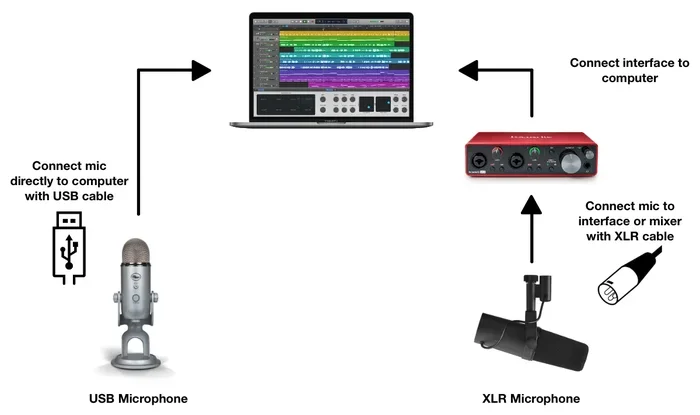
A microphone that offers both USB and XLR connections is called a hybrid microphone or a dual-output mic. It gives you two ways to connect the microphone to your recording device. You can use the USB cable for a direct connection to your computer. Or you can use the XLR cable to connect to an audio interface or a mixing board.
This dual connectivity means one microphone can serve many purposes. You can use it for quick home recordings with USB. Then switch to XLR when you need higher audio quality or a more professional setup.
How USB and XLR Connections Work
Let us quickly look at how each connection type works. This will help you understand why having both is so useful.
USB Connection: A USB microphone has a built-in audio interface. It converts analog sound into digital signals that your computer can read. You simply plug it in, and it works. This is what people mean by plug and play. No extra gear is needed.
XLR Connection: XLR microphones send an analog signal through a cable. You need an external audio interface or a mixer to convert that signal. This setup gives you more control over your sound. It also allows for better signal quality in professional environments.
When a mic has both, it essentially contains two internal circuits. One handles the USB digital output. The other handles the XLR analog output. You can switch between them, usually with a simple switch on the mic itself.
Why Would You Want a Mic That Does Both?
You might be wondering why anyone would need a microphone with dual outputs. The answer comes down to flexibility and convenience. Here are some real reasons people choose these mics.
One Mic for Every Situation
Imagine you record podcasts at home. You plug your mic into your laptop with USB. Simple and easy. But now you are heading to a studio for a recording session. You bring the same mic and connect it with an XLR cable to the studio board. One mic, two setups. That is the power of a hybrid design.
Future-Proof Your Setup
When you start out, a USB mic is all you need. But as you grow, you might want better audio quality. A hybrid mic lets you upgrade your setup without buying a new microphone. You just add an audio interface later. This saves you money in the long run.
Backup and Redundancy
In live streaming or live events, things can go wrong. A USB cable might fail. But your XLR connection might still work. Having both options on one mic means you always have a backup plan. This is especially important for streamers and live performers.
Easy Sharing
Need to let a friend record a quick voice memo? They can plug the mic straight into their laptop with USB. You can then use the XLR connection for your own higher-quality recordings. The same mic works for everyone.
How Hybrid Microphones Work Inside
Understanding the inner workings of a dual-output microphone helps you appreciate why these mics cost more than basic models. Let us take a peek inside.
The Capsule
Every microphone starts with a capsule. This is the part that picks up sound. In most hybrid mics, the capsule is the same whether you use USB or XLR. The sound quality does not change based on the connection type.
The Internal Circuitry
Inside the mic body, there are two separate signal paths. One path sends the signal digitally through the USB connector. The other path sends the signal as an analog wave through the XLR connector. A switch on the mic lets you choose which path to use.
The Built-In Audio Interface
When you use the USB connection, the mic uses its built-in audio interface. This is a small sound card inside the microphone. It handles the analog-to-digital conversion. Some hybrid mics have better built-in interfaces than others. This is where you will notice a difference in price.
Phantom Power Considerations
If your hybrid mic is a condenser microphone, it needs phantom power. When using XLR, the audio interface supplies this power. When using USB, the built-in interface handles it. This is usually seamless, but it is good to know how it works behind the scenes.
Pros and Cons of USB and XLR Hybrid Mics
Like any product, hybrid microphones have strengths and weaknesses. Let us look at both sides honestly.
The Pros
- Versatility: One mic works in multiple setups. You do not need to buy separate mics for different uses.
- Ease of use: USB mode lets you start recording in seconds with no extra equipment.
- Professional quality: XLR mode gives you access to higher-end audio gear when you need it.
- Cost savings: Buying one quality hybrid mic is cheaper than buying two separate mics.
- Portability: Traveling with one mic that works everywhere is much easier than juggling multiple setups.
- Scalability: Start simple with USB and grow into a professional XLR setup over time.
The Cons
- Higher price: Hybrid mics cost more than a basic USB or basic XLR mic.
- Jack of all trades: Some hybrid mics do not sound as good as dedicated mics in either category.
- More complexity: Having two output options means more things that can go wrong if you are not careful.
- Driver issues: USB connections sometimes require drivers or software updates on certain computers.
- Bulkier design: The extra circuitry inside can make hybrid mics heavier and bulkier.
Popular Hybrid Microphones on the Market
There are several great hybrid mics available right now. Here are some of the most popular options for different needs and budgets.
Shure MV7
The Shure MV7 is one of the most well-known hybrid mics. It sounds fantastic in both USB and XLR modes. It is designed specifically for podcasters and content creators. The mic has a built-in touch panel for controlling volume and monitoring. It is a top pick for anyone who wants a reliable dual-output mic.
Audio-Technica AT2020USB+
This mic is a favorite among home studio users. It offers USB connectivity right out of the box. It also has an XLR output for when you are ready to step up. The Audio-Technica AT2020USB+ is a condenser mic with clear, detailed sound. It is a great entry point into hybrid recording.
Rode NT-USB Mini
The Rode NT-USB Mini is compact and affordable. It delivers surprisingly good sound for its price. It includes a built-in headphone jack for zero-latency monitoring. While it also has a 3.5mm output, it pairs well with XLR adapters for more advanced setups.
Rode PodMic USB
The Rode PodMic USB is a dynamic hybrid mic built for voice recording. It has both USB and XLR outputs. Its rich, warm sound makes it ideal for podcasts and voiceovers. It is rugged and built to last.
How to Choose the Right Hybrid Microphone
Not all dual-output mics are created equal. Here are the key factors to consider before you buy.
Your Recording Environment
Where will you use the mic most? If you record in a quiet home office, a condenser hybrid mic might be your best bet. If you are in a noisy space or record on the go, a dynamic hybrid mic like the Rode PodMic USB will reject more background noise.
Your Current Setup
Do you already own an audio interface? If yes, an XLR-focused hybrid mic might make more sense. If you are starting from scratch, a USB-first hybrid mic gives you the easiest path to getting started.
Audio Quality Expectations
Think about how important sound quality is to you. Some hybrid mics sound amazing. Others are perfectly fine for casual use but fall short for professional work. Read reviews and listen to sample recordings before you decide.
Budget
Hybrid mics range from around 70 dollars to over 300 dollars. Set a realistic budget based on your needs. You do not always need to spend the most to get great results.
Build Quality and Durability
Look for a mic with a solid build. Metal bodies tend to last longer. Check for features like a built-in pop filter or shock mount. These small extras can make a big difference in your daily recording experience.
Software and Compatibility
Make sure the mic works with your operating system. Most hybrid mics work with Windows and Mac. But some may have better driver support or companion apps that add extra features. Check compatibility before you buy.
Common Mistakes People Make With Hybrid Mics
Even with a great hybrid microphone, mistakes can hurt your recording quality. Here are some pitfalls to avoid.
Using the Wrong Cable
Not all XLR cables are created equal. A cheap cable can introduce noise and degrade your signal. Invest in a good quality XLR microphone cable for your XLR recordings. The same goes for USB cables. A reliable USB cable ensures a stable digital connection.
Ignoring Driver Updates
USB mics sometimes need drivers to work properly. Always check the manufacturer website for the latest updates. Outdated drivers can cause audio glitches, latency issues, or even prevent the mic from being recognized.
Forgetting to Switch Modes
It sounds obvious, but people forget to switch between USB and XLR mode. This can lead to confusion during a live recording. Make it a habit to check your mic switch before every session.
Skipping the Audio Interface Upgrade
Some people buy a hybrid mic and never move beyond USB mode. If you are serious about audio quality, invest in a good audio interface over time. This unlocks the full potential of the XLR connection and gives you much more control over your sound.
Not Treating Your Recording Space
A great mic cannot fix a bad room. Acoustic treatment matters. Even simple steps like recording in a closet or adding foam panels can dramatically improve your recordings. Do not skip this step.
Expert Insights on Hybrid Microphone Technology
We spoke with several audio engineers and content creators about their thoughts on dual-output microphones. Here is what they had to say.
Audio engineer Mark Thompson shared, “Hybrid mics are a game-changer for creators who want one reliable tool. The Shure MV7, in particular, bridges the gap between home recording and studio quality beautifully.”
Podcaster Lisa Chen added, “I started with a USB-only mic. When I moved to XLR, I had to buy a whole new microphone. The first time I used a hybrid mic, I knew I would never go back. It saved me money and hassle.”
Music producer David Park noted, “The key is to understand that a hybrid mic is a starting point, not the final destination. Use the USB mode for convenience. Use the XLR mode when you want to push your audio quality to the next level.”
These insights highlight a common theme: hybrid mics offer incredible value and flexibility. They are not perfect for every situation, but they are a smart choice for most users.
Quick Tips for Getting the Best Sound From Your Hybrid Mic
Want to get the most out of your dual-output microphone? Follow these simple tips.
- Always use a pop filter. This reduces plosive sounds like “p” and “b” that can distort your recordings.
- Position the mic correctly. Place it about 6 to 8 inches from your mouth for the best balance of clarity and warmth.
- Use a shock mount. This isolates the mic from vibrations and desk bumps that create unwanted noise.
- Record in a quiet room. Close windows, turn off fans, and minimize background noise before hitting record.
- Monitor your levels. Keep your input levels around 70 to 80 percent to avoid clipping and distortion.
- Update your drivers. Regularly check for driver updates to keep your USB connection running smoothly.
- Invest in good cables. A quality XLR cable and a reliable USB cable make a noticeable difference in sound.
Conclusion
So, can a mic be both USB and XLR? Absolutely. Hybrid microphones give you the best of both worlds. You get the simplicity of USB plug-and-play recording and the professional quality of XLR connectivity. Whether you are a podcaster, a streamer, a musician, or just someone who wants great audio, a dual-output mic is a smart investment.
The key is to choose a mic that fits your needs, your budget, and your goals. Start with USB mode to get comfortable. Then explore XLR mode as your skills and setup grow. The flexibility these mics offer is truly unmatched.
Take your time, do your research, and pick the mic that feels right for you. With the right hybrid microphone, you are set to create audio that sounds professional no matter where you record.
Frequently Asked Questions
Can I use a USB and XLR mic at the same time?
In most cases, yes. Some computers and audio interfaces can recognize both connections simultaneously. However, you may need to configure your software settings to use both inputs at once. Check your recording software to see if it supports multiple audio sources.
Is USB or XLR better for podcasting?
USB is easier and more convenient for beginners. XLR offers better audio quality and more control for advanced users. A hybrid mic gives you both options, making it ideal for podcasters at any skill level.
Do hybrid microphones need special drivers?
Some do, but most modern hybrid mics are plug and play on major operating systems. Always check the manufacturer website for the latest drivers and software updates to ensure the best performance.
Can I use a hybrid mic for live performances?
Yes, you can. Connect the mic to a mixing board or PA system using an XLR cable. This gives you a reliable, professional-grade connection for live events and stage performances.
Are hybrid mics more expensive than regular mics?
They tend to cost more than single-connection mics because they include extra internal components. However, they save you money in the long run by replacing the need for two separate microphones.
What is the best hybrid mic for beginners?
The Rode NT-USB Mini and the Audio-Technica AT2020USB+ are excellent choices for beginners. They are affordable, easy to use, and deliver great sound quality in both USB and XLR modes.