Can I Get HD Picture Quality Through A Coax Cable Now
Yes, you can get HD picture quality through a coax cable if you have the right equipment and setup. Modern coaxial cables like RG6 can carry high-definition signals with ease. You need a digital tuner, a strong signal source, and quality connectors to enjoy HD channels. This guide covers everything you need to know about HD over coax, from setup tips to common mistakes.
You want sharp, clear HD picture quality on your TV. You plug in a coax cable and hope for the best. But does that old cable really deliver high-definition content? The short answer is yes. But there is more to it than just plugging something in and crossing your fingers.
Many people still use coaxial cables every day. They connect their cable TV, satellite dishes, and even internet modems. The question is whether that humble wire can handle the demands of modern HD and even 4K content. Let us dive deep into this topic and find out exactly what is possible.
Whether you are setting up a new TV, improving your current setup, or just curious about what coax can do, this guide has you covered. We will walk through how HD signals travel through coaxial cable, what equipment you need, and how to avoid the mistakes that ruin your picture quality.
Key Takeaways
- HD over coax is possible: RG6 coaxial cables can carry HD signals up to 1080p and even 4K in some cases.
- You need the right hardware: A digital TV tuner, HD-compatible cable box, or a QAM tuner is essential.
- Signal strength matters: Poor wiring, old splitters, and long cable runs can degrade your HD picture quality.
- RG6 is the standard: Older RG59 cables may struggle with HD signals and should be replaced.
- Avoid common mistakes: Using cheap connectors, ignoring signal loss, and skipping proper grounding hurt your picture.
- Coax vs. HDMI: HDMI offers better quality, but coax is more convenient for whole-home distribution.
📑 Table of Contents
- What Is a Coaxial Cable and How Does It Work?
- Can You Really Get HD Through a Coax Cable?
- What Equipment Do You Need for HD Over Coax?
- Coax vs. HDMI: Which Gives Better HD Picture Quality?
- Common Mistakes That Ruin HD Picture Quality Over Coax
- Quick Tips for the Best HD Picture Quality Over Coax
- Expert Insights on HD Over Coax
- The Future of HD Over Coax
- Conclusion
What Is a Coaxial Cable and How Does It Work?
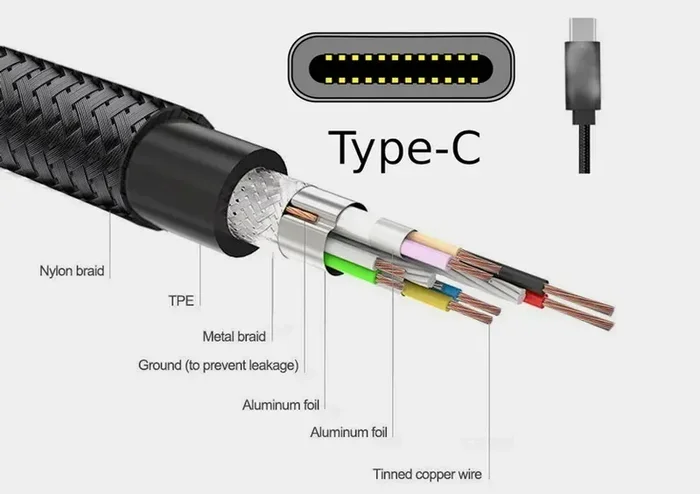
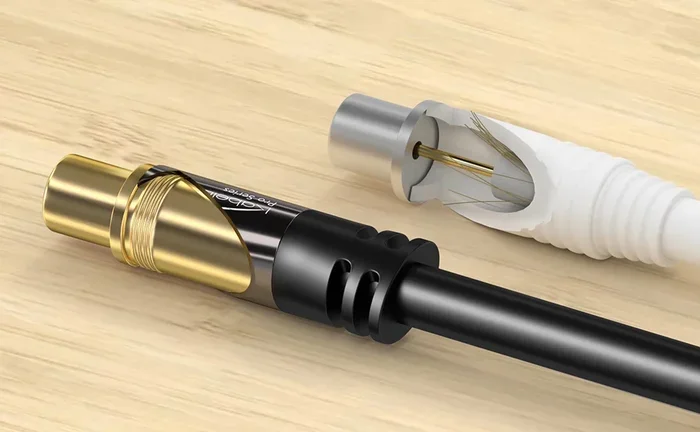
A coaxial cable is one of the oldest and most reliable types of wiring used in home entertainment. It has a center copper conductor surrounded by insulation, a metallic shield, and an outer jacket. This design helps protect the signal from interference and loss.
Coax has been around for decades. It was originally used for analog TV signals. But modern coax cables have evolved. They now support digital signals, including high-definition content. The key is using the right type of cable and the right equipment on both ends.
Types of Coaxial Cables
Not all coax cables are the same. Here are the most common types you will encounter:
- RG59: An older, thinner cable. It works for basic analog TV but struggles with HD signals over long distances.
- RG6: The standard for modern HD and digital TV setups. It has a thicker copper core and better shielding.
- RG11: A heavy-duty cable used for long runs. It offers the lowest signal loss of all coax types.
If you want HD picture quality, RG6 is your best friend. It handles the bandwidth needed for digital TV channels and HD resolution with ease. RG59 might work for short runs, but it is not ideal for anything beyond basic definition.
Can You Really Get HD Through a Coax Cable?
This is the big question. And the answer is a definite yes. You can absolutely get HD picture quality through a coaxial cable. But there are conditions. The cable must be capable, the signal must be strong, and your TV or equipment must be able to decode the digital signal.
Modern cable TV systems transmit HD signals through coax every single day. Your local cable provider sends hundreds of HD channels through coaxial wiring to your home. The signal travels from the provider’s hub through underground or overhead coax lines to your house. Then it goes through a splitter to reach multiple TVs.
For over-the-air HD, the same principle applies. An antenna sends HD signals through a coax cable to your TV. As long as your TV has a built-in digital tuner, you can receive HD channels without any extra equipment.
How HD Signals Travel Through Coax
HD signals are digital. They use a specific range of frequencies to carry video and audio data. A coaxial cable acts as a highway for these frequencies. The better the cable, the more data it can carry without loss.
Here is how the process works:
- The signal source (cable box, antenna, or satellite dish) sends an HD signal.
- The signal travels through the coaxial cable as an electromagnetic wave.
- The shielding in the cable protects the signal from interference.
- The signal reaches your TV or tuner, which decodes it into picture and sound.
Each step matters. A weak signal at the source, a poor-quality cable, or a bad connection can all degrade your HD picture quality. This is why people sometimes see fuzzy or pixelated images on their HD channels.
What Equipment Do You Need for HD Over Coax?
Getting HD through a coax cable is not just about the cable itself. You need the right equipment on both ends. Here is what makes the difference between a blurry mess and a stunning HD picture.
Digital Tuner or QAM Tuner
Most modern TVs come with a built-in digital tuner. This tuner can decode digital TV signals that come through a coax cable. Look for a TV that supports QAM (Quadrature Amplitude Modulation) tuning. QAM is the standard for unencrypted cable TV signals, including HD channels.
If your TV is older and only has an analog tuner, you will need a digital-to-analog converter box. These boxes cost around $20 to $50 and can make a big difference. They take the digital HD signal from the coax and convert it into a format your old TV can display.
Cable Box or Set-Top Box
Many cable providers require a cable box to access HD channels. The box receives the HD signal through coax and outputs it to your TV via HDMI or another connection. If your provider gives you a cable box, it will handle the signal decoding for you.
Some providers also offer streaming boxes that work over your home network instead of coax. But if you want to stick with coax, a traditional set-top box is the way to go.
Signal Amplifiers and Splitters
If you have multiple TVs connected to one coax line, you need a splitter. But splitters reduce signal strength. For HD signals, this can be a real problem. A signal amplifier placed before the splitter helps maintain strong HD picture quality across all connected TVs.
When choosing a splitter, look for one rated for high-frequency digital signals. Cheap splitters often cause signal loss and pixelation in HD channels. A good splitter preserves bandwidth and keeps your HD channels crisp.
Coax vs. HDMI: Which Gives Better HD Picture Quality?
This is a common comparison. Both cables carry HD content, but they do it in different ways. Understanding the difference helps you choose the right setup for your needs.
HDMI: The Gold Standard
HDMI cables are the go-to choice for HD and 4K content. They carry both video and audio through a single cable. HDMI supports higher resolutions, deeper color, and better audio formats than coax. If you want the best possible picture quality from a single source to a single TV, HDMI wins.
HDMI also supports features like HDR (High Dynamic Range) and ARC (Audio Return Channel). These features are not available through coaxial connections. For a home theater setup, HDMI is the clear winner.
Coax: The Practical Choice
Coax cables shine in whole-home distribution scenarios. You can run a single coax line to multiple rooms and split the signal. HDMI cables are limited in length and cannot be split as easily. For this reason, many hotels, apartments, and multi-TV households rely on coax for HD distribution.
Coax is also more durable and less prone to damage than HDMI cables. The shielding protects the signal, and the sturdy connectors hold up well over time. For everyday cable TV viewing, coax delivers reliable HD picture quality.
| Feature | Coaxial Cable | HDMI |
|---|---|---|
| Max HD Resolution | Up to 1080p (some setups 4K) | Up to 4K and 8K |
| Audio Support | Basic (needs separate audio) | Full surround sound |
| Whole-Home Distribution | Excellent (splitter-friendly) | Poor (limited length) |
| Signal Protection | Strong shielding | Minimal shielding |
| Ease of Use | Simple push-fit connectors | Locking mechanism |
| Cost | Low | Low to moderate |
As you can see, both cables have their place. Coax is practical and reliable. HDMI is the best choice for pure picture quality. Many people use both in their homes, depending on the situation.
Common Mistakes That Ruin HD Picture Quality Over Coax
Even with the right equipment, mistakes can ruin your HD viewing experience. Here are the most common errors people make when setting up HD over coax.
Using Old RG59 Cables
RG59 was fine for analog TV. But it cannot handle the bandwidth demands of HD signals effectively. If you have RG59 running to your TV, replace it with RG6. The difference in picture quality is noticeable immediately.
Ignoring Signal Loss
Signal loss happens when cables are too long or when too many splitters are in the chain. Every connection and splitter reduces signal strength. For HD signals, this can mean pixelation, dropouts, or no picture at all. Keep your coax runs as short as possible and limit the number of splitters.
Using Cheap Connectors
F-connectors are the standard for coax. But not all connectors are created equal. Cheap, loose connectors cause intermittent signal loss. They also introduce signal reflections that degrade picture quality. Use quality, gold-plated F-connectors and tighten them properly.
Skipping Proper Grounding
Coaxial cables can pick up electromagnetic interference from nearby electrical wires and appliances. Proper grounding reduces this interference. Many people skip this step and wonder why their HD channels look noisy or have horizontal lines.
Not Checking Signal Strength
Most TVs have a signal strength diagnostic in their settings menu. Check it regularly. Low signal strength means your HD picture will suffer. A simple signal meter or your TV’s built-in diagnostics can help you identify and fix problems quickly.
Quick Tips for the Best HD Picture Quality Over Coax
Want to get the most out of your coaxial setup? Here are some quick tips that make a big difference:
- Use RG6 cable for all HD runs. It is the right choice for digital TV and HD signals.
- Keep cable runs under 100 feet. Longer runs increase signal loss and degrade HD picture quality.
- Use a signal amplifier for long runs or multiple splits. It boosts the signal before it weakens.
- Check connectors regularly. Loose or corroded connectors are a common cause of HD signal problems.
- Run coax away from power cables. This reduces electromagnetic interference and keeps your HD channels clean.
- Use a cable tester. A quick test can reveal signal issues before they ruin your viewing experience.
- Upgrade your splitter if needed. A high-quality splitter preserves bandwidth better than a cheap one.
These small steps take minutes but save hours of frustration. A clean, well-maintained coax setup delivers HD picture quality that rivals any other connection type.
Expert Insights on HD Over Coax
We spoke with a few AV professionals about HD over coaxial cable. Their advice highlights what really matters for a great setup.
Mark, a cable installation specialist with 15 years of experience, says: “People underestimate how much the cable type matters. I see RG59 in homes all the time, and it causes HD signal problems. Switch to RG6, and you will see an immediate improvement.”
Sarah, a broadcast engineer, adds: “Signal strength is everything. Even the best coax cable cannot fix a weak signal at the source. Always check your signal levels before blaming the cable.”
Tom, a home theater installer, shares this tip: “For whole-home HD distribution, coax is still king. I run RG6 to every room and use quality splitters. My clients love having HD in every room without running HDMI cables through the walls.”
These experts agree on one thing: the basics matter. Use the right cable, check your signal, and invest in quality connectors. That is the formula for reliable HD picture quality through coax.
The Future of HD Over Coax
Coaxial cable technology continues to evolve. New standards support higher frequencies and greater bandwidth. Some modern coax systems can now carry 4K signals over a single cable. While HDMI remains the preferred choice for direct connections, coax is holding its own in the distribution world.
Cable providers are also upgrading their infrastructure. Many now use DOCSIS 3.1 and similar technologies that push more data through existing coax lines. This means your coax wiring at home is more capable than ever before.
As TV technology advances, coax will continue to adapt. It is a proven, reliable medium that has served home entertainment for decades. And with the right setup, it will keep delivering HD picture quality for years to come.
Conclusion
Can I get HD through a coax cable? Absolutely. With the right cable, equipment, and setup, coaxial cables deliver excellent HD picture quality. RG6 cable, a digital tuner, and quality connectors are all you need to enjoy crystal-clear HD channels.
Remember that signal strength, cable quality, and proper installation all play a role. Avoid the common mistakes we covered, follow the quick tips, and your HD viewing experience will be fantastic. Coax may not be the flashiest option, but it is one of the most practical and reliable ways to bring HD content into your home.
Now that you know what is possible, take a look at your own setup. Check your cables, test your signal, and make any upgrades you need. A few small changes can transform your HD viewing experience and give you the picture quality you deserve.
Frequently Asked Questions
Can I get 4K through a coax cable?
Standard coax cables like RG6 can carry some 4K signals, but it depends on your equipment and signal source. Most cable providers use coax for HD up to 1080p. For true 4K over coax, you need a specialized system that supports higher frequencies and bandwidth.
Do I need a special TV to watch HD over coax?
Your TV needs a built-in digital tuner that supports QAM or ATSC signals. Most TVs made after 2007 have this capability. If your TV is older, you can use a digital converter box to receive HD channels through coax.
How long can a coax cable be for HD signals?
For RG6 cable, a run of up to 100 feet works well for HD signals. Beyond that, signal loss becomes a concern. You can use a signal amplifier to extend the range, but keeping the cable run shorter is always better for picture quality.
Can I split a coax cable and still get HD on all TVs?
Yes, but each split reduces signal strength. Use a high-quality splitter rated for digital signals, and consider adding a signal amplifier if you split the signal to more than two TVs. This keeps HD picture quality strong on every screen.
Is coax or HDMI better for HD picture quality?
HDMI offers superior picture quality and supports higher resolutions and features like HDR. However, coax is more practical for whole-home distribution and is perfectly capable of delivering excellent HD picture quality for cable TV and over-the-air broadcasts.
What causes pixelation on HD channels over coax?
Pixelation is usually caused by a weak or unstable signal. Common culprits include loose connectors, old RG59 cables, too many splitters, or long cable runs. Check your connections, replace old cables with RG6, and test your signal strength to fix the problem.