Can I Use Macbook Usb C Charger On Iphone Right Now
Yes, you can use a Macbook USB C charger on your iPhone, but there are a few things you need to know first. The Macbook USB C charger delivers power through USB Power Delivery, which many iPhones support. However, charging speeds and cable compatibility depend on your iPhone model and the charger wattage you choose.
You have a Macbook charger sitting on your desk. Your iPhone battery is dying. You plug it in and wonder — does this even work? The short answer is yes. But the full story is more interesting than you might think.
Using a Macbook USB C charger on your iPhone is something millions of people do every day. It is convenient, it works, and in most cases, it is perfectly safe. But there are details about compatibility, charging speed, cable choice, and long-term battery health that every iPhone user should understand. This guide covers everything you need to know about charging your iPhone with a Macbook charger right now.
Whether you own an older iPhone with a Lightning port or the newest iPhone 15 with a USB-C port, this article has you covered. Let us break it all down in simple, practical terms.
Key Takeaways
- Compatibility: A Macbook USB C charger works with iPhones that support USB Power Delivery, including iPhone 8 and later models.
- Charging Speed: You may not get the fastest speeds unless you use the right wattage and a quality USB-C to Lightning cable.
- Safety: Apple chargers are generally safe, but using cheap third-party cables can damage your iPhone battery over time.
- iPhone 15 and Beyond: Newer iPhones use USB-C natively, making Macbook charger compatibility even easier.
- Best Practice: Always use certified cables and avoid extreme heat while charging your iPhone.
📑 Table of Contents
- Understanding USB-C Charging on Apple Devices
- Is a Macbook USB C Charger Compatible with iPhone?
- How Fast Can You Charge Your iPhone with a Macbook Charger?
- What You Need to Know About USB-C to Lightning Cables
- Safety Tips for Using a Macbook Charger on iPhone
- The Future: iPhone 15 and USB-C Compatibility
- Can I Use a Macbook USB C Charger on iPhone for Everyday Charging?
- Conclusion
Understanding USB-C Charging on Apple Devices
Apple has been moving toward USB-C for several years now. The transition started with the Macbook line and has slowly made its way into the iPhone lineup. Understanding how USB-C charging works helps you make better decisions about which charger to use.
What Is USB-C and Why Does It Matter?
USB-C is a universal connector standard. It is small, reversible, and powerful. Unlike the old USB-A ports you find on computers, USB-C can carry data, video, and power through a single cable. The USB-C port on your Macbook connects to the internal hardware, including components on the motherboard, which manages power delivery and data transfer.
USB-C also supports USB Power Delivery, a protocol that allows devices to negotiate the right amount of power. This means your Macbook charger and your iPhone can “talk” to each other and agree on a safe charging rate. That is a big reason why using a Macbook USB C charger on iPhone works so well.
How USB Power Delivery Works
USB Power Delivery, or USB PD, is a smart charging protocol. It adjusts voltage and current based on what the connected device needs. Here is how it works in simple terms:
- The charger sends power to the device.
- The device tells the charger how much power it needs.
- The charger adjusts output accordingly.
- Charging stops or slows down when the battery is full.
This negotiation process is what makes it safe to use a higher-wattage Macbook charger with a smaller device like an iPhone. The iPhone simply draws only the power it can handle.
Is a Macbook USB C Charger Compatible with iPhone?
The compatibility question is the first thing most people ask. And the answer is almost always yes. Let us look at the details so you understand exactly what works and what to watch out for.
Which iPhone Models Work with a Macbook Charger?
Almost every iPhone released since 2017 can charge from a Macbook USB C charger. Here is a quick breakdown:
- iPhone 8 and iPhone X: These were the first iPhones to support fast charging via USB-C. You need a USB-C to Lightning cable.
- iPhone 11, 12, 13, 14 series: All of these work with a Macbook charger. Fast charging is supported with the right cable.
- iPhone 15 and 16 series: These models use USB-C natively. You can plug a USB-C cable directly into the Macbook charger with no adapter needed.
If your iPhone supports USB Power Delivery, a Macbook charger will work. The only variable is how fast it charges, which depends on the charger wattage and the cable you use.
What About Older iPhones?
iPhones released before the iPhone 8 do not support fast charging through USB-C. You can still charge them with a Macbook USB C charger, but the speed will be the same as using the original 5-watt charger that came in the box. That is fine for overnight charging but not ideal if you need a quick boost.
How Fast Can You Charge Your iPhone with a Macbook Charger?
Charging speed is where things get really interesting. A Macbook USB C charger can deliver different wattages depending on the model. And your iPhone will only take as much power as it can handle.
Macbook Charger Wattage Options
Apple sells several Macbook charger sizes. Here is what is commonly available:
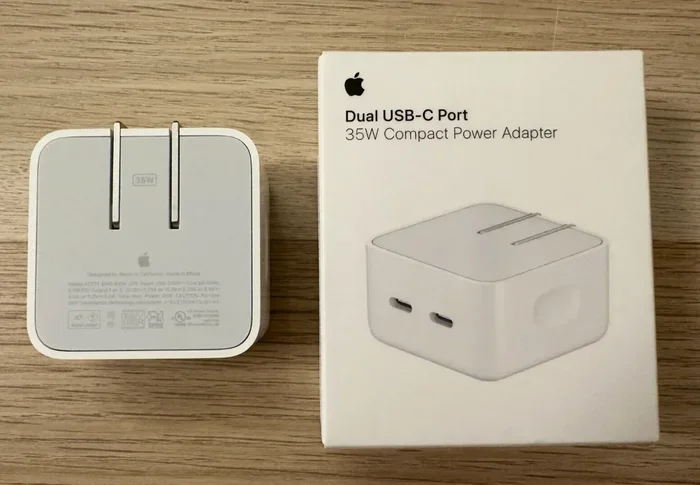
- 20W USB-C Power Adapter: This is the most common and affordable option. It works great for iPhones.
- 30W USB-C Power Adapter: Slightly more power. Works well for iPhones and iPads.
- 61W and 96W USB-C Power Adapters: These are designed for Macbook laptops. They work with iPhones too but offer no extra charging speed benefit.
For most iPhone users, a 20W USB-C charger is the sweet spot. It delivers fast charging without being overkill. Using a 61W or 96W Macbook charger on your iPhone will not damage it or charge it faster. The iPhone simply takes what it needs.
Real-World Charging Speed Comparison
Here is a simple comparison of what you can expect when charging an iPhone 14 Pro with different chargers:
- 5W charger (original iPhone charger): About 3 hours to full charge.
- 20W Macbook USB C charger: About 1.5 hours to full charge. This is roughly 50% faster.
- 30W Macbook USB C charger: Similar to 20W. The iPhone caps its intake at around 20W to 27W depending on the model.
- 61W or higher Macbook charger: Same speed as 20W for iPhone. The extra wattage goes unused.
The key takeaway is that a Macbook USB C charger will charge your iPhone faster than the old 5W charger. But there is a point of diminishing returns beyond 20W to 27W for most iPhone models.
Quick Tip for Faster Charging
Put your iPhone in Airplane Mode while charging. This reduces background activity and lets the battery fill up faster. Also, avoid using your phone heavily while it charges. Playing graphics-heavy games or streaming video while charging slows things down significantly.
What You Need to Know About USB-C to Lightning Cables
If you have an iPhone with a Lightning port, the cable you use matters just as much as the charger. Not all cables are created equal, and the wrong one can limit your charging speed or even damage your device.
MFi Certified Cables Are a Must
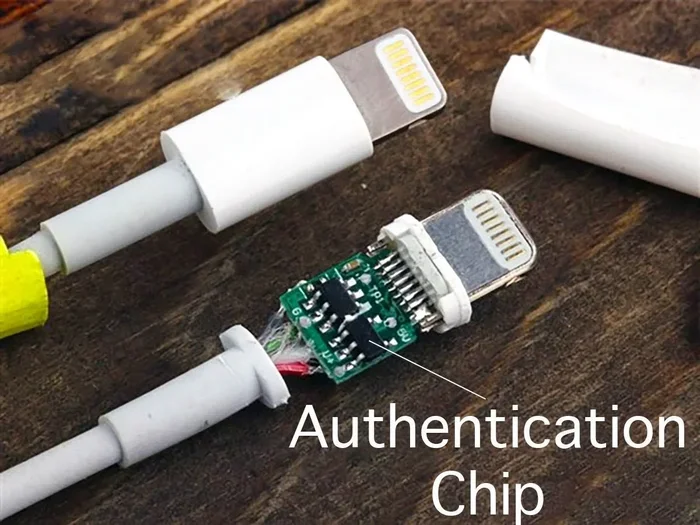
Apple’s MFi certification (Made for iPhone/iPad/iPod) guarantees that a cable meets Apple’s safety and performance standards. When buying a USB-C to Lightning cable, look for the MFi logo. This is especially important when you are using a Macbook USB C charger because uncertified cables can cause overheating, slow charging, or even battery damage.
Here are some tips for choosing the right cable:
- Buy from Apple directly or from trusted brands like Anker, Belkin, or Cable Matters.
- Avoid cheap cables from unknown sellers on marketplaces.
- Check for the MFi certification printed on the cable or its packaging.
- Replace frayed or damaged cables immediately to protect your iPhone battery health.
Cable Length and Quality
Longer cables do not necessarily charge slower, but very cheap thin cables can limit power delivery. A quality USB-C to Lightning cable that is 3 to 6 feet long works perfectly fine with a Macbook charger. Just make sure the cable can handle the wattage you are sending through it.
Expert Insight: Why Cable Quality Matters
Cheap cables often have thin internal wiring that cannot handle higher amperage. This means they heat up faster and degrade over time. A good cable is a small investment that protects both your charger and your iPhone. Think of it as insurance for your iPhone battery and your USB-C charging setup.
Safety Tips for Using a Macbook Charger on iPhone
Using a Macbook USB C charger on your iPhone is generally safe. Apple designs its chargers to work across its device ecosystem. But there are some safety considerations worth keeping in mind.
Heat and Charging
It is normal for your iPhone to feel slightly warm while charging. But if it gets hot to the touch, something is wrong. Here are some safety tips:
- Remove the case while fast charging if your iPhone gets warm.
- Do not charge your iPhone on soft surfaces like beds or pillows. This blocks ventilation.
- Avoid using your phone intensively while it charges with a Macbook charger.
- If the charger or cable smells like burning or looks damaged, stop using it immediately.
Battery Health Over Time
Your iPhone battery has a limited number of charge cycles. Fast charging with a Macbook USB C charger does use more power per session, but Apple has built in safeguards. The iPhone regulates the incoming power and manages the battery temperature automatically.
To keep your battery healthy over the long term:
- Enable Optimized Battery Charging in your iPhone settings.
- Avoid letting your battery drop to 0% regularly.
- Keep your battery between 20% and 80% for daily use when possible.
- Use official Apple chargers or MFi-certified accessories.
Common Mistakes to Avoid
Here are some mistakes people make when using a Macbook charger with their iPhone:
- Using damaged cables: A frayed cable is a fire hazard. Replace it right away.
- Ignoring heat warnings: If your iPhone gets unusually hot, unplug it and let it cool down.
- Buying the wrong wattage: A 61W or 96W charger will not hurt your iPhone, but it also will not charge it any faster than a 20W charger.
- Using non-certified adapters: Third-party chargers without proper certifications can be risky. Stick with Apple or reputable brands.
The Future: iPhone 15 and USB-C Compatibility
Apple made a big change with the iPhone 15 lineup. For the first time, iPhones came with a USB-C port instead of a Lightning port. This changes everything when it comes to using a Macbook USB C charger on iPhone.
Why USB-C on iPhone Is a Game Changer
With a USB-C port on your iPhone, you no longer need a special adapter or a dedicated cable. You can use the same USB-C cable and charger for your Macbook, iPad, and iPhone. This simplifies your Apple ecosystem and reduces cable clutter.
Here is what this means practically:
- One cable charges all your Apple devices.
- No need to carry multiple chargers when traveling.
- Macbook charger compatibility is now seamless across all your gear.
- Fast charging works out of the box with any USB-C charger.
If you own an iPhone 15 or 16, using a Macbook USB C charger is as simple as plugging in the cable. There is no Lightning adapter needed. Just connect and charge.
What About the USB-C Hub and Accessories?
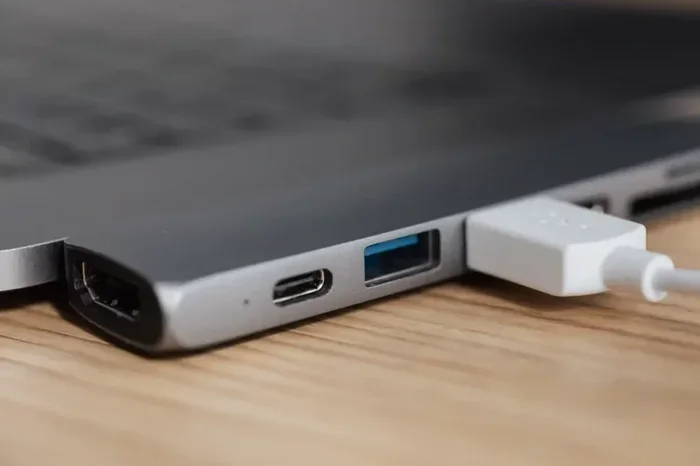
The shift to USB-C also opens up a world of accessories. You can use a USB-C hub to charge your iPhone while connecting other devices. Some hubs even support Thunderbolt speeds, which is great if you want a single dock for your Macbook and iPhone setup. These hubs connect to the same kind of motherboard circuitry that manages power delivery in both your computer and your phone.
The bottom line is that Apple is moving toward a universal connector standard. This makes life easier for everyone and makes the question of “Can I use a Macbook USB C charger on my iPhone?” a simple yes.
Can I Use a Macbook USB C Charger on iPhone for Everyday Charging?
The short answer is absolutely yes. A Macbook USB C charger is one of the most versatile charging tools you can own. It works with your Macbook, your iPad, your iPhone, and even some accessories like AirPods cases that support USB-C.
For everyday use, a 20W Macbook charger is perfect for overnight iPhone charging or quick top-ups during the day. You get faster speeds than the old 5W charger, safe power delivery, and the convenience of using one charger across multiple devices.
If you travel frequently, consider packing a compact USB-C charger and one high-quality cable. You will be able to charge your iPhone, Macbook, and iPad with just one power brick. That is a huge win for convenience and for keeping your bags light.
The key is to use quality cables, pay attention to heat, and let your iPhone manage the charging process. Apple has built smart power management into every modern iPhone, so you can trust the system to keep your iPhone battery safe and healthy.
Using a Macbook USB C charger on your iPhone is not just a workaround. It is a smart, practical, and fully supported way to keep your device powered up. Whether you have an older iPhone with Lightning or the latest iPhone 15 with USB-C, your Macbook charger has got you covered.
Conclusion
So, can you use a Macbook USB C charger on iPhone? Yes, you absolutely can. It is compatible, it is safe, and it charges your iPhone faster than the old standard charger that came in the box. Whether you have an iPhone with a Lightning port or the new USB-C model, a Macbook charger is a reliable and convenient option.
Just remember to use a quality cable, pay attention to heat, and choose the right wattage for your needs. A 20W USB-C charger is the best all-around choice for most iPhone users. It delivers fast charging, works across all Apple devices, and keeps your iPhone battery health in good shape over the long term.
Start using your Macbook USB C charger on your iPhone today. It is one of the simplest upgrades you can make to your daily charging routine. Your iPhone will charge faster, your cables will be simpler, and you will have one less thing to worry about in your busy day.
Frequently Asked Questions
Can I use any Macbook USB C charger on my iPhone?
Yes, any Apple Macbook USB C charger will work with your iPhone. The iPhone will only draw the power it can handle, so using a 61W or 96W charger will not cause any harm. However, a 20W charger is the most practical choice for everyday iPhone charging.
Will using a Macbook charger damage my iPhone battery?
No. Apple designs its chargers with built-in safety protocols. The iPhone regulates the incoming power and manages battery temperature automatically. Using a certified Macbook USB C charger will not damage your iPhone battery when used normally.
Do I need a special cable to charge my iPhone with a Macbook charger?
If you have an iPhone with a Lightning port, you need a USB-C to Lightning cable. If you have an iPhone 15 or later with USB-C, you can use a standard USB-C cable directly. Always look for MFi certification on Lightning cables for the best safety and performance.
How much faster does a Macbook charger charge an iPhone compared to the original charger?
A 20W Macbook USB C charger can charge your iPhone up to 50% faster than the original 5W charger. Most iPhone models reach about 50% battery in roughly 30 minutes with a 20W charger, compared to over an hour with the 5W charger.
Is it safe to charge my iPhone overnight with a Macbook charger?
Yes, it is safe. Modern iPhones have built-in battery management that stops charging once the battery reaches 100%. You can enable Optimized Battery Charging in your settings to further protect your battery health during overnight charging sessions.
Can I use a third-party Macbook-style USB C charger on my iPhone?
You can, but it is important to choose a reputable brand. Look for chargers that are USB Power Delivery certified and meet safety standards. Cheap, uncertified chargers can pose risks like overheating, inconsistent power delivery, and potential damage to your iPhone battery over time.