Can Micro HDMI Transfer Data Everything You Need to Know
Can Micro HDMI transfer data? Yes, it absolutely can. Micro HDMI cables carry both high-definition video and audio signals from your device to a display. Whether you need to connect a phone, tablet, or camera to a TV or monitor, Micro HDMI data transfer delivers reliable digital connections with strong signal quality.
You have a device with a tiny Micro HDMI port. You want to hook it up to your TV or monitor. But you keep asking yourself one question. Can Micro HDMI transfer data?
The short answer is yes. But there is so much more to know. Micro HDMI cables are small but powerful. They carry high-definition video, crystal-clear audio, and even data signals between devices. Whether you are a content creator, a gamer, or someone who just wants a bigger screen, understanding Micro HDMI data transfer matters.
In this guide, we will cover everything. From cable types to compatibility, speeds, and common mistakes. By the end, you will know exactly what Micro HDMI can do and how to get the best results.
Key Takeaways
- Micro HDMI cables transfer both data and audio/video signals between devices and displays.
- HDMI 1.4 specification supports 4K resolution, 3D video, and Ethernet channels through Micro HDMI connections.
- Compatible devices include smartphones, action cameras, tablets, and digital cameras with micro HDMI ports.
- Signal quality depends on cable quality, length, and version of the HDMI standard used.
- Adapters and hybrid cables make it easy to connect Micro HDMI devices to standard HDMI displays.
- Data transfer speed varies by HDMI version, with newer versions offering higher bandwidth.
- Common mistakes include using low-quality cables and confusing Micro HDMI with Mini HDMI ports.
📑 Table of Contents
- What Is Micro HDMI and How Does It Work?
- Can Micro HDMI Transfer Data: The Full Breakdown
- Micro HDMI vs Mini HDMI vs Standard HDMI
- Compatible Devices for Micro HDMI Data Transfer
- Data Transfer Speed and Signal Quality
- How to Set Up Micro HDMI Data Transfer
- Common Mistakes to Avoid with Micro HDMI
- Expert Insights on Micro HDMI Data Transfer
- Future of Micro HDMI and Alternative Connections
- Frequently Asked Questions
- Conclusion
What Is Micro HDMI and How Does It Work?
Understanding the Micro HDMI Connector
The Micro HDMI connector is one of the smallest HDMI ports available. It measures just 6.4 mm by 2.8 mm. That is significantly smaller than the standard HDMI port. Despite its size, it supports the same core functions as larger HDMI connectors.
Micro HDMI cables transmit both video and audio through a single cable. This makes them incredibly convenient. You do not need separate cables for picture and sound. Just plug in one cable and you are good to go.
The connector was designed primarily for portable devices. Smartphones, action cameras, and compact digital cameras use this port. It gives these small devices the ability to output to larger screens with ease.
How Data Transfer Works Through Micro HDMI
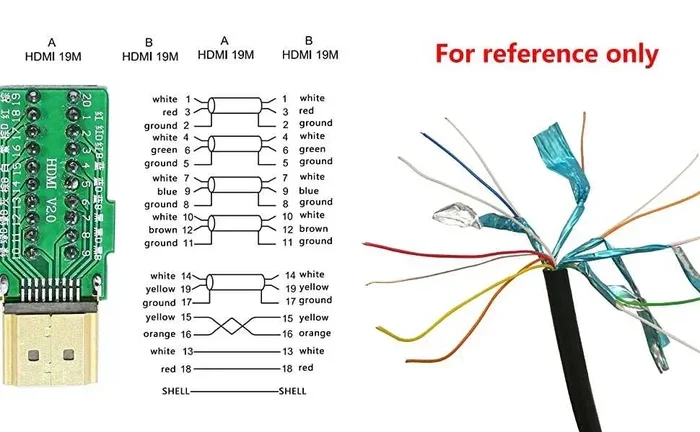
HDMI stands for High-Definition Multimedia Interface. At its core, it is a digital connection standard. HDMI data transfer happens through twisted pair wires inside the cable. These wires carry uncompressed digital signals.
When you plug a Micro HDMI cable into a device, the signal travels from the source to the display. The display decodes the signal and shows the video and plays the audio. This all happens in real time.
The beauty of this technology is that it is digital. Unlike older analog connections, there is no signal loss during transmission. The output on your screen matches the source exactly. This is why digital display connections through HDMI are so popular.
Can Micro HDMI Transfer Data: The Full Breakdown
Video Signal Transfer
Yes, Micro HDMI transfers video data with excellent quality. Depending on the HDMI version, it can support resolutions up to 4K and beyond. Here is a quick look at what different versions can handle.
- HDMI 1.4: Supports up to 4K at 30Hz. Also supports 3D video and an Ethernet channel.
- HDMI 2.0: Supports 4K at 60Hz. Offers higher bandwidth for smoother video.
- HDMI 2.1: Supports up to 8K at 60Hz or 4K at 120Hz. Ideal for gaming and high-frame-rate content.
When you use a Micro HDMI cable that supports these standards, your video quality will be stunning. You get sharp details, vibrant colors, and smooth motion on your display.
Audio Signal Transfer
Audio transfer is just as important as video. Micro HDMI handles this beautifully. It supports uncompressed audio formats like Dolby TrueHD and DTS-HD Master Audio.
You can also use features like ARC audio return channel. This lets audio travel back from your TV to a soundbar or receiver. It simplifies your setup and reduces cable clutter.
Whether you are watching movies, playing games, or streaming music, the audio quality through Micro HDMI is outstanding. You get rich, immersive sound without any extra equipment.
Data and Network Transfer
Here is something many people do not know. HDMI 1.4 and later include an Ethernet channel. This means your Micro HDMI cable can carry network data between two compatible devices.
You do not need a separate Ethernet cable for internet sharing. If both your source device and display support the HDMI Ethernet channel, they can share a connection through the cable. This is incredibly useful for smart TVs and streaming setups.
The Ethernet channel provides a 100 Mbps connection. While it is not as fast as a direct Wi-Fi or wired Ethernet connection, it works well for basic streaming and device communication.
Micro HDMI vs Mini HDMI vs Standard HDMI
Size Comparison
Not all HDMI connectors are the same. There are three main sizes. Understanding the differences helps you choose the right cable.
- Standard HDMI: The full-size port found on TVs, monitors, and laptops. Measures 13.9 mm by 4.45 mm.
- Mini HDMI: A smaller option used on some tablets and cameras. Measures 10.42 mm by 2.42 mm.
- Micro HDMI: The smallest option. Used on smartphones and compact action cameras. Measures 6.4 mm by 2.8 mm.
All three carry the same types of signals. The difference is purely physical size. You need the right cable or adapter for your specific device.
Do Not Confuse Micro HDMI with Mini HDMI
This is one of the most common mistakes people make. Micro HDMI and Mini HDMI look similar but are different sizes. A Mini HDMI cable will not fit into a Micro HDMI port and vice versa.
Always check your device manual before buying a cable. Using the wrong connector can damage your port or simply not work at all. If you are unsure, look up your device model online to confirm the port type.
Compatible Devices for Micro HDMI Data Transfer
Smartphones and Tablets
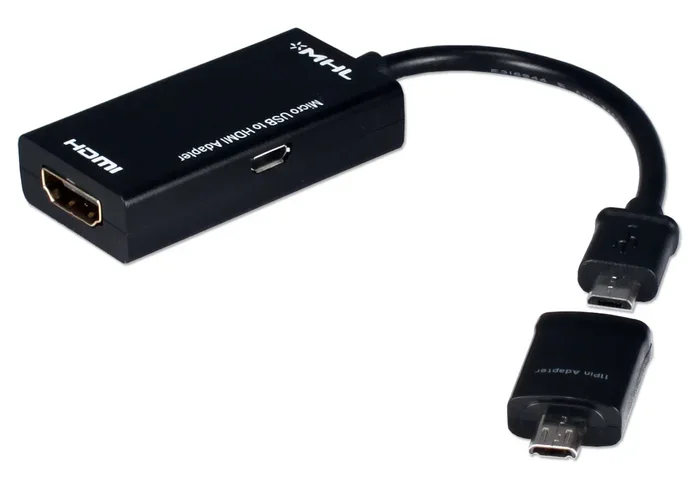
Some Android smartphones and tablets come with Micro HDMI ports. These devices can output video directly to a TV or monitor. You just need a Micro HDMI to HDMI adapter or cable.
Keep in mind that not all phones support this. Apple devices, for example, use Lightning or USB-C ports instead. If your phone has a Micro HDMI port, you are in luck. You can easily mirror your screen to a bigger display.
Action Cameras and Digital Cameras
Many action cameras and compact digital cameras use Micro HDMI. Brands like GoPro have used this connector in older models. It lets you preview footage on a larger screen while recording.
For photographers and videographers, this is a game-changer. You can review your shots on a big monitor. You can also live stream directly from your camera to a display setup.
Laptops and Portable Media Players
Some ultra-portable laptops and media players feature Micro HDMI ports. These devices benefit greatly from external display connections. You can extend your workspace or enjoy movies on a larger screen.
If you travel often, a Micro HDMI cable is a must-have accessory. It turns any hotel room TV into a personal monitor for your laptop or tablet.
Data Transfer Speed and Signal Quality
How Fast Is Micro HDMI Data Transfer?
The speed of HDMI data transfer depends on the cable version and the HDMI standard it supports. Higher versions offer more bandwidth. This means faster data transfer and better quality output.
Here is a simple comparison of HDMI versions and their capabilities.
- HDMI 1.4: Bandwidth of 10.2 Gbps. Supports 4K at 30Hz.
- HDMI 2.0: Bandwidth of 18 Gbps. Supports 4K at 60Hz.
- HDMI 2.1: Bandwidth of 48 Gbps. Supports 8K at 60Hz and 4K at 120Hz.
Higher bandwidth means more data moves through the cable every second. This results in smoother video, higher frame rates, and better overall quality.
Factors That Affect Signal Quality
Not all Micro HDMI cables are created equal. Several factors influence the quality of your signal.
- Cable build quality: Cheaper cables may have thinner shielding, leading to interference.
- Cable length: Longer cables can experience signal degradation. Keep cables under 6 feet for best results.
- HDMI version: Older versions may not support the latest resolutions and features.
- Port condition: Dust or damage to the port can weaken the connection.
Investing in a high-quality Micro HDMI cable makes a real difference. Look for cables that are certified and meet the latest HDMI standards.
How to Set Up Micro HDMI Data Transfer
Step-by-Step Setup Guide
Setting up Micro HDMI data transfer is simple. Follow these steps for a smooth connection.
- Check your device for a Micro HDMI port. Look for the small, trapezoid-shaped connector.
- Choose the right cable. You need either a direct Micro HDMI to HDMI cable or an adapter.
- Plug the Micro HDMI end into your device. Make sure it clicks into place.
- Connect the standard HDMI end to your TV, monitor, or projector.
- Switch your display input to the correct HDMI channel.
- Your device screen should now appear on the larger display.
Quick Tips for Best Performance
- Always use certified cables from reputable brands.
- Keep your cable as short as possible for the best signal quality.
- Update your device firmware to ensure full compatibility.
- Clean your HDMI ports regularly to prevent dust buildup.
- If you experience issues, try a different cable before troubleshooting further.
Common Mistakes to Avoid with Micro HDMI
Using the Wrong Cable Type
The biggest mistake is buying the wrong cable. As we discussed, Micro HDMI is not the same as Mini HDMI. Using the wrong cable will not work and could damage your port.
Always double-check your device specifications before purchasing. When in doubt, buy from a trusted retailer and verify compatibility.
Ignoring HDMI Version Compatibility
Not all Micro HDMI cables support the same features. An older HDMI 1.4 cable may not handle 4K at 60Hz. If you need higher resolutions, make sure your cable supports the right standard.
Check the packaging for the HDMI version number. This small detail makes a big difference in performance.
Using Low-Quality Cables
Cheap cables often have poor shielding and thin conductors. This leads to signal loss, flickering, and audio dropouts. A quality Micro HDMI cable costs a little more but delivers much better results.
Look for cables that are gold-plated, braided, and certified by HDMI Licensing. These features ensure reliable performance and long-lasting durability.
Expert Insights on Micro HDMI Data Transfer
Industry experts agree that Micro HDMI remains a solid choice for portable device connections. While USB-C to HDMI adapters are gaining popularity, Micro HDMI still has its place. Many professional cameras and older devices rely on this connector.
“The key is matching your cable to your device and your needs,” says a tech reviewer. “If you have a Micro HDMI port, invest in a good cable. It will serve you well for years.”
Experts also recommend keeping a spare Micro HDMI cable in your bag. Whether you are traveling for work or pleasure, having a reliable connection ready can save you from awkward moments.
Future of Micro HDMI and Alternative Connections
The tech world is always evolving. USB-C has become the new standard for many devices. It carries video, data, and power through a single reversible connector. Many new phones and laptops now use USB-C instead of Micro HDMI.
However, Micro HDMI is not disappearing overnight. Many devices still use it, especially in the camera and action camera markets. If you own devices with Micro HDMI ports, having quality cables on hand remains essential.
For those looking ahead, USB-C to HDMI adapters offer a flexible solution. They let you connect modern USB-C devices to HDMI displays. But for your current Micro HDMI devices, the right cable still works perfectly.
Frequently Asked Questions
Can Micro HDMI transfer data to a computer monitor?
Yes, Micro HDMI can transfer data to any monitor with an HDMI input. You just need a Micro HDMI to HDMI cable or an adapter. The connection carries both video and audio signals seamlessly. Your monitor will display the output from your device just like a TV would.
Does Micro HDMI support 4K resolution?
Yes, Micro HDMI supports 4K resolution through HDMI 1.4 and later versions. HDMI 1.4 handles 4K at 30Hz, while HDMI 2.0 supports 4K at 60Hz. Always check your cable specifications to confirm 4K support. A high-quality cable ensures you get the best picture quality.
Can I use a Micro HDMI cable for internet sharing?
Yes, HDMI 1.4 and later versions include an Ethernet channel. This allows two compatible devices to share an internet connection through the Micro HDMI cable. Both your source device and display must support this feature. It provides a 100 Mbps connection for basic streaming and device communication.
Is Micro HDMI the same as Mini HDMI?
No, Micro HDMI and Mini HDMI are different connectors. Micro HDMI is smaller at 6.4 mm by 2.8 mm. Mini HDMI measures 10.42 mm by 2.42 mm. They are not interchangeable. Always verify which port your device has before buying a cable.
What is the maximum cable length for Micro HDMI?
For the best signal quality, keep your Micro HDMI cable under 6 feet. Longer cables can experience signal degradation. If you need a longer run, consider using an active HDMI cable with a built-in signal booster. This maintains strong signal quality over greater distances.
Do all smartphones support Micro HDMI output?
No, not all smartphones support Micro HDMI. Most modern smartphones have moved to USB-C or Lightning ports. Only certain Android devices and older models include a Micro HDMI port. Check your phone specifications before purchasing a Micro HDMI cable or adapter.
Conclusion
Can Micro HDMI transfer data? Absolutely. Micro HDMI cables are versatile, reliable, and capable of transferring high-definition video, audio, and even network data. They connect your portable devices to larger screens with ease and deliver excellent signal quality.
Whether you are connecting a smartphone to a TV, a camera to a monitor, or a tablet to a projector, Micro HDMI gets the job done. The key is choosing the right cable, using the correct version, and avoiding common setup mistakes.
Invest in quality cables, keep your connections clean, and enjoy the seamless experience that Micro HDMI data transfer provides. With the right setup, your portable devices become powerful multimedia tools for work, entertainment, and creativity.