Can Any Laser Printer Use Micr Ink And Save Money Now
Not every laser printer can use Micr Ink effectively. MICR toner is specially formulated for check printing and banking documents, and printer compatibility matters more than most people realize. Using the wrong toner can lead to rejected checks, wasted money, and frustrating reprints. This guide breaks down exactly which printers work with Micr Ink, how to save money, and what to avoid.
If you print checks or financial documents regularly, you have probably wondered about Micr Ink. The short answer is that not every laser printer can use Micr Ink. But the full picture is more interesting than a simple yes or no.
MICR stands for Magnetic Ink Character Recognition. This special ink contains iron oxide particles that allow banks to process checks quickly and securely. When you print a check with standard toner, the magnetic properties are missing. That means the check might get flagged, delayed, or even rejected entirely.
Using the right Micr Ink in a compatible laser printer can save you hundreds or even thousands of dollars each year. Whether you run a small business, manage payroll, or handle personal finances, understanding MICR toner compatibility is essential. This guide covers everything you need to know about using Micr Ink with laser printers, how to cut costs, and what mistakes to avoid.
Key Takeaways
- Not all laser printers support Micr Ink: MICR toner has specific requirements that standard toners don’t meet.
- Compatibility depends on printer model, toner chip, and drum unit: Always verify before purchasing.
- You can save significant money: Compatible and remanufactured MICR toners offer big savings over OEM options.
- MICR compliance is critical: Banks reject non-compliant checks, so using proper toner is not optional.
- High-yield cartridges reduce cost per page: Choosing the right cartridge size impacts your long-term printing budget.
- Printer maintenance matters: Regular cleaning and proper storage keep your MICR prints sharp and bank-ready.
📑 Table of Contents
What Is Micr Ink And Why Does It Matter
Micr Ink is not your average printer toner. It is a specialized formulation designed specifically for the banking industry. The ink contains magnetic particles that align in a specific pattern when printed. Special readers at banks can detect these patterns instantly. This process speeds up check processing and reduces errors.
How MICR Technology Works
The magnetic ink is printed in a specific font, usually E-13B or CMC-7. When a check moves through a bank’s processing machine, the reader detects the magnetic signal from the ink. This signal confirms the check’s authenticity and routing information. Without proper Micr Ink, the machine cannot read the check correctly.
Standard laser toner simply does not contain the magnetic particles needed for this process. That is why you cannot just swap any toner cartridge into your printer and expect it to work for check printing. The toner must be MICR certified.
Why Banks Require MICR Compliance
Banks have strict rules about check printing. The Federal Reserve and the American Bankers Association set standards for MICR toner. These standards ensure that checks can be processed quickly across the banking system. Using non-compliant toner can result in:
- Delayed check processing: Your payments might take longer to clear.
- Rejected checks: The bank may refuse to accept the check altogether.
- Extra fees: Some banks charge fees for non-compliant checks.
- Security risks: Non-MICR checks are easier to counterfeit.
Using proper Micr Ink protects your business from these problems. It also gives you peace of mind that your financial documents will be processed without issues.
Can Any Laser Printer Use Micr Ink
This is the big question, and the answer is more nuanced than you might expect. The short version is no, not every laser printer can use Micr Ink. But many printers can with the right toner cartridge. Let us break down what makes a printer compatible.
Printer Compatibility Factors
Several factors determine whether your laser printer can handle Micr Ink. Understanding these factors helps you make the right purchase decision.
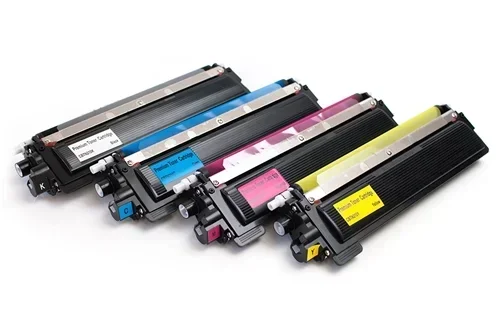
Toner Cartridge Compatibility: Your printer must accept a MICR-rated toner cartridge. Not all printers have MICR cartridges available for them. Major brands like HP, Brother, Canon, and Xerox offer MICR toner options for many of their models, but not every model is supported.
Toner Chip Recognition: Modern printers use chips in the toner cartridge to communicate with the printer. Some MICR cartridges use standard chips, while others require specific chip configurations. If the chip is not recognized, the printer will not print.
Drum Unit Requirements: The drum unit in your printer affects print quality. MICR printing requires a drum that produces sharp, consistent lines. A worn drum can cause blurry MICR characters, which banks may reject.
Fuser Temperature: MICR toner fuses differently than standard toner. It needs the right temperature and pressure to bond properly to paper. Printers with adjustable fuser settings give you more control over this process.
Printers Known To Work With Micr Ink
Many popular laser printers support MICR toner cartridges. Here are some of the most common compatible models:
- HP LaserJet Pro series: Models like the M404dn and M403dn accept MICR cartridges easily.
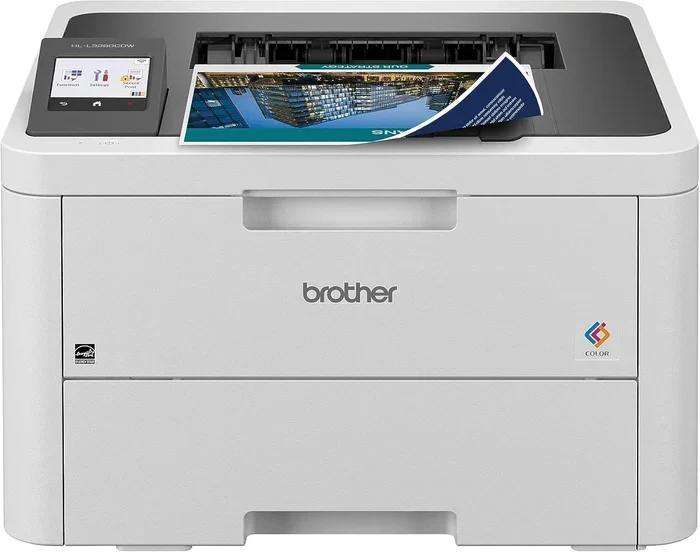
- Brother HL-L series: The HL-L2350DW and HL-L8360CDW are popular choices for MICR printing.
- Canon imageCLASS series: Several models in this line support MICR toner cartridges.
- Xerox VersaLink series: These printers offer excellent MICR print quality and reliability.
Before buying a MICR toner cartridge, always check the manufacturer’s compatibility list. Using the wrong cartridge can damage your printer or produce unreadable prints.
How To Save Money With Micr Ink
One of the biggest advantages of using Micr Ink is the potential for cost savings. Check printing can be expensive, especially if you rely on OEM (Original Equipment Manufacturer) toners. But there are smart ways to reduce your printing costs without sacrificing quality.
Compatible vs OEM Micr Toner
OEM MICR toners come from the same company that made your printer. They are reliable and often come with a warranty. However, they also come with a premium price tag. Compatible MICR toners are made by third-party manufacturers and cost significantly less.
Here is a quick comparison of the two options:
| Feature | OEM Micr Toner | Compatible Micr Toner |
|---|---|---|
| Price | Higher cost per cartridge | 30-50% less than OEM |
| Quality | Consistent and reliable | Nearly identical quality |
| Warranty | Full manufacturer support | Varies by brand |
| Availability | Widely available | May require online ordering |
| MICR Compliance | Fully certified | Look for MICR certified options |
| Page Yield | Standard yield | Often comparable or higher |
Compatible MICR toners have improved dramatically in recent years. Many third-party manufacturers now produce cartridges that meet or exceed OEM quality. The key is to buy from a reputable supplier who guarantees MICR compliance.
Remanufactured Micr Toner Options
Remanufactured MICR toners are another excellent money-saving option. These cartridges are recycled OEM cartridges that have been cleaned, refilled, and tested. They offer the same magnetic properties as new cartridges at a fraction of the cost.
When buying remanufactured MICR toner, look for these qualities:
- MICR certification: The cartridge must be certified for check printing.
- Page yield guarantee: Make sure the cartridge delivers the promised number of pages.
- Money-back guarantee: A good supplier stands behind their product.
- Fresh iron oxide content: The magnetic particles must be fresh for proper bank reading.
High-Yield Cartridges For Volume Printers
If you print a lot of checks, high-yield MICR cartridges are a game-changer. These cartridges contain more toner powder and print more pages before needing a replacement. The cost per page drops significantly when you use high-yield options.
For example, a standard MICR cartridge might print around 2,500 pages. A high-yield version could print 6,000 pages or more. That means fewer cartridge replacements and less downtime for your business. Over time, the savings add up substantially.
Common Mistakes When Using Micr Ink
Even with the right printer and toner, mistakes can happen. Avoiding these common errors saves you time, money, and headaches.
Using Standard Toner Instead Of Micr Toner
This is the most common mistake. Some people try to print checks with regular toner to save money upfront. The problem is that banks will likely reject these checks. You end up paying more in the long run due to reprints, fees, and processing delays. Always use genuine Micr Ink for any financial document.
Ignoring Printer Maintenance
MICR toner can leave residue inside your printer over time. Regular maintenance keeps your printer running smoothly. Here are some quick tips:
- Clean the drum unit: Wipe the drum gently every few months.
- Remove excess toner: Use a soft, lint-free cloth to clean toner spills.
- Store cartridges properly: Keep MICR toner in a cool, dry place away from direct sunlight.
- Run printer diagnostics: Most printers have built-in cleaning cycles you should run regularly.
Buying From Unverified Suppliers
The market is full of cheap MICR toners that do not meet compliance standards. Buying from an unverified supplier risks getting a cartridge that produces unreadable prints. Always check for MICR certification and read customer reviews before purchasing.
Using The Wrong Paper
MICR ink works best with specific check paper. This paper is designed to absorb the magnetic ink properly and produce clean readings. Using regular copy paper with Micr Ink can result in smudging, poor magnetic signal strength, and rejected checks. Invest in proper MICR check stock for the best results.
Expert Tips For Getting The Best Results
Getting the most out of your Micr Ink setup requires some know-how. These expert tips help you print better checks and save more money.
Match your font to the MICR standard: Use E-13B or CMC-7 fonts when designing your checks. These fonts are specifically designed for magnetic ink recognition. Using a different font can cause reading errors at the bank.
Print a test page first: Before printing a full batch of checks, print a single test page. Hold it up to the light and check that the MICR line is sharp and clear. This simple step catches problems early.
Keep spare cartridges on hand: Running out of MICR toner in the middle of a check run is stressful. Always keep at least one spare cartridge in your supply closet.
Monitor your toner levels: Most printers display toner levels on the screen. When the level drops below 20%, start planning your replacement. Running on empty can cause inconsistent print quality.
Choose the right paper weight: MICR check paper typically weighs between 20 and 24 pounds. Heavier paper feeds more smoothly through laser printers and produces sharper MICR characters.
The Cost Savings Breakdown
Let us talk numbers. How much can you really save by using Micr Ink wisely? The savings depend on your printing volume and the choices you make.
A typical small business prints around 500 checks per month. Using OEM MICR toner at about $80 per cartridge with a 2,500-page yield costs roughly 3.2 cents per page. Switching to a compatible MICR toner at $45 per cartridge with a similar yield drops the cost to about 1.8 cents per page.
Over a year, that is a savings of over $200 for a single printer. For businesses with multiple printers, the savings multiply quickly. Add in the cost savings from avoided rejected checks and reduced reprints, and the financial benefit becomes even clearer.
High-yield compatible MICR cartridges can save you even more. A high-yield cartridge priced at $70 that prints 6,000 pages costs just over 1 cent per page. That is a 69% reduction compared to standard OEM options.
Key Takeaways
- Not every laser printer supports Micr Ink: You need a printer with compatible MICR toner cartridges available.
- MICR compliance is non-negotiable: Banks require magnetic ink for check processing. Using standard toner causes rejections.
- Compatible and remanufactured toners save money: You can cut toner costs by 30-50% without sacrificing quality.
- High-yield cartridges reduce cost per page: Ideal for businesses with high check printing volume.
- Regular printer maintenance improves results: Clean drums, proper storage, and routine cleaning cycles keep your prints sharp.
- Use the right check paper: MICR-specific paper ensures the best magnetic signal and clean bank readings.
- Always verify compatibility before buying: Check your printer model against the MICR toner manufacturer’s compatibility list.
Frequently Asked Questions
Can I use regular laser toner to print checks?
No, you should not use regular laser toner for printing checks. Standard toner lacks the magnetic particles required for MICR recognition. Banks use special readers that detect the magnetic signal from Micr Ink. Without it, your checks may be delayed, rejected, or flagged for manual review. Always use MICR-certified toner for any financial document.
Which laser printers are compatible with Micr Ink?
Many popular laser printers support Micr Ink, including models from HP, Brother, Canon, and Xerox. Some of the most compatible models include the HP LaserJet Pro M404dn, Brother HL-L2350DW, and Xerox VersaLink C405. Always check the manufacturer’s compatibility list before purchasing a MICR toner cartridge for your specific printer model.
Is compatible Micr toner as good as OEM?
Yes, most compatible MICR toners today offer quality that matches or exceeds OEM cartridges. Reputable third-party manufacturers use fresh iron oxide particles and meet MICR compliance standards. The biggest difference is the price, with compatible options typically costing 30-50% less. Look for suppliers that offer MICR certification and a satisfaction guarantee.
How long does a Micr Ink cartridge last?
A standard MICR toner cartridge typically prints between 2,000 and 2,500 pages. High-yield cartridges can print 6,000 pages or more. The actual page count depends on your print density, the amount of text on each page, and your printer model. For businesses that print many checks, investing in a high-yield cartridge reduces replacement frequency and lowers the cost per page.
Can I refill my Micr Ink cartridge myself?
While it is technically possible to refill a MICR cartridge, it is not recommended for most users. MICR toner contains fine iron oxide particles that can be messy and difficult to handle. Improper refilling can damage the cartridge or produce inconsistent magnetic signals. It is better to purchase a new compatible or remanufactured MICR cartridge from a trusted supplier.
Does Micr Ink expire or degrade over time?
Yes, MICR toner does have a shelf life. When stored properly in a cool, dry place away from direct sunlight, MICR toner cartridges last about two to three years. Exposure to heat or humidity can degrade the magnetic particles and reduce print quality. Always check the expiration date on the cartridge packaging and buy from suppliers with fast inventory turnover to ensure freshness.
Final Thoughts On Micr Ink And Laser Printers
The question of whether any laser printer can use Micr Ink has a clear answer. Not every printer works with MICR toner, but many do. The key is knowing your printer model, finding the right MICR cartridge, and making smart purchasing decisions.
Saving money with Micr Ink is entirely possible. Compatible and remanufactured toners offer real savings without sacrificing the quality and compliance your business needs. By avoiding common mistakes and following the tips in this guide, you can print professional checks confidently and keep your printing costs under control.
Take the time to research your printer’s MICR compatibility today. The right setup pays for itself quickly through lower toner costs and fewer rejected checks. Whether you are a small business owner or managing personal finances, using Micr Ink correctly is one of the simplest ways to improve your check printing process and protect your bottom line.