Can Guest Mode See History Everything You Should Know
Can guest mode see history? The short answer is no. Guest mode on most web browsers does not save your browsing history, search queries, or cookies once you close the session. Guest browsing mode creates a temporary, isolated environment that keeps your activity separate from the main user profile, making it a useful tool for shared devices and quick private sessions.
Can guest mode see history? This is one of the most common questions people ask when they share devices or want more privacy online. Guest mode offers a separate browsing session that keeps your activity separate from the main user profile. In most cases, guest mode does not save browsing history, meaning your searches and visits stay hidden from others who use the same device. Understanding how guest mode works with history helps you browse with confidence and protect your digital footprint. In this guide, we will walk you through everything you need to know about guest mode and history visibility, from how it works to common myths and practical tips.
Many people use guest mode every day without fully understanding what it does. You might share a family computer, borrow a friend’s laptop, or use a work device. Guest mode seems like a simple solution for safe browsing. But the real question remains: can guest mode see history, and what happens to your browsing data? The answer matters more than most people realize. Whether you are concerned about privacy, shared devices, or simply curious about how your browser works, knowing the truth about guest mode and browsing history gives you peace of mind. Let us explore this topic in detail.
Key Takeaways
- Guest mode does not save browsing history: All visits, searches, and activity are deleted when you close the guest window.
- Guest mode is not the same as incognito mode: They serve different purposes and work differently on shared devices.
- Guest mode hides most local data: Cookies, cache, and temporary files are not stored after the session ends.
- Network admins can still track activity: Guest mode does not hide your browsing from your internet provider or workplace network.
- Downloaded files may remain on the device: Always check and remove downloaded files after using guest mode.
- Combining guest mode with a VPN offers stronger privacy: This adds an extra layer of protection against online tracking.
📑 Table of Contents
- What Is Guest Mode and How Does It Work?
- Can Guest Mode See History? The Direct Answer
- How Guest Mode Works Across Different Browsers
- What Guest Mode Actually Hides From Others
- Common Myths About Guest Mode and History
- Tips for Better Privacy When Using Guest Mode
- Final Thoughts on Guest Mode and History
What Is Guest Mode and How Does It Work?
Guest mode is a built-in feature available in most modern web browsers. It allows someone to browse the internet without signing into a personal account. The session is temporary and isolated from the main user profile. When you open a guest window, the browser creates a fresh environment with no saved data from previous sessions.
The idea behind guest browsing mode is simple. It lets anyone use the browser without leaving a trace. No bookmarks are saved. No passwords are stored. No browsing history is kept. Once you close the guest window, everything disappears. This makes it ideal for shared devices where multiple people use the same computer.
How Guest Mode Differs from Regular Browsing
In regular browsing mode, your web browser saves a lot of data. It records every website you visit in your browsing history. It stores cookies that remember your login details and preferences. It saves cached files to make pages load faster. All of this data stays on the device until you manually clear it.
Guest mode changes this completely. The browser treats the session as temporary from the start. No browsing data is written to the permanent storage. No search history is linked to your profile. When you close the window, the browser deletes the entire session. This creates a clean slate every time someone opens a guest window.
When Should You Use Guest Mode?
There are many situations where guest mode comes in handy. Here are some common ones:
- Sharing a family computer: You do not want your search history visible to other family members.
- Using a public computer: Libraries, internet cafes, and hotel lobbies often offer shared devices.
- Helping someone with their device: You need to look something up quickly without affecting their settings.
- Workplace shared computers: You want to keep your personal browsing separate from work tasks.
- Testing websites: Developers use guest mode to see how a site appears to a first-time visitor.
In all these cases, guest mode and history visibility work together to keep your activity private. The browser does not retain any record of what you did once the session ends.
Can Guest Mode See History? The Direct Answer
The direct answer to can guest mode see history is straightforward. No, guest mode does not save browsing history. When you browse in guest mode, the browser does not create a permanent record of the websites you visit. Once you close the guest window, that session is gone forever.
However, there is a subtle detail worth understanding. Guest mode does not prevent you from seeing history during the session. While you are browsing, the browser still tracks which pages you have visited in real time. You can see your current session history in the tab bar and through the browser’s navigation buttons. The key difference is that this history is not saved permanently.
What Happens to Your Browsing Data in Guest Mode?
When you use guest mode, the browser handles your data differently than it does in a regular session. Here is what happens to various types of data:
- Browsing history: Not saved. All visited pages are forgotten once you close the guest window.
- Search queries: Not stored. Your searches through the search engine are not recorded.
- Cookies: Not saved. Temporary cookies created during the session are deleted.
- Cache files: Not retained. Cached images and files are removed after the session.
- Form data: Not saved. Any information you type into forms is not stored.
- Passwords: Never saved. The browser will not offer to remember any passwords.
This comprehensive deletion is what makes guest mode so useful for privacy. The browser essentially wipes the slate clean every time you end a guest session.
Does Guest Mode Save Any Data at All?
Technically, guest mode does create some temporary data while the session is active. The browser needs to load web pages, and that requires temporary files. However, all of this data is stored in a temporary memory space that gets wiped clean when you close the window.
The key distinction is between temporary active data and permanent saved data. While guest mode is running, the browser must temporarily store some information to function properly. But none of this becomes permanent. Guest mode and history visibility are designed so that no trace remains after you log out or close the window.
How Guest Mode Works Across Different Browsers
Guest mode is available in all major web browsers, but the way it works can vary slightly from one browser to another. Understanding these differences helps you get the most out of private browsing features.
Google Chrome Guest Mode and History
Google Chrome is one of the most popular browsers, and its Chrome guest mode is well-designed. When you open a guest window in Chrome, you get a completely fresh browsing environment. Chrome does not link the guest session to any Google account.
Chrome guest mode does not save:
- Browsing history
- Cookies and site data
- Information entered in forms
- Permissions granted to websites
To open a guest window in Chrome, click the profile icon in the top right corner and select “Guest.” When you are done, simply close the window. Chrome automatically deletes all session data. This makes Chrome one of the strongest options for hidden browsing on shared devices.
Safari, Firefox, and Edge Guest Modes
Other browsers offer similar features with slightly different names and approaches:
- Safari: Safari uses “Private Browsing” mode. It does not save history, cookies, or temporary files. However, Safari does not have a true guest mode separate from private browsing.
- Firefox: Firefox offers “Private Browsing” with enhanced tracking protection. It blocks many third-party trackers by default and does not save session data.
- Microsoft Edge: Edge has an “InPrivate” browsing mode that works similarly to Chrome’s guest mode. It does not save browsing history or cookies.
While these modes are not called “guest mode,” they serve a similar purpose. They all focus on browser privacy by not saving your browsing activity after the session ends.
What Guest Mode Actually Hides From Others
Guest mode hides a significant amount of your browsing activity from other users of the same device. But it is important to understand exactly what it hides and what it does not. Let us break this down clearly.
Browsing History and Search Queries
The primary thing guest mode hides is your browsing history. Other users who share the same device will not see your visited websites in their history log. They will also not see your search history from the session. This is the core benefit of using guest mode on a shared device.
For example, if you borrow a family member’s laptop and use guest mode to search for a gift idea, they will not see those searches later. The browser does not record them. This is a huge advantage for maintaining privacy on shared computers.
Cookies, Cache, and Temporary Files
Guest mode also hides your cookies and cache files. Cookies are small files that websites use to remember you. Cache files are temporary copies of web pages that help them load faster.
In a regular browsing session, these files stay on the device long after you leave the website. In guest mode, they are deleted when you close the window. This means:
- Websites cannot track you across sessions.
- No personalized ads follow you after the session.
- No login sessions persist after you close the window.
This is a key aspect of digital privacy that makes guest mode valuable for quick, clean browsing sessions.
Downloaded Files and Bookmarks
Here is an important exception to keep in mind. Guest mode does not automatically delete files you download during a session. If you download a document, image, or any other file, it stays on the device’s download folder even after you close the guest window.
Similarly, if you bookmark a page while in guest mode, the bookmark might be saved temporarily in the guest session. But it will not appear in the main user’s bookmark list. Still, you should always manually remove downloaded files and clear the download history to maintain full internet safety.
Common Myths About Guest Mode and History
There are several misconceptions about guest mode and what it can do. Let us address the most common ones so you have accurate information.
Myth 1: Guest Mode Makes You Completely Anonymous
This is one of the biggest misconceptions about hidden browsing. Guest mode only hides your activity from other users of the same device. It does not make you anonymous on the internet. Your internet service provider, your employer, and the websites you visit can still track your activity.
Guest mode is a local privacy tool. It protects your data on the device level. It does not encrypt your traffic or hide your IP address. If you need true anonymity, you need additional tools like a VPN or the Tor browser.
Myth 2: Guest Mode Hides Activity from Network Admins
Another common myth is that guest mode hides your browsing from network administrators. This is not true. If you are using a work computer or a school network, the IT department can still see your browsing activity through network logs.
Guest mode only affects what is stored locally on the device. It does not affect network-level monitoring. If internet privacy is your main concern, you need to look beyond guest mode and consider tools that protect your traffic at the network level.
Myth 3: Guest Mode Is the Same as Incognito Mode
Many people use the terms “guest mode” and “incognito mode” interchangeably. But they are different features with different purposes.
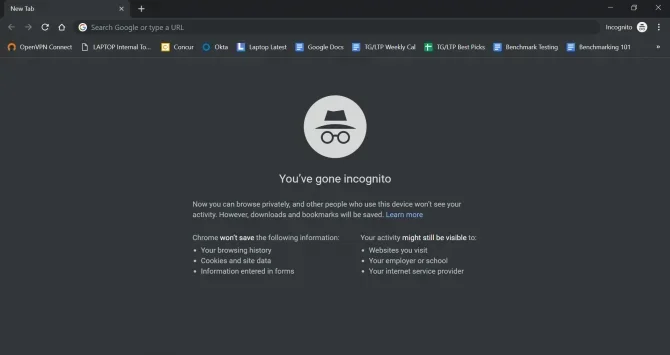
Incognito mode is designed for individual privacy. It prevents the browser from saving your session data. But it still ties to your existing browser profile and settings. Guest mode is designed for shared devices. It creates a completely separate environment with no connection to your profile.
Both are useful, but they serve different needs. Understanding this difference helps you choose the right mode for your situation.
Tips for Better Privacy When Using Guest Mode
Guest mode is a great tool, but it works best when combined with other privacy practices. Here are some practical tips to enhance your internet safety when using guest mode.
Use a VPN for Extra Protection
A virtual private network, or VPN, encrypts your internet traffic. This adds a powerful layer of protection that guest mode alone cannot provide. Even if you are using guest mode, your ISP can still see your browsing without a VPN.
Using a VPN with guest mode means your browsing activity is encrypted from the network level and hidden from local users. This combination gives you strong privacy on shared devices.
Clear Downloads Before Exiting
Always remember to check your download folder before closing the guest window. Guest mode does not automatically remove downloaded files. If you downloaded anything during the session, delete it manually or move it to a USB drive.
This is one of the most overlooked aspects of digital privacy. A simple habit of clearing downloads can prevent others from accidentally seeing your browsing activity.
Combine Guest Mode with Other Privacy Tools
For the best results, pair guest mode with other privacy-focused tools:
- Ad blockers: Prevent tracking scripts from loading in the first place.
- Privacy-focused search engines: Use alternatives that do not track your search history.
- Browser extensions: Add tools that block fingerprinting and tracking cookies.
- Parental controls: Use these to monitor or restrict what others can access on shared devices.
By layering these tools together, you create a strong privacy setup that goes far beyond what guest mode alone can offer.
Final Thoughts on Guest Mode and History
Can guest mode see history? The answer is clear and reassuring. Guest mode does not save browsing history, search queries, cookies, or cached data. It creates a clean, temporary environment that protects your browsing activity from other users of the same device.
At the same time, guest mode is not a magic shield that makes you invisible online. It does not hide your activity from network administrators, internet providers, or the websites you visit. For full digital privacy, you need to combine guest mode with other tools like VPNs and ad blockers.
The bottom line is simple. Guest mode is an excellent tool for everyday privacy on shared devices. It keeps your internet footprint minimal and your browsing data secure from prying eyes. Use it wisely, pair it with good habits, and you will browse with confidence every time.
Frequently Asked Questions
Can someone see my guest browsing history after I close the window?
No, they cannot. Guest mode automatically deletes all browsing history when you close the guest window. The next person who uses the device will not see any record of your session. This is one of the main benefits of using guest browsing mode on shared devices.
Does guest mode save any history at all?
Not permanently. While you are actively browsing, the browser tracks your current session in real time so you can navigate back and forth. But once you close the guest window, all session data is deleted. No browsing history, cookies, or cache files remain on the device.
Can the device owner see guest mode activity?
The device owner cannot see your browsing activity in the browser history. However, if the device has monitoring software installed at the system level, that software might still track activity. Guest mode only hides data within the browser itself, not from system-level monitoring tools.
How is guest mode different from incognito mode?
Incognito mode is designed for individual privacy on your own device. It prevents the browser from saving your session data but still uses your profile settings. Guest mode creates a completely separate environment with no link to your profile. It is designed specifically for shared devices where someone else uses the computer.
Can guest mode protect you from employer tracking?
Not fully. Guest mode hides your browsing from other users of the same device. But if you are on a work network, your employer’s IT department can still monitor your activity through network logs. For protection from employer tracking, you need a VPN and follow your organization’s acceptable use policies.
Is guest mode completely private and safe?
Guest mode provides strong local privacy by not saving your data on the device. But it is not completely private. Your internet provider, the websites you visit, and network administrators can still track your activity. For complete privacy, combine guest mode with a VPN, privacy-focused search engine, and good browsing habits.
=== CONCLUSION ===
Can guest mode see history? No, and that is exactly the point. Guest mode is designed to keep your browsing history private and your session data temporary. It is a simple yet powerful tool for anyone who shares devices or wants a clean browsing experience without leaving a trace.
Remember that guest mode works best when you understand its limits. It protects your data locally but does not hide you from the broader internet. Pair it with a VPN, use privacy-focused tools, and always clear your downloads before exiting.
Now that you know the full truth about guest mode and history visibility, you can browse smarter and safer. Apply these tips, share this knowledge with others, and take control of your digital privacy today.