Can I Add Bluetooth Audio To My Car With This Guide
Can I add Bluetooth audio to my car? Yes, and it is easier than most people think. You can use a Bluetooth adapter, an FM transmitter, or upgrade your car stereo to enjoy wireless streaming and hands-free calling. This guide walks you through every option, from budget-friendly solutions to full car audio upgrades, so you can pick what works best for your vehicle and budget.
Have you ever been stuck driving an older car that just does not play music from your phone? You know the frustration. You plug in a cable, it tangles, the sound cuts out, and you end up skipping songs more than listening to them. The good news is that adding Bluetooth audio to your car is one of the simplest upgrades you can make. It transforms your daily commute into a personal concert hall. And the best part? You do not need to be a car expert to pull it off.
Whether you drive a classic sedan from the 2000s or a modern SUV, there is a Bluetooth solution waiting for you. This guide covers every method, every price range, and every skill level. By the end, you will know exactly which option fits your car and your lifestyle. Let us dive in.
Key Takeaways
- Multiple Options Available: You can add Bluetooth to your car using adapters, FM transmitters, or by replacing your stereo entirely.
- Budget-Friendly Solutions Exist: FM transmitters and basic Bluetooth adapters cost under $30 and require no wiring.
- Better Sound Quality Is Possible: Upgrading to a Bluetooth-enabled receiver or stereo gives you superior audio quality.
- Hands-Free Calling Is a Safety Bonus: Bluetooth lets you make and take calls without touching your phone.
- Older Cars Can Be Upgraded Too: Even vintage vehicles without AUX inputs can get Bluetooth with the right device.
- Setup Is Simple: Most devices pair in under two minutes and require no technical skills.
- Avoid Common Mistakes: Choosing the wrong device or skipping firmware updates can hurt your experience.
📑 Table of Contents
- Why Bluetooth Audio Makes Driving Better
- How to Add Bluetooth to Your Car
- Bluetooth Adapter vs FM Transmitter: Which Is Right for You?
- Step-by-Step Setup Guide
- Tips for Better Bluetooth Audio Quality
- Common Mistakes People Make When Adding Bluetooth to Their Car
- Can You Add Bluetooth to Any Car?
- How Bluetooth Audio Works in a Car
- Is It Worth the Investment?
- Final Thoughts
Why Bluetooth Audio Makes Driving Better
Bluetooth has changed the way we listen to music in the car. Gone are the days of CDs, tangled cables, and FM radio static. With wireless streaming, your phone connects directly to your car’s speakers. The result is cleaner sound, fewer distractions, and a much better driving experience.
Here is why Bluetooth car audio matters so much today:
- Wireless Freedom: No more cables dangling from your dashboard. Your phone stays in your pocket or on the console.
- Hands-Free Calling: You can answer calls without taking your hands off the wheel. This is a major safety benefit.
- Spotify, Apple Music, and Podcasts: Stream any app directly through your car speakers.
- Easy Switching: Swap between your phone and a passenger’s phone in seconds.
- No Compatibility Headaches: Most Bluetooth devices work with both iPhone and Android.
Even if your car already has an AUX port, Bluetooth offers a step up. You get cleaner connections and the convenience of wireless pairing. Adding Bluetooth to car audio systems is one of the most popular aftermarket upgrades for a reason.
How to Add Bluetooth to Your Car
There are three main ways to get Bluetooth audio in your car. Each method has its own strengths. Let us break them down so you can choose the right one for your situation.
Option 1: Bluetooth FM Transmitter
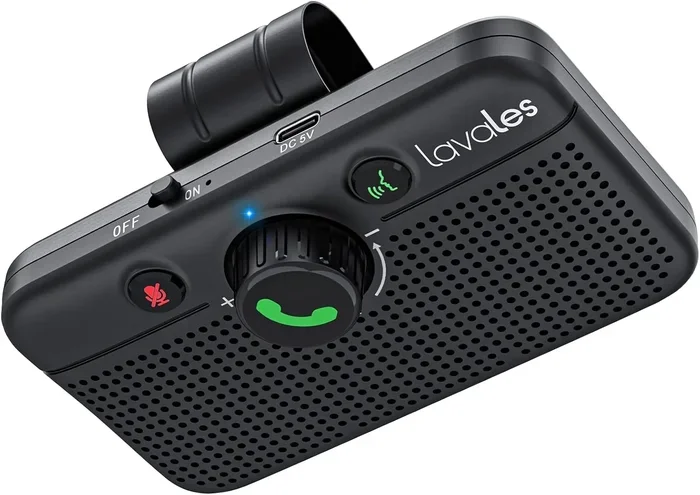
An FM transmitter is the most popular budget option. It plugs into your car’s cigarette lighter or USB port. The device broadcasts your phone’s audio over an empty FM frequency. Your car radio picks up that signal and plays your music through the speakers.
Here is what you need to know about FM transmitters for Bluetooth:
- Cost: Usually between $10 and $30.
- Setup Time: Under 3 minutes.
- Sound Quality: Decent, but not as crisp as a wired connection.
- Best For: Older cars without AUX inputs or USB ports.
- Extra Features: Many transmitters also charge your phone and include a built-in microphone for calls.
The main downside is occasional signal interference. If you live in a crowded city with many FM stations, you might hear some static. But for most drivers, the sound quality is more than acceptable.
Option 2: Bluetooth Adapter (AUX or USB)
A Bluetooth adapter connects directly to your car’s existing input. If your car has an AUX port, you plug the adapter in. If it has USB, you use that instead. The adapter receives the Bluetooth signal from your phone and sends it to your car’s audio system.
Why choose a Bluetooth AUX adapter?
- Better Sound Quality: Since it uses a direct connection, you get less interference than FM transmitters.
- Smaller Size: These adapters are tiny and easy to hide.
- Stable Connection: No searching for FM frequencies or dealing with static.
- Cost: Typically $15 to $40.
This is a great middle-ground option. You get wireless streaming without replacing your entire stereo. It works well for cars that already have decent speakers but lack Bluetooth capability.
Option 3: Replace Your Car Stereo
If you want the best possible Bluetooth car audio experience, replacing your stereo is the way to go. A new Bluetooth-enabled head unit gives you full integration with your phone. You get wireless streaming, hands-free calling, and often extra features like Apple CarPlay or Android Auto.
Here is what a stereo replacement involves:
- Cost: $100 to $400+ depending on the brand and features.
- Installation: You can DIY it with a wiring harness adapter, or pay a shop to do it.
- Sound Quality: Significantly better than adapters or transmitters.
- Best For: Car owners who want a permanent, high-quality upgrade.
Replacing a stereo might sound intimidating, but it is surprisingly straightforward. Many kits come with plug-and-play wiring harnesses. You do not need to cut any wires or modify your car’s electrical system.
Bluetooth Adapter vs FM Transmitter: Which Is Right for You?
Choosing between a Bluetooth adapter and an FM transmitter can be tricky. Both have their place. Let us compare them side by side to make the decision easier.
| Feature | Bluetooth Adapter | FM Transmitter |
|---|---|---|
| Sound Quality | Better (direct connection) | Good (minor static possible) |
| Setup Difficulty | Easy | Very Easy |
| Cost | $15 – $40 | $10 – $30 |
| Works Without AUX Port | No | Yes |
| Charging Feature | Sometimes | Usually Yes |
| Hands-Free Calling | Yes (with mic) | Yes (built-in mic) |
| Best For | Cars with AUX/USB | Older cars without inputs |
If your car has an AUX port, go with the adapter. The sound quality is noticeably better. If your car has no AUX or USB port at all, an FM transmitter is your best bet. Both options are affordable and easy to install.
Quick Tip: Before buying anything, check what audio inputs your car has. Look behind the stereo face or check your owner’s manual. This one step saves you from buying the wrong device.
Step-by-Step Setup Guide
Getting Bluetooth audio working in your car is simple. Here is how to do it for the two most common options.
Setting Up a Bluetooth FM Transmitter
- Plug the transmitter into your car’s cigarette lighter or USB port.
- Turn on your car radio and tune to an empty FM frequency (try 88.1 or 107.9).
- Set the transmitter to the same frequency.
- On your phone, go to Bluetooth settings and turn it on.
- Search for available devices and select the transmitter.
- Enter the PIN if prompted (usually 0000 or 1234).
- Start playing music on your phone. It should now play through your car speakers.
That is it. Your Bluetooth car setup is complete in under five minutes. If you hear static, try a different FM frequency. Move around your city to find the clearest one.
Setting Up a Bluetooth Adapter
- Plug the adapter into your car’s AUX or USB port.
- Turn on your car stereo and set it to AUX mode.
- Enable Bluetooth on your phone.
- Search for devices and select the adapter.
- Pair the devices using the default PIN if needed.
- Start streaming music from any app.
Expert Insight: Some Bluetooth adapters support aptX or LDAC codecs. These deliver higher-quality audio. If you care about sound quality and your phone supports it, look for an adapter with codec support. It makes a real difference in clarity and bass response.
Tips for Better Bluetooth Audio Quality
Once you have your Bluetooth audio system running, you want the best sound possible. Here are some practical tips to improve your experience.
1. Keep Your Phone Close to the Adapter or Transmitter. Bluetooth works best within 30 feet. If your phone is buried under a pile of jackets in the back seat, the signal weakens. Keep it on the console or dashboard for the strongest connection.
2. Update Your Device Firmware. Both your phone and your Bluetooth device receive software updates. These often fix audio glitches and improve connection stability. Check for updates regularly.
3. Reduce Interference. Other wireless devices can interfere with Bluetooth. If you have a Wi-Fi hotspot, a smartwatch, or multiple Bluetooth devices in the car, they can compete for bandwidth. Turn off devices you are not using.
4. Adjust EQ Settings on Your Car Stereo. Most car stereos have equalizer settings. Boosting the bass slightly can compensate for the compressed audio that Bluetooth sometimes produces. Experiment with the settings until you find a sound profile you love.
5. Use High-Quality Audio Files. Streaming at a higher bitrate gives you better sound. If you use Spotify, switch to Very High quality in the app settings. For Apple Music or Tidal, use the highest available streaming quality.
Quick Tip: If your music sounds muffled or thin, try lowering the volume on your phone slightly and raising the volume on your car stereo. This reduces distortion and improves clarity.
Common Mistakes People Make When Adding Bluetooth to Their Car
Even though the process is simple, people still make avoidable mistakes. Here are the most common ones and how to prevent them.
Mistake 1: Buying the Wrong Device for Your Car. Not every Bluetooth device works with every car. If your car lacks an AUX port, an adapter will not help. Always check your car’s inputs before purchasing.
Mistake 2: Ignoring the Pairing Process. Some people try to connect their phone without putting the device in pairing mode. This causes frustration. Always put the Bluetooth device in pairing mode first. Look for a flashing light or a voice prompt.
Mistake 3: Skipping the Test Drive. Do not assume everything works perfectly on the first try. Test your setup in your actual car before committing. Drive around for a few minutes. Check for dropouts or static.
Mistake 4: Forgetting About Call Quality. Music streaming and hands-free calling are two different things. Some devices stream music beautifully but have poor microphones for calls. If you plan to use Bluetooth for calls, check reviews for microphone quality.
Mistake 5: Not Unpairing Old Devices. If your car’s Bluetooth remembers multiple phones, it can cause connection conflicts. Go into your Bluetooth settings and remove old or unused pairings before connecting a new device.
Common Mistakes Section Note: Taking five minutes to avoid these pitfalls saves hours of frustration later. Read the manual, check compatibility, and test thoroughly.
Can You Add Bluetooth to Any Car?
The short answer is yes. Adding Bluetooth to any car is possible, no matter how old or new it is. The method just depends on what your car already has.
Here is how it works for different types of vehicles:
- Cars with AUX Ports: Use a Bluetooth AUX adapter. This is the simplest and most affordable route.
- Cars with USB Ports but No Bluetooth: Use a Bluetooth USB adapter. It connects just like a USB flash drive and streams audio wirelessly.
- Cars with Only a Cigarette Lighter: Use an FM transmitter. It broadcasts your phone’s audio over FM radio.
- Cars with CD Players and No Inputs: An FM transmitter is your best option. It does not require any input port.
- Cars with Factory Bluetooth: You may not need to add anything. Check if your car already supports Bluetooth before buying a device.
Expert Insight: Even luxury cars from the early 2000s can benefit from a Bluetooth upgrade. Factory Bluetooth from that era was often limited to phone calls only. Adding a Bluetooth adapter gives you full music streaming capability on top of the existing hands-free calling.
Do not assume your car is too old or too basic for Bluetooth. There is always a solution. The key is matching the right device to your car’s existing inputs.
How Bluetooth Audio Works in a Car
Understanding the basics of Bluetooth technology helps you troubleshoot issues and choose the right setup. Bluetooth uses short-range radio waves to transmit audio between devices. When you pair your phone to a Bluetooth receiver in your car, it creates a wireless link.
Here is the basic process:
- Your phone encodes audio into a digital signal.
- The signal is sent via Bluetooth radio waves to the receiver.
- The receiver decodes the signal and sends it to your car’s amplifier.
- The amplifier boosts the signal and sends it to the speakers.
Different Bluetooth codecs affect audio quality. The most common ones are SBC (standard), aptX (high quality), and LDAC (very high quality). Newer devices support multiple codecs, and they automatically select the best one based on what both devices support.
Quick Tip: If you want the best audio quality, look for devices that support aptX or aptX HD. These codecs deliver noticeably richer sound compared to standard SBC. They are especially noticeable with bass-heavy music and podcasts.
Is It Worth the Investment?
The short answer is absolutely. Bluetooth car audio is one of the highest-value upgrades you can make. A basic FM transmitter costs less than a tank of gas and lasts for years. A Bluetooth adapter costs about the same as a nice dinner out. And a new stereo pays for itself in improved sound quality and resale value.
Beyond the financial side, Bluetooth adds genuine convenience and safety to your driving. You can take calls without fumbling with your phone. You can switch between music apps effortlessly. You can leave your phone in your bag and still enjoy every song.
Even if you already have a newer car, adding Bluetooth can enhance the experience. Maybe your factory system lacks Apple CarPlay. Maybe the built-in Bluetooth only supports calls, not music. A simple adapter fills those gaps without replacing the whole system.
The bottom line is this: adding Bluetooth audio to your car is affordable, easy, and instantly improves your driving experience. There is no reason to wait.
Final Thoughts
Can I add Bluetooth audio to my car? Without a doubt, yes. Whether you choose an FM transmitter, a Bluetooth adapter, or a full stereo replacement, the upgrade is within reach. You do not need expensive tools or technical skills. Most setups take less than ten minutes, and the results last for years.
Start by checking what inputs your car has. Then pick the device that matches your needs and budget. Follow the setup steps, and you will be streaming music wirelessly in no time. The investment is small, but the payoff is enormous. Every drive becomes more enjoyable when your favorite music plays through your car speakers without a single cable in sight.
So go ahead. Make the switch. Your car and your playlist will thank you. Adding Bluetooth to your car is one of the smartest, simplest upgrades you can do today.
Frequently Asked Questions
Do I need any special tools to add Bluetooth to my car?
No special tools are needed for most Bluetooth devices. FM transmitters and AUX adapters plug in and work right away. If you are replacing a car stereo, you may need a screwdriver and a wiring harness adapter. These are inexpensive and easy to find online.
Will adding Bluetooth affect my car’s warranty?
Generally, no. Aftermarket Bluetooth adapters and transmitters do not void your car’s warranty because they are non-invasive. However, if you replace your stereo and damage the wiring during installation, that could cause issues. Always follow installation instructions carefully.
Can I use Bluetooth for both music and phone calls?
Yes. Most Bluetooth car audio devices support both music streaming and hands-free calling. The microphone picks up your voice for calls, and the audio channel handles music. Some budget FM transmitters may have weaker microphones, so check reviews if calling quality matters to you.
How far can my phone be from the Bluetooth device?
Bluetooth typically works within 30 feet (about 10 meters). If your phone is too far away, the connection may drop. Keep your phone on the dashboard or console for the most reliable connection while driving.
Can I connect multiple phones to one Bluetooth device?
Yes, most Bluetooth adapters and transmitters support multiple paired devices. They can remember several phones and switch between them. Some devices even allow two phones to be connected simultaneously, which is great for couples sharing a car.
Is Bluetooth audio quality as good as a wired connection?
Bluetooth audio has improved significantly over the years. Standard Bluetooth (SBC codec) is close to wired quality for most listeners. With aptX or LDAC codecs, the difference becomes very hard to notice. For everyday driving, Bluetooth audio quality is more than sufficient.
=== CONCLUSION ===
Adding Bluetooth audio to your car is one of the easiest and most rewarding upgrades you can make. Whether you drive a brand-new SUV or a classic sedan from the 1990s, there is a Bluetooth solution that fits your needs and budget. From simple FM transmitters under $20 to full stereo replacements with Apple CarPlay, the options are endless. The setup takes minutes, the sound quality is great, and the convenience is unbeatable. Do not let an outdated car stereo hold you back from enjoying your favorite music wirelessly. Pick your method, follow this guide, and hit the road with your playlist streaming seamlessly through your car speakers. Your driving experience is about to get a whole lot better.