Can Bluetooth Motorcycle Helmets Talk To Each Other
Yes, Bluetooth motorcycle helmets can talk to each other, but only when they are compatible and properly paired. This guide covers everything you need to know about helmet communication systems, Bluetooth range, pairing steps, and common mistakes riders make. Understanding how these systems work helps you stay connected and safe on every ride.
Have you ever wondered if Bluetooth motorcycle helmets can talk to each other? It is a great question, especially if you ride with friends or belong to a motorcycle club. The short answer is yes. But the full story has more details that every rider should know.
Bluetooth technology has changed the way motorcyclists communicate on the road. What once required bulky wired headsets now fits neatly inside your helmet. You can chat with your riding buddy, listen to music, and even get GPS directions without taking your hands off the handlebars. But can two different helmets actually connect and talk? Let us find out.
In this article, we will explore everything about motorcycle helmet communication. We will look at how Bluetooth pairing works, what limits your range, and how to set up a helmet intercom system the right way. By the end, you will know exactly what to expect and how to get the best results from your ride.
Key Takeaways
- Bluetooth motorcycle helmets can communicate: Two compatible helmets can connect wirelessly for clear rider-to-rider conversation.
- Compatibility matters: Not all helmets use the same Bluetooth protocol, so matching brands or systems is essential.
- Range is limited: Most Bluetooth helmet intercom systems work within 300 to 1,000 feet depending on conditions.
- Pairing is straightforward: The process takes just a few minutes if you follow the right steps.
- Multiple riders can connect: Many systems support group communication with up to six or more helmets.
- Common mistakes cause problems: Interference, outdated firmware, and wrong settings are the top reasons communication fails.
- Safety comes first: Keep conversations short and stay focused on the road at all times.
📑 Table of Contents
- How Bluetooth Motorcycle Helmets Work
- Can Two Different Bluetooth Helmets Connect?
- Understanding Bluetooth Range for Helmet Communication
- How to Pair Two Bluetooth Motorcycle Helmets
- Group Communication: Connecting More Than Two Helmets
- Common Mistakes That Break Helmet Communication
- Expert Tips for the Best Helmet Communication Experience
- Comparing Top Bluetooth Helmet Communication Systems
- The Future of Motorcycle Helmet Communication
- Conclusion
How Bluetooth Motorcycle Helmets Work
Bluetooth is a short-range wireless technology that lets devices exchange data. In the world of riding, it powers helmet audio systems and motorcycle communication systems. Understanding the basics helps you troubleshoot problems and get the most out of your gear.
The Basics of Bluetooth Connectivity
Every Bluetooth device has a tiny chip that sends and receives radio waves. When two helmets are both Bluetooth-enabled, they can form a small personal network called a piconet. One helmet acts as the master, and the other acts as the slave. They then share audio streams in real time.
Most modern helmets use Bluetooth version 4.0 or higher. Newer versions offer better battery life and stronger connections. If your helmet is older, it might still work, but the Bluetooth range and sound quality may suffer.
Built-In vs. Aftermarket Bluetooth Systems
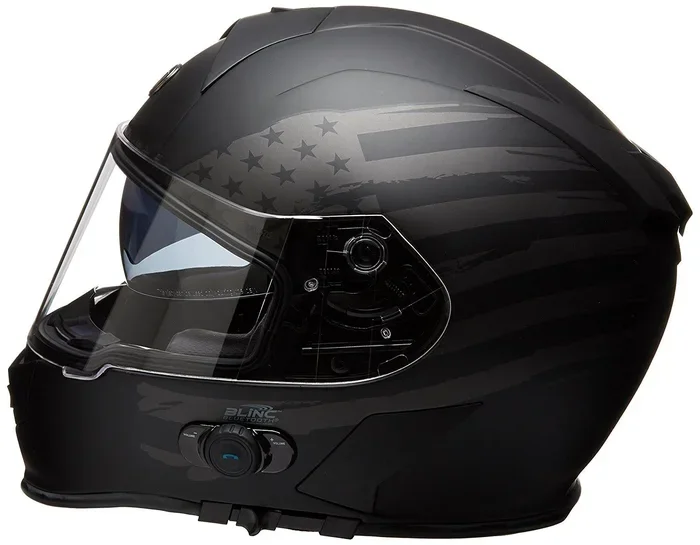
Some helmets come with Bluetooth already installed. Brands like Sena, Cardo, and Scala Rider offer helmets with built-in communication systems. You just charge them up and go. Other helmets leave the Bluetooth module out, so you need to buy an aftermarket motorcycle headset and install it yourself.
Both options work well. Built-in systems are cleaner and more convenient. Aftermarket systems give you more flexibility if you switch helmets often. Either way, the goal is the same: clear rider-to-rider communication without wires.
Can Two Different Bluetooth Helmets Connect?
This is the question most riders ask first. The answer depends on a few key factors. Let us break them down so you know exactly what to expect.
Same Brand vs. Different Brands
Helmets from the same brand usually connect without any issues. If both riders wear Sena helmets, for example, they can pair up in seconds. But what happens when one rider wears a Sena helmet and the other wears a Cardo helmet? The good news is that most modern systems support universal Bluetooth pairing. They follow standard Bluetooth protocols, so cross-brand communication is often possible.
That said, some proprietary features may not work across brands. For instance, one brand might offer better noise cancellation, but the other might have a longer helmet intercom range. Always check the specs before you buy if you ride with someone on a different brand.
Compatibility Checklist
Before you try to connect two helmets, run through this quick checklist:
- Check the Bluetooth version: Both helmets should ideally use Bluetooth 4.0 or later.
- Verify the intercom mode: Some helmets have different modes for phone calls, music, and intercom chat. Make sure both are set to intercom mode.
- Update firmware: Outdated software can cause pairing failures. Always install the latest updates from the manufacturer.
- Confirm the helmet is charged: A low battery can weaken the signal and cause dropouts.
- Reset both devices: If pairing fails, a fresh start often solves the problem.
Understanding Bluetooth Range for Helmet Communication
Range is one of the most talked-about topics in motorcycle helmet technology. The truth is that the advertised range is rarely what you experience in real life. Let us look at why.
What the Numbers Mean
Most manufacturers claim a range of 300 to 1,000 feet. But these numbers come from lab tests with no obstacles. In the real world, buildings, trees, and even your riding position can shrink that range significantly.
Under ideal conditions, you can expect around 500 to 900 feet of Bluetooth helmet range. When you ride in a city with lots of buildings, that number can drop to 200 feet or less. Open highways with clear sightlines give you the best results.
Factors That Affect Range
Several things influence how far your helmets can stay connected:
- Obstacles: Walls, vehicles, and large structures block the signal.
- Weather: Heavy rain and extreme humidity can weaken Bluetooth waves.
- Interference: Other electronic devices nearby, like GPS units or phones, can cause noise.
- Battery level: A low battery reduces signal strength.
- Helmet material: Some helmet shells with metal components can interfere with the signal.
Tips to Maximize Your Range
Want to get the best wireless helmet speaker performance? Follow these simple tips:
- Keep both helmets fully charged before a long ride.
- Stay in line of sight whenever possible.
- Avoid riding near tall buildings or dense tree cover.
- Turn off unnecessary Bluetooth devices on your phone.
- Keep both helmets updated with the latest firmware.
How to Pair Two Bluetooth Motorcycle Helmets
Setting up helmet-to-helmet communication is easier than most people think. The process takes about five minutes if you follow the steps below. Whether you are using the same brand or different brands, the basic pairing process is similar.
Step-by-Step Pairing Guide
- Turn on both helmets: Make sure each helmet is powered on and the Bluetooth function is active.
- Enter intercom mode: Press the intercom button on each helmet. You should see a light or hear a tone confirming the mode is active.
- Set one helmet as discoverable: One helmet needs to be visible to the other. Hold down the pairing button until the LED flashes.
- Search from the second helmet: On the other helmet, go to the Bluetooth settings and search for available devices.
- Select the first helmet: Choose the device name from the list. You may need to enter a default PIN, which is usually 0000 or 1234.
- Confirm the connection: Both helmets should beep or flash to confirm a successful Bluetooth pairing.
- Test the audio: Speak into one helmet and listen through the other. Adjust the volume if needed.
Troubleshooting Common Pairing Issues
If the helmets will not connect, do not panic. Try these fixes:
- Restart both helmets: A simple reboot clears most temporary glitches.
- Forget the old device: If one helmet was previously paired to a different device, delete that memory and try again.
- Move closer: Bring the helmets within a few feet of each other before attempting to pair.
- Check for interference: Turn off other Bluetooth devices nearby and try again.
- Update the app: Many helmet brands have companion apps. Make sure yours is up to date.
Group Communication: Connecting More Than Two Helmets
Riding in a group is one of the best parts of motorcycling. But staying connected with multiple riders requires a bit more setup. The good news is that most motorcycle Bluetooth systems support group communication.
How Multi-Helmet Communication Works
Many helmet intercom systems can connect up to six or even more helmets at once. This is called a mesh network or a multi-pair setup. Each helmet acts as a node in the network, passing the audio signal along to the next one.
This means that even if Rider A and Rider C are too far apart to connect directly, Rider B can relay the signal between them. It is a clever system that keeps the whole group talking.
Best Practices for Group Rides
To keep your group communication smooth, follow these guidelines:
- Keep the group size reasonable: More helmets mean more potential for signal drops. Stick to four or five riders for the best experience.
- Stay within range: Do not let the group spread out too far. Keep gaps under 500 feet when possible.
- Use one primary channel: Set all helmets to the same intercom channel to avoid confusion.
- Assign a leader: The lead rider can manage the group channel and keep conversations organized.
- Keep it brief: Long conversations distract from riding. Save detailed discussions for rest stops.
Common Mistakes That Break Helmet Communication
Even with the best gear, communication problems happen. Most of the time, the cause is a simple mistake that is easy to fix. Here are the most common errors riders make with their Bluetooth motorcycle helmets.
Mistake 1: Ignoring Firmware Updates
Manufacturers regularly release updates that fix bugs and improve Bluetooth connectivity. Skipping these updates can cause pairing failures and poor audio quality. Check for updates at least once a month.
Mistake 2: Pairing in the Wrong Mode
Many helmets have separate modes for phone calls, music streaming, and intercom chat. If both helmets are not in the same mode, they will not connect. Always double-check that both are set to intercom mode before trying to pair.
Mistake 3: Riding With Too Many Devices Connected
Some riders keep their phone, GPS, and music app all connected at the same time. This overloads the Bluetooth connection and can cause dropouts or lag. Disconnect devices you are not actively using.
Mistake 4: Forgetting to Charge
A helmet with a low battery will have a weaker signal. If you notice communication cutting out, check the battery level first. A full charge makes a big difference in helmet audio Bluetooth performance.
Mistake 5: Expecting Car-Like Range
Bluetooth is not the same as a walkie-talkie. It has a limited range and can be affected by obstacles. Do not expect to stay connected if you and your riding partner are half a mile apart. Keep your expectations realistic.
Expert Tips for the Best Helmet Communication Experience
After helping hundreds of riders set up their motorcycle helmet communication systems, we have gathered some pro tips that make a real difference.
Tip 1: Invest in quality helmets. Cheap helmets with poor Bluetooth integration often cause frustration. Spending a bit more on a reputable brand pays off in reliability and sound quality.
Tip 2: Use wind-resistant microphones. Wind noise is the enemy of clear communication. Helmets with built-in wind noise reduction or external microphones with windshields deliver much better results.
Tip 3: Position the speakers correctly. The helmet speakers should sit close to your ears but not cause pressure. Proper placement improves both sound quality and comfort on long rides.
Tip 4: Test before you ride. Always do a quick test run in your driveway or garage before hitting the open road. This helps you catch any issues early.
Tip 5: Keep conversations short and relevant. The road demands your full attention. Use your ride communication system for quick updates and directions, not long chats.
Comparing Top Bluetooth Helmet Communication Systems
Not all motorcycle communication systems are created equal. Here is a quick look at some of the most popular options riders choose today.
| Feature | Sena 50R | Cardo Packtalk Edge | Jabra Evolve2 |
|---|---|---|---|
| Bluetooth Version | 5.0 | 5.0 | 5.0 |
| Max Intercom Range | 1.6 miles | 1.6 miles | 1.2 miles |
| Multi-Rider Support | Up to 4 riders | Up to 15 riders | Up to 4 riders |
| Built-In Helmet | Yes | No (Aftermarket) | No (Aftermarket) |
| Noise Cancellation | Advanced | Advanced | Good |
| Price Range | $$$ | $$$ | $$ |
Each system has its strengths. The Sena 50R is great for riders who want an all-in-one built-in solution. The Cardo Packtalk Edge excels at group rides with its large multi-rider support. The Jabra Evolve2 offers solid performance at a more affordable price point. Choose the one that fits your riding style and budget.
The Future of Motorcycle Helmet Communication
Technology is always moving forward, and Bluetooth motorcycle helmet systems are no exception. Manufacturers are working on even better audio quality, longer ranges, and smarter features. Some newer helmets now include built-in cameras and augmented reality displays.
In the near future, we may see helmets that automatically adjust volume based on speed and wind conditions. Others might use AI to filter out background noise and enhance voice clarity. The possibilities are exciting for riders who want to stay connected without compromising safety.
For now, today’s Bluetooth motorcycle helmets talk to each other remarkably well. As long as you choose compatible gear, follow the pairing steps, and understand the limits of the technology, you will enjoy clear and reliable communication on every ride.
Conclusion
So, can Bluetooth motorcycle helmets talk to each other? Absolutely. With the right setup, compatible gear, and a basic understanding of how Bluetooth works, you can stay connected with your riding buddies throughout your journey. The key is to choose helmets that support helmet intercom communication, keep your firmware updated, and manage your expectations about range and conditions.
Whether you ride solo or with a group, a good motorcycle Bluetooth communication system adds a whole new dimension to your riding experience. You stay informed, you stay connected, and you stay safer on the road. Invest in quality gear, follow the tips in this guide, and enjoy the ride.
Now that you know how it all works, get out there and connect with your fellow riders. The open road is better when you share it with friends. Ride safe, ride connected, and happy trails.
Frequently Asked Questions
Do all Bluetooth motorcycle helmets support intercom communication?
Most modern Bluetooth helmets do support intercom communication, but it is not universal. Some budget helmets only support phone calls and music streaming without a dedicated intercom mode. Always check the product specifications before purchasing to confirm that helmet-to-helmet communication is supported.
What is the maximum range for helmet-to-helmet Bluetooth communication?
The maximum range typically falls between 300 and 1,000 feet in real-world conditions. The advertised range from manufacturers is often measured in ideal environments with no obstacles. Your actual range will depend on factors like weather, terrain, and interference from other electronic devices.
Can I connect a Sena helmet with a Cardo helmet?
Yes, in most cases you can. Both Sena and Cardo use standard Bluetooth protocols that allow cross-brand pairing. However, some advanced features like proprietary audio codecs or specialized group management may only work within the same brand ecosystem. Basic intercom communication should work fine between the two.
How long does the Bluetooth battery last on motorcycle helmets?
Battery life varies by model and usage, but most helmets offer between 8 and 15 hours of continuous communication on a single charge. Listening to music or using GPS alongside the intercom will drain the battery faster. Always charge your helmet fully before a long ride.
Is it safe to use Bluetooth helmets while riding?
Yes, it is generally safe as long as you keep conversations brief and stay focused on the road. Most experts recommend keeping the volume low enough that you can still hear traffic and emergency vehicles. Avoid complex or distracting discussions that take your attention away from riding.
What should I do if my helmets will not pair?
Start by restarting both helmets and making sure they are fully charged. Check that both are set to intercom mode and that Bluetooth is enabled. If the problem persists, forget any previous pairings on both devices and try again from scratch. Updating the firmware through the manufacturer’s app can also resolve many pairing issues.