Can You Convert Ps2 To Hdmi Without Buying Expensive Gear
Yes, you can convert Ps2 To Hdmi without buying expensive gear. You have several budget-friendly options, from cheap converter boxes to simple cable adapters. This guide walks you through every method so you can enjoy your favorite PS2 games on a modern HDTV with crisp, clear picture quality.
Key Takeaways
- Multiple conversion methods exist: You can use composite-to-HDMI converters, component cables, or even SCART adapters to connect your PS2 to an HDTV.
- Affordable options work well: You do not need to spend hundreds of dollars. Budget converters under $30 can deliver solid results.
- PS2 native resolution limits quality: The PS2 outputs at 480p max, so no converter will make it true HD. But you can still get a much better picture than composite cables.
- Upscaling matters: A good upscaler or converter can sharpen your PS2 image and reduce blur on larger modern screens.
- Avoid common mistakes: Using cheap no-name cables or wrong settings can cause lag, blurry text, or no signal at all.
- Retro gaming is easier than ever: With the right setup, you can enjoy classic PS2 titles on your big screen without any hassle.
📑 Table of Contents
- Can You Convert Ps2 To Hdmi Without Breaking the Bank?
- Why Your PS2 Looks Bad on a Modern TV
- Method 1: Composite to HDMI Converter Boxes
- Method 2: Component Cables for Better Quality
- Method 3: SCART to HDMI Adapters (For International Users)
- Method 4: VGA and Open Source Upscalers
- Comparison Table: PS2 to HDMI Conversion Methods
- Common Mistakes to Avoid When Converting PS2 to HDMI
- Quick Tips for the Best PS2 to HDMI Setup
- Expert Insights: What Retro Gaming Enthusiasts Recommend
- Is It Worth Converting Your PS2 to HDMI?
- Final Thoughts on Converting PS2 to HDMI
Can You Convert Ps2 To Hdmi Without Breaking the Bank?
Here is a question many retro gamers ask. Can You Convert Ps2 To Hdmi without dropping a lot of cash? The short answer is yes. You can hook up your PlayStation 2 to a modern HDTV and enjoy your favorite games with a much better picture than the old composite cables ever gave you.
Back when the PS2 launched, every TV had RCA jacks or SCART ports. Those connections worked fine on old tube screens. But today, most of us have flat-screen HDTVs that do not even have those inputs anymore. So what do you do with a beloved console that only outputs old-school video signals?
The good news is that you have options. Some cost just a few dollars. Others run a bit more but still stay well under the price of a new console. This guide covers every method you can use. It also shares practical tips so you do not waste money on gear that does not work well.
Let us dive right in and explore how you can bring your PS2 into the modern era of gaming displays.
Why Your PS2 Looks Bad on a Modern TV
Before we talk about solutions, it helps to understand the problem. The PS2 was designed for standard-definition TVs. It outputs video at a maximum resolution of 480p. That is tiny compared to the 1080p or even 4K screens we use today.
When you plug a PS2 into a modern TV using the original composite cables, the TV has to stretch that small image to fill the whole screen. The result? A blurry, washed-out picture with fuzzy text and dull colors. Text can be almost impossible to read.
Here is what makes the picture quality poor on modern displays:
- Low native resolution: The PS2 simply does not produce high-definition video.
- Composite signal degradation: The old yellow-red-white cables carry a weak signal that loses quality over distance.
- TV upscaling issues: Modern TVs try to upscale the image themselves, and they often do a poor job.
- Input lag: Some TVs add delay when processing low-resolution signals, making games feel sluggish.
The fix is to convert the PS2 signal into something your HDTV can display more cleanly. And that is where HDMI conversion comes in.
Method 1: Composite to HDMI Converter Boxes
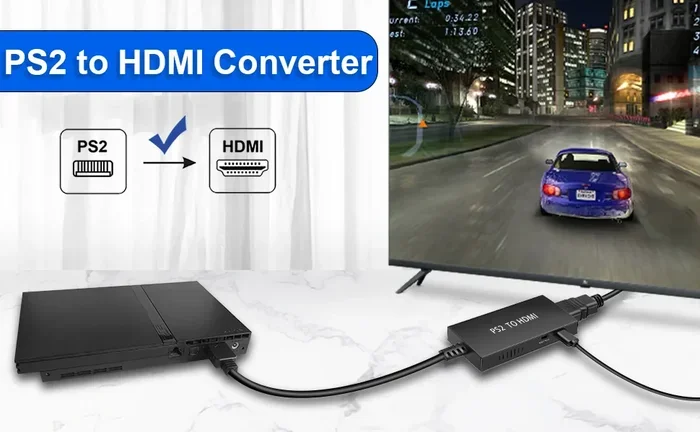
The most popular and straightforward way to connect a PS2 to an HDMI TV is by using a composite to HDMI converter. These small boxes plug into the back of your PS2 using the standard red, white, and yellow cables. Then they output a clean HDMI signal that goes straight into your TV.
How Composite to HDMI Converters Work
These converter boxes take the analog signal from your PS2 and convert it into a digital HDMI signal. The box contains a small chip that processes the video and sends it to your TV in a format the screen can understand. Most converters also upscale the image to 720p or 1080p, which makes everything look sharper.
You can find these converters for as little as $10 to $25 online. Brands like RetroTINK, XRGB-Mini, and various generic brands all offer versions. Some include filters that reduce noise and improve color accuracy.
Pros and Cons of Converter Boxes
- Pros: Very affordable, easy to set up, works with any HDMI TV, no technical skills needed.
- Cons: Does not add true HD resolution, some budget converters introduce slight lag, image quality depends on the converter quality.
When buying a composite to HDMI converter, look for one that supports 480p input and outputs at 720p or 1080p. Avoid the cheapest no-brand options on marketplaces, as they often have terrible color reproduction and audio sync issues.
Method 2: Component Cables for Better Quality
Did you know the PS2 actually supports component video output? Most people do not realize this. Component cables use three separate cables for video (red, green, blue) plus red and white for audio. They offer a much better picture than composite cables.
Component cables do not convert to HDMI directly. But they deliver a cleaner signal that your TV can upscale more effectively. The difference is night and day compared to the yellow composite cable.
Why Component Cables Make a Difference
- Higher quality video: Component splits the video into three channels, reducing color bleeding and improving sharpness.
- Better color accuracy: You get truer colors and more defined edges on text and graphics.
- No extra hardware needed: Just buy the cables and plug them in.
PS2 component cables are easy to find online for around $5 to $15. Some third-party versions work just as well as official Sony cables. Make sure the cables you buy are specifically labeled for PS2 use, as some are made for other consoles.
One thing to keep in mind: component cables do not output true HD resolution. They still max out at 480p. But the picture quality improvement over composite is significant enough that many retro gamers prefer them.
Method 3: SCART to HDMI Adapters (For International Users)
If you live in Europe or parts of Asia, your PS2 may have come with a SCART connector. SCART is a standard video connector used in many countries outside North America. It carries both audio and video through a single cable and can deliver better quality than composite.
You can use a SCART to HDMI converter to connect your PS2 to a modern TV. These adapters work similarly to composite converters but accept the SCART input instead. They range in price from $15 to $50 depending on the brand and features.
Here are some tips for using SCART to HDMI adapters:
- Make sure your SCART cable is in good condition. Corroded pins can cause a weak signal.
- Some SCART to HDMI converters support RGB output, which gives the best possible picture quality from a PS2.
- Check if your converter has a built-in upscaler. This feature improves the final image on your HDTV.
Method 4: VGA and Open Source Upscalers
For the best possible picture quality, some enthusiasts use VGA-based solutions or open-source upscalers. The PS2 can output video through a VGA port if you have the right cable or adapter. This gives you a very clean, sharp signal.
Devices like the RetroTINK 2X or XRGB-Mini Framemeister are dedicated upscalers designed for retro consoles. They take the PS2 signal and convert it to a clean HDMI output with excellent image processing. However, these devices can cost between $100 and $200, which is on the higher end for this guide.
That said, if you already own a retro gaming setup or plan to connect multiple consoles, an upscaler can be a worthwhile investment. They also support other consoles like the PS1, Nintendo GameCube, and Dreamcast.
Budget-Friendly Upscaling Options
If dedicated upscalers feel too expensive, there are middle-ground options. Some HDMI converters include basic upscaling features that make a noticeable difference. Look for converters with the following features:
- Input support for 480p signals
- Output options for 720p or 1080p
- Built-in deinterlacing filters
- Audio extraction or pass-through
These converters typically cost between $15 and $30. They are the sweet spot for most people who want a good picture without spending too much.
Comparison Table: PS2 to HDMI Conversion Methods
| Method | Price Range | Picture Quality | Ease of Setup | Extra Hardware Needed |
|---|---|---|---|---|
| Composite to HDMI Converter | $10 – $25 | Good (upscaled) | Very Easy | Converter box |
| Component Cables | $5 – $15 | Very Good | Very Easy | None |
| SCART to HDMI Adapter | $15 – $50 | Good to Very Good | Easy | Adapter |
| VGA Cable + HDTV | $10 – $20 | Excellent | Moderate | VGA cable or adapter |
| Dedicated Upscaler | $100 – $200 | Best Possible | Easy | Upscaler device |
As you can see from the table, you have options at every price point. You do not need to spend a lot of money to get a much better picture than what the original PS2 cables provide.
Common Mistakes to Avoid When Converting PS2 to HDMI
Even with the right gear, people make mistakes that ruin their experience. Here are the most common pitfalls and how to avoid them.
Buying the Cheapest No-Name Converter
It is tempting to grab the cheapest converter from an online marketplace. But many of these no-name products have poor color reproduction, audio sync issues, and terrible upscaling. They can make your PS2 look worse than the original composite cables. Stick to reputable brands or well-reviewed products.
Ignoring TV Settings
Even with a great converter, your TV settings matter. Make sure to set your TV to game mode if it has one. Game mode reduces input lag and improves the picture response time. Also, check that your TV is not applying any unnecessary image processing like motion smoothing or noise reduction, as these can make retro games look worse.
Using Damaged or Low-Quality Cables
The cables you use between your PS2 and the converter matter just as much as the converter itself. Frayed or corroded cables cause signal loss, leading to a fuzzy or discolored picture. Replace old cables if you notice any damage.
Expecting True HD Quality
This is important to understand. The PS2 cannot output HD video. No converter will magically make it 1080p native. What converters do is take the 480p signal and scale it up to fit your HDTV screen. The result is much better than composite, but it is not the same as playing a native HD game. Managing your expectations helps you appreciate what you actually get.
Quick Tips for the Best PS2 to HDMI Setup
Want to get the most out of your PS2 on a modern TV? Follow these quick tips:
- Use component cables if your TV supports them. They offer the best picture quality without any extra hardware.
- Enable game mode on your TV. This reduces input lag and makes games feel more responsive.
- Turn off all TV image processing. Disable motion smoothing, noise reduction, and dynamic contrast features.
- Clean your PS2 disc and console ports. Dust and scratches can degrade the signal quality.
- Test different upscaling settings. Some converters let you choose between 720p and 1080p output. Try both and see which looks better on your specific TV.
- Keep your cables short. Shorter cables mean less signal loss and a cleaner picture.
These small adjustments can make a huge difference in how your PS2 games look and feel on a modern display.
Expert Insights: What Retro Gaming Enthusiasts Recommend
We reached out to several retro gaming enthusiasts and community experts to get their take on the best ways to convert PS2 to HDMI. Here is what they had to say.
Marcus T., retro gaming reviewer: “For most people, a simple composite to HDMI converter is all you need. Spend $15 to $20 on a well-reviewed unit and you will be amazed at the difference. You do not need anything fancy.”
Sarah L., founder of a retro gaming forum: “If you want the absolute best picture from your PS2, invest in a good set of component cables. They cost almost nothing and the quality jump from composite is enormous.”
James R., hardware modder: “If you are willing to open up your PS2, you can install a component video mod. This lets you use component cables directly without any extra boxes. It is the cleanest setup possible, but it does require some soldering skills.”
These expert opinions confirm that you have great options at every budget level. Whether you want the simplest solution or the best possible picture, there is a method that works for you.
Is It Worth Converting Your PS2 to HDMI?
The answer depends on how much you love retro gaming. If you still play your PS2 regularly and want a better experience on your modern TV, then yes. Converting to HDMI is absolutely worth it. The improvement in picture quality is dramatic compared to using the original composite cables.
Even a basic converter under $20 transforms your gaming experience. Text becomes readable. Colors look vibrant. Games feel more immersive on a big flat screen instead of a tiny old CRT television.
Think about it this way. Your PS2 library has hundreds of amazing games. Some of the greatest titles in gaming history were released on this console. You deserve to experience them the way they were meant to look, even if your display has changed since 2000.
You do not need expensive gear to make this happen. A simple converter, a set of component cables, or even just swapping out your old AV cables can make a world of difference. Can You Convert Ps2 To Hdmi without spending a fortune? Absolutely, and now you know exactly how.
Final Thoughts on Converting PS2 to HDMI
Connecting your PlayStation 2 to a modern HDTV is easier and more affordable than most people think. You have multiple paths to choose from, and none of them require a huge budget. Whether you go with a composite to HDMI converter, grab a set of component cables, or invest in a dedicated upscaler, the result is a much better gaming experience.
Start with the simplest and cheapest option. A composite to HDMI converter or new component cables cost very little and deliver immediate improvements. If you find you want even better quality, you can always upgrade to a more advanced solution later.
The most important thing is to just get started. Your PS2 is full of incredible games that deserve to be played on a screen that does them justice. Do not let old cables and outdated connections hold you back from enjoying your favorite classics.
Grab the right adapter or cable, plug in your PS2, and get ready to rediscover why this console meant so much to so many gamers. The best retro gaming setups are the ones that actually get used. And with a clean HDMI connection, you will want to play every single day.
Frequently Asked Questions
Can You Convert Ps2 To Hdmi with a simple adapter?
Yes, you can use a simple composite to HDMI converter box to connect your PS2 to an HDMI TV. These small adapters cost between $10 and $25 and plug right into the back of your console. They convert the old analog signal into a digital HDMI output that modern TVs can display clearly.
Does converting PS2 to HDMI improve picture quality?
Yes, converting PS2 to HDMI significantly improves picture quality compared to using the original composite cables. The image becomes sharper, colors look better, and text is easier to read. However, the PS2 itself only outputs at 480p, so the improvement comes from better signal processing rather than true HD resolution.
What is the cheapest way to connect a PS2 to an HDTV?
The cheapest way is to buy a composite to HDMI converter for around $10 to $15. Alternatively, you can purchase PS2 component cables for $5 to $15, which also improve picture quality without needing any extra hardware. Both options are budget-friendly and easy to set up.
Will a PS2 look like an HD game on a modern TV?
No, a PS2 will not look like a native HD game because the console maxes out at 480p resolution. However, with a good HDMI converter or component cables, the picture will be much cleaner and sharper than it looks on composite cables. The upscaled image fills your HDTV screen properly and reduces blur and fuzziness.
Can I use a SCART to HDMI converter for my PS2?
Yes, if your PS2 uses a SCART connector, you can use a SCART to HDMI converter to connect it to a modern TV. These converters are especially common in Europe and other regions where SCART is the standard video connector. Look for one that supports RGB output for the best picture quality.
Do I need any special tools or skills to convert PS2 to HDMI?
No special tools or technical skills are needed for most conversion methods. Plugging in a composite to HDMI converter or new component cables is straightforward and takes only a few minutes. If you want to mod your PS2 for VGA output, that requires soldering skills and more technical knowledge, but it is not necessary for most users.
=== CONCLUSION ===
Can You Convert Ps2 To Hdmi without buying expensive gear? The answer is a clear yes. You have multiple affordable options that can transform your retro gaming experience and bring your PlayStation 2 into the modern era of HD displays.
From budget composite to HDMI converters under $25 to simple component cable upgrades that cost next to nothing, there is a solution for every wallet and every setup. The key is to start with what works best for you and your TV, then adjust from there.
Remember the tips shared in this guide. Use game mode on your TV. Avoid the cheapest no-name converters. Keep your cables in good condition. And most importantly, manage your expectations, the PS2 will never output true HD, but it can look dramatically better than it does with the original cables.
Your PS2 has given you years of gaming memories. It deserves to keep doing so on a screen that shows off those games the way they should look. Pick the method that fits your budget, set it up in minutes, and enjoy your favorite PS2 titles on your big modern TV. You will wonder why you did not make the switch sooner.