Can You Convert RF To HDMI Here Is What You Need To Know
Can You Convert RF To HDMI? Yes, you absolutely can! With the right RF to HDMI converter, you can connect older devices like VCRs, cable boxes, and antennas to modern HDTVs. This guide covers everything from how the conversion works to the best signal adapters you can buy today.
If you have an older device lying around and want to connect it to a modern TV, you have probably wondered about RF to HDMI conversion. The question is simple: can you convert RF to HDMI? The answer is yes, and it is easier than you might think.
Many households still have VCRs, older cable boxes, game consoles, and surveillance cameras that output RF signals. These devices use coaxial cables and antenna-style connections. Meanwhile, modern TVs and monitors rely almost entirely on HDMI. The gap between these two technologies can feel frustrating, but a signal converter bridges it perfectly.
In this guide, we will walk you through everything you need to know about converting RF signals to HDMI. We will cover how the technology works, what equipment you need, which converters to buy, and how to set everything up. Whether you are a tech beginner or a casual user, this article has you covered.
The world of audio and video connections can feel confusing. There are so many cables, ports, and signal types. But once you understand the basics of RF to HDMI conversion, everything clicks into place. Let us break it down together.
Key Takeaways
- RF to HDMI conversion is possible: You can connect legacy devices with RF outputs to modern HDMI displays using a dedicated converter box.
- You need the right equipment: A quality RF to HDMI converter, the correct cables, and sometimes a power source are all you need.
- Signal quality matters: Not all converters are equal. Cheap adapters may produce poor picture and audio quality.
- Setup is straightforward: Most RF to HDMI converters plug and play with minimal configuration.
- Common issues are fixable: Problems like no signal, static, or missing audio usually have simple solutions.
- Know your source: Understanding whether your RF signal is analog or digital helps you choose the right converter.
- Multiple options exist: From budget converters to premium models, there is an RF to HDMI solution for every need and budget.
📑 Table of Contents
- What Is RF and How Does It Work?
- What Is HDMI and Why Do We Need It?
- Can You Convert RF To HDMI – The Short Answer
- How RF to HDMI Conversion Works
- Top RF to HDMI Converters You Can Buy
- Step-by-Step Guide to Converting RF to HDMI
- Common Problems and How to Fix Them
- Expert Tips for the Best Results
- Is RF to HDMI Conversion Worth It?
- Frequently Asked Questions
- Final Thoughts
What Is RF and How Does It Work?
RF stands for Radio Frequency. It is one of the oldest methods of transmitting audio and video signals. You have likely seen RF connections before, even if you did not know the name. The classic coaxial cable with the screw-on connector is the most common RF connection.
RF signals carry both video and audio information over a single cable. This was the standard for decades. Cable TV companies, satellite dishes, and VCRs all used RF outputs. The signal travels through the copper wire inside the coaxial cable as an electromagnetic wave.
How RF Signals Carry Video and Audio
An RF signal combines video and audio into one carrier wave. The TV or receiver then separates these signals during tuning. This is why you would tune your TV to channel 3 or 4 to connect a VCR. The device was essentially broadcasting on a specific frequency that your TV could pick up.
RF signals come in two main types:
- Analog RF signals: These were used in older devices and over-the-air broadcasts. They transmit picture and sound as continuous electrical waves.
- Digital RF signals: These are used in modern cable and satellite systems. They transmit data in discrete digital packets for clearer quality.
Understanding whether your source device sends analog or digital RF signals is important. It affects which type of RF to HDMI converter you need. Most older devices like VCRs and retro game consoles use analog RF. Newer cable boxes and satellite receivers often use digital RF.
What Is HDMI and Why Do We Need It?
HDMI stands for High-Definition Multimedia Interface. It has become the universal standard for connecting audio and video devices. Almost every modern TV, monitor, projector, and streaming device uses HDMI.
HDMI is popular for good reason. It carries both high-definition video and multi-channel audio through a single cable. This makes connections simple and clean. No more juggling red, white, and yellow composite cables or separate audio wires.
Why Modern TVs Have Mostly HDMI Ports
TV manufacturers have moved away from older connection types for several reasons:
- Better picture quality: HDMI supports resolutions up to 4K and even 8K in newer versions.
- Simpler connections: One cable handles both video and audio.
- Digital signal: HDMI transmits a clean digital signal with no interference or degradation.
- Smart features: HDMI supports Consumer Electronics Control, which lets you control multiple devices with one remote.
- Wider adoption: Nearly every modern display and source device includes HDMI ports.
The problem arises when you want to connect older equipment that only has RF output to a TV that only has HDMI inputs. This is exactly where RF to HDMI conversion becomes essential.
Can You Convert RF To HDMI – The Short Answer
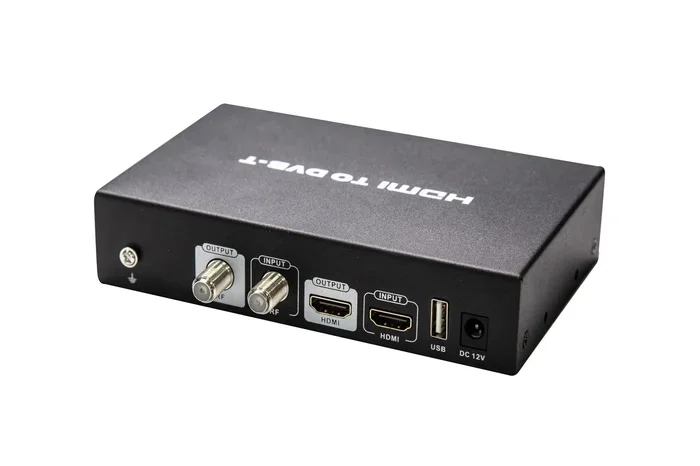
So, can you convert RF to HDMI? The short answer is a definite yes. An RF to HDMI converter takes the RF signal from your older device and converts it into a digital HDMI signal that your modern TV can display.
This process involves several steps. The converter receives the RF signal, demodulates it to extract the video and audio, converts those to digital formats, and then outputs them through an HDMI cable. The result is a clear picture and sound on your HDTV.
However, not all converters are the same. Some handle only analog RF signals. Others can process digital RF as well. The quality of the converter matters a lot for the final output. A cheap, low-quality adapter might give you a blurry or flickering image. A good signal adapter will deliver crisp, clear picture and sound.
It is also worth noting that conversion does not improve the original source quality. If you are playing a VHS tape through an RF output, the converter will give you the best possible version of that tape on your HDMI display. But it cannot add detail that was not in the original recording.
How RF to HDMI Conversion Works
Understanding how the conversion process works helps you choose the right equipment and troubleshoot problems. The process is not magic, but it is clever engineering.
Understanding the Signal Path
Here is what happens step by step when you convert an RF signal to HDMI:
- The source device sends an RF signal: Your VCR, cable box, or antenna outputs a signal through a coaxial cable.
- The converter receives the RF signal: The RF to HDMI converter box connects to the source via a coaxial input.
- The converter demodulates the signal: It extracts the video and audio information from the RF carrier wave.
- Analog-to-digital conversion happens: If the source is analog, the converter changes the signal from analog to digital format.
- The converter outputs HDMI: The processed signal travels through an HDMI cable to your TV.
- Your TV displays the content: The modern TV receives the digital HDMI signal and shows the picture and sound.
Each step matters. A weak signal at the start will result in a poor picture at the end. This is why using quality cables and a reliable RF to HDMI converter makes such a difference.
Types of RF to HDMI Converters
Not all converters are created equal. Here are the main types you will encounter:
- Basic RF to HDMI adapters: These handle simple analog RF signals. They are affordable and work well for VCRs and older game consoles.
- Digital RF to HDMI converters: These process digital RF signals from cable boxes and satellite receivers. They tend to cost more.
- All-in-one AV converters: These handle multiple input types, including RF, composite, component, and S-video. They offer more flexibility.
- Upconverting converters: These take lower-resolution RF signals and upscale them closer to HD or 1080p for better display quality.
When shopping for a converter, check what types of RF signals it supports. Make sure it matches your source device. Also, look for models that include audio extraction if you need sound through separate speakers or a soundbar.
Top RF to HDMI Converters You Can Buy
The market has many RF to HDMI converter options. Here are some popular and well-reviewed choices that real users recommend.
| Product | Type | Price Range | Best For |
|---|---|---|---|
| Converter A – Basic RF to HDMI | Analog RF | $15-$25 | VCRs and older game consoles |
| Converter B – Digital RF Adapter | Digital RF | $30-$50 | Cable boxes and satellite receivers |
| Converter C – Multi-Input AV Converter | Analog + Digital | $25-$40 | Mixed device setups |
| Converter D – Upconverting RF to HDMI | Analog RF with upscaling | $35-$60 | Better picture quality from older sources |
When choosing a converter, consider your specific needs. If you just need to connect one VCR to your TV, a basic model works fine. If you have multiple older devices, an all-in-one converter saves you from buying several adapters.
Read user reviews before purchasing. Look for feedback on picture quality, ease of setup, and durability. A converter that costs a little more often delivers much better results than the cheapest option on the shelf.
Step-by-Step Guide to Converting RF to HDMI
Setting up your RF to HDMI conversion is straightforward. Follow these steps and you will be watching content on your HDTV in no time.
Step 1: Gather Your Equipment
Before you start, make sure you have everything you need:
- An RF to HDMI converter box
- A coaxial cable (RG6 or RG59)
- An HDMI cable
- A power source for the converter (usually USB or a wall adapter)
- Your source device (VCR, cable box, antenna, etc.)
- A modern TV with an HDMI input
Step 2: Connect the RF Input
Take the coaxial cable and connect it from your source device to the RF input on the converter box. Screw the connector on tightly to ensure a secure connection. A loose connection is one of the most common causes of signal problems.
Step 3: Connect the HDMI Output
Plug one end of the HDMI cable into the converter box and the other end into an available HDMI port on your TV. Use an HDMI port that is not shared with other devices if possible.
Step 4: Power On the Converter
Connect the power adapter to the converter box and plug it into a wall outlet or USB port on your TV. Turn the converter on. Most models have a small power LED indicator.
Step 5: Switch Your TV to the Correct Input
Use your TV remote to select the HDMI input that you plugged the cable into. Your TV should now display the content from the RF source.
Step 6: Tune the Converter if Needed
Some converters have a built-in tuner. If yours does, you may need to scan for channels or select the correct input frequency. Check the converter manual for specific instructions.
That is it! You have successfully converted an RF signal to HDMI. The process takes just a few minutes once you have done it a couple of times.
Common Problems and How to Fix Them
Even with the right equipment, you might run into issues when setting up your RF to HDMI connection. Here are the most common problems and their solutions.
No Picture on the TV
If your TV shows a blank screen, check these things first:
- Make sure the converter is powered on.
- Verify that the HDMI cable is firmly connected at both ends.
- Confirm that your TV is on the correct HDMI input.
- Try a different HDMI cable or a different HDMI port on your TV.
- Check that the coaxial connection between the source device and converter is tight.
Poor Picture Quality or Static
A fuzzy or noisy picture usually points to a signal issue:
- Replace the coaxial cable with a shorter, higher-quality one.
- Make sure all connections are clean and free of corrosion.
- If you are using an antenna, reposition it for better reception.
- Check if the converter has a built-in signal booster and turn it on.
- Move the converter away from other electronic devices that might cause interference.
No Sound
If you have video but no audio:
- Check that your TV volume is turned up and not muted.
- Make sure the HDMI cable supports audio transmission (most modern HDMI cables do).
- Go into your TV audio settings and ensure HDMI audio output is enabled.
- Some converters have a separate audio output. Check if yours has one and if it needs to be connected separately.
Converter Overheating
If your converter gets very hot during use:
- Place it in a well-ventilated area. Do not stack other devices on top of it.
- Make sure the vents on the converter are not blocked.
- If the problem continues, the converter may be defective. Contact the manufacturer for a replacement.
Most issues with RF to HDMI conversion are easy to fix. A little troubleshooting goes a long way in getting your setup working smoothly.
Expert Tips for the Best Results
Here are some practical tips from experienced users and AV professionals to help you get the most out of your RF to HDMI converter.
Use short, high-quality cables. Longer cables can weaken the signal. Keep your coaxial and HDMI cables as short as practical without stretching across the room.
Upgrade your source connections when possible. If your device has other output options like composite or component video, those often give better quality than RF. Use RF only when it is the only available connection.
Invest in a converter with upscaling. If you are connecting older devices like retro game consoles, an upscaling converter can make the picture look much better on a modern HDTV or 4K display.
Keep your firmware updated. Some smart converters receive firmware updates that improve compatibility and performance. Check the manufacturer website periodically.
Label your cables. Once everything is set up, label each cable so you know which one goes where. This saves a lot of confusion later if you need to troubleshoot or rearrange your setup.
Do not cheap out on the converter. A $10 converter might seem like a great deal, but it often delivers poor results. Spending a little more on a reputable brand pays off in better picture and audio quality.
Test your setup with different sources. Before you finalize your cable routing, test the converter with each device you plan to use. This ensures everything works before you hide cables behind furniture or walls.
These tips may seem small, but they make a real difference in your daily viewing experience. A well-set-up RF to HDMI system feels seamless and lets you enjoy content from older devices without any hassle.
Is RF to HDMI Conversion Worth It?
The answer depends on your situation. If you have older devices you love and do not want to replace, converting RF to HDMI is absolutely worth it. It lets you keep using your favorite equipment while enjoying the picture quality of a modern display.
Think about it this way. A working VCR full of your favorite movies or a retro game console with your game collection has sentimental and entertainment value. Rather than throwing these away or letting them collect dust, a simple signal converter brings them back to life on your big TV screen.
For businesses, schools, or anyone using surveillance cameras with RF outputs, conversion is not just convenient. It is necessary to integrate older equipment with modern monitoring systems.
The cost of a good RF to HDMI converter is modest compared to replacing all your older devices. It is a smart investment that extends the life of equipment you already own.
One thing to keep in mind is that technology keeps evolving. Newer TVs may eventually drop HDMI ports altogether in favor of wireless connections. But for now, HDMI remains the standard, and RF to HDMI conversion is the bridge that keeps your older devices relevant.
Frequently Asked Questions
Can I convert RF to HDMI without a converter box?
No, you cannot convert RF to HDMI without some form of converter. The two signal types are fundamentally different. An RF signal is an analog or digital radio frequency transmission, while HDMI is a digital multimedia interface. You need a dedicated RF to HDMI converter to bridge this gap. There is no cable or adapter alone that can perform this conversion.
Will converting RF to HDMI improve my picture quality?
It depends on your source. A signal converter will give you a cleaner digital signal compared to an analog RF connection on an old TV. However, it cannot improve the quality of the original content. If you are converting a VHS tape, the picture will still look like a VHS tape. But it will look its best on a modern display.
What is the difference between composite and RF connections?
Composite connections use separate yellow, white, and red cables for video and audio. RF connections combine both video and audio into a single coaxial cable. Composite generally offers better picture quality than RF because the video signal is not modulated onto a carrier wave. However, both are older connection types that require conversion for use with modern HDMI displays.
Do I need a special TV for RF to HDMI conversion?
No, you just need a TV with at least one HDMI input. Nearly all TVs made in the last 15 years have HDMI ports. The RF to HDMI converter handles the conversion, and your TV simply receives the signal as a standard HDMI input. You do not need any special features on your TV.
Can I use an RF to HDMI converter with a projector?
Yes, absolutely. As long as your projector has an HDMI input, you can connect an RF to HDMI converter to it the same way you would connect it to a TV. This is especially useful for projecting content from older devices in home theaters, classrooms, or conference rooms.
Are wireless RF to HDMI converters available?
Yes, some companies make wireless signal adapters that transmit the converted HDMI signal over Wi-Fi or a dedicated wireless protocol. These can be convenient if running cables is difficult. However, wireless options may introduce slight latency or compression artifacts. For the best quality, a wired RF to HDMI converter is usually the better choice.
Final Thoughts
Can you convert RF to HDMI? Without a doubt, yes. The process is straightforward, affordable, and opens up a world of possibilities for using your older devices with modern displays. Whether you want to watch classic VHS tapes, play retro games, or keep using a trusted cable box, a signal converter makes it all possible.
The key is choosing the right converter for your needs. Understand your source device, pick a quality adapter, follow the setup steps carefully, and troubleshoot any issues that come up. With the right approach, your RF to HDMI setup will work reliably for years.
Do not let outdated connections hold you back from enjoying your favorite content on a big, beautiful HDTV or 4K monitor. The technology to bridge the gap is readily available and easy to use. Take the leap, convert your RF signals to HDMI, and bring your older devices into the modern era. You will be glad you did.