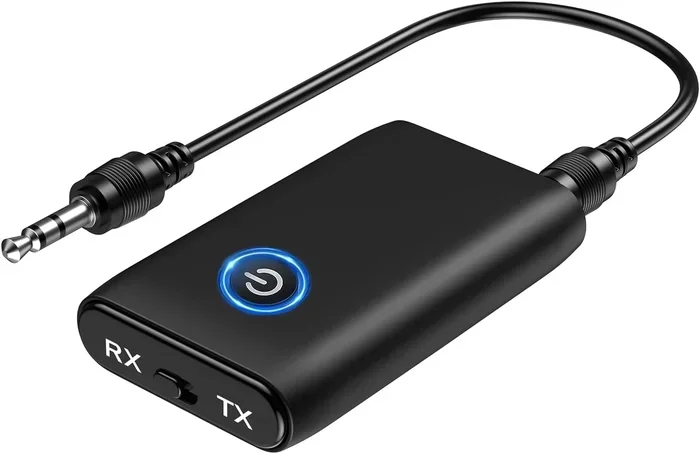
Can You Get A Bluetooth Aux Adapter And Stream Wirelessly
Yes, you can get a Bluetooth aux adapter to stream audio wirelessly from any device. A Bluetooth aux adapter lets you turn any speaker, car stereo, or headphones with a 3.5mm jack into a wireless audio device. It is one of the simplest and most affordable ways to upgrade your audio setup without buying new gear.
Have you ever wanted to play music from your phone through your old speakers but hated the idea of dealing with cables? Maybe your car stereo does not have Bluetooth, or your desktop speakers only have an old-school AUX input. The good news is that a Bluetooth aux adapter solves all of these problems in a simple and affordable way.
You can absolutely get a Bluetooth aux adapter and start streaming wirelessly in minutes. Whether you want to upgrade your car audio, breathe new life into old speakers, or just enjoy hands-free music at home, a Bluetooth adapter is the answer. In this guide, we will walk you through everything you need to know. We will cover how they work, what types are available, and how to pick the best one for your setup.
The world of wireless audio has grown fast in recent years. More people want to ditch the cables and enjoy the freedom of wireless streaming. A Bluetooth aux adapter is one of the easiest ways to join this trend without spending a lot of money. Let us dive in and explore how you can make it work for you.
Key Takeaways
- Bluetooth aux adapters are widely available: You can find them online and in most electronics stores at various price points.
- They work with almost any device: Phones, tablets, laptops, and desktop computers all support Bluetooth aux adapters easily.
- Setup is simple and fast: Most adapters pair in under a minute with no technical skills needed.
- Wireless streaming improves convenience: You get freedom of movement and fewer tangled cables in your setup.
- Quality varies by model: Choosing the right adapter depends on your audio needs, range, and codec support.
- Compatibility matters: Some adapters work better with certain operating systems and devices than others.
📑 Table of Contents
- What Is A Bluetooth Aux Adapter?
- How Does A Bluetooth Aux Adapter Work?
- Benefits Of Using A Bluetooth Aux Adapter
- Types Of Bluetooth Aux Adapters Available
- How To Choose The Right Bluetooth Aux Adapter
- Setting Up Your Bluetooth Aux Adapter
- Common Problems And How To Fix Them
- Expert Tips For Getting The Most Out Of Your Adapter
- Is A Bluetooth Aux Adapter Worth It?
- Conclusion
What Is A Bluetooth Aux Adapter?
A Bluetooth aux adapter is a small device that receives a Bluetooth signal and converts it into an audio output through a 3.5mm jack or RCA connection. Think of it as a bridge between your phone and your old-school audio gear. It picks up the wireless signal from your device and turns it into sound you can hear through speakers or headphones.
These adapters come in different shapes and sizes. Some are tiny dongles you plug directly into an AUX port. Others are larger units with extra features like built-in batteries or multiple connection options. The core idea is the same: they give any device with an AUX input the ability to receive Bluetooth audio.
Most Bluetooth aux adapters support Bluetooth connectivity versions 4.0 and above. This means you get a reliable connection with decent range. The latest adapters even support Bluetooth 5.0 or higher, which offers better range, faster data transfer, and improved audio quality. If you want wireless music streaming without spending a fortune, this is the way to go.
How Does It Differ From A Bluetooth Receiver?
People often confuse a Bluetooth aux adapter with a Bluetooth receiver. They are similar, but there is a key difference. A Bluetooth receiver usually has a dedicated output port and is designed to be a standalone device. An adapter, on the other hand, often plugs directly into an existing AUX port on your device. Both serve the same purpose, but adapters tend to be more compact and portable.
How Does A Bluetooth Aux Adapter Work?
The technology behind a Bluetooth aux adapter is straightforward. The adapter acts as a Bluetooth transmitter and receiver combo. It scans for nearby Bluetooth devices, pairs with your phone or computer, and then sends the audio signal through a wired connection to your speakers or stereo system.
Here is how the process works step by step:
- The adapter powers on and enters pairing mode.
- You go to your phone or device and search for available Bluetooth devices.
- You select the adapter from the list and confirm the pairing.
- Once connected, audio from your device streams wirelessly to the adapter.
- The adapter converts the Bluetooth signal into an analog audio signal through the AUX cable.
- Your speakers or stereo plays the sound.
Most adapters use Bluetooth codecs like SBC, AAC, or aptX to compress and transmit audio data. Better codecs mean better sound quality. If audio fidelity matters to you, look for adapters that support aptX or LDAC codecs. These deliver near-lossless sound quality over a Bluetooth connection.
The Bluetooth range of most adapters is about 30 to 50 feet. This means you can move around your room or even step outside while keeping your music playing. Some higher-end models offer extended range of up to 100 feet, which is great for larger spaces.
The Role Of Device Pairing
Device pairing is the most important step in using a Bluetooth aux adapter. It is the process that links your phone to the adapter securely. Most modern adapters use simple pairing methods. You just hold down a button, and the adapter becomes visible to nearby devices. The Bluetooth version on your adapter affects how quickly and smoothly this pairing happens. Newer versions pair faster and more reliably.
It is worth noting that some operating systems handle Bluetooth connections differently. If you have ever dealt with advantages and disadvantages of a proprietary operating system, you know that system-level Bluetooth support can vary. For example, some operating systems may have better Bluetooth stack optimization than others, which affects how well your adapter performs. This is a good reason to check compatibility before you buy.
Benefits Of Using A Bluetooth Aux Adapter
There are many reasons to add a Bluetooth aux adapter to your audio setup. Let us look at the biggest benefits.
1. Wireless Freedom
The most obvious benefit is freedom from cables. You can move around your room, cook in the kitchen, or relax on the porch while your music plays through your speakers. No more stretching across the room to change a song on your phone.
2. Works With Old Equipment
Do you have a great pair of speakers that only has an AUX input? A Bluetooth adapter gives them new life. You do not need to buy expensive new speakers just to get wireless streaming. This saves you money and reduces electronic waste.
3. Easy To Set Up
Most Bluetooth aux adapters require no software installation. You plug them in, pair your device, and you are done. The setup usually takes less than two minutes. This makes them perfect for people who are not tech-savvy.
4. Portable And Compact
Many adapters are small enough to fit in your pocket. You can carry one in your bag and use it with any AUX-equipped speaker or stereo you come across. This makes them great for travel, road trips, or use at a friend’s house.
5. Affordable Upgrade
Compared to buying a whole new stereo system with built-in Bluetooth, an adapter is a fraction of the cost. You can find quality adapters for as little as $15 to $30. It is one of the best budget upgrades you can make to your audio setup.
Types Of Bluetooth Aux Adapters Available
Not all Bluetooth aux adapters are the same. Different types serve different needs. Here is a breakdown of the most common options you will find on the market.
1. Plug-In Dongle Adapters
These are the most basic type. You plug them directly into the AUX port of your speaker, car stereo, or other audio device. They are small, lightweight, and require no charging in most cases. They draw power directly from the device they are plugged into. These are ideal for car use or stationary setups.
2. Portable Battery-Powered Adapters
These adapters have a built-in battery, so they work independently of the device they are connected to. They are great for portable speakers or situations where the AUX port does not supply enough power. You just charge them like you would a phone, and they last for hours on a single charge.
3. USB Bluetooth Adapters
These plug into a USB port instead of an AUX jack. They are perfect for desktop computers and laptops that do not have a 3.5mm audio jack. Some USB adapters also act as Bluetooth transmitters, sending audio from your computer to wireless headphones or speakers.
4. Car Bluetooth Adapters
Designed specifically for vehicles, these adapters plug into your car’s AUX port or cigarette lighter. They often come with built-in microphones for hands-free calling. If your car does not have factory Bluetooth, a car-specific adapter is the easiest way to add it.
How To Choose The Right Bluetooth Aux Adapter
With so many options out there, picking the right one can feel overwhelming. Here are the key factors to consider before you buy.
Check Bluetooth Version And Range
Look for adapters that support Bluetooth 4.0 or higher. Bluetooth 5.0 offers the best range and stability. If you need to move far from your audio source, go for a model with extended range. For most home use, a standard 30-foot range is more than enough.
Look For Codec Support
Codecs determine audio quality. If you care about sound fidelity, choose an adapter that supports aptX or aptX HD. Standard SBC codec is fine for casual listening, but aptX delivers noticeably better sound. This is especially important if you are using high-quality speakers or headphones.
Consider Power Source
Think about where and how you will use the adapter. If you are using it in a car, a plug-in dongle that draws power from the AUX port is convenient. For portable use, a battery-powered adapter gives you flexibility. For computers, a USB adapter is the simplest choice.
Compatibility With Your Devices
Make sure the adapter works with your specific devices. Most adapters work with any device that has Bluetooth, but some may have quirks with certain operating systems. It is always a good idea to check reviews and compatibility lists before purchasing.
Build Quality And Durability
A cheap plastic adapter might work fine at first but break after a few months. Look for adapters with solid build quality, especially if you plan to use them in a car or outdoors. Metal housings tend to last longer than plastic ones.
Setting Up Your Bluetooth Aux Adapter
Setting up a Bluetooth aux adapter is easy. Here is a quick guide to get you started.
First, plug the adapter into your speaker, stereo, or car AUX port. If it is a battery-powered model, make sure it is fully charged before you start. Next, turn on the adapter and put it in pairing mode. Most adapters have a flashing LED light that tells you they are ready to pair.
On your phone or device, go to the Bluetooth settings. Turn on Bluetooth and search for available devices. You should see your adapter in the list. Tap on it to connect. Once paired, you should hear a confirmation sound or see a steady light on the adapter.
Now open your music app or any audio source and start playing. The sound should come through your speakers or stereo wirelessly. If you experience any issues, try turning Bluetooth off and on again, or restart the adapter. Most problems are solved with a simple restart.
One thing to keep in mind is that some adapters work better with certain setups than others. If you have ever explored the advantages and disadvantages of using a value added network for electronic commerce communication, you understand that adding a layer of connectivity can sometimes introduce complexity. The same idea applies here. A Bluetooth adapter adds a wireless layer between your device and your speakers, and while it is usually seamless, occasional hiccups can happen. Keeping your adapter firmware updated and staying within range helps prevent most issues.
Quick Tips For Best Performance
- Keep your adapter within 30 feet of your source device for the best connection.
- Avoid placing the adapter near microwave ovens or Wi-Fi routers, as they can cause interference.
- Update your device’s Bluetooth drivers regularly for optimal performance.
- Turn off Bluetooth on devices you are not using to reduce signal congestion.
- Use a high-quality AUX cable between the adapter and your speakers for the best sound output.
Common Problems And How To Fix Them
While Bluetooth aux adapters are reliable, you might run into a few issues. Here are the most common problems and their solutions.
Connection Drops Frequently
If your adapter keeps disconnecting, it is usually a range or interference issue. Move closer to the adapter and remove any obstacles between your device and the adapter. Also, check if other wireless devices in your home are causing interference.
Poor Audio Quality
Static or crackling sound often means the adapter is too far from the source or the codec is not supported. Try moving closer and check if your adapter supports a better codec like aptX. Also, make sure your AUX cable is not damaged.
Device Will Not Pair
If your device cannot find the adapter, make sure it is in pairing mode. Try resetting the adapter by turning it off and on again. You can also try removing old Bluetooth pairings from your device and starting fresh.
Low Battery On Portable Adapters
Portable adapters lose battery over time, especially with heavy use. Charge them fully before each use and avoid letting the battery drain completely. If the battery life drops significantly, it might be time to replace the adapter.
Expert Tips For Getting The Most Out Of Your Adapter
Here are some insider tips from audio enthusiasts to help you get the best experience with your Bluetooth aux adapter.
First, invest in a good AUX cable. The cable between your adapter and your speakers matters more than people think. A shielded, high-quality cable reduces interference and delivers cleaner sound. Cheap cables can introduce noise and degrade your audio quality.
Second, keep your adapter firmware updated. Many manufacturers release firmware updates that improve connectivity, fix bugs, and enhance audio performance. Check the manufacturer’s website or app for updates regularly.
Third, position your adapter wisely. Place it in a central location with a clear line of sight to your device. Walls and furniture can weaken the Bluetooth signal. If you are using it in a car, mount it near the dashboard where it has the best chance of maintaining a strong connection.
Finally, do not overload your Bluetooth environment. If you have many Bluetooth devices in the same space, they can compete for bandwidth and cause connection issues. Keep your adapter close to your primary source device for the most stable connection.
Is A Bluetooth Aux Adapter Worth It?
The short answer is yes. A Bluetooth aux adapter is one of the most cost-effective ways to add wireless streaming to any audio setup. Whether you want to listen to music in your car, use old speakers wirelessly, or just enjoy the convenience of going cable-free, an adapter delivers real value. The technology is mature, the prices are low, and the setup is simple. For most people, it is the easiest and cheapest way to bring Bluetooth into their audio life.
If you are still on the fence, think about how much you use your current audio equipment. If you listen to music or podcasts regularly, an adapter will quickly pay for itself in convenience and enjoyment. It is a small investment that makes a big difference in your daily routine.
Conclusion
So, can you get a Bluetooth aux adapter and stream wirelessly? Absolutely. These small devices open up a world of wireless audio possibilities. They work with almost any speaker, stereo, or car system that has an AUX input. They are affordable, easy to set up, and incredibly convenient.
Whether you choose a simple plug-in dongle, a portable battery-powered model, or a USB adapter for your computer, you will enjoy the freedom of wireless audio streaming. Pick the right adapter for your needs, follow our setup tips, and you will be listening to wireless music in no time.
The best part is that you do not need to be a tech expert. Anyone can set up a Bluetooth aux adapter and start streaming today. Upgrade your audio setup and enjoy the wireless experience. You will wonder how you ever lived without it.