Can HDMI 20 and HDMI 21 Work Together in Your Setup
Yes, HDMI 2.0 and HDMI 2.1 can work together in the same setup. When you connect older HDMI 2.0 devices with newer HDMI 2.1 gear, the connection will still function. However, both devices will default to the lower common standard, which means you may miss out on advanced features like higher refresh rates and better bandwidth.
Have you ever plugged in a brand new HDMI 2.1 device only to realize your older gear uses HDMI 2.0? It is a very common situation. The good news is that HDMI 2.0 and HDMI 2.1 can work together in the same setup. You do not need to throw away your older equipment just because a newer version exists.
But here is the catch. When these two versions share a connection, they will not unlock every feature that HDMI 2.1 has to offer. The devices will communicate and settle on the capabilities they both support. This means your experience will depend on the oldest device in the chain. In this guide, we will walk through exactly how this works, what you can expect, and how to get the best results from a mixed HDMI setup.
Whether you are a gamer, a movie lover, or someone who just wants a simple home theater, understanding HDMI compatibility saves you time, money, and frustration. Let us break it all down.
Key Takeaways
- Backward Compatibility Works: HDMI 2.1 is designed to work with HDMI 2.0 ports and cables without any issues.
- Performance Drops to the Lowest Version: When HDMI 2.0 and HDMI 2.1 devices connect, they negotiate down to the shared capabilities of the older version.
- You Need Ultra High Speed Cables for Full HDMI 2.1 Features: Standard HDMI cables cannot carry the full bandwidth that HDMI 2.1 offers.
- Mixed Setups Are Common: Many home theater and gaming setups have a combination of HDMI 2.0 and HDMI 2.1 devices, and that is perfectly fine.
- Firmware Updates Can Help: Keeping your devices updated ensures the best possible performance when mixing HDMI versions.
- Upgrade Gradually: You do not need to replace all your HDMI 2.0 gear at once. Upgrade as your budget and needs allow.
📑 Table of Contents
- What Is HDMI 2.0 and What Does It Do?
- What Is HDMI 2.1 and Why Is It a Big Deal?
- Can HDMI 2.0 and HDMI 2.1 Work Together in Your Setup?
- What Happens When You Mix HDMI 2.0 and HDMI 2.1 Devices?
- How to Get the Best Results From a Mixed HDMI Setup
- Should You Upgrade Everything to HDMI 2.1?
- Final Thoughts
What Is HDMI 2.0 and What Does It Do?
HDMI 2.0 is an older but still widely used HDMI cable standard. It was released in 2013 and quickly became the go-to version for most consumer electronics. Even today, many devices ship with HDMI 2.0 ports, and for good reason. It handles most everyday tasks with ease.
Key Features of HDMI 2.0
HDMI 2.0 brought several important improvements over its predecessor, HDMI 1.4. Here are the highlights:
- 4K resolution at 60Hz: This was a huge step forward. You could watch ultra high definition content with smooth motion.
- 18 Gbps bandwidth: This is the data transfer speed that HDMI 2.0 supports. It is enough for most streaming and gaming needs.
- 3D audio support: HDMI 2.0 introduced better audio formats, including audio return channel (ARC).
- Dual audio streams: You could send two separate audio tracks to two different devices at the same time.
- Broad color gamut: HDMI 2.0 supports deeper colors and improved color depth compared to older versions.
Devices That Commonly Use HDMI 2.0
Many popular devices still rely on HDMI 2.0. These include older gaming consoles like the PlayStation 4 Pro and Xbox One X. Many soundbars, Blu-ray players, and streaming devices also use this standard. If you bought a TV or monitor between 2014 and 2019, there is a good chance it has HDMI 2.0 ports.
HDMI 2.0 is not bad. It still handles 4K content very well for most users. The limitations only become noticeable when you try to push for higher refresh rates or advanced features that HDMI 2.1 supports.
What Is HDMI 2.1 and Why Is It a Big Deal?
HDMI 2.1 is the latest major update to the HDMI standard. It was released in 2017 and brought a massive leap in performance. If you are into gaming or home theater, HDMI 2.1 is a game changer.
The Biggest Upgrades in HDMI 2.1
HDMI 2.1 introduced features that were simply not possible before. Here is what makes it special:
- 48 Gbps bandwidth: That is nearly three times the bandwidth of HDMI 2.0. This opens the door to much higher resolutions and frame rates.
- 8K resolution at 60Hz: HDMI 2.1 can handle ultra high definition content with smooth playback.
- 4K at 120Hz: This is a dream for gamers. Fast motion and responsive gameplay become much more fluid.
- Variable refresh rate (VRR): This reduces screen tearing and stuttering during gaming sessions.
- Auto low latency mode (ALLM): This automatically reduces input lag for a smoother gaming experience.
- Enhanced audio return channel (eARC): This supports advanced audio formats like Dolby Atmos without compression.
- Dynamic metadata: This allows HDR content to be optimized scene by scene for the best picture quality.
Which Devices Support HDMI 2.1?
Modern gaming consoles like the PlayStation 5 and Xbox Series X support HDMI 2.1. Many high end TVs and monitors released after 2020 also include HDMI 2.1 ports. Premium ultra high speed cables are required to take full advantage of these features. Brands like Belkin, Cable Matters, and Monoprice offer certified options that handle the full 48 Gbps bandwidth.
But here is where things get interesting. Not everyone has upgraded to HDMI 2.1 gear yet. And that brings us to the big question.
Can HDMI 2.0 and HDMI 2.1 Work Together in Your Setup?
This is the question on many people’s minds. The short answer is yes. HDMI 2.0 and HDMI 2.1 are backward compatible. You can plug an HDMI 2.1 device into an HDMI 2.0 port, and it will work. The connection will establish, and you will get a signal. But the performance will be limited by the older device.
The Short Answer: Yes, They Can
HDMI was designed with backward compatibility in mind. This means that newer versions are built to work with older equipment. When you connect an HDMI 2.1 source device to an HDMI 2.0 display, the two devices perform what is called a device handshake. During this process, they agree on the best shared capabilities. The result is a connection that works, but only at the level supported by the older device.
For example, if you connect a PlayStation 5 to a TV that only has HDMI 2.0 ports, you will still get a great picture. The console will output 4K at 60Hz instead of 4K at 120Hz. The game will still look fantastic. You just will not get the full refresh rate benefits that HDMI 2.1 provides.
How the Handshake Process Works
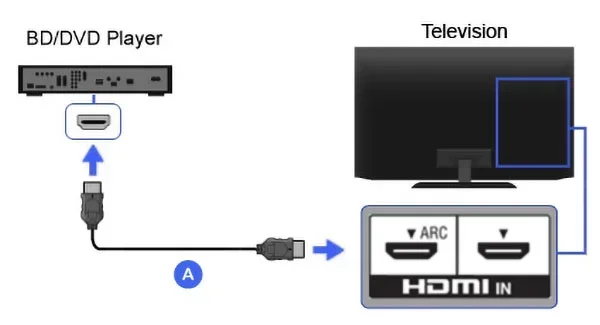
When you plug in an HDMI cable and turn on your devices, they communicate with each other. This is the handshake process. Here is what happens step by step:
- The source device (like a Blu ray player or gaming console) sends a signal to the display.
- The display responds with its supported capabilities.
- Both devices agree on the highest shared resolution, refresh rate, and features.
- The connection is established at that common standard.
This process happens automatically every time you power on your devices. You do not need to do anything manually. The signal quality depends on the cable and the lowest common denominator in your setup.
Quick Tips for Mixed HDMI Setups
Running a mixed setup with both HDMI 2.0 and HDMI 2.1 devices is very common. Here are some tips to make it work smoothly:
- Label your cables: Keep track of which cables are ultra high speed and which are standard. This helps you avoid confusion.
- Use the best cable possible: Even if your device is HDMI 2.0, a good HDMI cable ensures reliable signal quality.
- Check your ports: Not all ports on your TV may be the same. Some may be HDMI 2.0 and others HDMI 2.1. Check your TV manual.
- Keep firmware updated: Both your source devices and displays benefit from the latest firmware. Updates often improve compatibility.
- Use an adapter if needed: If you need to connect an HDMI 2.1 device to an older display, a quality adapter can help bridge the gap.
What Happens When You Mix HDMI 2.0 and HDMI 2.1 Devices?
When you have a mix of HDMI 2.0 and HDMI 2.1 devices, the connection will always default to the capabilities of the older device. This is not a flaw. It is how the standard was designed. But it does mean you need to understand the trade offs.
Resolution and Refresh Rate Limits
The most noticeable difference when mixing versions is the frame rate and resolution you get. HDMI 2.0 supports 4K at 60Hz. HDMI 2.1 supports 4K at 120Hz or even 8K at 60Hz. When an HDMI 2.1 device connects to an HDMI 2.0 port, the output will be capped at 4K 60Hz.
For many users, 4K at 60Hz is still excellent. Streaming services, Blu ray discs, and most console games look great at this resolution. The limitations only really matter for competitive gamers who want the highest possible refresh rate for a competitive edge.
Bandwidth and Signal Quality
Bandwidth is the amount of data that can travel through an HDMI cable per second. HDMI 2.0 provides 18 Gbps. HDMI 2.1 provides 48 Gbps. When you use an HDMI 2.1 cable with an HDMI 2.0 device, the connection will operate at 18 Gbps. The cable is capable of more, but the device cannot use it.
Using a higher quality cable will not hurt your setup. In fact, ultra high speed cables are more durable and better shielded. They can future proof your setup for when you do upgrade to fully HDMI 2.1 compatible devices.
HDMI 2.0 vs HDMI 2.1 Comparison
| Feature | HDMI 2.0 | HDMI 2.1 |
|---|---|---|
| Bandwidth | 18 Gbps | 48 Gbps |
| Max Resolution (at 60Hz) | 4K | 8K |
| Max Refresh Rate (at 4K) | 60Hz | 120Hz |
| HDR Support | HDR10 | HDR10, HDR10+, Dolby Vision |
| VRR Support | No | Yes |
| ALLM Support | No | Yes |
| eARC Support | ARC (basic) | eARC (enhanced) |
| Dynamic Metadata | No | Yes |
| Cable Type | Standard High Speed | Ultra High Speed |
Common Mistakes When Mixing HDMI Versions
There are a few mistakes that people make when they have a mixed HDMI setup. Avoiding these can save you a lot of headaches:
- Using cheap cables: A poor quality cable can cause signal drops, flickering, or no signal at all. Always use certified cables.
- Assuming all ports are the same: Many TVs have a mix of HDMI 2.0 and HDMI 2.1 ports. Check which port you are using.
- Ignoring firmware updates: Manufacturers often release updates that improve HDMI compatibility between devices.
- Using an adapter without checking specs: Not all adapters support the full bandwidth of HDMI 2.1. Cheap adapters can bottleneck your signal.
- Not testing all features: After setting up, go into your device settings and verify that features like VRR and ALLM are working correctly.
Expert Insights on Mixed HDMI Setups
According to HDMI Licensing experts, backward compatibility is one of the core design principles of the HDMI standard. This means that every new version is built to work with older devices. The goal is to make upgrades gradual and affordable. You should not feel pressured to replace everything at once.
Many home theater enthusiasts recommend a phased approach. Start by connecting your most important devices with the best cables you can afford. Upgrade the rest over time as your budget allows. This way, you get the best gaming performance and picture quality without a huge upfront cost.
How to Get the Best Results From a Mixed HDMI Setup
If you are running a setup with both HDMI 2.0 and HDMI 2.1 devices, there are steps you can take to maximize performance. These tips will help you squeeze every bit of quality from your equipment.
Use the Right Cable for Each Connection
Not every connection in your setup needs an expensive ultra high speed cable. But the ones that do should have the right cable. Here is a simple guide:
- HDMI 2.1 to HDMI 2.1 connections: Use an ultra high speed certified cable. This ensures full 48 Gbps bandwidth.
- HDMI 2.1 to HDMI 2.0 connections: A high speed cable is fine. The bandwidth will be limited to 18 Gbps regardless.
- HDMI 2.0 to HDMI 2.0 connections: A standard high speed cable works well for 4K at 60Hz.
Brands like Belkin and Cable Matters offer certified cables at various price points. Look for the “Ultra High Speed HDMI Certified” label on the packaging. This guarantees the cable can handle the full HDMI 2.1 bandwidth.
Firmware Updates Make a Difference
Keeping your devices updated is one of the simplest ways to improve compatibility. TV manufacturers, console makers, and device brands regularly release firmware that improves HDMI performance. These updates can fix bugs, add support for new features, and improve the device handshake process.
Make it a habit to check for updates once a month. Most devices have an automatic update option you can enable in the settings menu. This small step can make a big difference in how smoothly your mixed setup runs.
Quick Tips for Optimal Performance
- Power cycle your devices: Sometimes simply unplugging and replugging your devices can fix connection issues.
- Use short cables when possible: Longer cables can weaken the signal. Keep cables under 6 feet for the best results.
- Avoid cable splitsters: Splitters can reduce signal quality and limit bandwidth. Use them only when absolutely necessary.
- Check your TV settings: Some TVs have a game mode that optimizes the HDMI input for lower latency and smoother performance.
- Use the right port: If your TV has both HDMI 2.0 and HDMI 2.1 ports, connect your HDMI 2.1 device to the HDMI 2.1 port for the best results.
Should You Upgrade Everything to HDMI 2.1?
Deciding whether to upgrade your entire setup to HDMI 2.1 depends on your needs and budget. Not everyone needs the latest and greatest right now. Let us look at when the upgrade makes sense and when it does not.
When the Upgrade Makes Sense
There are clear situations where upgrading to HDMI 2.1 is worth it:
- You are a serious gamer: If you play competitive games on a PlayStation 5 or Xbox Series X, HDMI 2.1 gives you 120Hz refresh rates, VRR, and lower input lag.
- You own an 8K TV or monitor: To take advantage of 8K resolution, you need HDMI 2.1 ports and cables.
- You want the best HDR experience: HDMI 2.1 supports dynamic metadata and advanced HDR formats like Dolby Vision.
- You are building a new home theater: Starting fresh with HDMI 2.1 ensures your setup is future proof.
When HDMI 2.0 Is Still Fine
On the other hand, HDMI 2.0 still serves many users perfectly well:
- You watch standard 4K content: Most streaming content is 4K at 30Hz or 60Hz. HDMI 2.0 handles this without any issues.
- You do not game competitively: If you play casual games or mostly watch movies, the extra features of HDMI 2.1 may not matter to you.
- You are on a budget: HDMI 2.0 devices are often more affordable. There is no shame in getting great value from older gear.
- Your current setup works well: If everything looks and sounds great, there is no urgent need to upgrade.
The key is to assess your needs honestly. You do not need the newest technology just because it exists. But if you are planning a major upgrade or buying a new TV, going with HDMI 2.1 is a smart long term investment.
Final Thoughts
The short answer to whether HDMI 2.0 and HDMI 2.1 can work together is a resounding yes. They are designed to be backward compatible, and that is a great thing. It means you can mix and match devices without worrying about compatibility issues.
However, the performance you get will always be limited by the oldest device in the chain. If you want the full benefits of HDMI 2.1, you need HDMI 2.1 ports on both your source device and your display, along with an ultra high speed cable.
For most people, a mixed setup works just fine. You get excellent picture and sound quality without spending a fortune on a full upgrade. As technology evolves, you can gradually replace older devices with newer ones. The important thing is that your current setup works well and brings you joy.
So go ahead and connect your devices with confidence. Whether you are using HDMI 2.0, HDMI 2.1, or a mix of both, you are set for a great entertainment experience. The world of high definition audio and video is more accessible than ever, and that is something to be excited about.
Frequently Asked Questions
Do I need a special HDMI cable for HDMI 2.1?
Yes, you need an ultra high speed HDMI certified cable to get the full benefits of HDMI 2.1. Standard cables can still carry a signal, but they will not support the higher bandwidth and advanced features like 4K at 120Hz or 8K resolution.
Will my HDMI 2.0 device work with an HDMI 2.1 TV?
Absolutely. HDMI 2.1 is fully backward compatible with HDMI 2.0 devices. Your older device will work with the newer TV, but it will only use the features supported by HDMI 2.0. You will still get a great picture and sound quality.
Can I use an HDMI 2.1 cable with an HDMI 2.0 device?
Yes, you can. An ultra high speed HDMI 2.1 cable will work perfectly fine with an HDMI 2.0 device. The connection will operate at the 18 Gbps bandwidth limit of HDMI 2.0. Using a better cable will not harm your setup and can help future proof it.
What happens if I plug an HDMI 2.1 device into an HDMI 2.0 port?
The device will work, but it will be limited to HDMI 2.0 capabilities. This means you will get 4K at 60Hz instead of 4K at 120Hz. Advanced features like VRR and ALLM may not be available through the HDMI 2.0 port.
Do I need to upgrade all my cables to HDMI 2.1?
No, you do not need to upgrade all your cables at once. Only the connections that carry HDMI 2.1 signals need ultra high speed cables. Other connections can continue using your existing high speed cables without any issues.
Is HDMI 2.1 worth the upgrade for casual viewers?
For casual viewers who mostly watch streaming content and standard 4K movies, HDMI 2.0 is still more than enough. HDMI 2.1 really shines for gamers and home theater enthusiasts who want the highest refresh rates and the best HDR support. Upgrade when it makes sense for your needs.