Can Dvd Players Use Hdmi Cables For High Quality Video
Yes, you can connect a DVD player to an HDMI cable, but it depends on the model. Older DVD players lack HDMI ports, so you need an analog to digital converter or an upscaling DVD player. Newer DVD players and combo units often include HDMI output for better video quality. This guide covers every method, product option, and mistake to avoid.
So you just bought a shiny new HDMI cable and you are ready to upgrade your DVD player setup. But when you look at the back of your DVD player, you see old red white and yellow ports. No HDMI in sight. Now what? You are not alone. Many people ask this exact question every single day. Can DVD players use HDMI cables for high quality video? The short answer is yes. But the full answer depends on a few things.
In this guide we will walk through every option step by step. Whether you have an older DVD player or a newer model there is a way to get that crisp high definition video you want. We will cover converters adapters upscaling players and common mistakes to avoid. By the end you will know exactly what to do. No guesswork. No confusion. Just clear practical advice you can use right away.
Key Takeaways
- DVD players can use HDMI: Newer models have built-in HDMI ports for high quality video output.
- Older DVD players need a converter: An analog to digital converter box bridges the gap between old and new tech.
- Upscaling DVD players are a great option: They improve resolution before sending the signal through HDMI.
- You can still get quality video without HDMI: Component and composite cables work, but HDMI delivers the best results.
- Common mistakes cost you quality: Using the wrong cable or skipping a converter leads to poor picture and sound.
- HDMI adapters and cables are affordable: You do not need to buy a new DVD player to upgrade your setup.
- Check your DVD player first: Look at the back panel for ports before buying any adapter or cable.
📑 Table of Contents
- Can DVD Players Use HDMI Cables
- How Older DVD Players Connect to HDMI TVs
- Upscaling DVD Players for Better HDMI Quality
- Comparing Connection Methods for DVD Players
- Common Mistakes When Connecting DVD Players to HDMI
- Expert Tips for the Best HDMI DVD Experience
- Is It Worth Upgrading Your DVD Player for HDMI
- Frequently Asked Questions
- Final Thoughts
Can DVD Players Use HDMI Cables
The answer is not a simple yes or no. It depends on what kind of DVD player you own. Modern DVD players made after 2007 or so usually come with an HDMI port built right in. These players can connect directly to your TV with one cable and deliver great picture quality. But older models from the early 2000s or before often only have RCA composite or component video outputs.
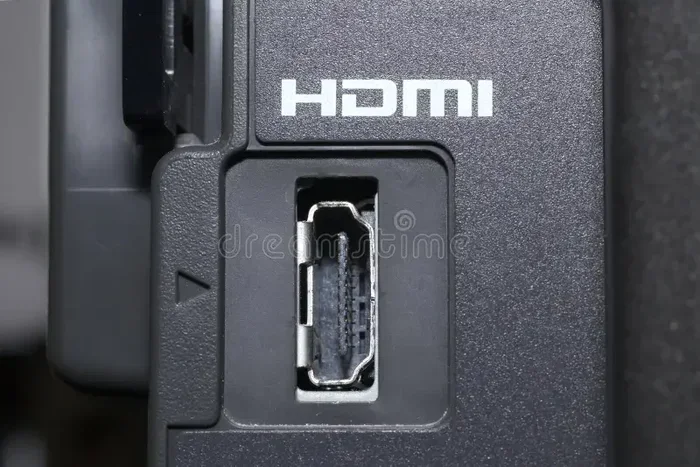
Here is how to tell what you have. Flip your DVD player over and look at the back. If you see a single flat trapezoid shaped port that says HDMI you are in luck. If you see only red white and yellow round ports then your player does not have HDMI. But that does not mean you are stuck. There are workarounds and we will cover them all below.
What HDMI Brings to the Table
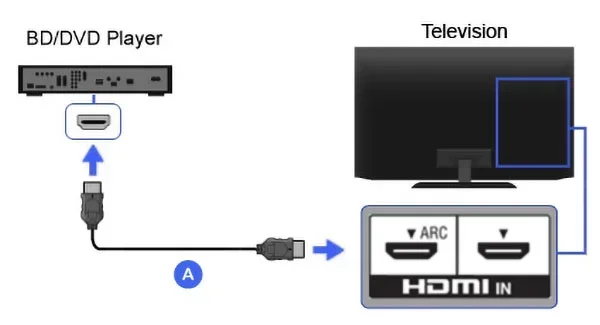
HDMI cables carry both audio and video through one single wire. That is a huge upgrade from the old RCA cables that needed three separate connections. With HDMI you get a digital signal instead of an analog one. This means sharper colors better contrast and no signal loss over distance. Most TVs made in the last 15 years have multiple HDMI inputs so connecting devices is easy.
For home theater setups HDMI is the gold standard. It supports high resolutions up to 4K on newer cables. Even a standard DVD played through HDMI looks noticeably better than the same DVD played through composite cables. The digital signal stays clean from start to finish. You get the best possible picture your DVD player can produce.
How Older DVD Players Connect to HDMI TVs
If your DVD player does not have an HDMI output you still have options. You just need a little extra gear. The goal is to convert the analog signal from your DVD player into a digital signal that your HDMI TV can read.
Using an Analog to Digital Converter
An analog to digital converter is the most common solution. These small boxes cost between 15 and 50 dollars. You connect your DVD player to the converter using RCA cables. Then you run a short HDMI cable from the converter to your TV. The converter does the heavy lifting by turning the old analog signal into a clean digital one.
Here is how it works in practice. Plug the yellow red and white RCA cables from your DVD player into the converter box. Then plug an HDMI cable from the converter into your TV. Switch your TV to the right HDMI input and you should see your DVD playing in much better quality. Some converters also upscale the video to 720p or 1080p which makes a big difference on larger screens.
HDMI Adapter Cables as a Shortcut
Another option is an HDMI adapter cable. These are composite to HDMI cables that have the RCA plugs on one end and an HDMI plug on the other. They work in a pinch but they do not offer the same quality as a dedicated converter box. The adapter does very little actual upscaling. It simply changes the signal format. For casual viewing they are fine but for the best picture quality go with a standalone converter.
Upscaling DVD Players for Better HDMI Quality
If you are in the market for a new DVD player consider getting an upscaling model. These players take the standard DVD resolution and stretch it closer to high definition before sending it through HDMI. The result is a noticeably sharper image on your TV screen.
How Upscaling Works
Standard DVDs have a resolution of 480p. That is fine for older tube TVs but on a modern 50 inch or bigger flat screen it can look fuzzy. An upscaling DVD player uses internal processing to boost that image closer to 1080p. It does not make the DVD look like a true Blu ray but it makes a real difference. The colors are sharper and the edges are cleaner.
Many upscaling players also improve the audio. They can convert standard stereo sound into surround sound formats that work with your AV receiver or soundbar. This gives you a full theater experience without spending a fortune on new discs or equipment.
Top Features to Look For
When shopping for an upscaling DVD player with HDMI keep these features in mind:
- HDMI output: This is non negotiable. Make sure the player has a real HDMI port not just an adapter.
- 1080p upscaling: Look for players that specifically say they upscale to 1080p for the best results.
- Multi format support: Some players handle DVD CD and even DivX files giving you more flexibility.
- Audio decoding: Players with Dolby Digital and DTS support give you better sound through your home theater system.
- Brand reputation: Brands like Panasonic Sony and LG make reliable upscaling players that last for years.
Comparing Connection Methods for DVD Players
Not sure which connection method is right for you? Here is a side by side look at the most common options for connecting a DVD player to a modern TV.
| Connection Type | Quality | Ease of Use | Cost | Best For |
|---|---|---|---|---|
| HDMI Direct | Excellent | Very Easy | Low (cable only) | DVD players with built in HDMI |
| Analog to Digital Converter | Very Good | Moderate | Medium ($15-$50) | Older DVD players without HDMI |
| Composite RCA to HDMI Adapter | Fair | Easy | Low ($5-$15) | Quick temporary setups |
| Component Video to HDMI | Good | Moderate | Medium ($20-$40) | Players with component output |
| AV Receiver with Converter | Excellent | Moderate | Higher ($50+) | Full home theater systems |
As you can see each method has its place. If your DVD player already has HDMI then you just need a good HDMI cable and you are done. If not a converter box gives you the best quality for the money. The adapter cables are fine for a quick fix but do not expect miracles.
Common Mistakes When Connecting DVD Players to HDMI
Even with the right gear people still make mistakes that hurt their video quality. Here are the most common ones and how to avoid them.
Using the Wrong HDMI Cable
Not all HDMI cables are created equal. A cheap or damaged cable can cause signal drops flickering or no picture at all. Look for cables that are rated for high speed and support at least 1080p resolution. You do not need the most expensive cable on the market but avoid the absolute cheapest no name options too.
Forgetting to Match Audio and Video Settings
Sometimes the picture looks great but the sound is wrong. This happens when the audio output settings on your DVD player do not match your TV or receiver. Go into the settings menu of your DVD player and make sure the audio output is set to HDMI or PCM. If you are using a surround sound system set it to bitstream or Dolby Digital for the best results.
Skipping the Converter Setup
If you are using an analog to digital converter do not just plug it in and walk away. Many converters have their own settings for resolution and output format. Take five minutes to go through the setup menu on the converter. Choose the highest resolution your TV supports. This one step can dramatically improve your viewing experience.
Ignoring Firmware Updates
If you bought a newer upscaling DVD player check for firmware updates from the manufacturer. These updates can improve HDMI compatibility and fix bugs that affect video output. Most brands have a simple update process that takes just a few minutes. It is worth doing especially if you just got a new TV.
Expert Tips for the Best HDMI DVD Experience
Want to get the most out of your DVD player and HDMI setup? Here are some tips from people who know this stuff well.
First keep your cables short and straight. Long HDMI cables can lose signal quality especially at higher resolutions. If you need to run a cable more than 15 feet consider an active HDMI cable with a built in signal booster. This keeps the digital signal strong all the way from your DVD player to your TV.
Second clean your connections regularly. Dust and dirt on the HDMI port or RCA connectors can cause intermittent signal problems. A quick wipe with a dry cloth before plugging things in goes a long way. It is a small step that most people skip but it makes a real difference.
Third consider your entire setup. If you have an AV receiver or soundbar connect the DVD player to the receiver first then run HDMI from the receiver to the TV. This gives you better audio control and often better video processing too. The receiver acts as a hub for all your entertainment devices.
Finally do not throw away your old cables just yet. If you are testing a new setup keep your composite cables handy. They are great for troubleshooting. If the HDMI connection gives you problems you can quickly switch back to RCA cables to figure out where the issue is.
Is It Worth Upgrading Your DVD Player for HDMI
This is the question many people ask after reading about all the options. The answer depends on how much you use your DVD player and what kind of TV you have.
If you have a modern TV with multiple HDMI inputs and you watch DVDs regularly then yes upgrading to a player with built in HDMI is worth it. You get better picture quality easier connections and often better audio too. A basic upscaling DVD player costs between 40 and 80 dollars which is a small price for a big improvement.
On the other hand if you only watch the occasional DVD and your current setup works fine there is no rush. You can buy a converter box for under 30 dollars and get great results without replacing your player. The choice is yours based on your budget and how much you care about picture quality.
Frequently Asked Questions
Can I connect an old DVD player directly to an HDMI TV?
No not directly. Older DVD players do not have HDMI ports. You need either an analog to digital converter or an HDMI adapter cable to bridge the connection. The converter gives better quality while the adapter cable is a quick but lower quality fix.
Do all HDMI cables work with DVD players?
Yes any standard HDMI cable will work with a DVD player that has an HDMI output. You do not need an expensive premium cable for DVD quality. A basic high speed HDMI cable handles standard and upscaled DVD resolutions just fine.
Will using HDMI improve DVD picture quality?
Absolutely. HDMI sends a digital signal which is much cleaner than the analog signal from RCA cables. You will notice sharper colors better contrast and a more stable picture. If your DVD player supports upscaling HDMI makes the improvement even more noticeable.
Can I use an HDMI splitter with a DVD player?
Yes an HDMI splitter lets you connect one DVD player to multiple TVs. However the DVD player must have HDMI output for this to work directly. If your player only has RCA outputs you would need a converter first before the splitter.
What resolution should I set my DVD player to for HDMI?
Set the output to 1080p if your TV supports it. If your TV is older or smaller 720p works fine too. Go into the settings menu of your DVD player and look for video output resolution. Choosing the highest option your TV supports gives the best results.
Is a converter box the same as an upscaling DVD player?
No they are different. A converter box changes the signal type from analog to digital. An upscaling DVD player improves the image quality internally before sending it out through HDMI. An upscaling player gives better results but costs more. A converter box is a budget friendly alternative.
Final Thoughts
So can DVD players use HDMI cables for high quality video? Yes they absolutely can and the results are worth the effort. Whether you have a newer model with built in HDMI or an older player that needs a converter you now have all the tools to get the best picture possible. The key is knowing what you have and choosing the right method for your setup.
Do not let an old DVD player hold you back from enjoying your favorite movies. A simple HDMI cable or a budget converter box can transform your viewing experience. The digital signal is cleaner the colors are richer and the sound is better. These are upgrades you can feel every single time you watch a movie.
Take action today. Check the back of your DVD player figure out what ports you have and pick the right solution from this guide. You will wonder why you did not make the switch sooner. Better video quality is just one cable away.