Can You Get A Hdmi To Vga Adapter For Older Devices
Yes, you can get an HDMI to VGA adapter for older devices, and it is one of the most popular connectivity solutions today. These adapters let you connect modern HDMI-equipped laptops, desktops, and media players to older VGA monitors and projectors. Whether you are setting up a legacy system or connecting to a projector in a meeting room, the right adapter makes it simple and affordable.
If you have an older monitor, projector, or display with a VGA port, you might wonder whether you can still use it with modern devices. The good news is that you can get an HDMI to VGA adapter that bridges the gap between new and old technology. This guide walks you through everything you need to know about finding, choosing, and using an adapter for your older devices.
Connecting a newer laptop or desktop to an older display can feel frustrating. You plug in the cable, and nothing happens. Or the screen shows no signal at all. This is a common problem that many people face when working with legacy devices and display connection setups. The HDMI to VGA adapter solves this problem by converting the digital HDMI signal into an analog VGA signal that older displays can understand.
In this article, we will explore the different types of adapters available, how they work, what to look for when buying one, and how to set them up. We will also cover common problems and share expert tips to make your setup hassle-free. Let us dive in and make your older devices work with modern technology.
Key Takeaways
- HDMI to VGA adapters are widely available and come in both active and passive forms for different needs.
- Older devices with VGA ports can still work with modern HDMI sources using the right adapter.
- Active adapters are often required because HDMI outputs a digital signal and VGA expects an analog signal.
- Audio may not transfer through HDMI to VGA adapters, so check your setup carefully.
- Resolution support varies by adapter, so choose one that matches your display needs.
- Compatibility with older operating systems can sometimes be tricky, especially with proprietary OS setups.
📑 Table of Contents
What Is An HDMI To VGA Adapter And Why Do You Need One
An HDMI to VGA adapter is a small device that converts the digital video signal from an HDMI port into an analog signal that a VGA display can read. HDMI stands for High-Definition Multimedia Interface, and it carries both video and audio in a single cable. VGA stands for Video Graphics Array, and it is an older analog standard that only carries video.
Many older computers, projectors, and monitors still use VGA connections. These devices were built before HDMI became the standard. If you want to use them today, you need a way to connect them to modern devices that only have HDMI outputs. That is where the adapter comes in.
Why Older Devices Still Matter
Older devices are not useless. Many people still rely on them for everyday tasks. A desktop computer with a VGA output might work perfectly fine for office work, browsing, or running older software. Schools, offices, and conference rooms often have projectors with VGA inputs that still function well.
Replacing all these devices just because they lack HDMI ports would be expensive and wasteful. The HDMI to VGA adapter gives these older devices a new lease on life. You can connect them to modern laptops, media players, or gaming consoles without spending a fortune on new equipment.
Some older devices run proprietary operating systems that may not support modern display protocols natively. In such cases, an adapter becomes even more essential to maintain compatibility and keep the system functional for its intended use.
Common Devices That Use VGA Ports
VGA ports are still found on many devices you might already own. Here are some common examples:
- Older desktop computers from the early 2000s and late 1990s
- CRT monitors and some early LCD monitors
- Older projectors used in classrooms and conference rooms
- Industrial equipment with legacy display outputs
- Some older laptops that predate the HDMI era
- Medical and scientific equipment with VGA display interfaces
If any of these devices are part of your setup, an HDMI to VGA adapter can help you connect them to modern sources without any hassle.
How HDMI To VGA Adapters Work
Understanding how these adapters work helps you choose the right one. The basic idea is simple. HDMI carries a digital signal, and VGA carries an analog signal. The adapter converts one into the other so the display can understand what the source is sending.
Digital To Analog Conversion
Digital to analog conversion is the core process inside an HDMI to VGA adapter. The HDMI source sends data in a digital format made up of ones and zeros. The adapter takes this digital data and translates it into continuous analog waveforms that a VGA monitor or projector can display.
This conversion requires a small chip inside the adapter. The chip processes the video signal and maps the digital colors and resolution to the analog output format. This is why active adapters are usually needed for HDMI to VGA connections, as they contain the processing hardware to handle the conversion.
Active vs Passive Adapters
Not all adapters are the same. There are two main types:
- Active adapters have a built-in chip that performs the digital to analog conversion. They require external power, usually through a USB cable. These are the most common and reliable type for HDMI to VGA connections.
- Passive adapters do not contain a conversion chip. They simply reroute the pins from one connector to another. Passive adapters only work when the source device can output an analog signal through HDMI, which is rare.
For most users connecting a modern device to an older VGA display, you will need an active HDMI to VGA adapter. Make sure you check the product description before buying.
Signal Quality And Resolution Support
The quality of the signal conversion depends on the adapter you choose. Cheap adapters may not support high resolutions or may produce a blurry image. Better adapters support resolutions up to 1080p or even 4K, depending on the model.
When shopping, look for adapters that clearly state their resolution support. If you need crisp text and clear images, invest in a higher-quality adapter. The difference in image quality can be significant, especially for detailed work like graphic design or reading small text on screen.
Types Of HDMI To VGA Adapters Available
The market offers several types of HDMI to VGA adapters to suit different needs. Each type has its own advantages and best use cases. Let us look at the most common options.
USB-Powered Active Adapters
These are the most popular type. They plug into the HDMI port on your source device and have a USB cable that provides power for the internal conversion chip. They are compact, affordable, and work with most setups.
These adapters usually support resolutions up to 1080p at 60Hz. Some models also support lower resolutions like 720p or 480p for older displays. They are ideal for office presentations, classroom setups, and home use.
HDMI to VGA Adapters With Audio
One limitation of VGA is that it does not carry audio. If you need sound along with video, look for an adapter that includes a 3.5mm audio output. These adapters have an extra port where you can plug in speakers or headphones.
Keep in mind that the audio comes from the source device, not the adapter itself. The adapter simply provides a separate audio output alongside the video conversion. This is useful for setups where your VGA monitor does not have built-in speakers.
HDMI to VGA Converter Boxes
For more permanent or professional setups, converter boxes offer a sturdier alternative to simple adapter cables. These boxes are larger but often provide better signal quality and more features. Some include additional ports for audio input, USB passthrough, or multiple output options.
Converter boxes are a great choice for electronic commerce setups or business environments where reliable display connectivity is essential. They provide stable performance and often support a wider range of resolutions and refresh rates.
In some business communication environments that rely on value-added networks for electronic commerce communication, having reliable display connectivity through proper adapters ensures that presentations and data sharing remain seamless and uninterrupted.
Portable HDMI to VGA Dongles
If you travel often, a portable dongle-style adapter is a great option. These are small enough to fit in your pocket and connect directly to the HDMI port without any extra cables. They are lightweight and perfect for on-the-go presentations.
Most portable dongles are passive or semi-active, meaning they work without external power but may have limitations on resolution or compatibility. Check the specifications carefully before purchasing a dongle for important presentations.
How To Choose The Right Adapter For Your Older Device
Not all adapters are created equal. Choosing the right one depends on your specific setup and needs. Here are the key factors to consider before making a purchase.
Check Your Source Device
First, confirm that your source device has an HDMI output. Most modern laptops, desktops, media players, and gaming consoles use HDMI. If your source device has a different output like DisplayPort or USB-C, you may need a different type of adapter or a multi-port converter.
Also, check whether your source device can output an analog signal natively. Some devices with HDMI ports can also output through other analog formats, which might eliminate the need for an adapter altogether.
Check Your Display Device
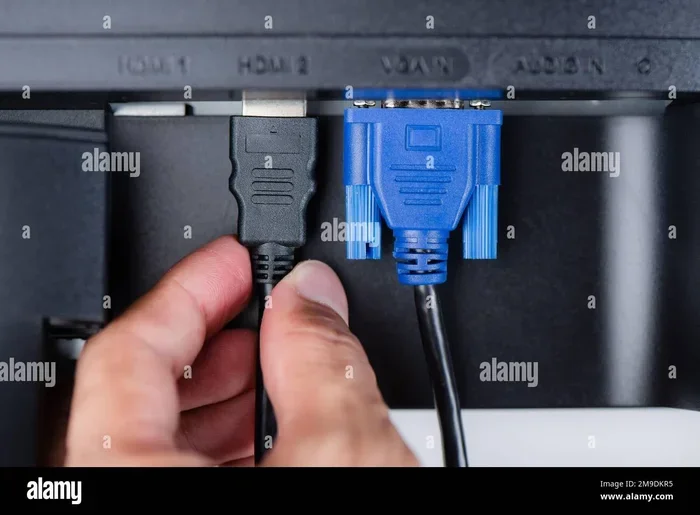
Next, confirm that your display has a VGA input. Look at the back of your monitor or projector for a blue-colored D-sub connector with 15 pins. This is the standard VGA port. If your display has a different input like DVI or DisplayPort, you may need a different type of adapter.
Also, check the maximum resolution your display supports. An older CRT monitor might only support 1024×768, while an older LCD monitor might support up to 1920×1080. Choose an adapter that supports the resolution of your display.
Consider Audio Needs
If you need audio along with video, make sure the adapter you choose has an audio output. Not all HDMI to VGA adapters include this feature. Some adapters only convert video and leave the audio to be handled separately through a different connection.
For setups where audio is important, such as conference rooms or home theaters, an adapter with built-in audio output saves you from running extra cables and managing multiple devices.
Build Quality And Brand Reputation
Cheap adapters from unknown brands can cause headaches. They may overheat, produce poor image quality, or stop working after a few weeks. Look for adapters from reputable brands with good customer reviews.
Spending a little more on a quality adapter saves you money in the long run. A reliable adapter will last longer, perform better, and cause fewer compatibility issues with your display connection setup.
Compatibility With Older Operating Systems
If your older device runs a legacy operating system, check whether the adapter requires specific drivers. Some adapters work plug-and-play on modern operating systems like Windows 10 or 11 but may need drivers for older systems like Windows 7 or XP.
In some cases, devices running proprietary operating systems may have limited compatibility with certain adapters. Always check the manufacturer’s compatibility list before buying, especially if you are working with specialized or older hardware.
Setting Up Your HDMI To VGA Adapter
Setting up an HDMI to VGA adapter is straightforward. Follow these steps for a smooth installation process.
Step-by-Step Setup Guide
- Connect the adapter to the HDMI port on your source device.
- Plug in the USB power cable if your adapter requires external power.
- Connect the VGA cable from the adapter to your display or projector.
- If your adapter has audio, connect the 3.5mm cable to your speakers or headphones.
- Turn on your source device and select the correct input on your display.
- Adjust the resolution in your display settings if the image does not look right.
Quick Tips For Best Results
- Use a high-quality VGA cable to avoid signal loss.
- Keep the adapter in a well-ventilated area to prevent overheating.
- If you see no signal, try unplugging and replugging the adapter.
- Match the output resolution to your display’s native resolution for the sharpest image.
- Update your display drivers if you experience any issues.
Common Problems And How To Fix Them
Sometimes things do not work right away. Here are some common issues and their solutions:
- No signal on the display: Check that all cables are firmly connected. Try a different VGA cable or a different HDMI port on your source device.
- Black screen or flickering: The adapter may be overheating. Let it cool down for a few minutes and try again. Make sure the USB power cable is connected if required.
- Poor image quality: Lower the resolution in your display settings. Also, check that your VGA cable is not damaged or too long.
- No audio: Make sure your adapter has an audio output and that it is connected to speakers or headphones. Check your sound settings on the source device.
- Adapter not recognized: Try a different USB port for power. You may also need to install drivers from the adapter manufacturer’s website.
Most problems can be solved with simple troubleshooting. If the adapter still does not work, it may be defective. Contact the manufacturer or try a different adapter from a trusted brand.
Final Thoughts
The HDMI to VGA adapter is a simple yet powerful tool that keeps your older devices relevant. Whether you need to connect a modern laptop to an old projector in a classroom or set up a desktop computer with a legacy monitor, the right adapter makes it possible.
Remember to choose an active adapter for reliable digital to analog conversion. Check the resolution support, audio features, and compatibility with your devices before buying. With the right adapter and a little patience, you can breathe new life into your older displays and keep using the equipment you already own.
Do not let outdated ports hold you back. A quality HDMI to VGA adapter is an affordable solution that saves time, money, and effort. It is one of the easiest ways to ensure your display connection works seamlessly, no matter how old your devices are.
Take a moment today to check your setup. If you have an older device with a VGA port and a modern source with HDMI, an adapter is all you need to get things working again. Your older devices still have plenty of life left in them.
Frequently Asked Questions
Can I use an HDMI to VGA adapter with a gaming console?
Yes, you can use an HDMI to VGA adapter with most gaming consoles that have HDMI outputs. However, the adapter only converts video, not audio, so you will need separate speakers or headphones. Check that your console supports analog output through the adapter before purchasing.
Do HDMI to VGA adapters support audio?
Most standard HDMI to VGA adapters do not carry audio because VGA is an analog video-only standard. However, some adapters include a 3.5mm audio output jack that lets you connect external speakers or headphones separately. Always check the product specifications before buying if you need audio support.
What is the difference between an active and passive HDMI to VGA adapter?
An active adapter contains a chip that converts the digital HDMI signal to an analog VGA signal and requires external power. A passive adapter simply reroutes the pins and does not perform any signal conversion. For most users, an active adapter is the right choice because modern devices output digital signals.
Can I get 4K resolution through an HDMI to VGA adapter?
Most HDMI to VGA adapters support up to 1080p resolution. Very few adapters support 4K, and even then, the VGA display may not be able to display that resolution. Check the adapter specifications carefully and match the resolution to your display’s capabilities for the best results.
Why does my HDMI to VGA adapter show no signal?
A no-signal issue is usually caused by loose cable connections, a defective adapter, or missing drivers. Try unplugging and replugging all cables, using a different VGA cable, or testing the adapter on another device. If the adapter requires power, make sure the USB cable is connected properly.
Are HDMI to VGA adapters compatible with all devices?
Most HDMI to VGA adapters work with a wide range of devices, but compatibility can vary. Some older devices or those running proprietary operating systems may have limited support. Always check the adapter’s compatibility list and your device specifications before purchasing to ensure a smooth setup.
=== CONCLUSION ===
The HDMI to VGA adapter is an essential tool for anyone working with older displays and modern devices. It bridges the gap between digital and analog technology, giving your legacy equipment a practical and affordable upgrade path. Whether you are in a classroom, office, or home setup, the right adapter ensures your display connection works without any fuss.
Choose an active adapter that matches your resolution needs, supports audio if required, and comes from a reputable brand. With the tips and guidance in this article, you are now equipped to make the best choice for your setup. Your older devices deserve to keep working, and a simple adapter makes that possible.