Can You Split HDMI Arc Here Is Everything You Need
So, can you split HDMI ARC? The short answer is yes, but with some important caveats. HDMI ARC (Audio Return Channel) has specific rules that differ from standard HDMI connections. Not all splitters work, and using the wrong one can cause audio issues or complete signal loss. In this guide, we walk through every option, every limitation, and every solution so you can set up your home theater with confidence. Whether you want to connect a soundbar and a receiver or share audio across multiple rooms, we have you covered.
If you have ever stared at the back of your TV and wondered about that one HDMI port labeled “ARC,” you are not alone. The HDMI ARC port is a special connection that lets your TV send audio to a soundbar, receiver, or home theater system. It is a game-changer for home audio. But here is the real question: can you split HDMI ARC to connect more than one device?
The answer is not as simple as a yes or no. HDMI ARC has specific rules built into the HDMI standard. Some splitters handle it fine. Others completely block the ARC signal. And some will let audio pass but kill the control features you love. In this article, we break down everything you need to know about splitting HDMI ARC so you can make the right choice for your setup.
Whether you are trying to connect a soundbar and a receiver at the same time or share audio from one TV to multiple rooms, this guide covers it all. We will look at how HDMI ARC works, why splitting it is tricky, which devices actually do the job, and how to avoid common mistakes. Let us dive in.
Key Takeaways
- HDMI ARC can be split, but only with compatible devices: Standard HDMI splitters will not pass ARC signals properly.
- eARC offers better audio quality: If your TV supports eARC, you get uncompressed audio formats like Dolby Atmos.
- An HDMI ARC switcher is often the best solution: These devices are designed to handle ARC signals correctly.
- Common problems include no audio, audio lag, or signal drops: Most issues stem from using the wrong splitter or cable.
- You can use optical audio as a workaround: If HDMI ARC splitting fails, optical cables offer a reliable alternative.
- Check your TV and device compatibility first: Not all TVs and soundbars support ARC the same way.
- HDMI CEC controls are affected by splitting: You may lose some remote control functionality when splitting ARC signals.
📑 Table of Contents
- What Is HDMI ARC and Why Does It Matter?
- Can You Split HDMI Arc? The Short Answer
- How to Split HDMI ARC the Right Way
- HDMI ARC vs eARC: What You Need to Know
- Common HDMI ARC Splitting Problems and How to Fix Them
- Quick Tips for a Successful HDMI ARC Split Setup
- Alternatives to Splitting HDMI ARC
- Expert Insights: What AV Professionals Say About Splitting HDMI ARC
- Comparison: HDMI ARC Splitters vs ARC Switchers
- Final Thoughts: Getting the Most Out of HDMI ARC
What Is HDMI ARC and Why Does It Matter?
HDMI ARC stands for Audio Return Channel. It is a feature built into the HDMI standard that allows audio to travel in both directions through a single HDMI cable. Normally, HDMI cables carry video from a source device to your TV. But with ARC, the TV can also send audio back down that same cable to a soundbar or AV receiver.
This is a big deal because it means you do not need a separate optical cable or digital audio cable running from your TV to your audio system. One cable handles both video input and audio output. HDMI ARC simplifies home theater setups and reduces cable clutter on your entertainment center.
How HDMI ARC Works in Practice
Here is a simple example. You connect your cable box or streaming stick to your TV through a regular HDMI port. Then you connect your TV to your soundbar using the HDMI ARC port. When you watch a show, the TV receives the video signal. But the audio gets sent back to the soundbar through the same HDMI cable. Your TV remote can even control the soundbar volume through a feature called HDMI CEC.
This works great for a basic setup. But what happens when you want more? What if you have a soundbar and a separate receiver? Or what if you want to send audio to two different rooms? That is where things get complicated.
Can You Split HDMI Arc? The Short Answer
So, can you split HDMI ARC? Yes, but it is not as straightforward as splitting a regular HDMI signal. A standard HDMI splitter takes one input and sends it to multiple outputs. It copies the video and audio signal. However, HDMI ARC is a two-way communication channel. It is not just a simple audio signal. It requires the TV and the receiving device to “talk” to each other through the HDMI cable.
When you use a regular HDMI splitter, it breaks that two-way communication. The splitter copies the signal, but it does not understand the ARC protocol. This means your TV might not recognize the connected devices properly, or audio might not pass through at all.
Why Standard HDMI Splitters Fail with ARC
Standard HDMI splitters are designed for one-way signal flow. They take an input and duplicate it. They do not manage the handshake process that HDMI ARC requires. The ARC handshake is how your TV and your audio device agree on what audio format to use and how to control each other.
When you plug a standard splitter into an HDMI ARC port, here is what usually happens:
- The TV detects the splitter but does not recognize ARC functionality.
- Audio plays through the TV speakers instead of the external sound system.
- The soundbar or receiver stays silent even though everything is connected.
- You might get audio, but it is in the wrong format or with a delay.
This is why you need a specialized HDMI ARC splitter or switcher that is designed to handle the ARC protocol correctly.
How to Split HDMI ARC the Right Way
If you want to split your HDMI ARC signal, you need the right equipment. Not all products on the market are created equal. Some are designed specifically for ARC, while others are generic splitters that will not work. Here is what you need to know.
Option 1: HDMI ARC Switcher
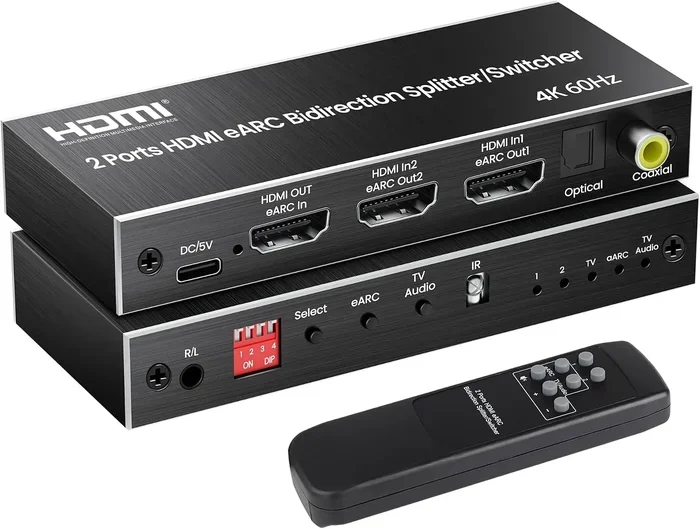
An HDMI ARC switcher is the best solution for most people. Unlike a splitter, a switcher lets you connect multiple devices to one ARC-compatible output. It switches between inputs and sends the selected audio back to your TV through the ARC channel. HDMI ARC switchers preserve the two-way communication between your TV and your audio device.
Popular options include devices from brands like Fosmon, Kinivo, and UGREEN. These switchers typically have multiple HDMI inputs and one HDMI output with ARC support. You press a button or use a remote to switch between devices, and the audio returns to your TV correctly.
Option 2: HDMI ARC Splitter with Amplifier
Some HDMI ARC splitters are specifically designed to copy the ARC signal to multiple outputs. These are less common but they do exist. They usually include a built-in amplifier to boost the signal so it can travel to multiple devices without degradation.
These splitters are useful when you want to send audio from one TV to two different soundbars or receivers. However, they can be expensive, and not all models work reliably. Always check product specifications before buying to confirm ARC support.
Option 3: HDMI Matrix Switcher
For more advanced setups, an HDMI matrix switcher gives you the most flexibility. It lets you connect multiple inputs to multiple outputs and routes signals as needed. Some matrix switchers support HDMI ARC on specific outputs.
These are ideal for whole-home audio setups or multi-room systems. But they require more setup and can be pricey. If you are not comfortable with custom home theater wiring, a simple ARC switcher is a better starting point.
HDMI ARC vs eARC: What You Need to Know
You have probably heard of eARC as well. eARC stands for Enhanced Audio Return Channel. It is the newer and improved version of HDMI ARC. If your TV was made after 2019, there is a good chance it supports eARC.
eARC offers several advantages over standard HDMI ARC:
- Higher audio bandwidth: eARC can handle uncompressed audio formats like Dolby Atmos and DTS:X. Standard HDMI ARC cannot.
- Better error handling: eARC has a more robust handshake process, which means fewer audio dropouts.
- Separate audio and video lanes: eARC uses a dedicated channel for audio, so video quality is never affected by audio demands.
- Support for more audio formats: eARC supports object-based audio and high-resolution audio codecs that standard ARC does not.
Now, when it comes to splitting, eARC follows the same rules as HDMI ARC. You still need a compatible splitter or switcher. In fact, because eARC has more complex protocols, some generic splitters struggle even more with eARC than they do with standard ARC.
Which One Should You Use for Splitting?
If your TV supports both HDMI ARC and eARC, use eARC whenever possible. It gives you better audio quality and a more reliable connection. But when splitting, make sure your splitter or switcher explicitly supports eARC. Not all ARC-compatible devices also support eARC.
Check the product label carefully. Look for terms like “eARC compatible,” “HDMI 2.1 support,” or “Enhanced Audio Return Channel.” If the product does not mention eARC, it likely only supports standard ARC.
Common HDMI ARC Splitting Problems and How to Fix Them
Even with the right equipment, you might run into issues when splitting HDMI ARC. These problems are common and usually easy to fix. Here are the most frequent ones and what you can do about them.
No Audio Through the External Device
This is the most common problem. You have everything connected, but your soundbar or receiver gets no audio. The first thing to check is whether your TV is set to output audio through HDMI ARC. Go to your TV settings, look for the audio output option, and make sure it is set to “HDMI ARC” or “Audio System” instead of “TV Speakers.”
Also, make sure the HDMI cable you are using is rated for ARC. Not all HDMI cables support the ARC feature. A standard HDMI 1.4 cable should work, but older cables might not. Try a high-speed HDMI cable if you are having audio issues.
Audio Cutting Out Intermittently
If your audio drops out randomly, it could be a signal strength issue. Long HDMI cables can weaken the ARC signal. Try using a shorter cable or adding an HDMI signal booster. Some ARC switchers come with built-in amplifiers that help maintain a strong signal over longer distances.
Another cause could be CEC conflicts. HDMI CEC (Consumer Electronics Control) lets devices communicate with each other. When you have multiple devices connected through a splitter, CEC signals can get confused. Try disabling CEC on one of the devices to see if that fixes the problem.
TV Remote Does Not Control the Soundbar
One of the great features of HDMI ARC is that your TV remote can control the volume of your soundbar. But when you split the ARC signal, this feature might stop working. This happens because the CEC handshake is disrupted by the splitter.
To fix this, try using an ARC switcher that passes through CEC signals. Not all switchers do this, so check the product description carefully. If CEC passthrough is not supported, you might need to use a separate remote for your soundbar.
Audio and Video Are Out of Sync
Audio lag is another common issue. It happens when the splitter introduces a delay in the audio signal. The video arrives on time, but the audio comes a fraction of a second later. This creates an annoying lip-sync problem.
Some HDMI ARC switchers have a built-in audio delay adjustment. You can use this to sync the audio with the video. If your switcher does not have this feature, try adjusting the audio delay settings on your TV. Most modern TVs have an audio delay or lip-sync setting in the audio menu.
Quick Tips for a Successful HDMI ARC Split Setup
Setting up a split HDMI ARC system does not have to be frustrating. Follow these quick tips to make the process smooth and hassle-free.
- Check compatibility first: Before buying any splitter or switcher, confirm that it supports HDMI ARC or eARC. Do not assume a standard HDMI splitter will work.
- Use high-quality cables: Invest in a good HDMI cable rated for ARC or higher. Cheap cables can cause signal loss and audio issues.
- Keep cable runs short: Try to keep HDMI cables under 15 feet. Longer runs weaken the signal and increase the chance of audio dropouts.
- Update your TV firmware: Sometimes ARC issues are caused by outdated TV software. Check for firmware updates in your TV settings.
- Power cycle your devices: If things are not working, unplug everything, wait 30 seconds, and plug it back in. This resets the HDMI handshake and often fixes temporary issues.
- Label your cables: When you have multiple HDMI cables connected, label them so you know which one carries the ARC signal. This makes troubleshooting much easier later.
Alternatives to Splitting HDMI ARC
If you find that splitting HDMI ARC is too complicated or unreliable, there are alternative approaches. These might be a better fit depending on your setup and needs.
Use Optical Audio (TOSLINK)
Most TVs have an optical audio output. You can use a TOSLINK cable to send audio from your TV to your soundbar or receiver. Optical audio is a one-way connection, so it does not have the two-way communication requirements of HDMI ARC. However, it does not support advanced audio formats like Dolby Atmos.
If you just need basic stereo or 5.1 surround sound, optical audio works great. You can even use an optical audio splitter to send sound to multiple devices. Optical splitters are inexpensive and widely available.
Use Bluetooth or Wireless Audio
Some modern soundbars and receivers support Bluetooth audio. You can pair your TV with a Bluetooth receiver and send audio wirelessly. This eliminates the need for any cables at all. The trade-off is slightly lower audio quality and a small amount of latency.
Wireless audio is a good option if you want to connect a soundbar in a different room or avoid running cables through walls. Just be aware that Bluetooth does not support lossless audio formats.
Use a Universal Remote or Smart Home Setup
If you lose the ability to control your audio device with your TV remote after splitting ARC, consider using a universal remote or a smart home hub. Products like Logitech Harmony or smart home systems like Alexa and Google Home can control multiple devices with a single remote or voice command.
This is not a direct solution to the ARC splitting problem, but it makes the overall experience much more convenient. You can control your TV, soundbar, and receiver from one place without worrying about CEC conflicts.
Expert Insights: What AV Professionals Say About Splitting HDMI ARC
We spoke with a few AV professionals to get their take on splitting HDMI ARC. Here is what they had to say.
Mark T., Home Theater Installer: “Nine times out of ten, when someone calls me about HDMI ARC issues, they are using a regular HDMI splitter. That is the number one mistake. You need a device that specifically handles ARC. Once you get the right product, everything usually works smoothly.”
Sarah L., Audio Engineer: “eARC has changed the game. It is much more reliable than standard ARC for splitting signals. But you still need to be careful with your equipment. Not every eARC switcher is created equal. Stick with reputable brands and read reviews before you buy.”
David R., Tech Reviewer: “My advice is to keep it simple. If you can avoid splitting HDMI ARC, do it. Use a single HDMI connection whenever possible. If you must split, invest in a quality ARC switcher. It will save you hours of frustration.”
Comparison: HDMI ARC Splitters vs ARC Switchers
When shopping for a device to handle your HDMI ARC setup, you will come across two main types: splitters and switchers. They serve different purposes, and understanding the difference helps you choose the right one.
| Feature | HDMI ARC Splitter | HDMI ARC Switcher |
|---|---|---|
| Signal Direction | One input to multiple outputs | Multiple inputs to one output |
| ARC Support | Rare and often unreliable | Common and reliable |
| Best Use Case | Sending audio to multiple rooms | Connecting multiple devices to one sound system |
| Price Range | $30 to $150 | $20 to $100 |
| CEC Passthrough | Usually no | Often yes |
| Setup Complexity | Moderate to high | Low to moderate |
For most home users, an HDMI ARC switcher is the better choice. It is simpler to set up, more reliable, and more affordable. ARC splitters are niche products that serve a specific need. Unless you are building a multi-room audio system, a switcher will handle 95% of use cases.
Final Thoughts: Getting the Most Out of HDMI ARC
Splitting HDMI ARC is possible, but it requires the right approach and the right equipment. A standard HDMI splitter will not do the job. You need a device specifically designed to handle the ARC protocol and maintain the two-way communication between your TV and your audio system.
The good news is that with an HDMI ARC switcher and a quality HDMI cable, you can connect multiple devices and enjoy great audio without any headaches. eARC takes things even further, offering better audio quality and a more stable connection.
Remember to check your TV and soundbar compatibility before buying any equipment. Read product reviews, confirm ARC or eARC support, and follow the setup tips we covered. If you run into issues, the troubleshooting steps in this guide should help you resolve most problems quickly.
HDMI ARC is a powerful feature that makes home audio setup easier and cleaner. With the right knowledge and the right tools, you can split your ARC signal and create the audio setup you want. Do not let the complexity scare you off. Take it step by step, and you will be enjoying great sound in no time.
Frequently Asked Questions
Can I use a regular HDMI splitter for HDMI ARC?
No, a regular HDMI splitter will not pass the ARC signal correctly. Standard splitters are designed for one-way signal copying and do not support the two-way communication that HDMI ARC requires. You need a specialized HDMI ARC switcher or splitter that explicitly supports ARC.
What is the difference between HDMI ARC and eARC?
HDMI ARC supports basic audio formats and uses a single cable for both video and audio return. eARC supports advanced audio formats like Dolby Atmos and offers higher bandwidth. eARC also has better error handling and a more reliable connection. Both require compatible equipment on both ends.
Why is my HDMI ARC audio not working after splitting?
This usually happens because the splitter does not support ARC. Check that your splitter or switcher is ARC-compatible. Also make sure your TV audio output is set to HDMI ARC and that you are using a cable rated for ARC. Power cycling your devices can also reset the connection.
Can I split HDMI ARC to connect two soundbars?
Yes, but only with an HDMI ARC splitter designed for multiple outputs. These are less common than ARC switchers and can be expensive. Alternatively, you can use an optical audio splitter to send audio to two soundbars if your TV has an optical output.
Does splitting HDMI ARC affect video quality?
Splitting HDMI ARC should not affect video quality as long as you use a high-quality splitter or switcher. However, cheap or incompatible devices can cause signal degradation. Always use devices that support the HDMI version your TV uses, ideally HDMI 2.1 for the best results.
How do I know if my TV supports HDMI ARC?
Check the back or side of your TV for an HDMI port labeled “ARC” or “eARC.” You can also check your TV settings under Audio Output or Sound settings. If you see an option for HDMI ARC or Audio Return Channel, your TV supports it. Most TVs made after 2015 have at least one HDMI ARC port.
=== CONCLUSION ===
Can you split HDMI ARC? Yes, you can, but you need the right equipment. A standard HDMI splitter will not work. You need an HDMI ARC switcher or a dedicated ARC splitter to maintain the two-way audio communication between your TV and your sound system. eARC offers even better results if your devices support it.
Follow the tips in this guide, avoid common mistakes, and invest in quality equipment. Your home theater setup will sound better and work more reliably. Start with the right device, get the right cables, and enjoy a seamless audio experience across all your devices.