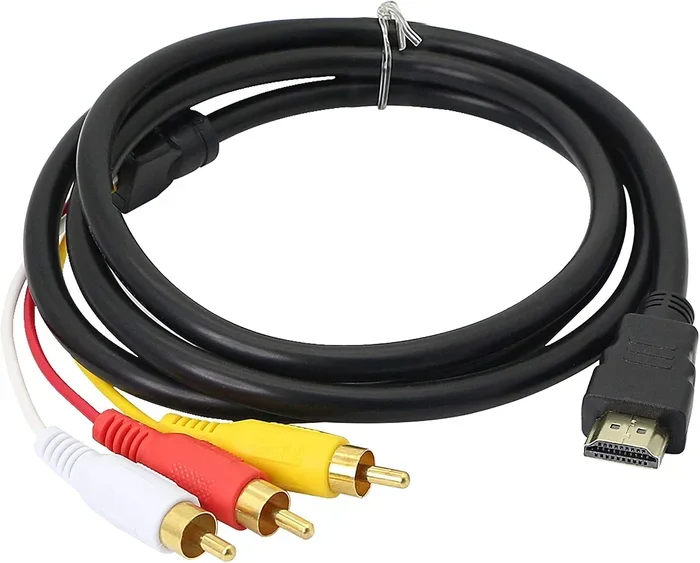
Can You Use Rca For Audio And Hdmi For Video Explained
Yes, you can use RCA for audio and HDMI for video on the same setup. Many devices support separate audio and video inputs, letting you mix analog RCA connections with digital HDMI signals. This approach works well for older gear and modern displays, giving you flexibility and solid sound and picture quality.
Key Takeaways
- RCA and HDMI can work together: You can split audio and video across two different cable types on most AV receivers and TVs.
- RCA handles analog audio: The red and white cables carry stereo sound and are great for older equipment.
- HDMI carries digital video: It supports high-definition video and multi-channel audio in one cable.
- You need an AV receiver or splitter: These devices help bridge RCA audio and HDMI video signals seamlessly.
- Signal quality matters: Using quality cables and proper setup ensures you get the best results.
- Legacy devices still work: Older sound systems and game consoles can pair with modern TVs using this method.
📑 Table of Contents
- Can You Use RCA For Audio And HDMI For Video?
- Understanding RCA Audio Connections
- Understanding HDMI Video Connections
- How RCA Audio And HDMI Video Work Together
- Setting Up RCA Audio With HDMI Video
- Common Problems And How To Fix Them
- When Should You Upgrade Your Cables?
- Expert Insights On Mixing Analog And Digital Connections
- Key Takeaways
- Conclusion
Can You Use RCA For Audio And HDMI For Video?
Here is the short answer. Yes, you can absolutely use RCA for audio and HDMI for video. This setup is more common than you might think. Many home theater enthusiasts and casual users rely on this combination every day. It lets you connect older audio gear to modern TVs and displays without any fuss.
The beauty of this approach is simplicity. You use the familiar red and white RCA cables for sound. Then you plug in an HDMI cable for crisp, high-definition video. Both signals travel to your TV or receiver at the same time. You get great picture quality and solid audio without buying a whole new setup.
This method works especially well if you have older speakers, soundbars, or amplifiers. Maybe you have a classic stereo system that only has RCA inputs. Or perhaps your vintage game console outputs video through HDMI but audio through RCA. Whatever the reason, this combo is totally doable.
In this guide, we will walk you through everything you need to know. You will learn how the connection works, what equipment you need, and how to set it up step by step. We will also cover common problems and share expert tips. By the end, you will feel confident setting up your own RCA audio and HDMI video system.
Understanding RCA Audio Connections
What Are RCA Cables?
RCA cables have been around for decades. You probably recognize them by their red and white (or red and black) plugs. These cables carry analog audio signals from one device to another. The red cable handles the right audio channel. The white cable handles the left channel. Together, they deliver stereo sound.
RCA connectors first appeared in the 1940s. They were designed for phonograph players. Over the years, they became a standard for all kinds of audio equipment. You will find RCA inputs on amplifiers, receivers, speakers, and even some TVs. Despite their age, they are still widely used today.
The great thing about RCA cables is their simplicity. You just plug them in and go. There is no complicated setup. No software to install. No drivers to update. This makes them perfect for people who want a straightforward audio connection.
Types Of RCA Audio Cables
Not all RCA cables are the same. Here are the main types you might encounter:
- Standard stereo RCA: Red and white cables for basic stereo sound. This is the most common type.
- Composite RCA: Yellow, red, and white cables. The yellow one carries video, while red and white handle audio.
- Component RCA: Red, green, and blue cables for video, plus red and white for audio. This offers better video quality than composite.
- Coaxial digital RCA: A single orange cable that carries digital audio. It supports surround sound formats like Dolby Digital.
Each type serves a different purpose. For our discussion, we focus on the standard stereo RCA for audio. This is what you will use when pairing RCA audio with HDMI video.
When To Use RCA For Audio
RCA audio cables shine in certain situations. Here are some examples where they make sense:
- You have an older stereo system or amplifier with only RCA inputs.
- You want to connect a turntable or vintage audio player to a modern setup.
- Your AV receiver has dedicated RCA inputs that you prefer to use.
- You are setting up a simple sound system without the need for digital connections.
- You want to avoid the cost of optical or HDMI audio cables.
RCA cables also work well for short to medium cable runs. They deliver clean analog audio over distances of about 25 feet. Beyond that, you might notice some signal loss. For most living rooms and bedrooms, this is not a problem.
Understanding HDMI Video Connections
What Is HDMI?
HDMI stands for High Definition Multimedia Interface. It is a digital connection that carries both video and audio through a single cable. HDMI has become the go-to standard for modern TVs, projectors, Blu-ray players, and gaming consoles.
One HDMI cable can carry uncompressed video and compressed or uncompressed audio. This means fewer cables on your entertainment center. It also means a cleaner, more organized setup. You get high-resolution video and multi-channel sound all from one port.
HDMI has evolved over the years. The original HDMI 1.0 supported up to 1080p. Today, HDMI 2.1 can handle 8K resolution and refresh rates up to 120Hz. This makes HDMI ideal for modern home theater setups and gaming.
Why HDMI Is Great For Video
There are many reasons why HDMI is the best choice for video. Let us break them down:
- High resolution support: HDMI handles everything from 720p to 4K and even 8K.
- Deep color depth: You get richer, more vibrant colors on your screen.
- Audio return channel (ARC): HDMI can send audio back from your TV to your receiver.
- Easy connection: Plug and play. No need for extra adapters or converters.
- Widely supported: Almost every modern TV and display has HDMI ports.
HDMI also supports advanced features like HDR (High Dynamic Range) and CEC (Consumer Electronics Control). These features enhance your viewing experience and make it easier to control multiple devices with one remote.
How RCA Audio And HDMI Video Work Together
The Basic Setup
So how does the RCA audio and HDMI video combination actually work? The idea is simple. You send video through the HDMI cable. At the same time, you send audio through the RCA cables. Both signals reach your TV or AV receiver independently.
Here is how it typically works. Your source device (like a Blu-ray player or streaming box) connects to your TV via HDMI. The video signal travels through the HDMI cable to your TV screen. Meanwhile, the audio signal goes through RCA cables to your speakers or sound system.
Your TV or AV receiver processes both signals. The video displays on the screen. The audio plays through your speakers. You get a synchronized experience with great picture and sound.
Devices That Support This Setup
Many devices support the split of RCA audio and HDMI video. Here are some common examples:
- AV receivers: Most receivers have both HDMI inputs and RCA inputs. They can handle both signals at the same time.
- Soundbars: Some soundbars accept RCA audio input while receiving video through HDMI from the TV.
- Older gaming consoles: Certain retro consoles output HDMI for video but may need RCA for audio depending on the model.
- Media players: Devices like the Apple TV or Roku can output HDMI video while you route audio separately via RCA.
The key is to check your device specifications. Look for devices that offer both HDMI and RCA ports. Most modern AV receivers and amplifiers do. You just need to make sure your gear supports this dual-connection approach.
Signal Flow Explained
Let us walk through the signal flow step by step. Understanding how the signals travel helps you troubleshoot any issues later.
- Your source device (Blu-ray player, game console, streaming box) generates both audio and video signals.
- The HDMI cable carries the video signal to your TV or display.
- The RCA cables carry the audio signal to your speakers, amplifier, or receiver.
- Your TV or receiver processes both signals independently.
- You see the video on screen and hear the audio through your speakers.
This flow is straightforward and reliable. As long as your cables are in good condition and your ports are clean, you should not have any problems. If you run into issues, check our guide on advantages and disadvantages of using a value added network for electronic commerce communication for insights on signal integrity in connected systems, as the principles of maintaining clean signal paths apply across different connection types.
Setting Up RCA Audio With HDMI Video
What You Will Need
Before you start, gather these items:
- RCA audio cables (red and white)
- HDMI cable
- Source device (Blu-ray player, game console, streaming box)
- TV or display with HDMI input
- Speakers, amplifier, or AV receiver with RCA input
- Optional: RCA to 3.5mm adapter if your device needs it
Having the right cables makes a big difference. Cheap cables can introduce noise or signal loss. Invest in well-shielded RCA cables and a high-speed HDMI cable. Your ears and eyes will thank you.
Step-By-Step Setup Guide
Follow these steps to set up your RCA audio and HDMI video system:
- Connect the HDMI cable: Plug one end into your source device’s HDMI output. Plug the other end into your TV’s HDMI input.
- Connect the RCA cables: Plug the red RCA cable into the red audio output on your source device. Plug the white RCA cable into the white audio output.
- Connect the other ends of the RCA cables: Plug them into the corresponding RCA audio inputs on your amplifier, receiver, or speakers.
- Power on all devices: Turn on your TV, source device, and audio system.
- Set the TV input: Use your TV remote to select the correct HDMI input.
- Set the audio output: On your source device, go to audio settings and select analog or RCA output instead of HDMI audio.
- Adjust volume: Use your audio system’s volume control to set the desired sound level.
That is it. Your RCA audio and HDMI video setup is ready. You should now see the picture on your TV and hear the sound through your speakers.
Quick Tips For The Best Experience
Here are some quick tips to get the most out of your setup:
- Keep RCA cables away from power cords to avoid interference.
- Use short, high-quality HDMI cables for the best video signal.
- Label your cables so you always know which is which.
- Clean your cable ports regularly with a soft, dry cloth.
- If you experience static or buzzing, try different RCA cables or move them away from power sources.
Small adjustments can make a big difference in audio and video quality. Do not overlook the importance of cable placement and quality.
Common Problems And How To Fix Them
No Sound Through RCA Cables
This is one of the most common issues. If you have video but no audio, try these fixes:
- Check that the RCA cables are firmly plugged in. A loose connection causes no sound.
- Make sure you selected the correct audio output on your source device.
- Verify that your TV is not set to mute or has the volume turned down.
- Try a different pair of RCA cables to rule out a faulty cable.
- Check if your TV or source device is set to output audio through HDMI instead of RCA.
Sometimes the simplest fix is the right one. A loose cable or wrong setting can cause big problems.
Poor Audio Quality
If your RCA audio sounds muffled or distorted, here is what to check:
- Look for kinks or damage in the RCA cable. Replace it if needed.
- Move RCA cables away from power cords and wireless routers. Electromagnetic interference can degrade audio quality.
- Make sure your amplifier or receiver settings match the input type.
- Try a shorter RCA cable run. Longer runs can weaken the analog signal.
Analog signals are more sensitive than digital ones. Small disturbances can affect the sound. Keep your RCA cables clean and well-positioned for the best results.
Video Not Displaying On HDMI
If your HDMI video is not working, try these steps:
- Unplug the HDMI cable and plug it back in firmly.
- Try a different HDMI port on your TV.
- Check your source device’s video output settings.
- Test with a different HDMI cable to rule out a bad cable.
- Make sure your TV is set to the correct HDMI input channel.
HDMI connections are generally very reliable. Most issues come from loose cables or incorrect settings. A little patience usually solves the problem.
When Should You Upgrade Your Cables?
Not every setup needs the latest and greatest cables. But there are times when an upgrade makes sense. Here are some signs that it is time to replace your cables:
- You notice flickering or intermittent video on your HDMI connection.
- Your RCA cables produce consistent static or buzzing noise.
- You have upgraded to a 4K TV and your old HDMI cable does not support it.
- Your cables are visibly damaged, frayed, or corroded.
- You want to take advantage of newer features like HDMI ARC or eARC.
Upgrading your cables can breathe new life into your setup. A good HDMI 2.1 cable and quality RCA cables are a small investment that pays off in better performance.
It is also worth noting that some people prefer to keep their RCA audio setup even when they upgrade to HDMI. The reason is simple. Certain audio equipment sounds better through analog RCA connections than through digital HDMI audio. Trust your ears. If you notice a difference, stick with what sounds best to you.
Expert Insights On Mixing Analog And Digital Connections
Mixing RCA audio with HDMI video is a practical approach that many audio engineers recommend. The analog RCA connection preserves the original audio signal without compression. Meanwhile, the HDMI connection delivers uncompressed video at high resolution. Together, they create a balanced setup that leverages the strengths of both technologies.
Some audiophiles argue that all-digital connections offer superior quality. While this is true in certain scenarios, it does not mean RCA audio is inferior. In fact, many professional studios still use analog RCA connections for monitoring. The key is using quality cables and proper shielding.
If you are curious about how different connection types affect signal integrity in broader network and communication contexts, you might find it helpful to explore concepts around advantage and disadvantage of MAC address filtering, as understanding how devices are authenticated and signals are managed at the network level gives you a deeper appreciation for why clean, dedicated signal paths like RCA for audio and HDMI for video work so well together.
Ultimately, the best setup is the one that works for you. Do not get caught up in chasing the perfect connection. Focus on what sounds and looks great in your space. That is what matters most.
Key Takeaways
- RCA and HDMI can work together seamlessly: Most modern devices support this combination without any extra hardware.
- RCA carries analog audio: Red and white cables deliver stereo sound to your speakers or receiver.
- HDMI carries digital video: It supports high resolutions and rich color depth for your TV or projector.
- Setup is straightforward: Just connect HDMI for video and RCA for audio, then adjust your device settings.
- Common issues are easy to fix: Loose cables, wrong settings, and interference cause most problems.
- Quality cables matter: Invest in well-built RCA and HDMI cables for the best experience.
- Trust your ears and eyes: If the setup looks and sounds good to you, it is the right setup.
Conclusion
So, can you use RCA for audio and HDMI for video? The answer is a clear yes. This combination gives you the best of both worlds. You get reliable analog audio through RCA and stunning digital video through HDMI. It works with older equipment and modern displays alike.
Setting up this configuration is simple. You need the right cables, a basic understanding of your devices, and a few minutes of your time. Once it is set up, you can sit back and enjoy your favorite movies, music, and games with confidence.
Remember to keep your cables in good condition. Use quality connections. And do not be afraid to experiment with your setup. The goal is to create an experience that looks and sounds amazing to you.
Whether you are a casual viewer or a dedicated home theater fan, mixing RCA audio with HDMI video is a smart and practical choice. It saves money, reduces cable clutter, and delivers solid performance. Give it a try and see the difference for yourself.
Frequently Asked Questions
Can I use RCA for audio and HDMI for video on the same TV?
Yes, most modern TVs support this setup. You simply connect the HDMI cable for video and the RCA cables for audio to separate inputs on your TV or AV receiver. Make sure to set your audio output to analog in your device settings.
Do I need a special adapter to use RCA audio with HDMI video?
In most cases, no. Standard RCA cables and HDMI cables work directly with most devices. However, if your source device only has HDMI output and no RCA audio output, you may need an HDMI audio extractor to split the audio and video signals.
Is RCA audio quality good enough for a home theater?
RCA audio quality is more than sufficient for most home theater setups. It delivers clear stereo sound and works well with amplifiers and speakers. For surround sound, you may need additional RCA cables or a digital audio connection.
Can I use long RCA cables without losing quality?
RCA cables work well up to about 25 feet. Beyond that, you may notice some signal degradation. If you need longer runs, consider using high-quality, shielded RCA cables or an RCA signal booster.
Will mixing RCA audio and HDMI video cause any sync issues?
No, sync issues are rare with this setup. Modern devices process audio and video signals independently and keep them in sync. If you do notice a delay, check your TV or receiver’s audio delay settings.
What is the difference between RCA audio and HDMI audio?
RCA carries analog audio signals through red and white cables. HDMI carries digital audio and video through a single cable. RCA is great for older equipment, while HDMI offers higher quality and more features for modern devices.