Do Digital Frames Need To Be Plugged In All The Time
Most digital frames can run on battery power or AC adapters, but many people plug them in continuously for uninterrupted slideshows. Whether you need constant power depends on your frame type, battery life, and how you plan to use it. This guide covers everything from power consumption to the best setup for your home or office.
Key Takeaways
- Plugging In Is Optional: Many digital frames come with rechargeable batteries and can run unplugged for hours.
- Continuous Plugging Saves You Effort: Keeping your frame plugged in ensures a never-ending slideshow without interruption.
- Battery Life Varies Widely: Some frames last 4 hours on a charge, while others can run all day on a single battery.
- Power Settings Matter: Adjusting brightness and sleep timers can significantly extend battery life.
- Smart Features Reduce Power Use: Modern frames with motion sensors and auto-dimming use less electricity.
- Safety First: Never leave a frame plugged in near water or in poorly ventilated areas.
📑 Table of Contents
- Do Digital Frames Need To Be Plugged In All The Time?
- How Digital Frames Get Their Power
- Plugged In vs. Battery Powered: A Side-by-Side Look
- Why People Choose to Keep Digital Frames Plugged In
- When Battery Power Makes More Sense
- How to Make Your Digital Frame Last Longer on Battery
- Do Digital Frames Use a Lot of Electricity?
- Safety Tips for Keeping Your Digital Frame Plugged In
- Expert Insights: What the Pros Recommend
- Final Thoughts: Do You Need To Keep Your Digital Frame Plugged In?
Do Digital Frames Need To Be Plugged In All The Time?
The short answer? No, not always. But the longer answer is more interesting. Digital frames come in many shapes, sizes, and power configurations. Some are designed to sit on a shelf and run on rechargeable batteries. Others need to stay connected to a wall outlet to keep the slideshow going.
If you are shopping for a digital photo frame, you probably have one big question in mind: “Do I need to keep it plugged in?” The truth is that it depends on what you want from your frame. Are you using it as a permanent display on your mantelpiece? Or do you want something portable that you can move from room to room?
In this article, we will break down everything you need to know about powering your digital frame. We will look at battery options, plug-in benefits, power-saving tips, and more. By the end, you will know exactly what setup works best for your needs.
Let us start with the basics. A digital frame is essentially a small computer with a screen. It displays photos, videos, and sometimes even weather updates. Just like any device with a screen, it needs energy to run. The question is simply how it gets that energy.
How Digital Frames Get Their Power
Understanding how your frame gets power is the first step to answering the big question. Most digital frames use one of three power methods. Let us look at each one closely.
AC Power (Plugged Into the Wall)
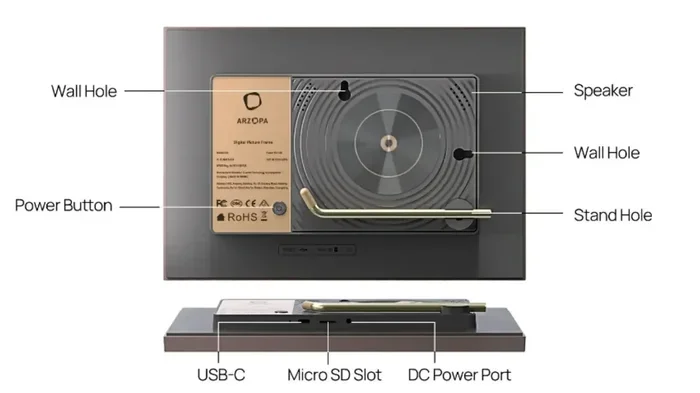
The most common way to power a digital frame is through a wall outlet. Every frame comes with an AC adapter and a power cord. You plug the adapter into the wall, connect it to the frame, and it starts working right away.
When a digital frame is plugged in, it has unlimited power. You never have to worry about the battery dying in the middle of a slideshow. This is ideal for frames that sit on a desk or hang on a wall in a fixed spot.
Many people choose to keep their frames plugged in all the time for this reason. It is simple. Set it up, forget about it, and enjoy the photos. There is no charging routine or battery anxiety.
Battery Power (Rechargeable or Replaceable)
Some digital frames are designed to be portable. These frames come with built-in rechargeable batteries. You charge them just like you would charge a phone, and then they run unplugged for several hours.
Battery-powered frames are great for people who want flexibility. You can place them anywhere without worrying about a nearby outlet. They work well in bedrooms, bathrooms, or even outdoors during a party.
Replaceable battery frames use AA or AAA batteries. These are less common but still available. You simply swap out dead batteries for new ones. This option works well for occasional use or frames in low-traffic areas of your home.
USB and Power Banks
A newer option is powering a digital frame with a USB cable connected to a power bank. This gives you the portability of battery power with the convenience of USB charging. Some frames even come with built-in USB ports that let you charge a phone at the same time.
This setup is clever for travel. You can pack a small power bank and keep your frame running on a road trip or at a family gathering. Just make sure your power bank has enough capacity to last the whole event.
Plugged In vs. Battery Powered: A Side-by-Side Look
Both power options have real benefits. Let us compare them so you can decide what works for your situation.
| Feature | Plugged In (AC Power) | Battery Powered |
|---|---|---|
| Power Supply | Unlimited from wall outlet | Limited per charge (2-8 hours typically) |
| Portability | Low, needs outlet nearby | High, can go anywhere |
| Maintenance | None, just plug and play | Regular charging required |
| Best For | Home decor, office displays | Travel, outdoor events, gifts |
| Cost Over Time | Minimal electricity cost | Battery replacement costs |
| Setup Ease | Very easy, just connect | Easy, but remember to charge |
As you can see, each option has its place. If you want a set-and-forget display, plugging in is the way to go. If you want freedom of movement, battery power wins.
Why People Choose to Keep Digital Frames Plugged In
There are several good reasons why many users prefer to keep their frames connected to power at all times. Let us explore the most common ones.
Never-Stop Slideshows
The biggest reason is simple: convenience. When your frame is plugged in, the slideshow runs forever. You do not have to stop and recharge it every few hours. This is perfect for displaying family photos in a living room or hallway where you want a constant display.
Imagine setting up a frame on your fireplace mantle during the holidays. You load it with festive photos and let it run 24/7. A plug-in frame handles this effortlessly. You never have to think about it again.
Better Display Quality
Here is something many people do not think about. When a frame runs on battery, it often dims the screen to save power. This can make photos look less vibrant. When plugged in, the frame can run at full brightness without worrying about draining the battery.
This matters a lot if you are using the frame to showcase high-quality photos or artwork. You want every detail to look sharp and clear. Plugging in gives you the best possible picture quality.
Smart Features Stay Active
Many modern digital frames come with smart features like Wi-Fi connectivity, cloud syncing, and motion sensors. These features need consistent power to work properly. When you keep the frame plugged in, all these smart functions stay active around the clock.
For example, some frames can pull new photos from your social media accounts automatically. Others send you alerts when someone is in the room. These features only work when the frame has a steady power supply.
When Battery Power Makes More Sense
Plugging in is great, but it is not the only option. There are plenty of situations where battery power is the better choice. Let us look at when going cordless makes sense.
Travel and On-The-Go Use
If you are bringing a digital frame on a trip, battery power is a must. You cannot exactly plug a frame into the wall at a hotel or a campsite. A charged battery lets you display photos anywhere you go.
Some travelers use digital frames at family reunions or weddings. They load up photos from the event and let the frame run for a few hours. A fully charged battery handles this perfectly.
Gifts for Loved Ones
Digital frames make wonderful gifts. Many gift-givers prefer battery-powered frames because the recipient does not need to worry about finding an outlet. The recipient can place the frame anywhere in the home and enjoy it right away.
Battery-powered frames also make great gifts for elderly family members. There is no complicated setup or cords to manage. Just charge it up, load the photos, and give it as a gift.
Spaces Without Outlets
Not every spot in your home has a power outlet nearby. Maybe you want to place a frame on a shelf in the bathroom or in a corner of the garden. In these cases, a battery-powered or power bank-powered frame is your best bet.
Some creative users even place digital frames on bookshelves or in display cases where cords simply do not reach. Battery power gives you the freedom to put your frame exactly where you want it.
How to Make Your Digital Frame Last Longer on Battery
If you decide to go with battery power, you will want to maximize every charge. Here are some proven tips to help your frame run longer between charges.
Lower the Screen Brightness
Screen brightness is the biggest battery drain on any digital frame. Reducing the brightness by just 20-30% can add hours to your battery life. Most frames let you adjust this in the settings menu.
Try setting the brightness to a level that looks good in your room but is not at maximum. You will be surprised at how much this simple change helps.
Use Sleep Mode When Not in Use
Many frames have a sleep or standby mode. When the frame detects no movement or after a set time, it dims or turns off the screen. This saves a lot of power over the course of a day.
You can usually set the sleep timer in the frame’s settings. A 5-minute or 10-minute timer works well for most home setups. The frame wakes up instantly when someone walks by.
Limit Slideshow Transitions
Fancy transitions between photos use extra processing power, which drains the battery faster. Stick to simple fade or dissolve transitions if you are running on battery.
You can also reduce the number of photos in the rotation. Fewer photos mean less processing, which means longer battery life. It is a small trade-off that can make a big difference.
Turn Off Wi-Fi When Not Needed
If your frame connects to Wi-Fi for cloud syncing or social media updates, that connection uses power. When you are running on battery, consider turning off the Wi-Fi and loading photos directly from a memory card or USB drive.
You can always turn Wi-Fi back on when you plug the frame in. This way, you get the best of both worlds: offline battery mode and online plugged-in mode.
Do Digital Frames Use a Lot of Electricity?
A common concern is whether leaving a digital frame plugged in all the time will spike your electricity bill. The good news is that these frames use very little power.
Most digital frames draw between 3 and 10 watts of electricity. To put that in perspective, a typical light bulb uses 40 to 60 watts. So your digital frame uses less power than a single light bulb.
Over a full month, a frame running 24/7 might use about 2 to 7 kilowatt-hours. At average electricity rates, that costs less than a dollar per month. It is one of the most affordable electronics to run in your home.
For comparison, a computer used for medical imaging and diagnostics draws significantly more power, as discussed in how computers are used in medicine. But your digital frame is a tiny consumer in comparison.
If you are still worried about energy use, look for frames with an energy-efficient rating or auto-dimming features. These models are designed to use as little power as possible without sacrificing display quality.
Safety Tips for Keeping Your Digital Frame Plugged In
Leaving any electronic device plugged in for long periods comes with some safety considerations. Here is how to keep your digital frame running safely.
Use the Right Adapter
Always use the adapter that came with your frame or one approved by the manufacturer. Using the wrong adapter can cause overheating or even damage the frame’s internal battery.
Check the voltage and amperage on the adapter label. Make sure it matches the requirements listed in your frame’s manual. A mismatch can lead to serious problems over time.
Avoid Overheating
Digital frames can get warm when running for long periods. This is normal. But if the frame feels hot to the touch, unplug it and let it cool down.
Place your frame in a well-ventilated area. Do not cover it with fabric or place it in an enclosed space. Good airflow keeps the temperature down and extends the life of your device.
Keep Away From Water
This one is obvious but important. Never place a plugged-in digital frame near water. Keep it away from sinks, bathtubs, and open windows where rain could reach it.
Even frames rated as splash-resistant should be kept away from direct water contact. Water and electricity do not mix, and safety should always come first.
Unplug During Storms
Power surges during thunderstorms can damage electronics. If you live in an area with frequent lightning, consider unplugging your frame during severe weather.
Using a surge protector is another smart move. A good surge protector absorbs excess voltage and keeps your frame safe. It is a small investment that can save you from costly repairs.
Expert Insights: What the Pros Recommend
We asked a few tech reviewers and digital frame enthusiasts about their power preferences. Here is what they had to say.
Most home users prefer plug-in frames for daily displays. The convenience of never having to charge or swap batteries is a huge draw. These users typically place their frames in living rooms, bedrooms, or home offices where outlets are easily accessible.
Travel enthusiasts and gift buyers lean toward battery-powered options. They value portability and the ability to place the frame anywhere without cords. Many keep the frame plugged in at home but switch to battery mode when traveling.
Tech experts suggest buying a frame with both options. Many modern frames support both AC power and rechargeable batteries. This gives you the flexibility to use it however you want. You get the best of both worlds without having to buy two separate devices.
The consensus is clear: there is no single right answer. The best choice depends on your lifestyle, where you plan to use the frame, and how much convenience matters to you.
Final Thoughts: Do You Need To Keep Your Digital Frame Plugged In?
The answer to “do digital frames need to be plugged in” is really up to you. If you want a hassle-free, always-on display, keeping it plugged in is the simplest solution. You get unlimited power, full brightness, and all smart features working at their best.
If you need portability or do not have a convenient outlet nearby, battery power is a great alternative. Just remember to keep the battery charged and follow the power-saving tips we shared.
Either way, digital frames are a wonderful way to bring your favorite memories to life. They are affordable, easy to use, and add a personal touch to any space. With the right power setup, your frame will keep displaying those precious moments for years to come.
Take a moment to think about where you want to place your frame and how you plan to use it. That will guide you toward the right power choice. And once you have your frame set up, you can sit back and enjoy the show.
Frequently Asked Questions
Can I leave my digital frame plugged in overnight?
Yes, absolutely. Most digital frames are designed to run continuously for 24 hours or more. They have built-in safety features that prevent overheating. Just make sure you use the original adapter and place the frame in a ventilated spot.
How long does a digital frame battery last on a single charge?
Battery life varies by model, but most frames last between 4 and 8 hours on a full charge. Some high-end models can go even longer. If you plan to use it away from an outlet, look for frames with large battery capacities.
Does unplugging a digital frame save electricity?
Yes, but the savings are very small. A digital frame uses about 3 to 10 watts, which costs less than a dollar per month if run 24/7. Still, unplugging it when not in use is a good habit for both energy savings and device longevity.
Can I use a digital frame without any power source?
Not for long. Every digital frame needs power to display photos. However, battery-powered and power bank-powered frames let you use them without a wall outlet for several hours at a time.
What is the best power option for a digital frame in a bedroom?
A plug-in frame works great in a bedroom because you can place it on a nightstand near an outlet. If you prefer a cordless look, a battery-powered frame charged every few days is a clean and simple alternative.
Do smart digital frames use more power than basic ones?
Smart frames with Wi-Fi and cloud features use slightly more power than basic models. But the difference is still very small. Enabling power-saving modes and turning off Wi-Fi when not needed keeps energy use low even on smart frames.
=== CONCLUSION ===
Digital frames do not need to be plugged in all the time, but doing so comes with clear advantages. Plugged-in frames offer unlimited power, better display quality, and always-active smart features. Battery-powered frames give you portability and flexibility for travel or spaces without outlets. The best choice depends on your personal needs and how you plan to use your frame.
No matter which option you choose, following simple power-saving tips will help your frame run longer and perform better. Adjust brightness, use sleep mode, and keep your device in a well-ventilated space. These small habits make a big difference over time.
Now that you know the answer to “do digital frames need to be plugged in,” you are ready to set up your frame the right way. Pick the power option that fits your lifestyle, load it with your favorite photos, and enjoy the memories every single day.