Can Your Wi Fi Be Too Fast Discover The Surprising Truth
Can your Wi-Fi be too fast? Yes, ultra-fast connections can cause hardware bottlenecks, network congestion, packet loss, and wasted money when your devices and setup cannot handle the speed. The good news is that simple adjustments to your router settings, QoS settings, and network configuration can fix most of these problems and restore connection stability.
Most people would never complain about having too much internet speed. But here is the truth that many homeowners and tech users do not expect. Can your Wi-Fi be too fast? The answer might surprise you. Yes, there are real situations where blazing fast wireless speeds can actually cause problems for your home network, your devices, and even your wallet.
When you sign up for a blazing fast internet plan, you assume everything will work better. But speed alone does not fix every issue. Sometimes a connection that is too fast creates bottlenecks, compatibility issues, and wasted money. Understanding this helps you make smarter choices about your network performance and bandwidth setup.
In this guide, we will explore why can your Wi-Fi be too fast is a real question worth asking. You will learn about the hidden downsides of ultra-fast connections, how to spot the warning signs, and what you can do to fix them. Whether you have gigabit internet or are thinking about upgrading, this article covers what you need to know.
Let us dive in and uncover the surprising truth behind ultra-fast wireless connections.
Key Takeaways
- Speed mismatches hurt performance: When your internet speed exceeds what your devices or router can handle, you face hardware bottlenecks that reduce network performance.
- Ultra-fast plans can cause congestion: High bandwidth plans may lead to network congestion and packet loss if your setup is not optimized for the volume of data.
- Router settings matter a lot: Proper QoS settings and network configuration can solve most issues caused by excessive throughput and speed mismatches.
- Wireless interference gets worse at high speeds: Faster Wi-Fi standards operate on higher frequencies that are more prone to wireless interference and signal degradation.
- Hardware upgrades fix the problem: Upgrading your router, network adapter, and ethernet connection cables removes bottlenecks and unlocks the full value of fast plans.
- Faster is not always better for every setup: Match your internet speed to your actual device capabilities and usage needs to avoid wasted bandwidth and frustration.
📑 Table of Contents
What Does It Mean When Wi-Fi Is Too Fast?
When we talk about can your Wi-Fi be too fast, we are not talking about the speed itself being harmful. Instead, we are discussing how extreme speed can create mismatches in your setup. Think of it like putting a high-performance engine in a car with weak brakes. The engine works great, but the rest of the system cannot handle it properly.
Understanding Internet Speed vs. Throughput
Internet speed and throughput are not the same thing. Speed is what your ISP promises. Throughput is what actually reaches your devices. Many people confuse these two terms. You might have a gigabit internet plan, but your actual throughput could be much lower. This gap is where problems start.
Several factors affect throughput in a home network. Your router quality and age play a big role. Wireless interference from neighboring networks also matters. Device compatibility with your Wi-Fi standard is another key factor. Signal strength at the device location affects how much speed you actually get. And your network configuration settings on the router can either help or hurt your results.
When your internet plan delivers speed that your hardware cannot process, you face a hardware bottleneck. This is the most common reason people ask can your Wi-Fi be too fast. The answer is not about the speed being dangerous. It is about the speed being wasted or even counterproductive. You pay for gigabit speeds but only get a fraction of that because your equipment cannot keep up.
Why Faster Is Not Always Better
You might think that faster is always better. But in networking, that is not always true. A network adapter in your laptop or phone has a maximum speed it can handle. If your router pushes data faster than the adapter can process, packets get dropped. This leads to packet loss and connection instability. Your network performance actually gets worse, not better.
Here are some real-world examples of when speed becomes a problem:
- You have a gigabit internet plan but an older router that only supports Wi-Fi 5.
- Your phone supports Wi-Fi 6 but your router is stuck on Wi-Fi 4.
- Your ethernet connection is gigabit, but your ISP plan is only 100 Mbps.
- You have high bandwidth but poor signal strength in certain rooms of your home.
- Your smart TV has an old network adapter that cannot process speeds above 100 Mbps.
Each of these scenarios shows how can your Wi-Fi be too fast is not just a silly question. It reflects real technical mismatches that affect daily use. The speed is there, but your equipment cannot use it properly. The result is frustration, wasted money, and a poor online experience.
How Excessive Speed Affects Your Devices and Network
When your connection is extremely fast, your devices work harder to keep up. This might sound strange, but it is true. Not all devices are built to handle ultra-fast internet. Let us look at how this affects your network and what you can do about it.
The Problem with Mismatched Hardware
A hardware bottleneck happens when one part of your network cannot keep up with the rest. Imagine a garden hose connected to a fire hydrant. The water pressure is enormous, but the hose cannot handle it. The result is wasted water and potential damage to the system.
The same thing happens with your network performance. If your router sends data at 2 Gbps but your smart TV only supports 100 Mbps, the TV cannot use all that speed. Meanwhile, other devices on the network may suffer from network congestion because the router is pushing too much data too quickly. This creates a domino effect that slows everything down.
Common devices that struggle with excessive speed include:
- Older smart TVs and streaming boxes with limited bandwidth support
- Legacy laptops with outdated network adapters
- Smart home devices like smart plugs, cameras, and sensors
- Printers and scanners with slow wireless chips
- Gaming consoles from previous generations
- Older smartphones that only support Wi-Fi 4 or Wi-Fi 5
These devices do not break because of fast speed. But they may struggle to maintain a stable connection stability when the network pushes data faster than they can process. You might notice your smart TV buffering or your smart speaker dropping offline more often than usual. These are signs that your bandwidth is exceeding what your devices can handle.
Wireless Interference and Signal Issues at High Speeds
Wireless interference becomes a bigger problem at higher speeds. Faster Wi-Fi standards use higher frequency bands, like the 5 GHz or 6 GHz bands. These frequencies have shorter ranges and are more easily blocked by walls, furniture, and even weather conditions outside.
When you have can your Wi-Fi be too fast as a concern, interference is often a hidden factor. Your router might be broadcasting at speeds that your device cannot reliably receive. The result is frequent disconnects, slow latency spikes, and frustrating buffering during streaming or gaming sessions.
Here are tips to reduce wireless interference and improve your setup:
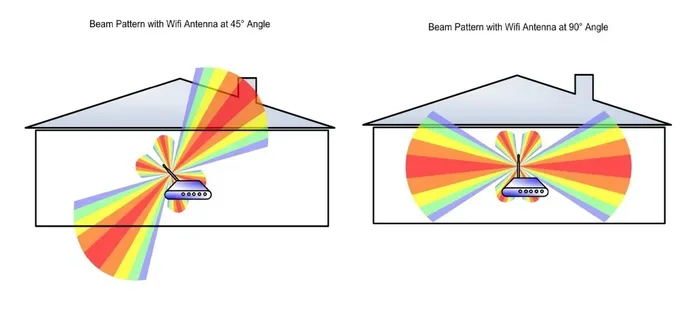
- Place your router in a central location in your home for even signal strength coverage
- Keep it away from microwaves, cordless phones, and baby monitors that cause interference
- Use the Wi-Fi standard that matches your devices for the best throughput
- Consider a mesh network system for better coverage in larger homes
- Switch to the 2.4 GHz band for devices that are far from the router
- Update your router firmware regularly to fix network configuration bugs
These small changes can dramatically improve your network performance and reduce the problems caused by excessive speed. Better placement and smarter band selection make a huge difference.
Common Problems Caused by Ultra-Fast Connections
Now that we understand the basics, let us look at the specific problems that arise when can your Wi-Fi be too fast becomes a real issue. These are the problems real users face every day, and they are more common than you might think.
Network Congestion and Packet Loss
Network congestion happens when too much data flows through your network at once. You might think fast internet prevents congestion. But the opposite can be true. When your connection is extremely fast, more devices try to use it simultaneously. This floods the network and causes packet loss.
Packet loss is when data fails to reach its destination. It causes stuttering videos, dropped calls, and lag in online games. Even with high bandwidth, packet loss can ruin your experience. The key is balance between speed and connection stability. Without that balance, your fast connection feels slower than a mediocre one.
Signs that network congestion is affecting you include:
- Videos buffering even though your speed test shows fast results
- Video calls freezing or dropping audio unexpectedly
- Online games lagging despite a strong signal strength
- Slow page loads when multiple devices are active on the network
- Downloads starting but never completing at full speed
If you notice these issues, can your Wi-Fi be too fast might actually be part of the problem. The speed is overwhelming your network equipment or your ISP infrastructure. The data is moving so fast that your devices and router cannot process it efficiently.
ISP Throttling and Configuration Issues
Some Internet Service Providers practice ISP throttling. This means they slow down your connection after you reach a certain data threshold. But here is the twist. Sometimes ultra-fast plans trigger aggressive throttling policies. Your ISP may limit your bandwidth more aggressively on higher-tier plans. This defeats the purpose of paying for fast internet.
Configuration issues also play a big role. If your router settings are not optimized for high speed, you will not get the full benefit. Common configuration mistakes include:
- Leaving QoS settings at default values that do not prioritize your needs
- Not updating router firmware regularly to fix bugs and improve throughput
- Using incorrect network configuration for your specific internet plan
- Having duplicate SSID names causing device confusion and roaming issues
- Not enabling ethernet connection for stationary devices that could benefit from wired speed
- Leaving latency-sensitive settings unconfigured for gaming or video calls
Fixing these configuration issues can unlock the full potential of your fast connection. It also reduces the problems that come with excessive speed. A properly configured network handles high bandwidth much more gracefully than a default setup.
How to Fix Issues When Wi-Fi Is Too Fast
The good news is that you can fix most problems related to can your Wi-Fi be too fast. The solutions are practical and do not require expensive upgrades. Let us walk through the most effective fixes step by step.
Adjusting Router Settings and QoS
QoS settings stand for Quality of Service. These settings let you prioritize certain types of traffic on your network. For example, you can give video calls priority over background downloads. This is especially helpful when your connection is very fast and multiple devices are competing for bandwidth. Without QoS, your router treats all data equally, which can cause important tasks to get delayed.
Here is how to adjust your router settings for better performance:
- Log into your router admin panel (usually 192.168.1.1 or 192.168.0.1)
- Navigate to the QoS settings section in the admin dashboard
- Enable QoS and set priority rules for your most important devices
- Limit the maximum speed for heavy downloaders to prevent network congestion
- Set your gaming or video calling devices to high priority
- Save settings and restart your router to apply the changes
Proper network configuration through QoS can solve many issues caused by excessive speed. It ensures that critical tasks get the throughput they need without overwhelming the rest of the network. This simple adjustment can transform your online experience.
Upgrading Network Hardware
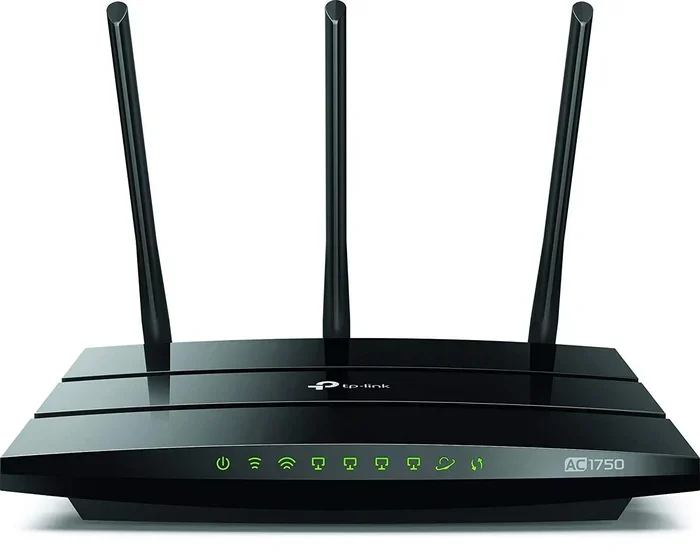
Sometimes the fix is simple: upgrade your hardware. If your router cannot handle gigabit internet, it is time for a new one. Look for routers that support the latest Wi-Fi standard, such as Wi-Fi 6 or Wi-Fi 6E. These routers are designed to handle high speeds efficiently and distribute bandwidth more evenly across devices.
Consider these hardware upgrades to remove hardware bottlenecks:
- A modern router with built-in QoS settings and advanced network configuration options
- Ethernet connection cables (Cat 6 or Cat 7) for stationary devices like desktops and consoles
- Mesh Wi-Fi systems for better signal strength coverage throughout your entire home
- USB network adapters for older computers that need to support faster Wi-Fi standards
- Wi-Fi extenders or access points for dead zones where wireless interference is strongest
Upgrading your hardware removes the hardware bottleneck that causes problems when speed is too high. Your devices will thank you for the smoother and more reliable experience. The investment pays for itself in saved time and reduced frustration.
Optimizing Device Settings for High Speed
Do not overlook your device settings. Each device on your network has its own network adapter and capabilities. Make sure your devices are set to use the best available Wi-Fi standard. On Windows, you can check this in your network adapter properties. On Mac, look in System Preferences under Network. On phones, check your Wi-Fi settings for the preferred network standard.
Quick tips for optimizing device settings:
- Update your device drivers regularly to support the latest Wi-Fi standards
- Disable power-saving mode on your network adapter to maintain consistent throughput
- Forget and reconnect to your Wi-Fi network after making router changes
- Check for firmware updates on all connected devices for better connection stability
- Use the ethernet connection when possible for stationary devices that need maximum speed
- Reduce latency by disabling background apps that consume bandwidth during important tasks
These small steps can make a big difference in network performance and connection stability. Your devices will connect faster, stay connected longer, and use your internet speed more efficiently.
When Faster Internet Is Actually Better
Not every situation suffers from excessive speed. In fact, there are many cases where faster internet is genuinely better. Let us look at when upgrading your speed makes sense and who benefits the most from ultra-fast connections.
Ideal Setups for High-Speed Connections
Certain setups benefit greatly from ultra-fast internet. If you have the right equipment, more speed means a better experience. Here are scenarios where fast internet truly shines and where can your Wi-Fi be too fast is not really a concern:
- Smart homes with dozens of connected devices all streaming and communicating simultaneously
- 4K and 8K streaming on multiple screens at the same time without any buffering
- Large households with heavy internet users who all need reliable bandwidth at the same time
- Remote workers who run video conferences all day and need consistent connection stability
- Gamers who need low latency and high throughput for competitive online gaming
- Content creators who upload large files regularly and need fast ethernet connection speeds
In these situations, having more speed prevents network congestion during peak usage hours. Your equipment can handle the load, and the extra capacity gives you room to grow. This is the ideal scenario where faster truly means better.
Who Benefits Most from Ultra-Fast Wi-Fi?
Not everyone needs ultra-fast internet. But some users benefit significantly from it. These include families with multiple streamers and gamers sharing one connection. Home office workers who depend on reliable network performance for their livelihood. People who use cloud storage and cloud computing daily. Households with extensive smart home ecosystems that require constant bandwidth. And users who download large files or games frequently and want to save time.
For these users, investing in gigabit internet and compatible hardware is a smart move. The key is making sure your entire setup supports the speed. Otherwise, you face the same problems we discussed earlier. The speed is there, but your equipment cannot use it. Balance is everything when it comes to can your Wi-Fi be too fast.
The Bottom Line
So, can your Wi-Fi be too fast? The answer is yes, but not in the way you might think. Speed itself is not the enemy. The problem lies in mismatches between your speed, hardware, and configuration. When these elements are out of balance, even the fastest connection can cause frustration and wasted money.
The good news is that you have the power to fix these issues. Start by checking your network performance and identifying any hardware bottlenecks in your setup. Adjust your router settings and QoS settings to prioritize what matters most to you. Upgrade your hardware when your current equipment cannot keep up. And always make sure your devices are compatible with your internet plan.
Can your Wi-Fi be too fast is a question that deserves attention from every internet user. The surprising truth is that speed without compatibility is wasted speed. Take the time to optimize your setup, and you will enjoy a faster, more stable, and more reliable connection every single day. Your network will perform at its best, and you will get the full value out of your internet investment.
Frequently Asked Questions
Is it possible for Wi-Fi to be too fast for your devices?
Yes, it is possible. When your router delivers speeds that your device’s network adapter cannot handle, you experience packet loss and connection instability. The speed overwhelms the device, causing more problems than it solves.
Does faster internet always mean better performance?
No, faster internet does not always mean better performance. If your hardware, network configuration, or Wi-Fi standard cannot keep up, you will face hardware bottlenecks. The key is matching your speed to your equipment and usage needs.
How do I know if my Wi-Fi speed is too much for my hardware?
Signs include frequent buffering, dropped connections, slow latency despite fast speed tests, and devices struggling to maintain a stable connection. Run speed tests on multiple devices and compare the results to your plan speed to identify mismatches.
Can ultra-fast Wi-Fi cause connection instability?
Yes, ultra-fast Wi-Fi can cause instability when your devices or router cannot process the data quickly enough. This leads to packet loss, network congestion, and dropped signals. Proper QoS settings and hardware upgrades can resolve these issues.
Should I downgrade my internet plan if my Wi-Fi is too fast?
Not necessarily. Instead of downgrading, focus on fixing the mismatch. Upgrade your router, use ethernet connections for stationary devices, and adjust your network configuration. These steps let you keep your fast plan while enjoying stable performance.
What is the best way to optimize my network for high-speed internet?
The best way is to enable QoS settings on your router, update all device drivers and firmware, use the correct Wi-Fi standard for your devices, and place your router strategically for the best signal strength. These steps ensure your high-speed connection delivers its full potential.