Do All Wifi Light Switches Require A Neutral Wire
Do all wifi light switches require a neutral wire? The answer is no, but it depends on the brand and model you choose. Many modern smart light switches are designed to work without a neutral wire, making them perfect for older homes. However, some wifi light switch models still need that extra wire for stable power. Understanding your electrical wiring setup before buying is essential. This guide covers everything from basic wiring to top-rated no-neutral options.
Have you ever walked into a room and thought, “I wish I could control the lights from my phone”? A wifi light switch makes that dream a reality. These smart devices let you turn lights on and off using your voice, a phone app, or even a schedule. But here is the big question that stops many homeowners in their tracks. Do all wifi light switches require a neutral wire? The short answer is no. But the full answer is a bit more complicated, and it is worth understanding before you buy anything.
If you have an older home, there is a good chance your light switch boxes do not have a neutral wire. This can feel like a dead end if you want to join the smart home revolution. The good news is that manufacturers have caught on. Today, you can find plenty of no neutral wire smart switch options that work beautifully in older setups. In this guide, we will walk through everything you need to know. We will cover how these switches work, what to look for, and which brands offer the best no-neutral options on the market right now.
Key Takeaways
- Not all wifi light switches need a neutral wire: Many brands now offer no-neutral smart switch options.
- Check your existing wiring first: Use a voltage tester to see if a neutral wire is present in your switch box.
- No-neutral switches use a bypass module: This small device lets the switch work without a neutral wire by routing power differently.
- Some smart switches still require a neutral wire: Premium brands like Lutron and certain Philips Hue models need that connection for full functionality.
- Hiring a licensed electrician is always a safe choice: Especially if you are unsure about your home’s electrical wiring.
- LED compatibility matters: No-neutral switches can sometimes cause flickering with certain LED bulbs.
- Smart home integration is easier with the right switch: Choose a wifi light switch that works with Alexa, Google Home, or Apple HomeKit.
📑 Table of Contents
- What Is a Neutral Wire and Why Does It Matter?
- How Wifi Light Switches Work
- Do All Wifi Light Switches Require a Neutral Wire?
- What Happens If You Don’t Have a Neutral Wire?
- Top No-Neutral Wifi Light Switches Worth Considering
- Should You Hire an Electrician for the Installation?
- Quick Tips for Choosing the Right Wifi Light Switch
- Common Mistakes to Avoid
- Expert Insights on Smart Switch Wiring
- Key Takeaways on Do All Wifi Light Switches Require A Neutral Wire
What Is a Neutral Wire and Why Does It Matter?
Understanding the Role of the Neutral Wire
To understand why some wifi light switches need a neutral wire and some do not, you first need to know what a neutral wire is. In a standard light switch wiring setup, you usually find two or three wires inside the switch box. There is a live wire, sometimes called the “hot” wire. There is a ground wire for safety. And then there is the neutral wire, which completes the electrical circuit.
Think of it like a hallway. The live wire brings electricity to the light. The neutral wire sends it back. Without that return path, the circuit cannot work properly. In older homes built before the 1980s, many electrical boxes were wired with just a switch loop. That means only the live wire and the ground wire were pulled into the box. No neutral wire was included because it was not required by code at the time.
Today, modern building codes in most areas require a neutral wire in every switch box. But that does not help the millions of homes that were built before these rules changed. If your home is older, there is a strong chance your switch boxes lack a neutral wire. This is exactly why no neutral wire smart switch products exist in the first place.
How the Neutral Wire Completes the Circuit
When you flip a traditional light switch, you are simply breaking or completing the live wire connection. The electricity flows from the source, through the switch, to the light fixture, and then back through the neutral wire. This back-and-forth flow is what makes the light turn on.
Now, a smart switch is different. It needs a small amount of power to stay “awake” so it can connect to your wifi network. Even when the light is off, the switch itself is still using a tiny bit of electricity. In a traditional setup with a neutral wire, the switch draws that power from the neutral line. It stays powered up and ready to respond to your commands. Without a neutral wire, the switch has no way to get that standby power the traditional way. That is where the clever engineering comes in.
How Wifi Light Switches Work
The Basics of Smart Switch Technology
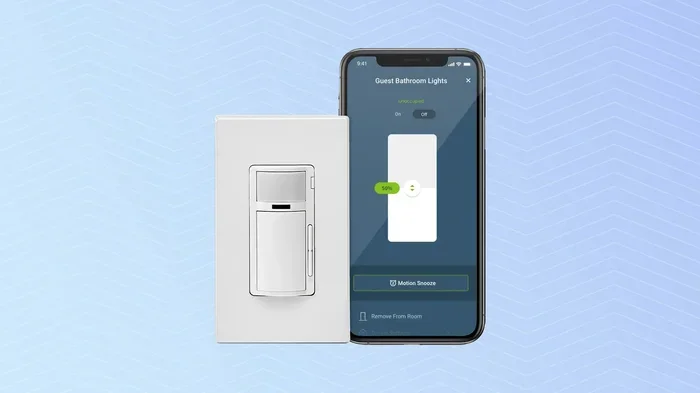
A wifi light switch is essentially a traditional switch with a built-in wifi chip and a small circuit board. This allows it to communicate with your home network and receive commands from your phone or smart speaker. When you say “Hey Google, turn off the living room lights,” the signal goes to your wifi router, then to the switch, which then breaks or completes the circuit to the light.
But here is the tricky part. That wifi chip and circuit board need power to function. They need it 24 hours a day, seven days a week. Even when your lights are off, the switch is still listening for commands. This is called “standby power.” And getting that standby power without a neutral wire requires some creative solutions.
Why Wifi Light Switches Need Power Even When Off
Imagine you are at work and you want to turn on the porch light before you get home. You open the app on your phone and tap the button. For that command to work, the switch at the porch must be powered on and connected to the internet. If it had no power at all, it would be “asleep” and unable to receive your command.
This is why smart lighting engineers had to solve the no-neutral wire problem. A traditional switch does not need power when the light is off. It just sits there as a simple mechanical connection. A smart switch cannot do that. It must always be ready. So the industry developed two main approaches to solve this problem.
Do All Wifi Light Switches Require a Neutral Wire?
The Short Answer: Not Always
Do all wifi light switches require a neutral wire? No, they absolutely do not. But many of them do, and this is where confusion sets in. The truth is that the market is split right now. Some brands design their smart switch products to require a neutral wire. Others have engineered their products to work perfectly without one. Both approaches are valid, but they use different technology to get the job done.
If you walk into a hardware store or browse online, you will see dozens of options. Some will clearly state “neutral wire required” in the product description. Others will proudly advertise “no neutral wire needed.” The key is knowing which one matches your home’s setup. You cannot just guess. You need to look inside your switch box and see what wires are present.
Why Some Brands Still Need a Neutral Wire
Brands that require a neutral wire often do so because it provides a more stable and reliable power source. A dedicated neutral wire gives the switch a consistent path for its standby power. This means fewer flickering issues, better compatibility with LED bulbs, and a more reliable connection to your home automation system.
Some of the most popular smart switch brands in this category include Lutron Caseta and certain models from Philips Hue. These are high-quality products, but they do assume you have a neutral wire in your switch box. If you do not, you will need to run a new wire or use a different product entirely. For many homeowners, this is not a practical option, especially in multi-story homes where running new wiring can be expensive and disruptive.
What Happens If You Don’t Have a Neutral Wire?
Common Problems Without a Neutral Wire
If you try to install a neutral wire required smart switch in a box that lacks a neutral wire, you will run into problems. The switch simply will not work. It has no way to get the power it needs to stay connected to your wifi network. You might see a blinking light on the switch, or it might not power on at all.
Some people try to “cheat” the system by using a bypass or a dummy wire. This is not recommended. It can create safety hazards, violate electrical codes, and even cause fires in extreme cases. Always follow the manufacturer’s instructions and your local electrical codes. Your safety is more important than any smart switch feature.
Workarounds and Solutions for No-Neutral Setups
The good news is that you have several options if your switch box lacks a neutral wire. The first and best option is to buy a no neutral wire smart switch. These products are specifically designed for this situation. They use a technology called a bypass module or a capacitor-based power management system to draw the tiny amount of standby power they need from the live wire only.
Another option is to run a new neutral wire from your electrical panel to the switch box. This is the most thorough solution, but it is also the most expensive and invasive. A licensed electrician can do this for you, but it involves opening walls and running cables through your home. For most people, a no-neutral smart switch is the far more practical choice.
You can also consider using smart bulbs instead of smart switches. A smart bulb like the Philips Hue or LIFX works in any standard socket and does not need a neutral wire at the switch. The trade-off is that the physical switch still controls the light, so you would need to keep the switch always on and use the app or voice commands to turn it off and on. This can be annoying for some households, but it is a valid workaround.
Top No-Neutral Wifi Light Switches Worth Considering
Best Budget-Friendly Options
If you want to upgrade your home without spending a fortune, there are great budget-friendly no neutral wire wifi light switches available. One of the most popular options in this category is the Sonoff Mini R4. It is a tiny, affordable smart switch that works without a neutral wire. It connects to your wifi network and supports Alexa, Google Home, and even Apple HomeKit with a bridge. The setup is simple, and the price is hard to beat.
Another solid budget pick is the TP-Link Kasa Smart Light Switch KS200M. This is a single-pole switch that does not require a neutral wire. It has a clean, minimalist design that fits most modern switch plates. The Kasa app is easy to use, and you can set up schedules, timers, and scenes right from your phone. It is a great entry point for anyone new to smart home technology.
Premium No-Neutral Smart Switches
If you are willing to spend a bit more for premium features, there are excellent options too. The Lutron Caseta Smart Bridge system is a top-tier choice, though it does require a neutral wire in most configurations. However, Lutron offers the Caseta Wireless Dimmer with a Pico remote, which can be used as a wireless switch paired with a regular Lutron relay that does not need a neutral wire in certain setups.
For a truly no-neutral premium option, consider the Inovelli Blue Zigbee switch. It works with the Inovelli bypass module, which handles the power management without needing a neutral wire. This switch offers excellent dimming capabilities, local control, and deep integration with smart home platforms like Home Assistant and Hubitat. It is a favorite among smart home enthusiasts who want advanced features without the neutral wire requirement.
Comparison Table: Popular No-Neutral Wifi Light Switches
| Switch | Neutral Wire Required? | Price Range | Voice Assistant Support | Best For |
|---|---|---|---|---|
| Sonoff Mini R4 | No | $10 – $15 | Alexa, Google, Apple | Budget smart home starter |
| TP-Link Kasa KS200M | No | $15 – $25 | Alexa, Google | Easy setup and reliable performance |
| Inovelli Blue Zigbee | No (with bypass) | $40 – $55 | Alexa, Google, HomeKit | Advanced dimming and smart home pros |
| Lutron Caseta (with Pico) | Usually yes | $50 – $70 | Alexa, Google, HomeKit | Premium reliability and dimming |
| Leviton Decora Smart Wi-Fi | No (some models) | $25 – $40 | Alexa, Google | Decora style and solid features |
Note: Always double-check the specific model and your local wiring before purchasing. Some models may have variations that require or do not require a neutral wire.
Should You Hire an Electrician for the Installation?
When DIY Is Safe
If you are comfortable working with electricity, installing a wifi light switch can be a straightforward DIY project. The basic steps are simple. First, turn off the power at your circuit breaker. Use a voltage tester to confirm the power is off. Remove the old switch and take note of which wire goes where. Connect the new switch wires to the corresponding terminals. Secure everything in the box, attach the faceplate, and turn the power back on.
Many no-neutral smart switches come with clear instructions and color-coded wires. The Sonoff Mini R4, for example, is about the size of a small matchbox and fits inside the existing switch box with very little modification. If you have ever changed a light switch before, a no neutral wire smart switch install is very similar.
When to Call a Professional
However, there are times when you should definitely call a licensed electrician. If your switch box has wiring you do not recognize, do not touch it. If you see aluminum wiring, frayed cables, or any signs of heat damage, stop and call a professional. If your home has a complex wiring setup with multiple switches controlling the same light (like a 3-way or 4-way switch setup), a professional can help you navigate the smart switch installation safely.
An electrician can also help you add a neutral wire to your switch box if you decide that is the route you want to take. This is a job that requires knowledge of local electrical codes and proper wiring practices. It is not worth the risk to improvise when it comes to electricity. A licensed professional will ensure everything is safe, up to code, and working perfectly.
Quick Tips for Choosing the Right Wifi Light Switch
- Check your switch box first. Turn off the power and look inside. Count the wires. If you see a white wire connected to the switch, you likely have a neutral wire.
- Read the product specifications carefully. Some switches list “neutral wire required” in small print. Do not skip this step.
- Consider your bulb type. No-neutral switches can sometimes cause flickering with certain LED bulbs. Check the switch’s compatible bulb list before buying.
- Think about smart home integration. Make sure the switch works with your existing smart home ecosystem, whether that is Alexa, Google Home, or Apple HomeKit.
- Buy a voltage tester. This inexpensive tool is essential for any electrical work. It will confirm whether the power is off before you touch any wires.
- Consider a smart hub. Some no-neutral switches work best with a hub like Zigbee or Z-Wave. Factor in the cost of the hub when comparing prices.
Common Mistakes to Avoid
- Assuming all switch boxes have a neutral wire. This is the most common mistake. Many older homes do not. Always verify before you buy.
- Ignoring the bypass module requirement. Some no-neutral switches need a separate bypass module for certain bulb types. Check the box and the instructions.
- Using a smart switch with incompatible dimmers. Not all smart switches work well with all dimmable bulbs. Test compatibility before committing to a whole-home setup.
- Forgetting to turn off the breaker. This is a safety issue that cannot be overstated. Always kill the power before you open any switch box.
- Overloading the switch. Some no-neutral switches have maximum wattage limits. Make sure your total bulb wattage stays within the rated capacity.
Expert Insights on Smart Switch Wiring
According to electrical experts, the trend in the smart home industry is moving strongly toward no-neutral wire designs. As more homeowners adopt smart lighting technology, manufacturers are investing heavily in making their products work with existing wiring. This means the days of worrying about neutral wires are numbered. Soon, almost every wifi light switch on the market will work without one.
Electrical contractors also note that the most important step is always the inspection phase. Before you buy any smart switch, open up a few switch boxes in your home and see what you are working with. Take a photo of the wires and bring it with you when you shop. This simple step can save you from buying the wrong product and returning it later.
Another expert tip is to consider the future. If you are planning a major renovation or electrical upgrade, now is the perfect time to add neutral wires to all your switch boxes. This future-proofs your home and gives you the freedom to choose any smart switch on the market, regardless of its wiring requirements.
Key Takeaways on Do All Wifi Light Switches Require A Neutral Wire
The question of do all wifi light switches require a neutral wire comes down to the specific product and your home’s wiring. Not all smart switches need a neutral wire, and the market is filled with excellent no-neutral options. Whether you choose a budget-friendly Sonoff Mini or a premium Inovelli Blue, there is a smart switch that will work in your home. The key is to check your wiring first, choose a compatible product, and install it safely. With the right wifi light switch, you can enjoy the convenience of smart lighting without the hassle of rewiring your entire home.
Start by inspecting your switch boxes. Make a list of which rooms need upgrades. Then browse the no-neutral options available and pick the one that fits your budget and smart home ecosystem. You will be amazed at how much easier it is to control your lights once you make the switch. Welcome to the world of home automation!
Frequently Asked Questions
Can I install a wifi light switch myself if I have no electrical experience?
If you are comfortable turning off the breaker and using a voltage tester, basic switch replacement is manageable for most homeowners. However, if you feel unsure at any point, it is always best to hire a licensed electrician. Electrical work carries real risks, and safety should always come first.
Will a no-neutral wifi light switch work with all types of bulbs?
Most no-neutral smart switches work well with standard LED bulbs. However, some may cause flickering with certain dimmable or low-wattage LEDs. Always check the switch’s compatibility list and consider using a bypass module if recommended by the manufacturer for your specific bulb type.
How can I tell if my switch box has a neutral wire?
Turn off the power at the breaker and remove the switch plate. Look inside the box. If you see a white wire connected to the switch or capped with a wire nut, you likely have a neutral wire. If you only see black and ground wires, you probably do not. Using a non-contact voltage tester can also help confirm your findings.
What is a bypass module and why do some no-neutral switches need one?
A bypass module is a small device that installs in the light fixture instead of the switch. It helps manage the tiny amount of power that the smart switch needs to stay active. Without it, some LED bulbs may flicker when the switch is off. Not all no-neutral switches require one, but many dimmable setups benefit from having one.
Are no-neutral wifi light switches less reliable than neutral-wire switches?
Not necessarily. Modern no-neutral switches use advanced power management technology that is very reliable. You may experience occasional flickering with certain bulb types, but overall, the performance is comparable. Choosing a reputable brand and following the installation instructions carefully will ensure a stable and dependable connection.
Can I use a wifi light switch with a 3-way switch setup?
Yes, but it requires a specific setup. Some smart switch brands offer 3-way compatible kits that include a smart switch and a companion switch or a wireless remote. The wiring is more complex than a single-pole setup, so it is often best to consult an electrician for 3-way and 4-way installations.
=== CONCLUSION ===
Do all wifi light switches require a neutral wire? No, they do not. The smart home industry has evolved to meet the needs of homeowners with older wiring. Whether your switch box has a neutral wire or not, there is a wifi light switch that will work for you. From budget-friendly options like the Sonoff Mini R4 to premium picks like the Inovelli Blue, the market is full of versatile and reliable choices.
Take the time to check your wiring, compare your options, and choose a switch that fits your needs and your home. With the right smart switch, you can enjoy the convenience of smart lighting and the peace of mind that comes with a safe, properly installed setup. Your home is ready for the future, and it all starts with the right switch.