Do Hdmi Extenders Degrade Signal Quality Explained
Do HDMI extenders degrade signal quality? The short answer is yes, but only to a small degree — and proper setup makes a huge difference. HDMI extenders boost your signal over long distances, but cheap models can cause signal loss, resolution drops, and latency. Choosing the right type, like fiber optic HDMI or network-based HDMI extender options, keeps your HD video quality nearly perfect.
This is a comprehensive guide about Do Hdmi Extenders Degrade Signal.
Key Takeaways
- Signal degradation is minimal: Good-quality HDMI extenders lose very little signal over standard distances.
- Extender type matters: Fiber optic and network-based extenders preserve signal better than basic copper ones.
- Cable length is the biggest factor: Longer runs increase the chance of HDMI signal loss and quality drops.
- Cheap extenders hurt quality: Budget models often introduce resolution drops and latency.
- Proper setup prevents problems: Using signal boosters, quality cables, and correct placement keeps your video sharp.
- 4K and high-res signals are more fragile: They degrade faster than 1080p over long HDMI cable distances.
- Active cables and repeaters help: These tools refresh the signal and reduce digital signal transmission errors.
[FEATURED_IMAGE_PLACEHOLDER]
Do HDMI Extenders Degrade Signal Quality Explained
You just spent hours setting up your home theater or office display. The picture looks amazing — until you realize you need to run the HDMI cable further than 50 feet. That’s where HDMI extenders come in. But here’s the question everyone asks: do HDMI extenders degrade signal quality? The honest answer is yes, a little. But it depends a lot on the type of extender you use and how you set it up.
In this guide, we’ll break down exactly how HDMI extenders affect your video signal quality. You’ll learn about different extender types, what causes signal loss, and how to keep your picture looking sharp. Whether you’re extending a 4K HDMI extension setup or just trying to reach a projector across a room, this article has you covered.
What Is an HDMI Extender and How Does It Work?
An HDMI extender is a device that takes your HDMI signal and sends it over a longer distance than a standard cable allows. Most regular HDMI cables work well up to about 15 to 25 feet. Beyond that, you start seeing HDMI signal degradation. That’s where extenders save the day.
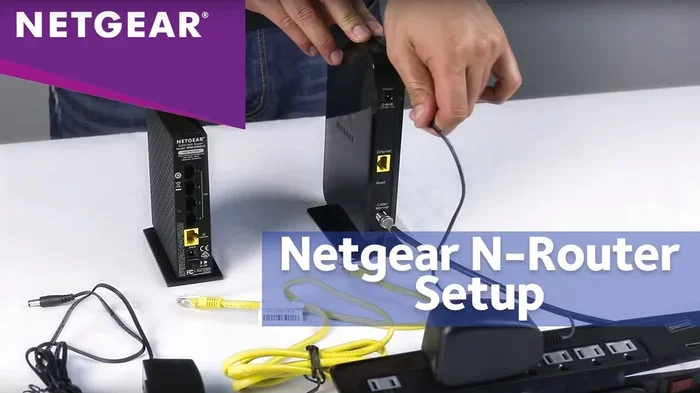
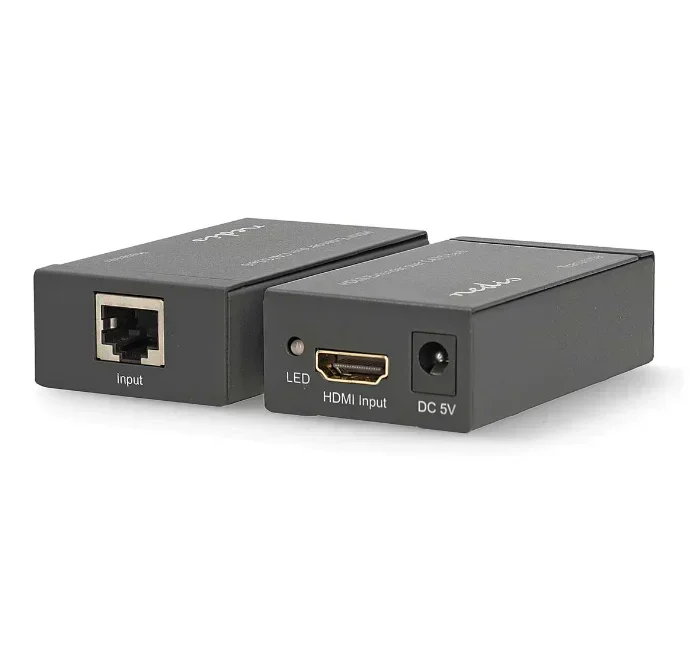
Here’s how they work in simple terms. The extender has a sender unit and a receiver unit. The sender plugs into your source device — like a Blu-ray player or gaming console. It sends the signal through a secondary cable to the receiver unit, which connects to your display. This secondary cable can be Ethernet, coaxial, or fiber optic. Each type handles the digital signal transmission differently.
Why Do You Need an HDMI Extender?
There are many reasons people need extenders. Maybe your projector sits on the far wall of a conference room. Perhaps your living room TV is 60 feet from your cable box. In both cases, a regular HDMI extension cable won’t cut it. The signal gets too weak, and you end up with a blank screen or fuzzy picture.
HDMI extenders solve this problem. They boost and retransmit the signal so it reaches your display clearly. Some people also use them to hide their equipment in a closet or cabinet, keeping cables out of sight while maintaining great HD video quality.
Do HDMI Extenders Really Degrade Signal Quality?
This is the big question. And the answer isn’t a simple yes or no. HDMI extenders do introduce a small amount of signal processing. That processing can cause minor quality loss. But in most real-world setups, the difference is barely noticeable — especially with good-quality equipment.
Think of it like this. When you speak into a microphone and play it through speakers, there’s a tiny bit of quality loss. But nobody notices it in a normal room. The same idea applies to HDMI signal extension. The signal gets converted, boosted, and sent again. A tiny bit of data can be lost in that process. But with modern extenders, the loss is extremely small.
When Does Signal Degradation Become Noticeable?
You’ll start to see problems when several things go wrong at once. Using a low-quality extender is one factor. Running the cable too far is another. Environmental interference plays a role too. Here are the main situations where HDMI signal loss becomes obvious:
- Using a budget or unbranded extender — These often have poor internal components.
- Running cables over 100 feet — Even good extenders struggle at extreme lengths.
- Using 4K or 8K resolution — Higher resolutions carry more data and are more sensitive.
- Running cables near power lines — Electrical interference causes signal interference.
- Using old or damaged cables — Degraded cables add to the problem.
Do All HDMI Extenders Cause the Same Level of Degradation?
Absolutely not. This is a huge misconception. A premium fiber optic HDMI extender will preserve nearly 100% of your original signal quality. A cheap copper-based extender from a no-name brand might drop your resolution or add lag. The difference is massive.
Here’s a quick comparison of the main extender types and how they impact signal quality:
| Extender Type | Signal Quality Impact | Max Distance | Best For |
|---|---|---|---|
| Fiber Optic HDMI | Minimal loss, excellent quality | Up to 300+ feet | 4K and long runs |
| Network-Based (Cat6/Cat7) | Low loss, very reliable | Up to 330 feet | Home theater and office |
| Coaxial Extender | Moderate loss | Up to 150 feet | Budget setups |
| Basic HDMI Repeater | Some loss at high res | Up to 50 feet | Short extensions |
| Active HDMI Cable | Very low loss | Up to 30 feet | Medium-distance runs |
As you can see, the type of extender makes a big difference. Fiber optic HDMI and network-based HDMI extender options give you the best results with almost no visible quality loss.
Types of HDMI Extenders and Their Signal Impact
Not all extenders are created equal. Each type uses different technology to transmit your signal, and each has its own impact on video signal quality. Let’s look at the most common types.
1. Fiber Optic HDMI Extenders
Fiber optic HDMI extenders are the gold standard for signal preservation. They convert the electrical HDMI signal into light pulses and send them through glass or plastic fibers. Light travels fast and clean, which means almost zero signal degradation.
These extenders handle 4K and 8K resolutions beautifully. They also have very low latency, so you won’t notice any delay in gaming or live video. The main downside is cost — fiber optic setups run a bit more than other options. But for serious HD video quality, they’re hard to beat.
2. Network-Based HDMI Extenders (Cat5e/Cat6/Cat7)
Network-based HDMI extender systems use Ethernet cables to carry the HDMI signal. A sender unit connects to your source device and feeds the signal into an Ethernet cable. A receiver unit at the other end converts it back to HDMI for your display.
These systems work well for distances up to about 330 feet. They offer solid signal preservation and are very popular in both home and commercial settings. The HDMI over Ethernet approach is flexible because you can use existing network wiring in many buildings.
One thing to watch out for: cheap Cat5e cables may not support the full bandwidth needed for 4K. Use Cat6 or Cat6a cables for the best results. This small upgrade makes a big difference in reducing HDMI signal loss.
3. Coaxial HDMI Extenders
Coaxial extenders use traditional coaxial cables to carry the HDMI signal over longer distances. They’re affordable and widely available. However, they tend to have more signal degradation than fiber optic or network-based options.
These work fine for 1080p setups at moderate distances. But if you need 4K HDMI extension or longer runs, coaxial extenders may show their limits. You might notice color banding or reduced sharpness.
4. HDMI Repeaters and Signal Boosters
A signal booster or repeater sits inline between two HDMI cables. It receives the weakening signal, cleans it up, and retransmits it at full strength. This is different from a full extender system, but it serves a similar purpose.
Repeaters work great for medium-distance runs. They’re especially useful when you need to go just a bit beyond your cable’s limit. The key is placing the repeater at the right spot — not too close to the source, not too far from the display.
5. Active HDMI Cables
Active HDMI cables have built-in chips that boost the signal as it travels through the cable. They act like a very short extender built right into the cable itself. These are great for runs of 15 to 30 feet.
Because the boosting happens inside the cable, there’s very little added latency or quality loss. They’re a simple solution for people who don’t want a full extender setup. Just plug them in and go.
Factors That Affect Signal Quality with HDMI Extenders
Several factors determine how much your signal will degrade when using an extender. Understanding these helps you make smarter buying and setup decisions.
Cable Length and Distance
HDMI cable distance is the number one factor. Every foot of cable or extender run adds a tiny bit of signal loss. Short runs under 50 feet usually have no visible issues. But once you push past 100 feet, even good extenders start to show strain.
The rule of thumb is simple: the longer the run, the more important your extender choice becomes. For runs over 100 feet, go with fiber optic HDMI or high-quality network-based systems.
Resolution and Bandwidth
Higher resolutions need more bandwidth. A 1080p signal is relatively easy to extend. But a 4K signal at 60Hz with HDR carries a lot more data. That extra data is more fragile during transmission.
If you want 4K HDMI extension without quality loss, you need an extender rated for 4K bandwidth. Many budget extenders only support 4K at 30Hz, which can cause motion blur and reduced sharpness. Always check the bandwidth rating before buying.
Signal Interference
Signal interference comes from many sources. Power cables running parallel to your HDMI or Ethernet cables can cause electromagnetic interference. Fluorescent lights, microwaves, and even poorly shielded wall wiring can introduce noise.
To reduce interference, keep your HDMI extension cable runs away from power lines. Use shielded cables where possible. If you notice flickering or sparkles in your picture, interference is likely the culprit.
HDCP Compatibility
HDCP stands for High-bandwidth Digital Content Protection. It’s a copy-protection system built into HDMI. Sometimes, passing through an extender can break the HDCP handshake. This doesn’t degrade picture quality directly, but it can cause your screen to go black or show an error message.
Make sure your extender supports HDCP 2.2 if you’re streaming 4K content from services like Netflix or Disney+. Incompatible HDCP handling is one of the most common reasons people think their HDMI signal extension is causing quality problems.
How to Minimize Signal Loss with HDMI Extenders
The good news is that you can take several steps to keep signal loss to a minimum. Most of these tips are easy to follow and don’t require expensive gear.
1. Choose the Right Extender Type
Match your extender to your needs. For short runs under 50 feet, an active HDMI cable works great. For 50 to 150 feet, a network-based extender is a solid choice. For anything over 150 feet or for 4K setups, invest in fiber optic HDMI technology.
2. Use High-Quality Secondary Cables
The cable between your sender and receiver matters just as much as the extender itself. Cheap Ethernet cables or thin coaxial cables introduce their own signal loss. Use Cat6 or better for network-based systems. Use quality fiber patch cables for fiber optic setups.
3. Place Your Extender Properly
Don’t hide your extender in a hot, enclosed space. Heat degrades electronic components over time. Place your sender and receiver units in well-ventilated areas. If you must mount them in a cabinet, make sure there’s airflow.
4. Avoid Daisy-Chaining Extenders
Some people connect two or more extenders in a row to reach even further distances. This is called daisy-chaining. Each extender adds processing and a small amount of quality loss. Avoid daisy-chaining if possible. If you truly need extreme distance, use a single high-quality extender rated for that length.
5. Keep Firmware Updated
Many modern network-based extenders have firmware updates. These updates fix bugs and improve digital signal transmission quality. Check the manufacturer’s website periodically and update your extender’s firmware.
Quick Tips to Protect Your Signal
- Always buy extenders from reputable brands.
- Test your setup at full resolution before mounting everything permanently.
- Use cable management to avoid sharp bends that can damage internal wiring.
- Label both ends of your extender cables for easy troubleshooting.
- Keep spare extenders on hand for quick swaps if something fails.
Common Mistakes That Cause Signal Degradation
Even with a good extender, common mistakes can cause unnecessary HDMI signal loss. Here are the most frequent ones.
1. Buying the Cheapest Extender Available
Budget extenders might seem like a great deal. But they often use low-grade components that can’t handle high bandwidth. You might save $20 upfront but lose picture quality or deal with constant dropouts. It’s better to invest in a quality product from the start.
2. Ignoring Cable Quality
Your extender is only as good as the cables connected to it. Using a worn-out HDMI cable or a flimsy Ethernet patch cable undermines everything. Always pair your extender with quality cables rated for the resolution you need.
3. Exceeding the Rated Distance
Every extender has a maximum distance rating. Pushing beyond that rating doesn’t mean the signal will just get a little weaker — it can mean total signal failure. Stick to the manufacturer’s recommended distance for reliable performance.
4. Not Accounting for Latency
If you’re using your setup for gaming or live video, latency matters. Some extenders add noticeable delay. Look for extenders that advertise low latency or “gaming mode” support if this is important to you.
5. Skipping HDCP Checks
As mentioned earlier, HDCP incompatibility can cause black screens and error messages. Always verify that your extender supports the same HDCP version as your source and display devices.
Expert Insights on HDMI Signal Extension
Industry professionals who work with AV systems every day have a few consistent recommendations. First, they always match the extender to the resolution and distance requirements. Second, they never cut corners on cabling. Third, they test the entire signal chain before final installation.
“The biggest mistake we see is people using the wrong extender for their resolution,” says a senior AV technician with over 15 years of experience. “A 1080p extender will struggle with 4K. Always check the specs and make sure your gear supports what you need.”
Another common expert tip is to think about future-proofing. If you’re installing an extender now, consider whether you’ll need higher resolution support in a year or two. Choosing a fiber optic HDMI system gives you the most headroom for future upgrades.
Professionals also recommend keeping a signal testing tool on hand. These small devices plug into your HDMI chain and show you the signal strength and resolution in real time. They’re invaluable for troubleshooting any HDMI signal degradation issues.
Key Takeaways
- Signal degradation is minimal: Good-quality HDMI extenders lose very little signal over standard distances.
- Extender type matters: Fiber optic and network-based extenders preserve signal better than basic copper ones.
- Cable length is the biggest factor: Longer runs increase the chance of HDMI signal loss and quality drops.
- Cheap extenders hurt quality: Budget models often introduce resolution drops and latency.
- Proper setup prevents problems: Using signal boosters, quality cables, and correct placement keeps your video sharp.
- 4K and high-res signals are more fragile: They degrade faster than 1080p over long HDMI cable distances.
- Active cables and repeaters help: These tools refresh the signal and reduce digital signal transmission errors.
Conclusion
So, do HDMI extenders degrade signal quality? Yes, there’s a small amount of processing involved every time a signal gets converted and retransmitted. But with the right equipment and setup, that degradation is so tiny you’ll never notice it.
The key is choosing the right type of extender for your needs. For most home users, a network-based HDMI extender or fiber optic HDMI system delivers outstanding results. Pair it with quality cables, proper placement, and correct HDCP support, and your HD video quality will stay crisp and clear.
Avoid the common mistakes we covered. Don’t buy the cheapest option blindly. Don’t exceed rated distances. Don’t ignore cable quality. Follow the tips and best practices in this guide, and your extended HDMI setup will perform beautifully for years to come.
Take action today. Check your current setup, identify any weak points, and upgrade where needed. A little planning goes a long way toward keeping your video signal strong and your viewing experience enjoyable.
Do HDMI Extenders Degrade Signal Quality?
They can, but only minimally when you use a quality extender matched to your setup. Cheap or mismatched extenders are more likely to cause visible quality loss.
How Far Can You Run an HDMI Extender Without Losing Quality?
Most quality extenders work well up to 100 to 150 feet for 1080p. For 4K, fiber optic extenders can reach 300 feet or more with minimal quality loss.
Does an HDMI Repeater Improve Signal Quality?
Yes, a repeater refreshes and boosts the signal, reducing HDMI signal loss over long runs. It doesn’t improve quality beyond the original source but prevents degradation.
Is Fiber Optic HDMI Better Than Network-Based Extenders?
Fiber optic HDMI generally offers the best signal preservation and lowest latency. Network-based extenders are more affordable and flexible but may have slightly more signal processing.
Can HDMI Extenders Cause Latency?
Some extenders add a small amount of latency. Gaming and live video setups benefit from low-latency models. Look for extenders specifically rated for gaming or low-delay performance.
What’s the Difference Between an HDMI Extender and an HDMI Splitter?
An extender sends the signal over a longer distance to one display. A splitter copies the signal to multiple displays. They serve different purposes, and only extenders deal with long-distance HDMI signal extension concerns.
Frequently Asked Questions
What is Do Hdmi Extenders Degrade Signal?
Do Hdmi Extenders Degrade Signal is an important topic with many practical applications.