Do I Need A Modem With Asus Zenwifi For Fast Internet
Do I Need A Modem With Asus Zenwifi? The short answer is yes — most of the time. The Asus Zenwifi is a powerful mesh WiFi system, but it is not a modem. It needs a modem to receive your internet signal from your ISP. However, if your internet provider gives you a modem-router combo or gateway device, you may not need a separate modem. Understanding this difference saves you money, prevents setup headaches, and ensures you get the fastest possible internet speeds.
Setting up a home network can feel confusing. You buy a sleek mesh WiFi system like the Asus Zenwifi, and suddenly you face a bunch of questions. Do you need a modem? Can you skip one? What happens if you use the wrong setup? These are all valid concerns, and they matter more than most people think.
The Asus Zenwifi is one of the best mesh WiFi systems on the market right now. It delivers strong coverage, fast speeds, and reliable connections throughout your home. But here is the thing — it is not a modem. It is a router. And that difference changes everything about how you set up your internet connection. In this guide, we will walk you through exactly what you need, why you need it, and how to get the best setup for your home.
Whether you are a tech beginner or someone who just wants to make sure your home network is running right, this article has you covered. We will break down the modem vs router debate, show you how the Asus Zenwifi connects to your internet, and give you practical tips to avoid common setup mistakes. Let us get started.
Key Takeaways
- The Asus Zenwifi is a router, not a modem: It creates your wireless network but cannot connect directly to your internet source without a modem.
- You need a modem if your ISP provides only a fiber or cable line: Without a modem, the Zenwifi cannot translate that signal into usable internet.
- A modem-router combo may eliminate the need for a separate device: Many ISPs offer gateway devices that handle both jobs in one unit.
- Setting up the Zenwifi with a modem is simple: A single Ethernet cable connects the modem to the Zenwifi main unit.
- Using the wrong setup can slow your speeds: Old or incompatible modems can bottleneck your internet performance.
- Your internet plan and hardware must match: A fast plan with a slow modem defeats the purpose of a premium mesh system.
📑 Table of Contents
- What Is the Asus Zenwifi and How Does It Work?
- Do You Actually Need a Separate Modem?
- How the Asus Zenwifi Connects to Your Internet
- Modem vs Router — What’s the Difference?
- Setting Up Your Asus Zenwifi With a Modem
- Getting the Fastest Speeds With Your Setup
- Expert Insights on Modem and Mesh WiFi Setups
- Key Takeaways
- Conclusion
What Is the Asus Zenwifi and How Does It Work?
Understanding the Asus Zenwifi Mesh System
The Asus Zenwifi is a mesh WiFi system designed to cover your entire home with strong, reliable wireless internet. Unlike a single router that might struggle with dead zones, the Zenwifi uses multiple nodes or units to spread your WiFi coverage evenly across every room. The result is a seamless network where your phone, laptop, and smart home devices stay connected as you move around the house.
At its core, the Asus Zenwifi functions as a high-performance wireless router. It sends out the WiFi signal that your devices connect to. It handles traffic management, security settings, and band steering to keep your wireless network running smoothly. But it does not bring the internet into your home on its own. That job belongs to the modem.
What Makes It Different From a Regular Router
A regular router connects to your modem and shares the internet with your devices. The Asus Zenwifi does the same thing, but with a major upgrade. It uses mesh technology, which means the main unit and any satellite units work together as one unified network setup. You get one WiFi name and password, and the system automatically routes your devices to the strongest signal.
The Zenwifi also supports the latest WiFi standards, including WiFi 6 in many models. This means faster speeds, better handling of multiple devices, and improved performance in busy households. But none of these features matter if you do not have the right internet connection coming into your home in the first place.
Do You Actually Need a Separate Modem?
The answer depends on your internet provider and the type of service you have. In most cases, yes, you need a modem. But there are exceptions. Let us look at when you need one and when you do not.
When a Modem Is Necessary
If your ISP provides internet through a cable line, fiber optic line, or DSL phone line, you need a modem. The modem takes that raw signal from the wall and converts it into data your devices can use. Without a modem, the Asus Zenwifi has no internet to share. It is like having a highway with no on-ramp.
Here are the common situations where you need a separate modem:
- Cable internet: Your ISP sends a coaxial cable into your home. You need a cable modem to decode that signal.
- DSL internet: Your ISP uses a phone line. A DSL modem is required to process the connection.
- Fiber optic internet: Some fiber providers require a specific fiber modem or ONT (optical network terminal) to translate the light signal into internet data.
In all of these cases, the Asus Zenwifi connects to the modem through an Ethernet cable. The modem brings the internet in, and the Zenwifi spreads it out wirelessly.
When You Can Skip the Modem
Some ISPs provide a gateway device, which is a modem and router combined into one box. If your ISP gave you a gateway, you might not need a separate modem. However, there is a catch. Gateway devices are often basic and may not deliver the best performance. If you are investing in a premium system like the Asus Zenwifi, you might want to bypass the gateway and use a dedicated modem paired with the Zenwifi for better speeds.
Here is when skipping a separate modem makes sense:
- Your ISP gateway supports bridge mode, which turns off its routing features.
- You are not experiencing any speed or connectivity issues.
- Your ISP provides fiber internet through an ONT that also handles routing.
How the Asus Zenwifi Connects to Your Internet
Understanding the physical connection helps you set things up correctly. The process is straightforward, but getting it right matters for your internet speed and overall performance.
Connecting Through a Separate Modem
This is the most common setup for people who want the best performance. Here is how it works:
- Your ISP line (cable, DSL, or fiber) connects to the modem.
- The modem converts the signal and sends it out through an Ethernet cable.
- You plug that Ethernet cable into the WAN port on the main Asus Zenwifi unit.
- The Zenwifi takes that internet signal and broadcasts it as a strong wireless network throughout your home.
All you need is one Ethernet cable and a compatible modem. This setup gives the Zenwifi full control over your wireless network, which means better performance and more features.
Connecting Through a Modem-Router Combo
If you use a modem-router combo from your ISP, the setup is slightly different. The combo device handles both the modem and router functions. You would connect the combo to your ISP line and then connect the Asus Zenwifi to the combo in access point mode or bridge mode. This disables the combo’s WiFi and lets the Zenwifi take over as the main router.
This setup works, but it adds an extra device to your network. Each extra device can potentially introduce a small bottleneck. For the cleanest and fastest setup, a separate modem paired with the Zenwifi is the way to go.
Modem vs Router — What’s the Difference?
Many people use the words modem and router interchangeably, but they are two very different devices. Understanding the difference helps you make smart choices about your home network setup.
What Does a Modem Do?
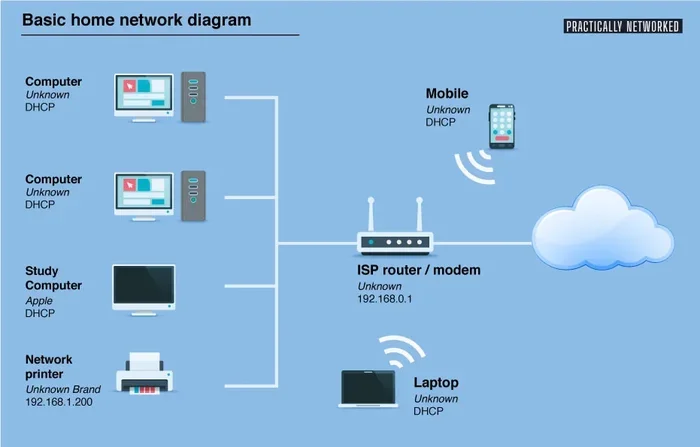
A modem is the device that connects your home to the outside world. It talks to your ISP and brings the internet signal into your house. Think of it as the bridge between the wide internet and your personal broadband service. Without a modem, no internet signal enters your home.
Different types of internet connections require different modems:
- Cable modems work with coaxial cables from your cable TV provider.
- DSL modems work with phone lines from DSL providers.
- Fiber ONTs work with fiber optic lines from fiber providers.
The modem does not create your WiFi network. It does not tell your devices where to go. It simply brings the raw internet signal into your home.
What Does a Router Do?
A router takes the internet signal from the modem and shares it with your devices. It creates the wireless network you connect to. It also manages traffic, assigns IP addresses, and keeps your devices secure. The Asus Zenwifi is a router — specifically, a high-performance mesh router that spreads the signal everywhere.
The router is what gives you WiFi. It is what lets your phone, laptop, smart TV, and smart home devices go online. But the router cannot do its job without the modem feeding it an internet signal first.
The Modem-Router Combo Explained
A modem-router combo, also called a gateway, does both jobs in one box. It brings the internet in and shares it wirelessly. These devices are convenient because they use less space and require fewer cables. However, they often come with limitations.
Most ISP-provided gateways are basic models. They may not support the latest WiFi standards, and they often lack advanced features like mesh capabilities. If you want top performance from your Asus Zenwifi, using a separate modem and router gives you much better results.
| Feature | Separate Modem + Router | Modem-Router Combo (Gateway) |
|---|---|---|
| Performance | Higher — each device handles one job | Lower — shared hardware limits speed |
| WiFi Coverage | Excellent with mesh systems like Zenwifi | Basic — limited range and features |
| Upgrade Flexibility | Replace one device without replacing the other | Replace both if one part fails |
| Setup Complexity | Slightly more cables | Simpler — fewer devices |
| Cost Over Time | Higher upfront, lower long-term | Lower upfront, rental fees add up |
Setting Up Your Asus Zenwifi With a Modem
Setting up the Asus Zenwifi with a modem is simpler than you might think. You do not need to be a tech expert. Follow these steps, and you will be online in no time.
Step-by-Step Setup Process
- Connect your modem to the ISP line. Plug the coaxial cable, phone line, or fiber cable into the modem. Power it on and wait for the lights to stabilize.
- Connect the modem to the Zenwifi. Use an Ethernet cable. Plug one end into the modem’s Ethernet port and the other end into the WAN port on the main Zenwifi unit.
- Power on the Zenwifi. Plug the main unit into a power outlet and wait for it to boot up. The LED lights will tell you when it is ready.
- Download the Asus WiFi app. Use your phone to scan the QR code on the Zenwifi unit or visit the setup page in your browser.
- Follow the on-screen instructions. The app will walk you through creating your network name, password, and settings. It will also guide you through adding any satellite nodes if your kit includes them.
- Test your connection. Once setup is complete, open a browser and visit a website. Run a speed test to confirm everything is working.
That is it. In about 15 to 20 minutes, your Asus Zenwifi mesh system should be up and running with a strong internet connection throughout your home.
Quick Tips for a Smooth Setup
- Place the main Zenwifi unit centrally in your home for the best WiFi coverage.
- Use a high-quality Ethernet cable — a Cat 6 or Cat 6a cable ensures you get the fastest speeds between the modem and the Zenwifi.
- Check your modem compatibility before buying. Not all modems work with every ISP. Look for a modem approved by your provider.
- Update the firmware on your Zenwifi right after setup. This ensures you have the latest features and security patches.
- Enable WPA3 security in the settings for the strongest encryption on your home network.
Getting the Fastest Speeds With Your Setup
Now that you have the right modem and the Asus Zenwifi set up, you want to make sure you are getting every bit of speed your internet plan promises. A great setup means nothing if something is holding it back.
Optimizing Your Network Settings
The Asus Zenwifi comes packed with settings that can boost your performance. Here are a few things to check:
- Enable QoS (Quality of Service): This feature prioritizes traffic for important devices like your gaming console or work laptop.
- Use the 5GHz band for speed: The 5GHz band offers faster speeds over shorter distances. The 2.4GHz band covers more distance but at slower speeds.
- Enable AiMesh: If you add more Zenwifi nodes, AiMesh lets them all work together seamlessly for expanded WiFi coverage.
- Adjust the channel width: Setting the channel width to 80MHz or 160MHz (if supported) can significantly boost your internet speed.
Common Mistakes to Avoid
Even with the best equipment, simple mistakes can slow down your network. Watch out for these:
- Using an old or incompatible modem: An outdated modem can bottleneck your speeds, no matter how good the Zenwifi is. Make sure your modem supports the speed tier of your internet plan.
- Placing the modem in a bad spot: Keep the modem in a central, open location. Avoid closets, cabinets, or corners where the signal gets blocked.
- Ignoring firmware updates: Both your modem and the Zenwifi benefit from regular updates that improve performance and fix bugs.
- Overloading the network: Too many devices on one band can slow things down. Use band steering to spread devices across both the 2.4GHz and 5GHz bands.
- Skipping the Ethernet backhaul: If you are using multiple Zenwifi nodes, connecting them with Ethernet cables (instead of wireless) gives you the fastest possible backhaul speeds.
Expert Insights on Modem and Mesh WiFi Setups
Networking experts agree that separating your modem and router gives you the best results. When you use a dedicated modem with the Asus Zenwifi, each device does what it does best. The modem handles the connection to the ISP, and the Zenwifi handles the wireless distribution. This division of labor reduces bottlenecks and improves overall performance.
Many experts also recommend buying your own modem instead of renting one from your ISP. Rental fees add up over time, and ISP-provided modems are often a generation or two behind. A good standalone modem can save you money in the long run and improve your internet speed at the same time.
When shopping for a modem, check the DOCSIS standard if you have cable internet. DOCSIS 3.1 is the current standard and supports gigabit speeds. For fiber internet, check with your ISP for the recommended ONT model. Matching your modem to your broadband service type ensures you get the most out of your Asus Zenwifi mesh system.
Key Takeaways
- The Asus Zenwifi is a router, not a modem: It creates your wireless network but cannot connect directly to your internet source without a modem.
- You need a modem if your ISP provides cable, DSL, or fiber service: Without a modem, the Zenwifi has no internet signal to share.
- A modem-router combo from your ISP may work, but it limits performance: For the best speeds and features, use a separate modem with the Zenwifi.
- Setup is straightforward: One Ethernet cable from the modem to the Zenwifi WAN port, and you are good to go.
- Matching your modem to your internet plan is critical: An underpowered modem will cap your speeds no matter how fast your plan is.
- Optimize your settings after setup: Enable QoS, use the 5GHz band, and keep firmware updated for the best performance.
- Avoid common placement and configuration mistakes: Central placement, quality cables, and proper band management make a big difference.
Conclusion
So, do I need a modem with Asus Zenwifi? Yes, in most cases you do. The Zenwifi is a fantastic mesh router, but it is not a modem. It needs a modem to bring the internet into your home before it can spread that signal everywhere. The good news is that setting up a modem with the Zenwifi is easy, and the result is a fast, reliable wireless network that covers every corner of your home.
Take the time to choose the right modem for your internet provider and internet plan. Avoid the temptation to use an old or ISP-provided gateway if you want the full speed and features the Asus Zenwifi has to offer. A proper setup with a compatible modem makes all the difference in the world.
Your home network is only as strong as its weakest link. Make sure every piece of the puzzle — the modem, the router, the cables, and the settings — is working together. When you get it right, you will enjoy blazing fast speeds, seamless coverage, and a network that just works. That is what the Asus Zenwifi is all about, and with the right modem in place, you will get the most out of every dollar you spent.
Frequently Asked Questions
Can I use the Asus Zenwifi without any modem at all?
No, you cannot. The Zenwifi needs a modem to receive an internet signal from your ISP. Without a modem, it can only create a local network for devices to talk to each other, but it will not connect to the internet. Always make sure you have a working modem before setting up the Zenwifi.
What modem works best with the Asus Zenwifi?
The best modem depends on your ISP and internet speed tier. For cable internet, look for a DOCSIS 3.1 modem approved by your provider. For fiber, check with your ISP for the recommended ONT. A compatible modem that matches your speed plan ensures the Zenwifi can deliver its full performance potential.
Do I need a modem if I already have a router from my ISP?
It depends. If your ISP router is a modem-router combo and it is working well, you can use it. But if you want better speeds and features, consider using the ISP router in bridge mode and pairing it with the Asus Zenwifi. This lets the Zenwifi handle all the WiFi duties while the ISP device simply passes through the internet signal.
Can I connect the Asus Zenwifi directly to a fiber wall plate?
Not directly. Fiber internet requires an ONT (optical network terminal) to convert the light signal into an electrical internet signal. The ONT acts as your modem. You then connect the ONT to the Zenwifi with an Ethernet cable. Check with your fiber ISP for the correct ONT model for your setup.
Will using a separate modem improve my WiFi speeds?
Yes, it can. ISP-provided gateways are often basic and limit your speeds. A separate, modern modem paired with the Asus Zenwifi removes that bottleneck. The Zenwifi can then focus on distributing the fastest possible signal wirelessly throughout your home. This is especially noticeable on fast internet plans above 300 Mbps.
How do I know if my modem is compatible with the Asus Zenwifi?
Check two things. First, make sure your modem works with your ISP. Second, ensure it has an Ethernet output port. The Zenwifi connects to the modem through a standard Ethernet cable. Any modem with a working Ethernet port and a compatible internet connection should work with the Asus Zenwifi mesh system.