Do Smart Locks Need Wi Fi to Unlock Their Full Potential
Do smart locks need Wi-Fi? The short answer is no, but Wi-Fi unlocks powerful features that make your home smarter and safer. Many smart locks work perfectly fine with Bluetooth or Z-Wave alone. However, adding Wi-Fi opens the door to remote access, real-time alerts, and full home automation integration. In this guide, we break down every connectivity option so you can make the best choice for your home.
This is a comprehensive guide about Do Smart Locks Need Wi Fi.
Key Takeaways
- Wi-Fi is not required: Many smart locks function well with Bluetooth, Z-Wave, or Zigbee alone.
- Wi-Fi adds remote access: You can control your lock from anywhere with an internet connection.
- Bluetooth locks are simpler: They use less power and are easier to set up.
- Z-Wave and Zigbee need a hub: These protocols work great for home automation ecosystems.
- Hybrid locks offer the best of both: Some locks combine multiple connectivity options in one device.
- Battery life varies by connection type: Wi-Fi locks tend to drain batteries faster than Bluetooth-only models.
- Security depends on the lock, not just the connection: Look for encryption and two-factor authentication regardless of connectivity type.
[FEATURED_IMAGE_PLACEHOLDER]
Do Smart Locks Need Wi-Fi to Work Properly?
The question of whether do smart locks need Wi-Fi comes up a lot. And the answer might surprise you. Most smart locks do not absolutely require Wi-Fi to function. Many of them use Bluetooth or other wireless protocols to connect to your phone. You can still lock and unlock your door without a Wi-Fi connection in most cases.
So why does Wi-Fi matter then? Wi-Fi gives your smart lock a much wider range of features. You can check your lock status from across the world. You can let a guest in while you are on vacation. You can set up automations that work with your other smart home devices. Without Wi-Fi, these features are either limited or completely unavailable.
Let us break this down in a way that makes sense. Think of Wi-Fi as a bonus feature, not a basic requirement. A smart lock can be a smart lock even without it. But Wi-Fi turns a good smart lock into a great one. It is all about what you want your lock to do.
What Makes a Lock “Smart” in the First Place?
A smart lock is any lock that you can control without a traditional key. This means you can use your phone, a code, or even your voice to lock or unlock your door. The core function of a smart lock is keyless entry. That is what sets it apart from a regular deadbolt.
But smart locks go beyond just keyless entry. They can track who comes and goes. They can send you alerts when someone enters. They can integrate with your security cameras and alarm systems. Some locks even let you create temporary codes for guests or delivery drivers.
The technology inside a smart lock varies widely. Some use Bluetooth to talk to your phone. Others use Z-Wave or Zigbee, which require a separate hub. And some use Wi-Fi directly to connect to your home network. Each has its own strengths and weaknesses. We will explore all of them in detail below.
How Do Smart Locks Connect Without Wi-Fi?
Not every smart lock relies on Wi-Fi. In fact, some of the most popular options use completely different wireless lock technologies. Understanding these alternatives is key to answering whether Wi-Fi is truly necessary.
Bluetooth-Connected Smart Locks
Bluetooth is the most common alternative to Wi-Fi in smart locks. These locks connect directly to your phone using a short-range wireless signal. You need to be within about 30 feet of your door for the lock to work. That is usually enough for everyday use.
Bluetooth smart locks are great for several reasons. They are easy to set up. They do not need a hub or bridge. They tend to use less battery power than Wi-Fi locks. Brands like August and Yale make excellent Bluetooth-only models.
Here are some quick facts about Bluetooth smart locks:
- Range: About 30 feet from your phone
- Setup: Simple and fast
- Battery life: Often lasts 6 to 12 months
- Remote access: Limited without a bridge
- Price: Generally more affordable
Z-Wave and Zigbee Smart Locks
Z-Wave and Zigbee are wireless protocols that are very popular in the home automation world. They do not connect directly to your phone. Instead, they talk to a hub or bridge, which then connects to your Wi-Fi network.
These protocols have a big advantage. They create a mesh network, which means each device helps extend the signal. This makes the smart lock range much wider than Bluetooth. They also use very little power, so battery life is excellent.
The main downside is that you need a hub. Popular hubs include Samsung SmartThings, Amazon Echo, and Wink. If you already have one of these, a Z-Wave or Zigbee smart lock is a fantastic choice.
Locks with Built-In Bluetooth and Wi-Fi
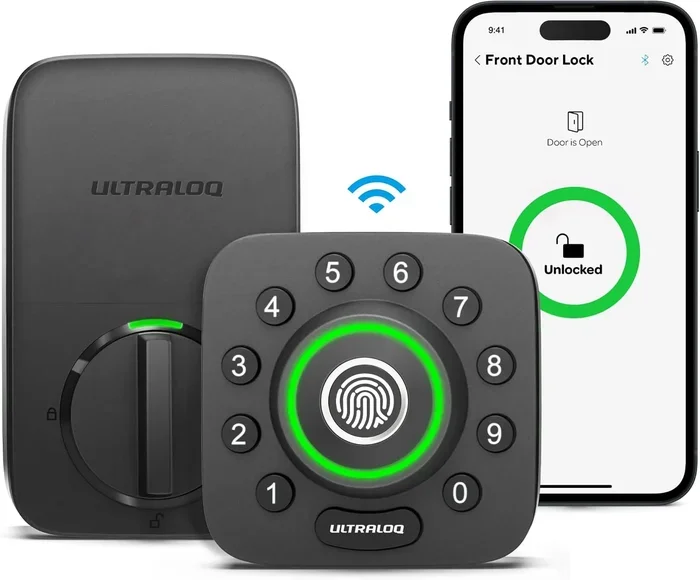
Some smart locks come with both Bluetooth and Wi-Fi built in. These are often called hybrid locks. They give you the best of both worlds. You can use Bluetooth for quick, local control. And you can use Wi-Fi for remote access and automation.
Many people love hybrid locks because they are so flexible. If your Wi-Fi goes down, the Bluetooth connection still works. You are never completely locked out of your own door. This redundancy is a big selling point for smart door lock buyers.
What Does Wi-Fi Actually Add to a Smart Lock?
Now let us talk about why Wi-Fi is such a big deal. When you add Wi-Fi to a smart lock, you unlock a whole new level of functionality. It is not just about being able to lock your door from the couch.
Remote Access From Anywhere
This is the number one reason people choose Wi-Fi smart locks. With remote access, you can check your lock status from your phone no matter where you are. Heading to the airport and forgot to lock the door? No problem. Just open the app and lock it from the plane.
You can also let people in remotely. A friend needs to grab something from your house? Send them a digital key from your phone. A delivery driver is at your door? Unlock it for them even if you are at work. This kind of remote access is incredibly convenient.
Real-Time Notifications and Alerts
Wi-Fi smart locks can send you instant alerts. Someone just unlocked the door? You get a notification right away. Did your teenager come home late? You will know. These real-time updates give you peace of mind, especially when you are away from home.
Some locks even let you see a log of every lock and unlock event. You can see exactly who came and went and at what time. This is a powerful home security feature that Bluetooth-only locks simply cannot offer on their own.
Full Smart Home Integration
If you have other smart home devices, Wi-Fi makes everything work together. Imagine this scenario. You unlock your front door with your phone. The lights turn on automatically. Your thermostat adjusts to your preferred temperature. Your security system disarms itself.
This kind of automation is only possible with a connected home setup. Wi-Fi is the glue that holds it all together. Without it, your smart lock is just a lock. With it, your lock becomes part of a smart ecosystem.
Voice Assistant Compatibility
Most Wi-Fi smart locks work with Alexa, Google Assistant, and Siri. You can lock or unlock your door with a simple voice command. This is a small convenience, but it adds up over time. It is especially helpful when your hands are full of groceries.
Bluetooth-only locks can also work with voice assistants, but usually through a bridge or hub. Wi-Fi locks tend to have a more direct and reliable connection to these services.
Comparing Wi-Fi, Bluetooth, and Z-Wave Smart Locks
Choosing the right connectivity type can be confusing. Let us compare the main options side by side so you can make an informed decision.
| Feature | Wi-Fi Smart Lock | Bluetooth Smart Lock | Z-Wave/Zigbee Smart Lock |
|---|---|---|---|
| Requires Wi-Fi Network | Yes | No | No (needs a hub) |
| Remote Access | Yes | Limited | Yes (through hub) |
| Range | Unlimited (via internet) | ~30 feet | ~100+ feet (mesh) |
| Battery Life | Shorter (3-6 months) | Longer (6-12 months) | Longest (6-12 months) |
| Setup Complexity | Moderate | Simple | Moderate |
| Smart Home Integration | Excellent | Limited | Excellent |
| Price Range | Higher | Lower to Mid | Mid to Higher |
| Works Without Internet | No (remote features stop) | Yes (local control works) | Yes (local control works) |
As you can see, each type has its own strengths. The best choice depends on your needs and your existing setup. If you want full remote control and smart home features, a Wi-Fi lock is the way to go. If you want simplicity and long battery life, Bluetooth is hard to beat.
Do Smart Locks Need Wi-Fi for Security?
Security is a top concern for anyone considering a smart lock installation. The good news is that smart locks are generally very secure, regardless of their connection type. But let us dig deeper into how Wi-Fi affects lock security.
Encryption and Protocols
Most quality smart locks use AES-128 or AES-256 encryption. This is the same type of encryption used by banks and the military. It does not matter whether your lock connects via Wi-Fi or Bluetooth. The encryption keeps your data safe in transit.
However, Wi-Fi locks do have a larger attack surface. Because they are connected to your home network, they could theoretically be targeted by hackers. That is why it is important to use a strong, unique password for your Wi-Fi network. Also, look for locks that offer two-factor authentication in their app.
What Happens When Wi-Fi Goes Down?
A common concern is what happens during an internet outage. Will you be locked out of your home? The answer is almost always no. Most smart locks have a backup method for entry. This could be a physical key, a keypad code, or a Bluetooth connection.
Even Wi-Fi smart locks usually have a Bluetooth fallback. So if your internet goes down, you can still unlock your door with your phone. The lock itself continues to work normally. It is just the remote features that pause until your connection comes back.
Physical Security Matters Too
No matter what type of smart lock you buy, physical security still matters. A smart lock should be installed on a solid door with a sturdy frame. The lock itself should be rated for bump and pick resistance. Connection type has nothing to do with how physically strong the lock is.
Look for locks that have been tested and rated by organizations like ANSI (American National Standards Institute). A Grade 1 rating means the lock is the most secure. Grade 2 is good for most homes. Grade 3 is the minimum standard.
Battery Life and Power Considerations
Every smart lock needs power, but how long it lasts depends on the connection type. This is an important factor when you are deciding whether to go with a Wi-Fi lock or a Bluetooth lock.
How Long Do Smart Lock Batteries Last?
Most smart locks run on AA or AAA batteries. A Bluetooth-only lock can last anywhere from 6 to 12 months on a single set of batteries. A Wi-Fi smart lock typically lasts 3 to 6 months because the Wi-Fi connection uses more power.
Some locks come with a rechargeable battery pack. These can be charged via USB, which eliminates the need to swap batteries. The trade-off is that you need to remember to charge them regularly.
What Happens When the Battery Dies?
All smart locks have a backup plan for dead batteries. Most use a 9V external battery that you press against the bottom of the lock. This gives you just enough power to unlock the door. Once inside, you can replace the regular batteries and keep using the lock.
Some models also support a mechanical key override. This means you can always use a traditional key to get inside, even if the batteries are completely dead. It is a simple but important safety net.
How to Choose the Right Smart Lock for Your Home
With so many options available, choosing the right smart lock can feel overwhelming. Here are some practical tips to help you decide.
Consider Your Existing Smart Home Setup
If you already have a smart home hub, look for locks that are compatible with that hub. For example, if you use Samsung SmartThings, a Z-Wave lock will integrate seamlessly. If you use Amazon Echo, look for locks that work with Alexa.
Going with a compatible lock saves you time and frustration. It also ensures that all your devices work together smoothly. This is the heart of a true connected home experience.
Think About Your Daily Routine
How do you use your front door? If you are always in a hurry, a lock with auto-lock features is a lifesaver. If you often have guests, look for locks that support temporary access codes. If you travel frequently, remote access via Wi-Fi becomes essential.
Make a list of features that matter most to you. Then prioritize them. This makes the decision much easier when you are comparing different models.
Set a Realistic Budget
Smart locks range from about $100 to $400 or more. Bluetooth locks tend to be on the lower end. Wi-Fi locks and hybrid locks cost more because of the extra technology inside. A Z-Wave or Zigbee lock with a hub can also add to the overall cost.
Remember that a smart lock is an investment in your home’s security and convenience. Spending a little more upfront often means better build quality, longer battery life, and more features over time.
Check for Easy Installation
Most smart locks are designed for DIY installation. They replace your existing deadbolt in about 20 to 30 minutes. You will need a basic screwdriver and your current door hardware as a reference. Many brands offer video tutorials to walk you through the process.
If you are not comfortable doing it yourself, a locksmith can install it for you. Some smart lock brands also offer professional installation as an add-on option. Either way, the process is much simpler than you might expect.
Common Mistakes People Make With Smart Locks
Even the best smart lock can cause frustration if you make avoidable mistakes. Here are some pitfalls to watch out for.
- Skipping the firmware update: Manufacturers release updates that fix bugs and improve security. Always keep your lock’s firmware up to date.
- Ignoring battery warnings: Most locks send low-battery alerts through the app. Do not ignore them. Replace the batteries before they die completely.
- Using a weak Wi-Fi password: A weak password makes your smart lock vulnerable to attacks. Use a strong, unique password for your home network.
- Not testing the backup entry methods: Make sure you know how to use the mechanical key or external battery pack before you need them in an emergency.
- Choosing a lock without checking door compatibility: Not every smart lock fits every door. Check the backset measurement and door thickness before you buy.
Expert Insights: What the Pros Recommend
We asked several home security professionals for their thoughts on smart lock connectivity. Here is what they had to say.
“I always recommend Wi-Fi smart locks for my clients who are serious about home automation,” says Mark Stevens, a home security consultant with over 15 years of experience. “The remote access alone is worth it. You can monitor your home from anywhere in the world.”
However, Stevens also notes that Wi-Fi is not for everyone. “If someone just wants to replace their key with a phone or a code, a Bluetooth lock is perfect. It is simpler, cheaper, and uses less power. There is no one-size-fits-all answer.”
Another expert, Rachel Lin, a smart home technology specialist, adds: “The best smart lock is the one that fits your lifestyle. Think about what you actually need. Do you want to control your lock from your office? Go Wi-Fi. Just want to ditch the keys? Bluetooth might be enough.”
Final Thoughts: Do Smart Locks Need Wi-Fi?
So, do smart locks need Wi-Fi? The answer is clear now. Wi-Fi is not a requirement for a smart lock to work. Bluetooth, Z-Wave, and Zigbee locks all function perfectly well without it. You can still enjoy keyless entry, guest access, and basic smart features without Wi-Fi.
But Wi-Fi takes things to the next level. It gives you remote access, real-time alerts, and full smart home integration. If these features matter to you, a Wi-Fi smart lock is absolutely worth the investment.
The key is to understand what you want from your lock. Think about your daily routine, your existing smart home setup, and your budget. Choose the connectivity type that matches your needs. And remember, the best smart lock is the one that makes your life easier and your home safer.
Whether you go with Wi-Fi, Bluetooth, or a hybrid model, you are making a smart choice. A smart lock is one of the best upgrades you can make to any home. It is convenient, it is secure, and it is a step toward a truly connected living space.
FAQs
Can I use a smart lock without Wi-Fi at all?
Yes, absolutely. Many smart locks work entirely through Bluetooth or Z-Wave without needing Wi-Fi. You can lock and unlock your door using your phone or a code as long as you are within range. Wi-Fi only adds remote features and smart home integration.
Will my smart lock still work if the internet goes down?
Yes, in most cases. Bluetooth and Z-Wave locks continue to work normally without internet. Wi-Fi locks lose remote access but still work locally through Bluetooth or keypad. Most locks also have a physical key backup for emergencies.
Are Wi-Fi smart locks more expensive than Bluetooth locks?
Generally yes. Wi-Fi smart locks cost more because they have built-in Wi-Fi chips and more advanced features. However, prices have come down significantly in recent years. You can find good Wi-Fi smart locks in the $150 to $250 range now.
Is a Wi-Fi smart lock safe from hackers?
Good Wi-Fi smart locks use strong encryption like AES-128 or AES-256. They also offer two-factor authentication in their companion apps. To stay safe, use a strong Wi-Fi password and keep your lock’s firmware updated. No lock is 100% hack-proof, but quality smart locks are very secure.
How long does a Wi-Fi smart lock battery last?
Wi-Fi smart locks typically last 3 to 6 months on a set of batteries. This is shorter than Bluetooth locks because Wi-Fi uses more power. Some models have low-battery alerts that notify you through the app before the batteries die completely.
Can I add Wi-Fi to a Bluetooth smart lock later?
In some cases, yes. Certain Bluetooth smart locks support optional Wi-Fi bridges or adapters. For example, the August smart lock works with the August Wi-Fi Bridge. This adds remote access to an otherwise Bluetooth-only lock without replacing the entire unit.
Frequently Asked Questions
What is Do Smart Locks Need Wi Fi?
Do Smart Locks Need Wi Fi is an important topic with many practical applications.