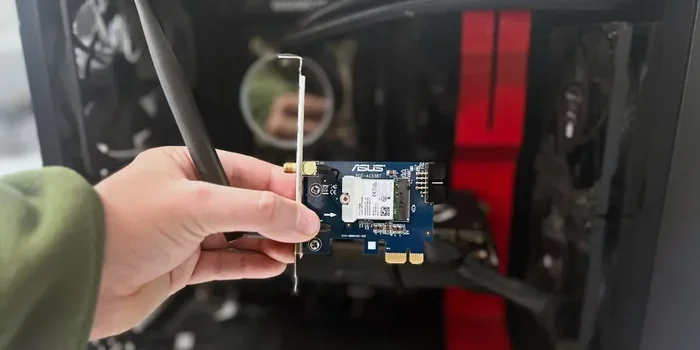
Do You Need A PCI WiFi Card To Improve Your Internet
A PCI WiFi card can seriously upgrade your wireless internet, but you might not always need one. Whether your desktop lacks Wi-Fi or you want faster speeds, an internal wireless card beats a basic USB adapter. This guide breaks down when a PCI WiFi card makes sense, how to choose the right one, and what alternatives exist.
A strong wireless connection is essential in every home today. Whether you are streaming movies, working from home, or gaming online, your internet setup matters a lot. Many desktop users find themselves stuck with slow or no Wi-Fi at all. That is where a PCI WiFi card comes into the picture. But do you really need one?
The short answer is: it depends on your current setup and what you need. A PCI WiFi card can transform a desktop computer into a powerful wireless machine. It offers better speeds, stronger signals, and more reliability than most USB alternatives. However, not everyone needs one. This guide will help you figure out if a PCI WiFi card is the right move for you.
We will cover everything from how these cards work to when you should consider an upgrade. You will also learn about alternatives and how to pick the best card for your needs. Let us dive in.
Key Takeaways
- A PCI WiFi card delivers faster and more stable wireless connections compared to USB adapters, especially for desktops.
- You likely need a PCI WiFi card if your motherboard lacks built-in Wi-Fi or your current wireless setup is too slow.
- Wi-Fi 6 and Wi-Fi 6E PCI cards offer the best future-proof performance for modern internet plans and routers.
- Installation is straightforward for most desktop PCs, but laptops usually need USB alternatives instead.
- Consider USB WiFi adapters or mesh systems as alternatives if you are not ready for an internal card upgrade.
- Driver compatibility and motherboard slot availability are key factors before purchasing a PCI WiFi card.
📑 Table of Contents
- What Is a PCI WiFi Card?
- Signs You Need a PCI WiFi Card
- How to Choose the Right PCI WiFi Card
- Installing a PCI WiFi Card
- PCI WiFi Card vs USB WiFi Adapter
- Alternatives to a PCI WiFi Card
- Common Mistakes When Buying a PCI WiFi Card
- Expert Insights: When a PCI WiFi Card Is Worth It
- Do You Need a PCI WiFi Card? Final Verdict
What Is a PCI WiFi Card?
A PCI WiFi card is a small expansion card that you install inside your desktop computer. It plugs directly into a PCI or PCIe slot on your motherboard. This gives your PC access to wireless networks without needing an external device.
Unlike a USB WiFi dongle, an internal card connects directly to your system board. This means a more stable connection and better performance overall. Most PCI WiFi cards also support the latest wireless standards, including Wi-Fi 6 and Wi-Fi 6E.
How Does a PCI WiFi Card Work?
When you install a PCI WiFi card, it takes over the wireless duties from your computer. The card communicates with your router using radio frequencies, just like any other wireless device. It sends and receives data, giving you access to the internet without wires.
The card handles all the heavy lifting for wireless signal processing. Because it sits inside the PC case, it avoids the interference that USB adapters sometimes face. This leads to a cleaner, more reliable wireless connection every time.
PCI vs PCIe WiFi Cards
You might hear two terms: PCI and PCIe. They are not the same thing. PCI is an older standard that transfers data more slowly. PCIe (Peripheral Component Interconnect Express) is newer and much faster.
Most modern PCI WiFi cards use the PCIe interface. This gives you better speeds and lower latency. When shopping, always look for PCIe compatibility. Check your motherboard to see which slots are available before buying.
Signs You Need a PCI WiFi Card
Not sure if a PCI WiFi card is right for you? Here are some clear signs that you might need one.
Your Desktop Has No Built-in Wi-Fi
Many desktop motherboards still do not include Wi-Fi connectivity out of the box. If your PC has no wireless option at all, a PCI WiFi card is one of the best solutions. You can check your motherboard specs or look at the back of your PC for antenna ports.
Instead of relying on a USB adapter, an internal card gives you a cleaner setup. It also frees up your USB ports for other devices.
Your Current Wi-Fi Is Too Slow
If your internet speeds feel sluggish, your wireless hardware might be the bottleneck. Older wireless cards or USB adapters often cannot keep up with modern internet plans. A new PCI WiFi card with Wi-Fi 6 support can dramatically improve your internet speed.
Think about it this way. Your internet plan might offer 300 Mbps, but your old card can only handle 50 Mbps. A PCI WiFi card lets you actually get the speeds you are paying for.
You Need Better Wireless Range
Do you struggle with weak signals in certain rooms? A PCI WiFi card with a high-gain antenna can extend your wireless coverage significantly. The internal placement also reduces signal loss compared to USB adapters that sit on the back of your desk.
If you have been considering ways to extend my Wi-Fi to 200 feet away, a better wireless card is a great starting point. It strengthens the signal at the source before it even reaches your router.
You Want to Future-Proof Your Setup
Technology moves fast. A Wi-Fi 6 or Wi-Fi 6E PCI card ensures your desktop stays compatible with the latest routers and networks. These cards support faster speeds, more simultaneous connections, and lower latency.
If you plan to keep your desktop for several years, investing in a PCI WiFi card now saves you money later. You will not need to replace it every couple of years.
How to Choose the Right PCI WiFi Card
Not all PCI WiFi cards are the same. Here is what you should look for before making a purchase.
Check Your Wireless Standard
Wireless standards have evolved over the years. The most common ones you will see are:
- Wi-Fi 5 (802.11ac): Good for most homes. Speeds up to 3.5 Gbps.
- Wi-Fi 6 (802.11ax): Faster and more efficient. Great for busy networks.
- Wi-Fi 6E: Adds the 6 GHz band. The newest and fastest option.
For most users, a Wi-Fi 6 PCI card offers the best balance of speed and value. If your router supports Wi-Fi 6, make sure your card does too.
Consider Your Motherboard Slots
Before buying a card, check what slots your motherboard has. Most modern desktops have at least one PCIe x1 slot. Some cards need a PCIe x4 slot, so always verify the requirements.
If you are unsure, check your motherboard manual or look up the model online. A quick search for your motherboard model will show all available expansion slots.
Antenna Quality Matters
The antenna on your PCI WiFi card plays a big role in signal strength. Cards with external antennas usually perform better than those with internal ones. If you need strong wireless signal across a large home, go for a card with two or more detachable antennas.
Driver and Software Support
A good PCI WiFi card should come with easy-to-install drivers. Check the manufacturer’s website for driver support for your operating system. Some cards work plug-and-play on Windows 10 and 11, while others need manual driver installation.
Installing a PCI WiFi Card
Installing a PCI WiFi card is easier than most people think. You do not need to be a tech expert. Here is a simple step-by-step guide.
Step 1: Turn Off Your PC and Unplug It
Safety first. Shut down your computer completely and unplug the power cable. Press the power button a few times to discharge any remaining electricity.
Step 2: Open Your PC Case
Remove the side panel of your desktop case. Most cases have screws or thumb screws that hold the panel in place. Set them aside safely.
Step 3: Find an Available PCIe Slot
Look for an open PCIe x1 slot on your motherboard. These are the smaller slots, usually located near the bottom of the board. Remove the corresponding metal bracket from the back of the case.
Step 4: Install the Card
Hold the PCI WiFi card by its edges. Align the gold connectors with the PCIe slot. Press it in firmly until it clicks into place. Use a screw to secure the card bracket to the case.
Step 5: Close the Case and Power On
Put the side panel back on. Plug in your power cable and turn on the PC. Windows should recognize the new card automatically.
Step 6: Install Drivers
If Windows does not install the drivers on its own, visit the card manufacturer’s website. Download the latest driver for your model and install it. Restart your PC if prompted.
Quick Tips for Installation
- Always ground yourself before touching internal components to avoid static damage.
- Keep your motherboard manual handy for slot identification.
- If the card does not work, try a different PCIe slot.
PCI WiFi Card vs USB WiFi Adapter
People often compare internal PCI WiFi cards with USB WiFi adapters. Both have pros and cons. Here is a quick comparison.
| Feature | PCI WiFi Card | USB WiFi Adapter |
|---|---|---|
| Performance | Better speeds and lower latency | Good but slightly slower |
| Installation | Requires opening the PC case | Plug and play |
| Signal Quality | Stronger, less interference | More prone to interference |
| Portability | Fixed inside the PC | Easy to move between devices |
| Price | Slightly more expensive | More budget-friendly |
| Best For | Desktop PCs, heavy users | Laptops, casual users |
For most desktop users, a PCI WiFi card is the better choice. It offers superior performance and a cleaner setup. USB adapters work well for laptops or temporary solutions. If you want to learn more about USB alternatives, check out whether you can get an extension on your Wi-Fi to boost range without opening your PC.
Alternatives to a PCI WiFi Card
A PCI WiFi card is not the only way to get wireless internet on your desktop. Here are some alternatives worth considering.
USB WiFi Adapter
A USB adapter is the simplest option. You plug it into any available USB port, and you are connected. These adapters are affordable and easy to use. However, they usually offer lower speeds than internal cards.
Mesh Wi-Fi System
If your main issue is weak coverage, a mesh system might be the answer. Mesh routers use multiple units to spread wireless signal throughout your home. They are easy to set up and manage through a phone app.
You might also want to explore whether you can connect a mesh router to an existing router to extend coverage without replacing your current equipment.
Powerline Adapter with Wi-Fi
Powerline adapters use your home’s electrical wiring to carry internet signals. Some models include built-in Wi-Fi access points. This is a great option if running Ethernet cables is not practical.
Upgrade Your Router
Sometimes the problem is not your PC at all. An older router might be holding back your internet speed. Upgrading to a Wi-Fi 6 router can improve performance for every device on your network.
Common Mistakes When Buying a PCI WiFi Card
Avoid these common pitfalls when shopping for a PCI WiFi card.
Buying the Wrong Standard
Do not buy a Wi-Fi 5 card if your router supports Wi-Fi 6. You will leave performance on the table. Always match your card to your router’s standard for the best results.
Ignoring Slot Compatibility
Not every PC has the same slots. A card that needs PCIe x4 will not work in an x1 slot. Always double-check before purchasing.
Skipping Driver Updates
Even after installation, keep your drivers updated. Manufacturers release updates that improve performance and fix bugs. Visit the manufacturer’s website periodically to check for the latest versions.
Overlooking Antenna Options
Internal antennas are fine for basic use. But if you need strong range, cards with external antennas are worth the extra cost. Do not settle for weak signal when a better option exists.
Expert Insights: When a PCI WiFi Card Is Worth It
We asked networking experts when a PCI WiFi card makes the most sense. Here is what they had to say.
“If you are running a desktop that relies on a USB adapter, you are missing out on real performance,” says tech reviewer Mark Stevens. “A PCI WiFi card gives you a direct connection to the motherboard, which means faster data transfer and fewer dropped connections.”
“For gamers and remote workers, the upgrade is almost mandatory,” adds network specialist Lisa Chen. “Stable, low-latency connections are non-negotiable for these use cases. A quality PCI WiFi card delivers exactly that.”
The consensus is clear. If you use your desktop for anything beyond basic browsing, a PCI WiFi card is a smart investment.
Do You Need a PCI WiFi Card? Final Verdict
So, do you need a PCI WiFi card to improve your internet? The answer depends on your situation.
If your desktop has no built-in Wi-Fi, a PCI WiFi card is one of the best upgrades you can make. It gives you faster speeds, better range, and a more reliable connection than any USB adapter. If you are a gamer, a remote worker, or a heavy streamer, the benefits are even more noticeable.
On the other hand, if your current setup works fine and you only browse the web occasionally, you might not need to upgrade. A simple USB adapter could be enough for light use.
The bottom line is this: a PCI WiFi card is a worthwhile investment for most desktop users. It improves your network performance, boosts internet speed, and gives you peace of mind that your connection will keep up with modern demands.
Before you buy, make sure your motherboard has an available slot and that you choose a card matching your router’s wireless standard. With the right card, you will notice the difference immediately.
If you are still unsure about your setup, you might want to check whether you can add Wi-Fi to a non-Wi-Fi motherboard for more guidance on getting wireless capability on your desktop.
Frequently Asked Questions
Can I install a PCI WiFi card in any desktop?
Most desktops have at least one PCIe slot available for expansion. However, you should check your motherboard manual to confirm compatibility. Some small form factor PCs may have limited or no expansion slots available.
Is a PCI WiFi card better than a USB WiFi adapter?
Yes, in most cases. A PCI WiFi card offers better speeds, lower latency, and stronger signal quality because it connects directly to the motherboard. USB adapters are convenient but tend to have more interference and lower performance.
Do I need special software for a PCI WiFi card?
Most modern PCI WiFi cards work with Windows 10 and 11 without extra software. However, you may need to download drivers from the manufacturer’s website for the best performance and full feature support.
Can a PCI WiFi card improve my internet speed?
A PCI WiFi card can help you reach the speeds your internet plan provides. It will not increase your plan’s speed beyond what your ISP offers, but it removes hardware bottlenecks that slow you down.
Does a PCI WiFi card support Bluetooth?
Many modern PCI WiFi cards come with built-in Bluetooth support. This is convenient if you want to connect wireless peripherals without a separate Bluetooth adapter. Check the card’s specifications before buying.
How much does a good PCI WiFi card cost?
Prices range from about $20 for basic models to $80 or more for high-end Wi-Fi 6E cards. A mid-range Wi-Fi 6 card typically costs between $30 and $50, offering excellent value for most users.
=== CONCLUSION ===
A PCI WiFi card is one of the most effective ways to improve your desktop’s wireless performance. It delivers faster speeds, better range, and a more stable connection than USB alternatives. Whether you are upgrading an older PC or building a new one, the right internal wireless card makes a real difference.
Consider your current setup, your motherboard slots, and your wireless needs before making a purchase. With the right PCI WiFi card, you will enjoy a faster, more reliable internet experience every single day. Do not let slow or missing Wi-Fi hold you back any longer.