Can 4070 Laptop Run 2K Games and Why You Should Care
A 4070 laptop can absolutely run 2K games, and it does so with impressive performance. The NVIDIA GeForce RTX 4070 mobile GPU delivers strong frame rates at 1440p, especially when paired with smart settings and DLSS technology. If you want a portable machine that handles modern titles at high quality, this GPU is a solid pick.
Can a 4070 laptop run 2K games? The short answer is yes, and it does a fantastic job at it. The NVIDIA GeForce RTX 4070 mobile GPU has become one of the most popular choices for gamers who want portable power. Whether you are playing AAA titles or competitive shooters, this graphics card handles 1440p resolution with ease. In this guide, we will break down exactly what you can expect from a 4070 laptop when gaming at 2K.
Many gamers wonder if a laptop GPU can match desktop performance. The honest truth is that mobile versions of the RTX 4070 are slightly less powerful than their desktop counterparts. However, the gap has narrowed significantly with each new generation. Modern 4070 laptops still deliver excellent frame rates at 2K, especially when you use the right settings and features. Let us dive into the details and see why this GPU deserves your attention.
Key Takeaways
- Solid 2K Performance: The RTX 4070 laptop handles 1440p gaming very well in most modern titles.
- DLSS Makes a Big Difference: Using DLSS 3 can boost frame rates significantly without losing visual quality.
- Thermals Matter: Laptop cooling design affects how long the 4070 can sustain peak performance.
- Battery Life Drops During Gaming: Expect shorter battery life when playing 2K games on battery power.
- Great Value for Portable Gaming: The 4070 offers a strong balance between power and portability.
- Ray Tracing Is Playable: With DLSS enabled, ray tracing at 2K is possible in many games.
- Check Your Specific Model: Not all 4070 laptops are equal — TGP and cooling vary by manufacturer.
📑 Table of Contents
- Understanding the RTX 4070 Laptop GPU
- Can a 4070 Laptop Actually Run 2K Games?
- Laptop Cooling and Its Impact on Performance
- 4070 Laptop vs. Desktop RTX 4070 for 2K Gaming
- Best 4070 Laptops for 2K Gaming
- Battery Life and Power Considerations
- Common Mistakes to Avoid with a 4070 Laptop
- Expert Insights: Is a 4070 Laptop Worth It for 2K?
- Final Thoughts on 4070 Laptop 2K Gaming
Understanding the RTX 4070 Laptop GPU
The RTX 4070 mobile is built on NVIDIA’s Ada Lovelace architecture. It comes with 2048 CUDA cores and 8GB of GDDR6 VRAM. These specs are more than enough for 2K gaming in most scenarios. The mobile version has a lower total graphics power, or TGP, compared to the desktop model. This means it uses less energy and generates less heat, which is essential for a laptop form factor.
What Makes the 4070 Special for 2K Gaming
Several features make the RTX 4070 a great choice for 1440p gaming. First, the DLSS 3 technology uses AI to generate extra frames. This means you can run games at lower resolutions and upscale them to 2K. The result is smooth gameplay without sacrificing image quality. Second, the RT cores handle ray tracing efficiently. You can enjoy realistic lighting and reflections in supported games without a massive frame rate drop.
Third, the 8GB VRAM is a sweet spot for 2K gaming. Most modern games use between 6GB and 10GB of VRAM at 1440p. The 4070 has enough memory to handle high texture settings comfortably. This gives you more room to crank up visual details without worrying about stuttering or frame drops.
Can a 4070 Laptop Actually Run 2K Games?
The real question most gamers ask is whether a 4070 laptop can deliver smooth gameplay at 2K. The answer depends on the game, your settings, and the specific laptop model. In general, yes, the RTX 4070 mobile handles 2K very well. But let us look at some real-world examples to give you a clearer picture.
Performance in Popular Games
Here is a look at how a 4070 laptop performs at 2K in several popular titles. These numbers assume high or ultra settings with DLSS enabled:
- Cyberpunk 2077: Around 60-75 FPS at 2K with ultra settings and DLSS on.
- Red Dead Redemption 2: 70-85 FPS at 2K with high settings.
- Elden Ring: 80-100 FPS at 2K with high settings.
- Call of Duty: Warzone 2: 90-110 FPS at 2K with competitive settings.
- Alan Wake 2: 55-70 FPS at 2K with high settings and DLSS on.
- Hogwarts Legacy: 65-80 FPS at 2K with high settings.
These numbers show that the RTX 4070 laptop delivers a very smooth 2K experience in most games. For competitive titles, you can push settings even higher and hit well over 100 FPS. For demanding AAA games, medium to high settings with DLSS give you a great balance of quality and performance.
The Role of DLSS in 2K Gaming
DLSS is a game-changer for laptop gaming. It uses AI to render the game at a lower resolution and then upscales it to 2K. This technique frees up GPU resources, resulting in higher frame rates. The image quality remains sharp and close to native 2K. With DLSS 3 frame generation, the improvements are even more dramatic.
Without DLSS, you might see a 20-30% drop in frame rates at 2K. With DLSS enabled, you can often match or exceed native performance. This is especially helpful in laptop form factors where thermal limits can throttle GPU performance. DLSS helps you stay within a comfortable frame rate without pushing the hardware too hard.
Laptop Cooling and Its Impact on Performance
One factor that often gets overlooked is laptop cooling. A 4070 laptop generates a fair amount of heat during intense gaming sessions. If the cooling system is not effective, the GPU will throttle its performance to prevent overheating. This can lead to lower frame rates and a less enjoyable gaming experience.
How to Keep Your 4070 Laptop Cool
Good cooling starts with the laptop design itself. Look for models with dual fans, large heat pipes, and vapor chamber cooling. These features help dissipate heat more effectively. Brands like ASUS, Lenovo, MSI, and Alienware are known for their robust cooling solutions in gaming laptops.
Beyond the hardware, there are simple steps you can take. Use a laptop cooling pad to improve airflow. Elevate the back of the laptop with a stand. Keep the vents clear of dust and debris. These small changes can make a big difference in sustained performance.
Another tip is to monitor your GPU temperatures while gaming. Software like MSI Afterburner or HWiNFO can show real-time stats. If your temperatures exceed 90°C regularly, consider adjusting your fan curves or reducing the TGP slightly. Keeping the GPU cool ensures it runs at full speed for longer sessions.
4070 Laptop vs. Desktop RTX 4070 for 2K Gaming
It is natural to compare the mobile RTX 4070 with the desktop version. Both are great for 2K gaming, but they have some key differences. The desktop RTX 4070 has a higher TGP of 200W compared to the laptop version, which ranges from 80W to 150W. This means the desktop card has more raw power available at all times.
Performance Comparison
In most games, the desktop RTX 4070 outperforms the laptop version by about 15-25%. This gap is noticeable in demanding titles like Cyberpunk 2077 or Alan Wake 2. However, the difference is much smaller when DLSS is enabled. With DLSS on both systems, the gap narrows to around 10-15%.
For most gamers, the laptop version is more than enough. The convenience of portability often outweighs the slight performance loss. You get to enjoy 2K gaming on the go, whether you are at a friend’s house or traveling. The desktop 4070 is better if you want maximum frame rates and do not need portability.
| Feature | RTX 4070 Laptop | RTX 4070 Desktop |
|---|---|---|
| CUDA Cores | 2048 | 5888 |
| VRAM | 8GB GDDR6 | 12GB GDDR6X |
| TGP | 80W – 150W | 200W |
| 2K Avg FPS (High + DLSS) | 70-90 | 90-110 |
| Portability | Excellent | None |
| Ray Tracing Performance | Good | Very Good |
| Price Range | $1,200 – $2,000 | $550 – $650 |
Best 4070 Laptops for 2K Gaming
If you are shopping for a 4070 laptop, not all models are created equal. The TGP, cooling design, and display quality all affect your gaming experience. Here are some tips for choosing the right one.
What to Look For
- TGP Rating: Aim for a model with a TGP of at least 140W. Higher TGP means better sustained performance.
- Display Refresh Rate: A 165Hz or 240Hz display lets you take full advantage of high frame rates at 2K.
- Cooling Design: Look for dual-fan systems with multiple heat pipes and vapor chambers.
- RAM and Storage: 16GB of RAM is the minimum for 2K gaming. 32GB is ideal. An NVMe SSD ensures fast load times.
- Build Quality: A sturdy chassis helps with both durability and thermal management.
Top Picks for 2024
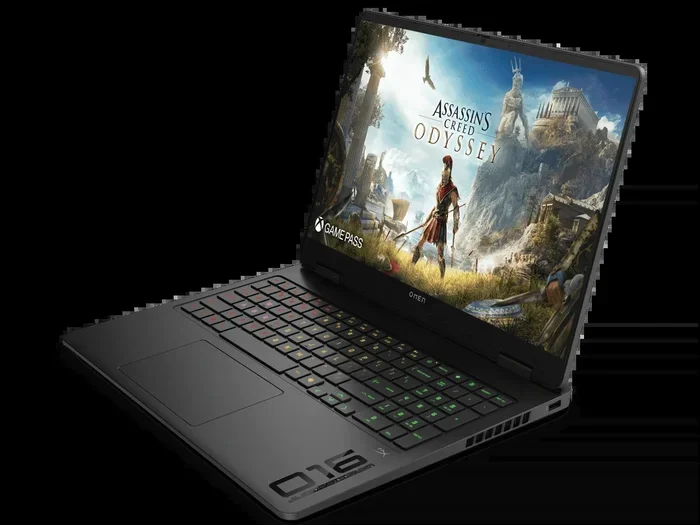
Several laptops stand out in the 4070 category. The ASUS ROG Zephyrus G14 offers excellent portability with strong performance. The Lenovo Legion Pro 7i is a powerhouse with superb cooling. The MSI Raider GE78 HX provides a high TGP and a great display. Each of these models handles 2K gaming beautifully with the RTX 4070.
Battery Life and Power Considerations
Gaming on battery power is possible but not ideal. A 4070 laptop consumes significant energy when running 2K games. Expect battery life to drop to 1-2 hours during intense gaming sessions. For the best experience, plug in your laptop while playing.
Some laptops offer a power-saving mode that limits GPU performance to extend battery life. This is useful for less demanding games or casual play. But for 2K gaming at high settings, always use the power adapter. Your frame rates and visual quality will thank you.
Another consideration is the power brick. High-performance 4070 laptops often come with large chargers. Make sure you have a reliable power source when gaming away from home. Some models support USB-C charging, which adds flexibility for travel.
Common Mistakes to Avoid with a 4070 Laptop
Even with a powerful GPU like the RTX 4070, some mistakes can hurt your gaming experience. Here are a few to watch out for.
- Ignoring Driver Updates: NVIDIA regularly releases Game Ready drivers that optimize performance for new games. Always keep your drivers up to date.
- Running Without DLSS: Leaving DLSS off means you are leaving performance on the table. Enable it for a noticeable boost.
- Overlooking Thermal Paste: Over time, thermal paste can dry out. Replacing it can lower temperatures and improve performance.
- Setting Power to Maximum in All Scenarios: Running the GPU at full power all the time can lead to excessive heat and fan noise. Use balanced profiles when not gaming.
- Not Checking Game-Specific Optimizations: Some games are better optimized for laptop GPUs than others. Research before you buy a new title.
Expert Insights: Is a 4070 Laptop Worth It for 2K?
From a professional standpoint, the RTX 4070 laptop is one of the best choices for 2K gaming on the go. It offers a great balance of performance, portability, and price. You do not need to spend as much as you would on a desktop setup, and you get the freedom to game anywhere.
The 8GB VRAM is sufficient for 2K in most titles, but very demanding games may push it. Ray tracing performance is solid when paired with DLSS. The mobile chip also benefits from NVIDIA’s ongoing software optimizations, which means your investment stays relevant longer.
If you are a student, a remote worker, or someone who needs a versatile machine, the 4070 laptop checks all the boxes. It handles gaming, content creation, and everyday tasks with ease. The 2K gaming experience is smooth, colorful, and immersive on these machines.
Final Thoughts on 4070 Laptop 2K Gaming
So, can a 4070 laptop run 2K games? Absolutely. The RTX 4070 mobile GPU delivers strong performance at 1440p across a wide range of titles. With DLSS, ray tracing, and high-quality settings, you get a visual experience that is hard to beat on a portable device. The key is to choose a well-designed laptop with good cooling and a high refresh rate display.
Keep your drivers updated, use DLSS, and manage your thermals, and your 4070 laptop will serve you well for years. Whether you are a casual gamer or a competitive player, this GPU handles 2K with confidence. Invest in a solid model, take care of it, and you will enjoy a fantastic gaming experience wherever you go.
The portable gaming revolution is here, and the RTX 4070 laptop is leading the charge. Do not let anyone tell you that you need a desktop to enjoy great 2K gaming. A 4070 laptop proves that powerful, portable, and practical can all go hand in hand.
Frequently Asked Questions
Is the RTX 4070 laptop good for 2K gaming?
Yes, the RTX 4070 laptop is excellent for 2K gaming. It delivers smooth frame rates in most modern titles at 1440p, especially when you use DLSS and high-quality settings. It is one of the best laptop GPUs available for portable 2K gaming.
How much FPS can I expect from a 4070 laptop at 2K?
You can expect 60 to 100+ FPS at 2K depending on the game and settings. Competitive titles like Call of Duty can push past 100 FPS easily. Demanding AAA games like Cyberpunk 2077 will run around 60-75 FPS on high settings with DLSS enabled.
Does a 4070 laptop support ray tracing at 2K?
Yes, the RTX 4070 laptop supports ray tracing at 2K. With DLSS enabled, you can enjoy ray tracing in most games without a severe frame rate drop. The RT cores on the 4070 handle lighting and reflections efficiently.
How long does a 4070 laptop battery last while gaming at 2K?
Battery life drops significantly during 2K gaming. Expect around 1 to 2 hours of gameplay on battery power. For the best experience, always plug in your laptop while gaming at 2K. The GPU draws too much power to sustain long sessions on battery alone.
What TGP should I look for in a 4070 laptop?
Aim for a TGP of at least 140W for the best 2K performance. Higher TGP means the GPU can sustain higher clock speeds for longer. Some models offer 150W or more, which gives you a noticeable boost over lower-TGP configurations.
Can I upgrade the GPU in a 4070 laptop?
No, laptop GPUs are soldered onto the motherboard and cannot be upgraded. This is why it is important to choose the right GPU when buying a gaming laptop. The RTX 4070 will serve you well for several years of 2K gaming.
=== CONCLUSION ===
The RTX 4070 laptop is a powerhouse for 2K gaming. It handles modern titles with ease, delivers smooth frame rates, and offers features like DLSS and ray tracing that enhance your visual experience. Whether you are a casual gamer or a dedicated enthusiast, this GPU meets the demands of 1440p gaming on a portable device.
Remember to pick a laptop with strong cooling, a high refresh rate display, and a high TGP rating. Keep your drivers updated, use DLSS, and manage your settings wisely. With these tips, your 4070 laptop will give you a fantastic 2K gaming experience for years to come. The portable power of the RTX 4070 proves that you do not need a bulky desktop setup to enjoy top-tier gaming performance.