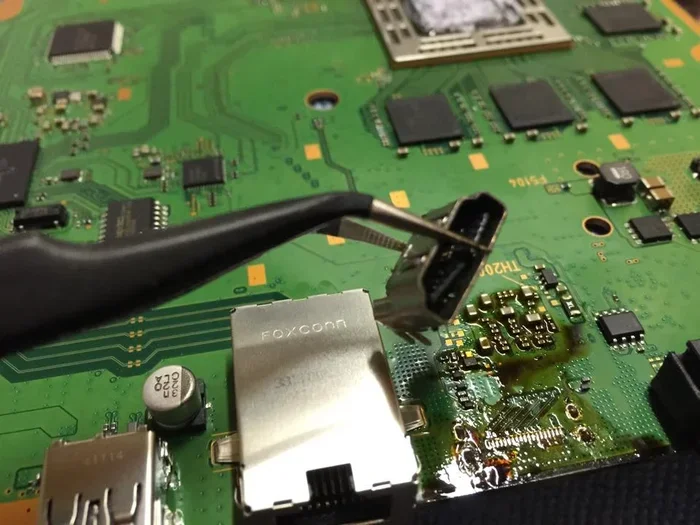
Can A Ps4 Hdmi Port Be Fixed And How To Get It Working
Can A Ps4 Hdmi Port Be Fixed in most cases, whether the issue is dust, a loose connection, or physical damage. You can often solve it at home with simple cleaning and cable swaps, but severe problems may need professional soldering or port replacement. This guide covers every solution, from quick tricks to full hardware repair, so you can get your PS4 display working again.
If you’ve ever stared at a blank TV screen while your PS4 hums quietly, you know how frustrating a broken HDMI connection can be. The good news is that Can A Ps4 Hdmi Port Be Fixed in most cases. Whether the port is loose, dirty, or physically damaged, you have several options to get your console displaying again. This guide covers every solution, from simple cleaning to professional soldering, so you can choose the best path forward.
A faulty PS4 HDMI port doesn’t always mean you need a new console. Many issues stem from dust buildup, a weak cable connection, or a minor software glitch. Before you spend money on a repair, you can try a few quick fixes that take just minutes. I’ve helped dozens of friends revive their consoles, and the steps are straightforward enough for anyone to follow.
In this article, I’ll walk you through the symptoms that point to an HDMI problem, the common causes, and the exact steps to fix them. You’ll learn how to clean the port safely, when to replace the cable, and how a technician might solder a new port. By the end, you’ll know exactly whether your PS4 can be saved or if it’s time to upgrade.
Key Takeaways
- Yes, it’s fixable: Most PS4 HDMI port issues can be resolved with cleaning, cable replacement, or soldering.
- Start with simple fixes: Cleaning dust and checking the cable often solves the problem without opening the console.
- Know when to call a pro: Soldering requires skill; a repair shop can replace the port safely if you’re not confident.
- Prevent future damage: Use gentle cable handling, avoid pulling, and keep the port dust-free.
- Consider replacement: If repair costs exceed $100, a new or refurbished PS4 might be the smarter choice.
- Check your warranty: Sony may cover HDMI port repairs if the console is still under warranty.
📑 Table of Contents
Why Your PS4 HDMI Port Might Stop Working
Understanding the root cause helps you pick the right fix. A PS4 HDMI port can fail for many reasons, and not all of them involve physical damage. Sometimes the problem is simple, and other times it requires a deeper look. Both the PS4 Slim and the original fat model use a similar HDMI output, but the port’s solder joints can weaken over time, especially if you plug and unplug the cable often.
Common Symptoms of a Failing HDMI Port
- No signal on your TV: The screen stays black even though the PS4 is powered on and the light is solid white.
- Flickering or intermittent display: The image appears and disappears when you wiggle the cable or tap the console gently.
- No audio: You get video but no sound, or the audio cuts out randomly during gameplay.
- Resolution drops: The picture becomes blurry or stuck at a low resolution like 480p, even when your TV supports 4K resolution.
- Loose connection: The HDMI plug falls out easily or doesn’t sit snugly in the port, indicating worn-out pins.
These symptoms often point to a loose HDMI connection or debris inside the port. Before assuming the worst, try the quick checks below.
What Causes HDMI Port Damage on a PS4
Several factors can wear out or break the HDMI port over time. The most common culprits include:
- Frequent plugging and unplugging: Repeated insertion can widen the port’s grip, making the connection weak and unreliable.
- Dust and lint buildup: Tiny particles block the contact pins, leading to a poor HDMI handshake between the console and TV.
- Cable strain: Yanking the cable or leaving it hanging puts stress on the port’s solder joints, which can crack them over time.
- Power surges: Electrical spikes can fry the internal circuitry of the HDMI controller chip on the motherboard.
- Physical impact: Dropping the console or knocking it while the cable is plugged in can bend the port’s pins or tear the solder pads.
Knowing what caused the damage helps you decide whether a DIY fix is safe or if you need professional repair. If the port looks physically bent or cracked, skip to the replacement section.
Can A Ps4 Hdmi Port Be Fixed? Yes, Here’s How
The answer to Can A Ps4 Hdmi Port Be Fixed is a confident yes. The repair method depends on the severity of the damage. I’ll break it down into three levels: quick home fixes, intermediate troubleshooting, and advanced hardware repair. Most users find a solution in the first two levels without ever touching a soldering iron.
Quick Fixes You Can Try at Home
Start with these simple steps before taking anything apart. Many users fix the issue without ever opening the console.
- Power cycle your PS4: Turn off the console, unplug it for five minutes, then plug it back in. This resets the HDMI handshake and clears temporary glitches that can cause a no signal on TV error.
- Try a different HDMI cable: A damaged cable often mimics a bad port. Swap in a known working cable and test both the PS4 and the TV.
- Test a different TV or monitor: Plug the PS4 into another display to rule out a TV-side problem. Sometimes the TV’s HDMI port is the real issue.
- Clean the HDMI port gently: Use a soft, dry toothbrush or a can of compressed air to remove dust from the port’s openings. This alone fixes the problem for many users.
- Check the TV input settings: Ensure the TV is set to the correct HDMI channel and that the resolution matches the PS4’s output. For PS4 Pro, set the TV to “Enhanced” format for 4K support.
If none of these work, the issue likely lies inside the console. Move on to the next section.
Common Mistakes When Troubleshooting HDMI Issues
Avoid these errors that waste time and sometimes make the problem worse:
- Not trying a different cable: Many people assume the port is broken when a faulty cable is the real cause. Always test another cable first.
- Blowing into the port: Moisture from your breath can corrode the pins. Use compressed air instead.
- Using a metal pin to scrape debris: This can short-circuit the port and cause permanent damage. Stick to plastic toothpicks or soft brushes.
- Ignoring TV firmware updates: An outdated TV firmware can sometimes block the HDMI handshake. Check for updates on your TV manufacturer’s website.
- Forcing the cable in: If the plug doesn’t fit easily, don’t push hard. You risk bending the port’s pins further.
When You Need Professional Repair
If the port is physically bent, cracked, or has a broken solder joint, you’ll need a more hands-on approach. A repair shop can perform HDMI port replacement or soldering to restore the connection. Here’s what to expect:
- Inspection: The technician opens the console and examines the port and the motherboard for cracked solder joints or damaged pins.
- Cleaning: They use specialized tools like flux and a soldering iron to clean the port contacts without causing further damage.
- Replacement: If the port is beyond repair, they desolder the old one and install a new PS4 HDMI port module that matches your model.
- Testing: After repair, they test the display and audio to ensure a solid HDMI handshake across multiple resolutions.
Professional repair typically costs between $50 and $150, depending on your region and the extent of the damage. Always ask for a quote before committing, and make sure the shop has experience with PlayStation hardware.
How to Fix a Loose or Dirty HDMI Port
A loose or dirty port is the most common reason for no signal on TV errors. You can fix it yourself with patience and the right tools. I’ll show you how to clean the port safely and check your cable and TV settings.
Cleaning the Port Without Breaking It
Before you open the PS4, try these external cleaning methods. They’re safe and often solve the problem instantly.
- Compressed air: Hold the can upright and blast short bursts into the HDMI port. This blows out loose dust and lint without touching the pins.
- Soft brush: Gently brush the port’s opening with a clean, dry toothbrush. Use light pressure to avoid bending the pins.
- Isopropyl alcohol: Dampen a cotton swab with 90% or higher isopropyl alcohol and carefully swab inside the port. Let it dry completely before plugging in a cable.
- Toothpick method: Use a wooden toothpick to carefully scrape out any hardened debris around the port’s edges. Be extremely gentle to avoid breaking the pins.
Quick Tip: Never use metal objects like pins or needles to clean the port. You risk short-circuiting the delicate contacts and causing permanent damage. If the port is very dirty, a can of electrical contact cleaner works wonders.
Checking the HDMI Cable and TV Settings
Sometimes the problem isn’t the port at all. A faulty cable or incorrect TV settings can create the same symptoms. Follow these steps to rule them out:
- Inspect the cable ends: Look for bent pins, dirt, or frayed wires at both the PS4 and TV ends. A damaged connector is a common hidden cause.
- Test with a high-quality cable: Use an HDMI 2.0 or higher cable that supports 4K resolution if your PS4 Pro is involved. Cheap cables can cause flickering and audio dropouts.
- Adjust TV settings: On your TV, set the HDMI signal format to “Standard” or “Enhanced” depending on your console. For PS4 Pro, use “Enhanced” for 4K support.
- Disable CEC settings: Consumer Electronics Control (CEC) can sometimes interfere with the HDMI handshake. Turn it off temporarily to test if the display stabilizes.
- Change the HDMI port on your TV: Plug the cable into a different port on the TV to rule out a faulty TV port.
If the display works after these changes, your original cable or TV port was the culprit, not the PS4’s HDMI port. I always keep a spare HDMI cable in my media cabinet now, and it has saved me from unnecessary panic more than once.
The Soldering and Replacement Route
When cleaning and cable swaps don’t work, the next step is repairing or replacing the port itself. This involves either soldering a new port onto the motherboard or swapping the entire port module. I’ll explain both paths so you can decide what’s right for you.
What to Expect from a Port Replacement
A full HDMI port replacement involves removing the damaged port and installing a new one. This is a common repair for PS4 HDMI port issues, especially in older models that have been plugged and unplugged thousands of times.
- Cost: Parts and labor usually range from $60 to $150. The port itself costs around $10 to $30, but the labor adds up.
- Time: A skilled technician can complete the repair in 1 to 2 hours.
- Warranty: Reputable shops often provide a 3- to 6-month warranty on the repair and the part used.
- Risk: If done poorly, soldering can damage nearby components on the motherboard, so choose an experienced repair provider.
Before you agree to a replacement, ask the technician to show you the old port and confirm that it’s truly the cause of the no signal problem. A good shop will walk you through each step before starting the work.
DIY vs. Professional Soldering
Can you solder a new PS4 HDMI port yourself? Technically yes, but it’s not for beginners. The solder points are tiny and close together, and one slip can destroy the motherboard.
DIY soldering requires:
- A quality soldering iron with temperature control.
- Fine-tipped solder and flux.
- A magnifying glass or microscope.
- Steady hands and patience.
- Technical knowledge of the PS4’s internal layout.
If you’ve never soldered before, I strongly recommend taking the console to a professional. Search online for “PS4 HDMI port repair near me” and read reviews. A local repair shop can often fix the port faster and safer than a DIY attempt.
Expert Insight: Many repair shops use a hot-air rework station to remove and replace HDMI ports without damaging the board. This method is much safer than a DIY soldering iron approach, so don’t hesitate to let a pro handle it. They also check the HDMI controller chip on the motherboard to ensure it isn’t the real cause of the HDMI port damage.
Preventing Future HDMI Port Problems
Once you’ve fixed the PS4 HDMI port, you’ll want to keep it working. Prevention is simple and only takes a few habits. I’ve seen people repeat the same mistakes that caused the original damage, so I’ve put together a short list of best practices.
Best Practices for Cable Management
- Don’t yank the cable: Always pull the plug by the head, not the cord. Yanking puts stress on the port’s pins and can loosen the solder joints over time.
- Secure the cable: Use a cable tie or Velcro strap to keep the HDMI cable from dangling. A dangling cable can catch and rip the port loose if it gets snagged.
- Keep the console stable: Place your PS4 on a flat, sturdy surface. Avoid moving it while the cable is connected, especially if the port is already showing signs of wear.
- Use a cable protector: An HDMI cable strain relief clip can reduce the angle of pull on the port, extending its life significantly.
- Dust cover: When the console isn’t in use, cover the HDMI port with a small dust cap or a piece of tape to prevent lint buildup. This is especially helpful if you have pets.
- Use a surge protector: Plug your PS4 into a surge protector to guard against power spikes that can fry the HDMI controller chip. A cheap surge protector can save you hundreds in repair costs.
Quick Tip: I keep my PS4 on a shelf with a small drawer underneath. I store the HDMI cable coiled inside the drawer when not in use, which prevents dust and keeps the cable from getting damaged. It’s a small habit that makes a big difference.
When to Replace Your PS4 Instead
Sometimes repair isn’t the best option. If your PS4 is older and has other issues, spending money on an HDMI port replacement might not make sense. Here’s how to decide.
Weighing Repair Costs vs. a New Console
Consider these factors when deciding whether to repair or replace:
- Age of the console: If your PS4 is over 5 years old and has other hardware issues, a new PS5 or a refurbished PS4 Pro might be a better investment.
- Repair cost: If the repair quote exceeds $100, compare it to the cost of a used PS4 or PS4 Pro. A refurbished console often comes with a warranty and costs similar to a repair.
- Warranty status: If your PS4 is still under Sony’s limited warranty, contact Sony support for a free or low-cost repair. The HDMI port is often covered as a hardware defect.
- Emotional value: If the console holds games and data you can’t replace, repair makes sense. Otherwise, upgrading to a newer model might offer better performance and 4K resolution support.
Quick Tip: Before you decide, check the resale value of your PS4 on platforms like eBay or Facebook Marketplace. A working PS4 with a broken HDMI port still has value, and you might be able to sell it for parts or to a repair shop.
| Option | Cost Range | Time to Complete | Best For |
|---|---|---|---|
| DIY Cleaning & Cable Swap | $0 – $20 | 15 – 30 minutes | Loose connection, dust, or bad cable |
| Professional Port Repair | $50 – $150 | 1 – 2 hours | Soldering issues, bent pins, or damaged port |
| Full HDMI Port Replacement | $60 – $150 | 1 – 2 hours | Severely damaged or cracked port |
| Buy Used/Refurbished PS4 | $100 – $250 | 1 – 3 days (shipping) | Old console with multiple issues |
| Upgrade to PS5 | $300 – $500 | Immediate (if you already have a PS5) | Gamers who want modern performance and 4K resolution |
Key Takeaway: A repair is worth it if the console is relatively new and the only issue is the HDMI port. Otherwise, consider a replacement. I always tell friends to get a written quote before any repair, so there are no surprises.
Conclusion
The answer to Can A Ps4 Hdmi Port Be Fixed is a clear yes. Whether you clean out dust, swap a bad cable, or have a technician solder a new port, you can bring your PS4 back to life. Start with the simple fixes, work your way up to professional help if needed, and take steps to protect the port in the future. Your gaming experience depends on a solid PS4 HDMI port, and with the right approach, you can get that crisp display and crystal-clear audio back in no time.
Don’t let a broken HDMI connection keep you from your favorite games. Try the steps above, and you’ll likely be back to gaming the same day. If the problem persists, a professional repair can often save the console for a fraction of the cost of a new one. Trust the process, and your PS4 HDMI port will thank you.
Frequently Asked Questions
Can I fix a broken PS4 HDMI port myself?
Yes, if the issue is dust or a loose connection, you can clean the port with compressed air or isopropyl alcohol. However, if the port is physically damaged or the solder joints are broken, professional repair is the safer option to avoid further damage to the motherboard.
How much does it cost to replace a PS4 HDMI port?
Professional repair typically costs between $50 and $150, which includes parts and labor. The port module itself is inexpensive, but the labor adds the bulk of the cost. Always ask for a detailed quote before approving the repair.
Why does my PS4 say no signal even with a working cable?
A no signal on TV error often points to a dirty or loose PS4 HDMI port. Try cleaning the port, using a different HDMI cable, and testing another TV. If those steps don’t work, the port’s solder joints may be damaged and need professional attention.
Can I use an HDMI to AV converter if the HDMI port is dead?
Yes, an HDMI to AV converter can bypass a dead HDMI port by using the PS4’s AV multi-out port instead. This lets you connect to older TVs using composite or component cables, though you’ll lose high-definition quality.
Is it worth repairing a PS4 with a broken HDMI port?
If your PS4 is under five years old and the only issue is the HDMI port, repair is usually worth it. If the console has other hardware problems or is over five years old, a replacement might be more cost-effective.
How do I clean my PS4 HDMI port safely?
Use compressed air to blow out loose dust, then gently brush the port with a dry toothbrush. For stubborn debris, dampen a cotton swab with 90% isopropyl alcohol and carefully clean the contacts. Never use metal objects or blow directly into the port, as moisture can cause corrosion.