Can Bluetooth Signal Be Amplified for Stronger Connection
Yes, you can amplify a Bluetooth signal, but the method matters a lot. Whether you are dealing with weak wireless connections, audio dropouts, or limited range, there are real ways to improve your Bluetooth signal strength. This guide covers everything from Bluetooth range extenders and repeaters to simple repositioning tricks that make a huge difference. You will learn practical steps to boost your Bluetooth connectivity and enjoy seamless wireless streaming.
Have you ever been sitting across the room, trying to listen to music, and suddenly your Bluetooth headphones start stuttering? Or maybe your wireless speaker cuts out right when the beat drops. It is frustrating, right? You start wondering, can Bluetooth signal be amplified to fix this annoying problem?
The short answer is yes. But the full answer is more interesting. Bluetooth signal strength depends on many factors, and amplifying it is not always about buying expensive gear. Sometimes, a simple change in position does the trick. Other times, you need a dedicated Bluetooth range extender or a firmware update. This guide walks you through every option, so you can enjoy a stronger, more reliable wireless connection without the headaches.
We will cover how Bluetooth signals work, why they weaken, and the best ways to boost them. You will also learn about Bluetooth repeaters, signal boosters, and common mistakes that ruin your Bluetooth connectivity. By the end, you will know exactly what to do to get the best performance from your wireless devices.
Key Takeaways
- Bluetooth signals can be amplified: Using repeaters, extenders, and positioning tricks, you can significantly improve your wireless range and connection quality.
- Interference is the biggest enemy: Wi-Fi routers, microwaves, and physical walls weaken your Bluetooth signal strength more than distance alone.
- Bluetooth 5.0 and newer offer better range: Upgrading your devices gives you a natural boost without extra hardware.
- Simple fixes work surprisingly well: Repositioning devices, reducing obstacles, and updating firmware often solve connection problems.
- External Bluetooth adapters outperform built-in chips: They offer stronger antennas and better signal penetration for desktop and laptop users.
- Signal boosters are not magic: They extend range but cannot overcome physical barriers or severe interference completely.
- Consistent maintenance keeps connections strong: Regular driver updates, device resets, and clean pairing habits ensure long-term performance.
📑 Table of Contents
- How Bluetooth Signals Work and Why They Weaken
- Can You Actually Amplify a Bluetooth Signal?
- Best Ways to Boost Your Bluetooth Signal Strength
- Bluetooth Signal Boosters: Do They Really Work?
- Common Bluetooth Connection Problems and Fixes
- Expert Tips for Maximum Bluetooth Performance
- Final Thoughts on Amplifying Bluetooth Signals
How Bluetooth Signals Work and Why They Weaken
Before you can fix a weak signal, you need to understand how Bluetooth works. Bluetooth uses radio waves to send data between devices. These waves travel through the air at a specific frequency, usually 2.4 GHz. The signal carries your audio, files, or commands from one device to another. But radio waves are not infinite. They lose power as they travel, and obstacles get in their way.
Think of it like shouting across a field. The further away someone is, the harder it is to hear them. Add a few walls, and the sound gets even weaker. That is exactly what happens with Bluetooth signal strength. The signal starts strong at the source but fades over distance and through barriers.
The Role of Bluetooth Versions in Range
Not all Bluetooth versions are the same. Older versions like Bluetooth 4.0 have a much shorter range than newer ones. Bluetooth 5.0, for example, can reach up to 240 meters in open space. That is a massive improvement. If your devices use an older version, your wireless range will naturally be limited. Upgrading to newer hardware is one of the easiest ways to improve performance without buying extra equipment.
Physical Obstacles That Block Bluetooth
Walls, floors, and furniture all block Bluetooth signals. Concrete and brick are especially bad. Metal objects reflect radio waves, which causes interference. Even water can weaken a signal. That is why your Bluetooth connection might drop when you move into a different room or stand behind a large appliance. The more obstacles between your devices, the weaker the signal penetration becomes.
Can You Actually Amplify a Bluetooth Signal?
This is the big question. And the answer is yes, but with some important caveats. You cannot simply “turn up the volume” on a Bluetooth signal the way you would with a speaker. Bluetooth uses low-power radio waves by design. The technology itself limits how strong a single device can transmit. However, you can use tools and techniques to make the signal travel further and stay stronger.
What Does “Amplifying” Bluetooth Mean?
When people talk about amplifying a Bluetooth signal, they usually mean one of three things. First, increasing the range so devices connect from farther away. Second, improving the stability so the connection does not drop. Third, boosting the signal strength so audio and data transfer faster. Each of these goals requires a different approach. Understanding what you want to achieve helps you choose the right solution.
The Science Behind Bluetooth Signal Boosting
Bluetooth signals are governed by regulations set by wireless standards organizations. These rules limit transmission power to prevent interference with other devices. A Bluetooth transmitter cannot simply blast signal at full power without breaking these rules. That is why signal booster devices and repeaters exist. They receive the weak signal, clean it up, and retransmit it at full strength. This effectively extends the range without violating regulations.
Another factor is antenna design. Devices with better antennas naturally send and receive stronger signals. This is why external Bluetooth adapters often outperform built-in chips. The antenna is larger and more efficient, which improves overall wireless streaming quality.
Best Ways to Boost Your Bluetooth Signal Strength
Now that you understand the basics, let us look at the most effective ways to improve your Bluetooth connection. These methods range from free and easy to more advanced solutions that require purchasing extra hardware.
Use a Bluetooth Range Extender
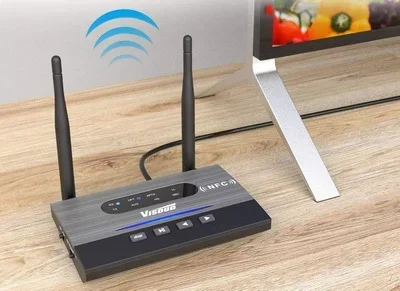
A Bluetooth range extender is one of the most effective tools for boosting signal strength. These small devices plug into a wall outlet or connect via USB. They receive the Bluetooth signal from your source device and rebroadcast it at a higher power. This extends the Bluetooth range significantly, sometimes doubling or tripling the original distance.
When choosing a range extender, look for one that supports your Bluetooth version. A Bluetooth 5.0 extender works best with Bluetooth 5.0 devices. Some extenders also support multiple connections, which is great if you want to pair several wireless devices at once.
Reposition Your Devices
Sometimes the simplest fix is the best one. Moving your devices closer together can dramatically improve signal strength. Try to keep your Bluetooth source and receiver within the same room. Avoid placing devices behind large furniture or inside cabinets. Even a few feet of extra distance can make a noticeable difference in connection stability.
Height matters too. Placing devices on higher shelves or mounting them on walls reduces the number of obstacles in the signal path. Line-of-sight placement is ideal for the strongest possible wireless connection.
Reduce Wireless Interference
Your home is full of devices that compete for the same radio frequency. Wi-Fi routers, microwave ovens, baby monitors, and even cordless phones all use the 2.4 GHz band. When too many devices operate on the same frequency, they create congestion. This is called Bluetooth interference, and it weakens your signal.
To reduce interference, move your Bluetooth device away from other wireless electronics. If possible, switch your Wi-Fi router to the 5 GHz band. This frees up the 2.4 GHz space for Bluetooth devices. You will notice fewer dropouts and smoother wireless audio as a result.
Update Your Bluetooth Drivers and Firmware
Old software can cause weak signals and pairing problems. Manufacturers release updates that improve Bluetooth connectivity and fix bugs. Check your device settings or manufacturer website for the latest driver updates. On Windows, you can do this through Device Manager. On phones, simply check for system updates in your settings menu.
Firmware updates for Bluetooth accessories like headphones and speakers are equally important. These updates often include improvements to signal strength and range. Keeping your devices up to date is one of the easiest ways to maintain peak performance.
Bluetooth Signal Boosters: Do They Really Work?
Bluetooth signal boosters and repeaters are popular products, but do they live up to the hype? The short answer is yes, they do work. But not all boosters are created equal. Understanding the difference between a repeater and a true signal booster helps you make a smart purchase.
Bluetooth Repeaters vs. Signal Boosters
A Bluetooth repeater receives the signal from your source device and retransmits it. It acts as a middleman, extending the range. A signal booster, on the other hand, amplifies the existing signal without retransmitting it. Both have their uses, but repeaters are generally more effective for extending range over longer distances.
Repeaters work best when placed halfway between your source device and the receiving device. For example, if your phone is in the living room and your speaker is in the backyard, place the repeater somewhere in between. This creates a stronger wireless signal path that bridges the gap.
What to Look for in a Quality Booster
Not all boosters are worth your money. Look for products that support the latest Bluetooth standards. A booster that works with Bluetooth 5.0 or higher will give you the best results. Check the advertised range and read customer reviews to see real-world performance.
Also consider the build quality. Cheap plastic casings and poor antenna design lead to weak performance. A well-built booster with a strong antenna makes a big difference in signal penetration and overall range. Brands like Avantree, TP-Link, and 1Mii are worth checking out for reliable options.
| Feature | Bluetooth Repeater | Bluetooth Signal Booster |
|---|---|---|
| How It Works | Receives and retransmits signal | Amplifies existing signal |
| Range Extension | High | Moderate |
| Setup Difficulty | Easy | Very Easy |
| Best For | Long distance connections | Short range improvements |
| Price Range | $20-$80 | $15-$50 |
| Signal Quality | Good with proper placement | Depends on original signal |
Common Bluetooth Connection Problems and Fixes
Even with a strong signal, Bluetooth connections can still cause problems. Understanding the most common issues helps you troubleshoot faster and get back to enjoying your wireless audio without frustration.
Short Range Issues
If your Bluetooth devices only connect when they are very close, something is limiting the range. The most common causes are old Bluetooth versions, weak antennas, or heavy interference. Try updating your devices and moving them away from other wireless electronics. If the problem persists, consider using a Bluetooth adapter with an external antenna for better signal strength.
Audio Dropouts and Lag
Audio dropouts happen when the Bluetooth signal gets interrupted briefly. This can be caused by physical obstacles, interference, or a weak connection. Bluetooth latency, or delay, is a related issue that affects audio sync. To fix dropouts, reduce the number of devices competing for the same frequency. For latency, look for codecs that support low-latency wireless streaming, like aptX Low Latency.
Pairing Failures
Sometimes devices simply refuse to pair. This is often a software issue rather than a signal problem. Reset both devices and try pairing again. Make sure the devices are close together during the initial pairing process. If pairing still fails, delete old pairing records and start fresh. Keeping your Bluetooth pairing list clean helps maintain strong connections.
Expert Tips for Maximum Bluetooth Performance
Getting the most out of your Bluetooth devices takes a little know-how. These expert tips help you squeeze every bit of performance from your wireless connections.
Choose the Right Bluetooth Version
Newer Bluetooth versions bring better range, faster data transfer, and improved efficiency. Bluetooth 5.0 and 5.3 offer significantly better performance than older versions. If you are buying new headphones, speakers, or adapters, prioritize devices with the latest Bluetooth standards. This future-proofs your setup and gives you the best possible wireless range from day one.
Keep Devices Close and Line-of-Sight
Line-of-sight is the golden rule of Bluetooth performance. The fewer obstacles between your devices, the stronger the signal. Keep your phone and speaker in the same room with a clear path between them. Avoid placing devices in corners or behind thick walls. A clear line-of-sight connection gives you the best connection stability and audio quality.
Use External Bluetooth Adapters
Built-in Bluetooth chips in laptops and desktops are often weak. An external Bluetooth adapter with a high-quality antenna solves this problem. These adapters plug into USB ports and provide much stronger signal output. They are especially useful for desktop users who need reliable Bluetooth connectivity across a large room or office space.
Restart Devices Regularly
Restarting your devices clears temporary glitches and refreshes the Bluetooth connection. Make it a habit to restart your phone, speaker, or headphones once a week. This simple step prevents many common wireless connection problems and keeps your devices running smoothly.
Keep Firmware and Software Updated
Manufacturers constantly improve Bluetooth performance through software updates. Check for updates on all your Bluetooth devices regularly. An up-to-date device delivers better range, faster pairing, and fewer dropouts. This is one of the easiest and most overlooked ways to maintain strong Bluetooth signal strength over time.
Final Thoughts on Amplifying Bluetooth Signals
So, can Bluetooth signal be amplified? Absolutely. Whether you use a range extender, reposition your devices, reduce interference, or simply update your software, there are many ways to boost your Bluetooth connectivity. The key is understanding what is causing your weak signal and choosing the right fix for your situation.
Most people will see a big improvement from simple steps like repositioning devices and reducing wireless interference. For those with larger spaces or more demanding needs, a Bluetooth range extender or external adapter makes a real difference. The goal is a strong, stable wireless connection that lets you enjoy your music, calls, and streaming without interruptions.
Take the time to apply the tips in this guide. Your Bluetooth devices will perform better, last longer, and give you a much more enjoyable experience. A stronger Bluetooth signal means more freedom to move around your home or office without losing connection. That is a win for everyone.
Frequently Asked Questions
Can I amplify Bluetooth signal without buying extra equipment?
Yes, you can. Simple steps like repositioning your devices, reducing wireless interference, and updating firmware can significantly improve your Bluetooth signal strength without spending a dime. Moving devices closer together and keeping them in line-of-sight are the easiest and most effective free methods.
How far can Bluetooth reach with a signal booster?
A standard Bluetooth connection reaches about 30 feet indoors. With a quality Bluetooth range extender, you can push that to 100 feet or more, depending on obstacles and interference. Bluetooth 5.0 devices with boosters can reach even further in open spaces, sometimes up to 240 meters.
Do Bluetooth signal boosters slow down audio quality?
Good quality boosters do not noticeably reduce audio quality. However, cheap or poorly designed boosters may introduce latency or compress the audio signal. Look for boosters that support high-quality codecs like aptX or LDAC to maintain excellent wireless audio performance while extending range.
Why does my Bluetooth signal keep dropping?
Signal dropouts usually happen due to interference from other wireless devices, physical obstacles, or outdated firmware. Wi-Fi routers, microwaves, and thick walls are common culprits. Updating your devices, reducing interference, and repositioning your equipment can fix most dropping issues.
Is a Bluetooth range extender the same as a Wi-Fi extender?
No, they are different devices. A Bluetooth range extender specifically boosts Bluetooth signals between wireless devices. A Wi-Fi extender boosts your wireless internet signal. While they use similar technology, they serve different purposes and are not interchangeable.
Can I use multiple Bluetooth boosters in one home?
Yes, you can use multiple boosters to cover a larger area. Place them strategically between devices that need a stronger connection. Just make sure each booster uses a different channel if possible, to avoid creating additional Bluetooth interference that could weaken your overall wireless connection.