Can I Charge Macbook Via Usb C Everything You Should Know
Yes, you can charge your MacBook via USB-C, and it is the standard and most convenient method for powering up all modern MacBooks. USB-C charging delivers fast speeds, works with both MacBook Air and MacBook Pro, and supports power delivery of up to 140 watts. In this guide, we walk you through everything you need to know about MacBook USB-C charging, from choosing the right charger to troubleshooting common problems.
So you are sitting there with your MacBook and a USB-C cable in hand. The question is simple but important. Can I charge MacBook via USB C? The short answer is yes. The longer answer is even better, because USB-C charging has become the go-to method for powering up modern MacBooks.
Apple has fully embraced the USB-C standard across its laptop lineup. Whether you own a MacBook Air or a MacBook Pro, USB-C is your primary charging port. This shift has brought a lot of convenience, but it has also raised questions. People want to know which cables work, which chargers are safe, and how fast the charging actually is.
In this article, we will cover everything you need to know. We will look at how USB-C charging works on a MacBook, which chargers are compatible, and what speeds you can expect. We will also tackle common problems and compare USB-C to the older MagSafe chargers. By the end, you will feel confident about using USB-C to charge your MacBook.
Key Takeaways
- USB-C is the standard charging port for all modern MacBooks, including MacBook Air and MacBook Pro models released since 2015.
- Any USB-C charger with proper power delivery can charge your MacBook, but Apple’s own adapter delivers the safest and most reliable results.
- Charging speed depends on wattage, with 60W to 140W USB-C adapters offering the fastest power delivery for different MacBook models.
- Third-party USB-C chargers work fine as long as they meet USB Power Delivery standards and come from reputable brands like Anker or Belkin.
- Common issues like slow charging can often be fixed by checking cable quality, cleaning the USB-C port, and resetting the SMC on Intel MacBooks.
- USB-C offers more than just charging, including data transfer and video output through a single reversible connector.
- Thunderbolt 3 and USB4 cables provide superior performance and future-proof your entire charging and accessory setup.
📑 Table of Contents
Can You Charge a MacBook with USB-C?
The answer is a clear yes. Every MacBook released since 2015 with a USB-C port can be charged through that port. Apple made the switch to USB-C as the sole charging method starting with the 2015 MacBook. Since then, all MacBook Air and MacBook Pro models rely on USB-C for power.
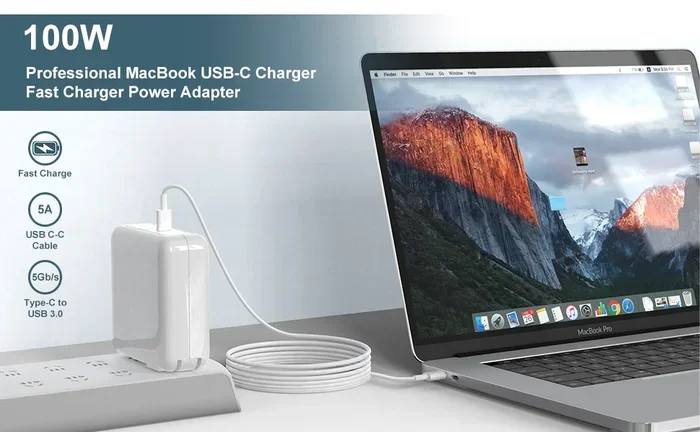
This means your MacBook USB-C charging setup is straightforward. You plug a USB-C cable into your laptop and connect it to a power source. The USB-C port handles both data and power delivery. This is one of the biggest advantages of the USB-C standard. You do not need separate cables for charging and data transfer.
How USB-C Charging Works on MacBook
USB-C charging uses a protocol called USB Power Delivery, or USB PD for short. This protocol allows the cable and charger to negotiate the right amount of power. Your MacBook and the charger communicate with each other. They agree on the best wattage for safe and efficient charging.
The USB-C connector is reversible. You can plug it in either way. This is a small detail that makes a big difference in daily use. No more flipping the cable three times to get it right. The USB-C port on your MacBook supports up to 100 watts of power delivery. Most MacBook models come with a 60W or 96W USB-C power adapter.
The power delivery protocol also supports bidirectional charging. This means the USB-C port can both send and receive power. You can charge your MacBook from a USB-C wall charger. You can also charge other devices from your MacBook. This flexibility is one reason USB-C has become so popular among laptop users.
Which MacBooks Support USB-C Charging?
All modern MacBooks support USB-C charging. Here is a quick breakdown of models:
- MacBook Air (2018 and later) uses USB-C for charging.
- MacBook Pro 13-inch (2016 and later) charges via USB-C.
- MacBook Pro 14-inch and 16-inch use Thunderbolt 3 USB-C ports for charging.
- MacBook (2015-2017) was the first model with a single USB-C port for charging.
If you have an older MacBook with a MagSafe or USB-A port, it may not support USB-C charging. But any MacBook from the last several years will work with a USB-C charger without any issues.
How Fast Does USB-C Charging Work?
Charging speed is one of the most common questions people ask. The answer depends on a few factors. The wattage of your charger matters a lot. The quality of your USB-C cable matters too. And your specific MacBook model plays a role as well.
Understanding Wattage and Charging Speed
Wattage measures how much power your charger can deliver. A higher wattage means faster charging, up to a point. Most MacBook Air models come with a 30W or 35W USB-C power adapter. These work fine for everyday use. They will charge your MacBook Air at a steady and reliable pace throughout the day.
MacBook Pro models often need more power to charge efficiently. The 14-inch and 16-inch MacBook Pro models come with a 67W, 96W, or 140W USB-C charger. These higher-wattage adapters charge your laptop faster. They also support fast charging, which can fill your battery from zero to 50 percent in about 30 minutes. This is a lifesaver when you are rushing out the door.
Here is a simple comparison of charging speeds based on charger wattage:
- 30W USB-C charger: Good for MacBook Air. Slow but steady charging for MacBook Pro.
- 67W USB-C charger: Works well for 13-inch MacBook Pro. Adequate for 14-inch models.
- 96W USB-C charger: Ideal for 14-inch MacBook Pro. Fast and reliable charging.
- 140W USB-C charger: Best for 16-inch MacBook Pro. Fastest USB-C charging available.
Does Cable Quality Affect Charging Speed?
Yes, it really does. Not all USB-C cables are created equal. A cheap or damaged cable can slow down your charging significantly. Look for cables that support USB Power Delivery and high wattage ratings. Thunderbolt 3 cables and USB4 cables are excellent choices. They handle more power and faster data transfer speeds.
A good USB-C cable should support at least 60 watts of power delivery. For MacBook Pro users, look for cables rated for 100 watts or more. This ensures you get the full charging speed your charger can provide. Always buy cables from reputable brands. Avoid the cheapest options from unknown sellers, as they may not meet safety standards.
The length of the cable can also play a small role in charging performance. Shorter cables tend to charge slightly faster because there is less electrical resistance. But the difference is usually minor in everyday use. Focus more on cable quality and wattage rating than on length when making your choice.
Best USB-C Chargers for MacBook
Choosing the right USB-C charger can feel overwhelming. There are so many options on the market. But the good news is that most USB-C chargers will work with your MacBook. You just need to pay attention to a few key details before you buy.
Apple USB-C Power Adapter
The safest and most reliable choice is Apple’s own USB-C power adapter. These adapters are designed specifically for MacBooks. They deliver consistent and stable power. They work seamlessly with your laptop without any compatibility issues. Apple offers several wattage options to match different MacBook models.
The 30W USB-C power adapter is perfect for MacBook Air users who need a compact and efficient charger. The 67W and 96W adapters work great for MacBook Pro models that require more power. The 140W adapter is designed for the 16-inch MacBook Pro and supports the fastest USB-C charging available. These adapters are not cheap, but they are built to last and offer excellent safety features.
Third-Party USB-C Chargers
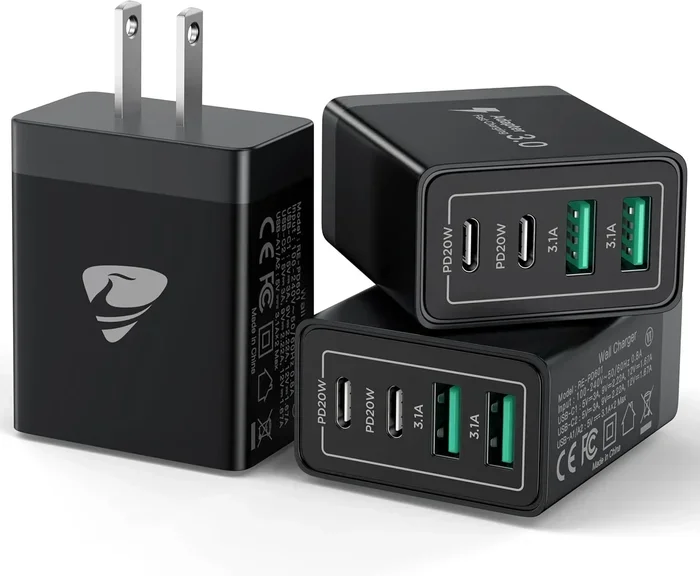
You do not have to buy the Apple charger to get great results. Many third-party USB-C chargers work just as well. Brands like Anker, Belkin, and UGREEN offer high-quality USB-C chargers for MacBook. These chargers often cost less and come with extra features like multiple ports for charging several devices at once.
When choosing a third-party charger, look for these important features:
- USB Power Delivery support: This is essential for safe and fast charging with your MacBook.
- Proper wattage rating: Match the charger wattage to your specific MacBook model for best results.
- Reputable brand: Stick with well-known brands to avoid safety issues and poor performance.
- Safety certifications: Look for UL, CE, or FCC certification on the charger packaging.
A USB-C hub or docking station can also serve as a charging solution. Many USB-C hubs include a USB-C charging port along with other ports for peripherals like monitors and external drives. This is a great option if you want a clean desk setup with fewer cables cluttering your workspace.
USB-C Power Banks for MacBook
Did you know you can charge your MacBook with a USB-C power bank? This is a great option for travel or emergencies. A high-capacity USB-C power bank can give your MacBook extra battery life on the go. Look for power banks that support at least 60 watts of power delivery to charge a MacBook effectively.
Some popular options include the Anker 737 Power Bank and the Baseus Blade series. These power banks are compact yet powerful. They can charge a MacBook Air or MacBook Pro while you are away from a wall outlet. Just make sure the power bank has a USB-C port that supports USB Power Delivery for best results.
Common USB-C Charging Problems and How to Fix Them
USB-C charging is generally very reliable. But sometimes things go wrong and you need to troubleshoot. Here are the most common issues MacBook users face and how to solve them quickly.
MacBook Not Charging When Plugged In
This is the most frustrating problem to encounter. Your MacBook shows no charging indicator even though the cable is connected. Try these steps first before assuming the worst:
- Check the USB-C cable: Swap it with a different cable to rule out a faulty or damaged cable.
- Try a different power adapter: A different USB-C charger can help you identify where the problem lies.
- Clean the USB-C port: Dust and lint can build up and block the connection. Use a soft brush or compressed air to clean the port gently.
- Reset the SMC: On Intel MacBooks, resetting the System Management Controller can often fix charging issues.
- Check for software updates: Sometimes a macOS update fixes hidden charging bugs that affect your MacBook.
If none of these steps work, the issue might be hardware-related. Contact Apple Support or visit an Apple Store for a professional diagnosis. Do not attempt to open your MacBook yourself, as this can void your warranty.
Slow Charging Issues
If your MacBook charges slowly, the cause is often simple and easy to fix. A low-wattage charger is the most common culprit. If you are using a 30W charger with a MacBook Pro, it will charge slowly. Upgrade to a higher-wattage USB-C charger for much faster and more efficient results.
Another cause is using your MacBook while it charges. Running demanding apps while charging slows down the process significantly. Try closing unnecessary apps and letting your MacBook charge without heavy use. This simple tip can make a noticeable difference in how fast your battery fills up.
Also check the temperature of your laptop. MacBooks slow down charging when they get too hot or too cold. If your laptop feels warm to the touch, let it cool down before expecting fast charging. Using your MacBook on a hard, flat surface helps with heat dissipation and keeps your charging speed optimal.
USB-C Port Not Recognizing the Charger
Sometimes the MacBook does not recognize the USB-C charger at all. This can happen with third-party chargers that do not fully comply with USB Power Delivery standards. Try a different charger or cable to see if that resolves the issue. If the problem persists, the USB-C port itself might be damaged or obstructed. In that case, professional repair may be needed to restore proper charging functionality.
USB-C vs MagSafe: Which Charging Method Is Better?
Apple used to use MagSafe magnetic connectors for MacBook charging for many years. The newer MacBooks have switched entirely to USB-C. But many people still wonder about the differences between the two methods. Let us compare USB-C and MagSafe charging for MacBooks in detail.
Convenience and Ease of Use
USB-C charging is incredibly versatile. One cable can charge your MacBook, phone, and tablet all at the same time. You can also use the same cable for data transfer and video output. This makes USB-C a great all-in-one solution for your workspace. The reversible connector means you never have to worry about which way to plug it in.
MagSafe was famous for its magnetic connection. The cable would detach easily if someone tripped over it. This protected your MacBook from being pulled off a desk or table. USB-C cables do not have this magnetic feature. However, newer MagSafe accessories now work with USB-C, combining the best of both worlds in one convenient package.
Charging Speed Comparison
In terms of raw charging speed, USB-C generally wins. USB-C power delivery can provide up to 140 watts of power to your MacBook. MagSafe 2 on older MacBooks maxed out at around 87 watts. The newer MagSafe 3 on MacBook Pro uses USB-C underneath, so the speeds are very similar and comparable.
For most users, the charging speed difference between the two methods is not noticeable in daily use. Both methods will fully charge your MacBook overnight while you sleep. USB-C has the clear edge for fast charging on the go and overall versatility across devices.
Compatibility and Future-Proofing
USB-C is the future of charging and connectivity. It is the universal standard across laptops, phones, tablets, and countless accessories from different brands. Investing in USB-C chargers and cables means your entire setup will stay relevant for many years to come. MagSafe is Apple-specific and limited to Apple devices only.
If you are buying new accessories today, USB-C is the clear and smart choice. It offers better compatibility across devices, faster charging potential, and more functionality in a single small connector. MagSafe is great for its magnetic convenience, but USB-C is the more practical long-term option for most users.
Tips for Safe and Efficient USB-C Charging
Follow these simple and practical tips to get the best performance from your USB-C charging setup every single day.
- Use certified cables and chargers: Look for USB-IF certification or MFi certification for Apple devices to ensure safety.
- Avoid cheap no-name accessories: They may damage your MacBook or charge it very slowly and unreliably.
- Keep your USB-C ports clean: Regular cleaning prevents dust buildup and connection issues over time.
- Use the right wattage: Match your charger wattage to your specific MacBook model for the best results.
- Update your macOS regularly: Software updates often include charging optimizations and bug fixes.
- Avoid extreme temperatures: Charge your MacBook in a comfortable room temperature environment for safety.
- Enable optimized battery charging: This macOS feature reduces battery wear and extends long-term battery health.
These tips are simple but very effective. They will help extend your MacBook battery life and ensure safe, efficient USB-C charging every time you plug in your laptop. A little care goes a long way in protecting your investment.
The Bottom Line on MacBook USB-C Charging
So, can I charge MacBook via USB C? Absolutely yes. USB-C charging is the standard for all modern MacBooks released in the last several years. It is fast, versatile, and incredibly convenient for everyday use. Whether you use a MacBook Air or a MacBook Pro, a USB-C charger will power up your laptop reliably and efficiently.
The key is to use the right equipment for your specific needs. Choose a compatible USB-C charger with the proper wattage for your MacBook model. Invest in a quality USB-C cable that supports USB Power Delivery for the best performance. And do not be afraid to explore third-party options from reputable and trusted brands. The USB-C ecosystem offers flexibility and future-proofing that older charging methods simply cannot match.
With the tips and information in this guide, you are now fully equipped to make the most of USB-C charging. Your MacBook is ready to go. Just plug in, power up, and enjoy the simplicity and speed of modern USB-C charging technology.
Frequently Asked Questions
Can I use any USB-C charger to charge my MacBook?
Most USB-C chargers will work with your MacBook, but you should check the wattage carefully. Apple recommends using a charger that matches or exceeds your MacBook’s power requirements. A charger with USB Power Delivery support is essential for safe and efficient charging. Cheap or uncertified chargers may damage your laptop or charge it very slowly and unreliably.
How long does it take to charge a MacBook via USB-C?
Charging time depends on your MacBook model and the charger wattage you are using. A MacBook Air with a 30W charger takes about 2 to 3 hours to fully charge. A MacBook Pro with a 96W charger takes roughly 2 hours. Using a higher-wattage USB-C charger reduces charging time significantly. Fast charging can reach 50 percent in about 30 minutes on supported MacBook Pro models.
Can I charge my MacBook with a USB-C power bank?
Yes, you can charge your MacBook with a USB-C power bank. You need a power bank that supports at least 60 watts of power delivery to charge a MacBook effectively. High-capacity power banks like the Anker 737 or Baseus Blade series work well for this purpose. This is a great option for travel or when you are away from a wall outlet and need to keep your laptop powered up.
Why is my MacBook not charging when connected to USB-C?
Several issues can cause this frustrating problem. Try a different USB-C cable or charger first to rule out a faulty accessory. Clean the USB-C port to remove any dust or debris that may be blocking the connection. Reset the SMC if you are using an Intel MacBook. Make sure your charger supports USB Power Delivery properly. If the issue persists, the USB-C port or battery may need professional inspection by a qualified technician.
Is it safe to use a third-party USB-C charger for MacBook?
Yes, it is safe as long as the charger is from a reputable brand and supports USB Power Delivery standards. Look for safety certifications like UL, CE, or FCC on the product before purchasing. Avoid cheap, uncertified chargers from unknown brands that may pose safety risks. Trusted third-party brands like Anker, Belkin, and UGREEN offer reliable and safe USB-C chargers for MacBook users.
Can I charge my MacBook and use it at the same time via USB-C?
Yes, you can charge your MacBook and use it simultaneously through USB-C without any problems. However, using demanding applications while charging may slow down the charging speed noticeably. For the fastest charging possible, close unnecessary apps and let your MacBook charge without heavy use. This is especially important when using a lower-wattage USB-C charger, as the power demands of apps can compete with charging speed.