Can I Convert My Old Tv To Bluetooth With These Tips
Yes, you can convert your old TV to Bluetooth even if it was made years ago. With the right Bluetooth adapter or audio transmitter, you can stream music, shows, and more to wireless headphones or a Bluetooth speaker. In this guide, we walk you through every method, share product tips, and help you pick the best option for your setup.
Key Takeaways
- Bluetooth conversion is possible: You can add Bluetooth to virtually any old TV using an adapter or transmitter.
- Multiple methods exist: Options include Bluetooth audio transmitters, FM transmitters, and Bluetooth soundbars.
- Setup is simple: Most solutions require just a few cables and a quick pairing process.
- Audio quality varies: Some methods offer better sound than others, so choose based on your needs.
- Cost is affordable: Most Bluetooth adapters cost between $15 and $50.
- Compatibility matters: Check your TV’s audio output ports before buying any adapter.
- Wireless freedom is the payoff: Once set up, you enjoy cable-free audio streaming from your old TV.
📑 Table of Contents
- Can I Convert My Old TV To Bluetooth? Here Is How
- What Does It Mean to Convert Your TV to Bluetooth?
- How to Convert Your Old TV to Bluetooth: Step-by-Step Methods
- Best Bluetooth Adapters for Old TVs
- Setting Up Bluetooth Audio on Your Old TV
- Common Problems and How to Fix Them
- Is It Worth Converting Your Old TV to Bluetooth?
- Final Thoughts on Converting Your Old TV to Bluetooth
Can I Convert My Old TV To Bluetooth? Here Is How
So you want to add Bluetooth to your old TV but are not sure where to start. Maybe your TV does not have Bluetooth built in. Maybe it is an older model that predates wireless technology altogether. The good news is that you can absolutely convert your old TV to Bluetooth and start streaming audio wirelessly.
Whether you want to connect wireless headphones for late-night movie sessions or pair a Bluetooth speaker for music, the process is easier than you think. You do not need a brand-new TV. You do not need expensive tools. Just a few affordable accessories and a little patience.
In this guide, we will show you every method available. We will cover the best adapters, walk you through setup, and help you troubleshoot common problems. By the end, you will know exactly how to bring your old TV into the wireless age.
What Does It Mean to Convert Your TV to Bluetooth?
When people say they want to convert old TV to Bluetooth, they mean adding wireless audio capability. Your TV still plays video as it always does. The change is on the audio side.
Think of it this way. Your TV currently sends sound through a cable. You hear it from the built-in speakers. Converting it to Bluetooth means replacing that wired connection with a wireless audio link. You can then send sound to any compatible device nearby.
Why Would You Want Bluetooth on an Old TV?
There are many reasons to add Bluetooth connectivity to your television. Here are some of the most common ones:
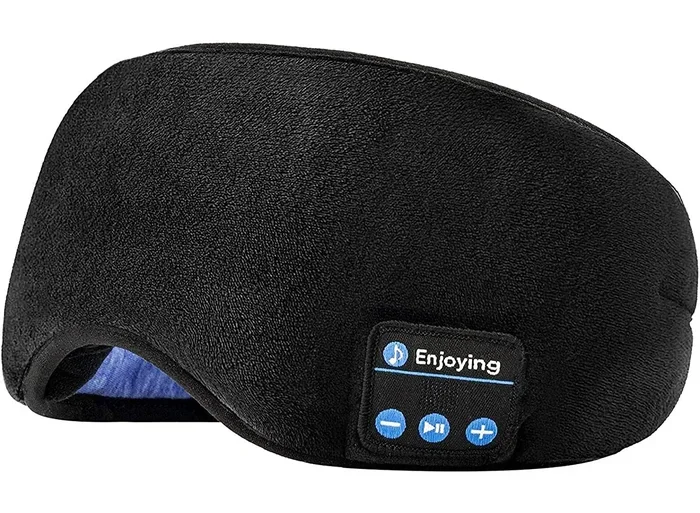
- Wireless headphones: Watch TV late at night without waking up family members.
- Better sound: Connect a Bluetooth speaker or soundbar that sounds better than old TV speakers.
- Cleaner setup: Reduce cable clutter behind your TV stand.
- Flexibility: Move around freely while still hearing audio from your TV.
- Smart TV upgrade: Give your older TV some of the features that modern models offer.
Basically, adding Bluetooth makes your old TV more versatile. It is a small change that makes a big difference in how you use your entertainment setup.
How to Convert Your Old TV to Bluetooth: Step-by-Step Methods
Now let us get into the actual methods. There are several ways to achieve Bluetooth audio on an older television. Each method works differently depending on what ports your TV has. Let us break them down one by one.
Method 1: Use a Bluetooth Audio Transmitter
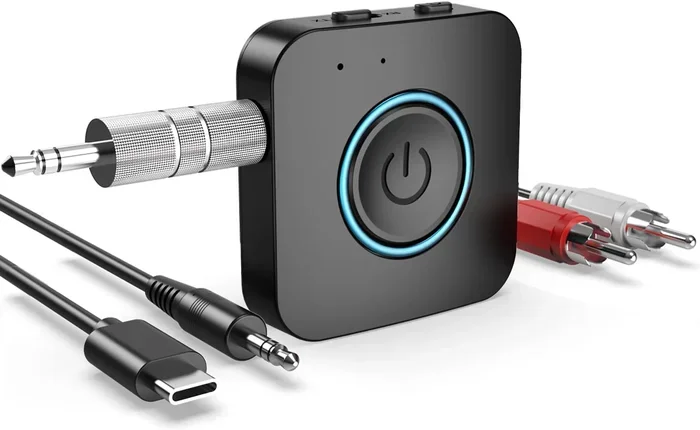
This is the most popular and reliable method. A Bluetooth audio transmitter plugs into your TV and sends audio wirelessly to a receiver or compatible device.
Here is how it works:
- Plug the transmitter into your TV’s audio output port.
- Power on the transmitter and put it in pairing mode.
- Pair it with your Bluetooth speaker, headphones, or a separate Bluetooth receiver.
- Enjoy wireless audio from your TV.
Most of these transmitters connect through a 3.5mm aux cable or RCA ports. They are small, affordable, and work with almost any TV that has an audio output. You can find them online for around $15 to $40.
Method 2: Use an FM Bluetooth Transmitter
If your TV only has a headphone jack, an FM transmitter is another great option. This tiny device plugs into the headphone jack and broadcasts audio on an FM frequency.
You then tune a Bluetooth FM receiver or even a car stereo to that frequency. The audio plays wirelessly. This method is especially handy if your TV lacks RCA or aux outputs.
Keep in mind that FM transmitters can sometimes experience interference from nearby electronics. The signal quality may not be as consistent as a direct Bluetooth transmitter. But for basic audio streaming, it works well enough.
Method 3: Connect a Bluetooth Soundbar
Another simple route is buying a Bluetooth soundbar that also has a wired input option. You connect the soundbar to your TV using an aux cable or optical output. Then you can also use it wirelessly when needed.
This is a two-in-one solution. You get better sound quality and Bluetooth capability at the same time. Many modern soundbars support audio pairing with multiple devices, so switching between your TV and phone is easy.
Method 4: Use a Bluetooth Receiver with an Aux Cable
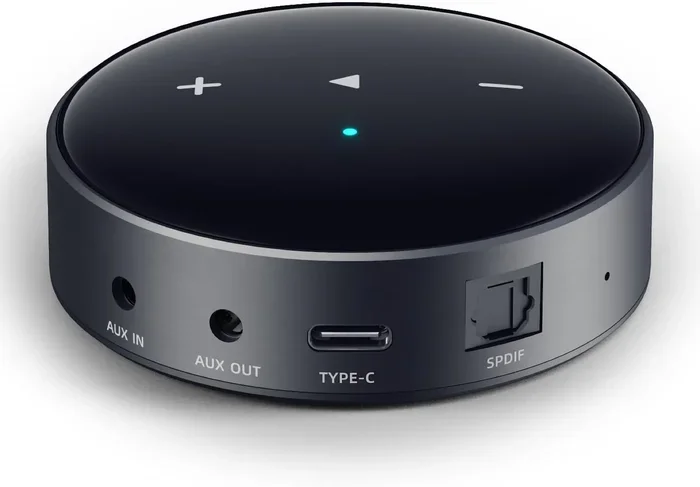
A Bluetooth receiver is a small box that you place near your TV. You run an aux cable from the TV’s audio output to the receiver. The receiver then sends audio to your Bluetooth headphones or speaker.
This method is great for people who want a dedicated Bluetooth receiver that stays connected to the TV full time. You just pair your headphones once, and it remembers the device. Every time you turn on the TV, audio flows automatically.
Best Bluetooth Adapters for Old TVs
Not all adapters are created equal. When shopping for a Bluetooth adapter for your old TV, look for these features:
- Compatibility: Make sure it works with your TV’s specific audio output ports.
- Bluetooth version: Go for at least Bluetooth 4.0 or higher for better audio streaming.
- Range: Look for adapters with a range of at least 30 feet.
- Battery life: If it is battery-powered, a long battery life is a big plus.
- Audio codec support: AAC and aptX support mean better sound quality.
Quick Tips for Choosing the Right Adapter
- Check your TV’s ports first. Look at the back panel for a headphone jack, RCA ports, or an aux input.
- Read user reviews. Real-world feedback tells you about reliability and audio pairing issues.
- Start budget-friendly. A $20 transmitter works well for most households. You do not need to spend more unless you want premium features.
- Consider a 2-in-1 device. Some transmitters double as receivers, giving you more flexibility.
Popular Options Worth Considering
Here are a few types of products that work well for retro TV Bluetooth upgrades:
- Mpow Bluetooth 5.0 Transmitter: Affordable and easy to set up. Works through a 3.5mm jack.
- 1Mii Bluetooth 5.0 Transmitter and Receiver: Supports both sending and receiving audio wirelessly.
- Avantree DG60: Offers aptX Low Latency for better signal quality during movies and games.
- TaoTronics Bluetooth 5.0 Transmitter: Comes with an RCA cable adapter for older TVs.
All of these are readily available online and work with most old TV models. They are plug-and-play devices, meaning you do not need technical skills to install them.
Setting Up Bluetooth Audio on Your Old TV
Once you have your adapter, setup is quick. Let us walk through a typical installation process. This applies whether you are using a transmitter, receiver, or FM device.
Step 1: Identify Your TV’s Audio Output
Walk to the back of your TV. Look for any of these ports:
- Headphone jack (3.5mm): A small round port, often green.
- RCA audio ports: Two round ports, usually red and white.
- Optical output: A square port, sometimes labeled TOSLINK.
- Aux output: A 3.5mm or 6.35mm jack.
If you find any of these, you are good to go. If your TV only has no audio outputs at all, you may need to open the back panel and solder a wire directly to the speaker terminals. This is more advanced, but it is possible for those who are handy.
Step 2: Connect Your Bluetooth Adapter
Plug your Bluetooth adapter into the appropriate port. Use the included cable if needed. For example:
- 3.5mm transmitter: Plug it straight into the headphone jack.
- RCA transmitter: Use the RCA cable to connect red and white ports.
- Optical transmitter: Use an optical cable for digital audio output.
Step 3: Power and Pair the Device
Turn on your adapter. Put it in pairing mode by holding the Bluetooth button for a few seconds. Then go to your Bluetooth speaker or headphones and search for new devices. Select your adapter from the list to complete Bluetooth connectivity.
That is it. Most setups take under five minutes. After the first pairing, the devices usually reconnect automatically every time they are powered on.
Step 4: Adjust Your TV Audio Settings
Go into your TV settings and make sure audio output is set to the external port you used. Some TVs default to internal speakers. Switching to external output ensures the audio goes through your Bluetooth adapter instead.
Common Problems and How to Fix Them
Even with the right equipment, you might run into a few snags. Here are some common issues and simple fixes.
No Sound After Pairing
This is the most common complaint. Try these fixes:
- Check that the TV volume is turned up.
- Make sure the Bluetooth device is not muted.
- Verify that the TV audio output is set to the correct port.
- Unpair and re-pair the devices.
Audio Delay or Lag
Some wireless audio setups experience a slight delay. This is called latency. To reduce it:
- Buy an adapter that supports aptX Low Latency or aptX HD codecs.
- Keep the transmitter and receiving device close together.
- Avoid placing other wireless devices between them.
Intermittent Signal Drops
If your Bluetooth receiver keeps disconnecting, try the following:
- Move the adapter closer to your headphones or speaker.
- Remove obstacles between the devices.
- Check for interference from Wi-Fi routers or microwaves.
- Replace the batteries if your adapter is wireless.
TV Does Not Recognize the Adapter
Some older TVs have limited support for external audio devices. If this happens:
- Try a different aux cable or connection type.
- Use an FM transmitter instead, which bypasses software recognition.
- Check if a firmware update is available for your TV.
Expert Insight on Audio Quality
Audio experts recommend using a transmitter that supports AAC or aptX codecs for the best signal quality. Standard Bluetooth audio can sound compressed. Upgraded codecs deliver richer, more detailed sound. It is worth spending a few extra dollars for this feature if you care about audio clarity.
Also, keep in mind that distance affects performance. Most Bluetooth adapters work well within a 30-foot range. Walls and furniture reduce that range. For best results, keep your listening device in the same room as the TV.
Is It Worth Converting Your Old TV to Bluetooth?
Let us talk about value. Adding Bluetooth to old TV models costs very little. A basic adapter runs $15 to $30. A mid-range transmitter with better features costs $40 to $60. Compare that to buying a new smart TV, which can cost hundreds of dollars.
The convenience is huge. You get wireless headphones support, better audio options, and a cleaner entertainment setup. You also extend the life of a TV that still works perfectly fine. There is no reason to throw away a perfectly good television just because it lacks Bluetooth audio streaming.
For gamers, this upgrade is especially useful. Bluetooth headphones help you hear in-game audio without disturbing others. For movie fans, a Bluetooth speaker or soundbar can dramatically improve sound quality. Even for casual viewers, the ability to control where your audio plays is a welcome upgrade.
The bottom line: if your TV works but lacks Bluetooth, this is one of the easiest and most rewarding upgrades you can make. It takes minutes, costs very little, and transforms how you watch and listen.
Final Thoughts on Converting Your Old TV to Bluetooth
Adding Bluetooth to an old TV is one of the simplest electronics upgrades you can do. You do not need a technician. You do not need complicated tools. A small adapter, a few minutes, and a quick pairing process are all it takes.
Whether you choose a Bluetooth audio transmitter, an FM device, or a soundbar with Bluetooth, you are adding real value to your setup. The wireless audio freedom is something you will appreciate every single day. Late-night shows, morning news, movie marathons, and gaming sessions all feel better when you can hear them the way you want.
So go ahead. Pick the method that fits your TV and your budget. Set it up this weekend. You will be glad you did. Your old TV still has plenty of life left in it. Now it can also keep up with modern Bluetooth connectivity standards.
Frequently Asked Questions
Can any old TV be converted to Bluetooth?
Most old TVs can be converted as long as they have at least one audio output port. This includes a headphone jack, RCA ports, or an optical output. If your TV has no audio outputs at all, you can still use an FM transmitter through the headphone jack or open the back panel and connect wires directly to the internal speakers.
How much does it cost to add Bluetooth to an old TV?
A basic Bluetooth audio transmitter costs between $15 and $30. Mid-range models with better signal quality and extra features range from $40 to $60. If you already own a Bluetooth speaker or headphones, you may only need a $15 adapter to get started.
Does adding Bluetooth reduce audio quality?
Standard Bluetooth audio can compress sound slightly. However, transmitters that support AAC or aptX codecs deliver much better audio streaming quality. For most users, the difference is small. If you want the best sound, choose a transmitter with aptX Low Latency support and keep the devices close together.
Can I connect wireless headphones to my old TV using Bluetooth?
Yes. After you install a Bluetooth transmitter on your TV, you can pair any wireless headphones with it. This is a popular choice for late-night viewing. Your family can sleep while you enjoy your show with private audio. Just make sure your headphones are fully charged and in pairing mode.
Is a Bluetooth soundbar better than a transmitter for old TVs?
It depends on your goal. A Bluetooth soundbar improves overall audio quality and fills a room with sound. A transmitter is better if you want to use wireless headphones or a portable speaker. Many people own both. The soundbar handles everyday viewing, while a transmitter is great for private listening.
How long does the setup take?
Most setups take under five minutes once you have the right cable. You plug in the adapter, power it on, and pair your audio device. The process is straightforward and does not require any technical knowledge. Converting old TV to Bluetooth is truly a plug-and-play experience.
=== CONCLUSION ===
Converting your old TV to Bluetooth is simple, affordable, and incredibly useful. You can stream wireless audio to headphones, speakers, or soundbars in just a few minutes. The right Bluetooth adapter brings your older television into the modern era without spending a fortune. Whether you use a transmitter, FM device, or soundbar, the result is the same: better flexibility and more enjoyable viewing. Follow the steps in this guide, pick a method that suits your TV’s ports, and enjoy the freedom of Bluetooth connectivity on your old TV today.