Can I Use Bluetooth Without Internet On Any Device
Yes, you can use Bluetooth without internet on virtually any device. Bluetooth is a short-range wireless technology that operates independently of Wi-Fi or mobile data. You can pair devices, stream audio, transfer files, and connect accessories all without an active internet connection.
Have you ever been in a place with no Wi-Fi and wondered if your Bluetooth still works? Maybe you are on a flight, in a cabin, or in a basement with terrible signal. The good news is that Can I Use Bluetooth Without Internet is a question with a very simple answer: yes.
Bluetooth is a wireless technology that connects devices using radio waves. It does not need the internet to function. You can pair your phone to a speaker, connect wireless headphones, or transfer files between two laptops all without tapping into any Wi-Fi network. This makes Bluetooth one of the most reliable wireless tools you have.
In this article, we will break down exactly how Bluetooth works without internet. You will learn what you can do offline, what you cannot, and how to get the most out of your Bluetooth devices when you are not connected. Whether you are a tech beginner or a casual user, this guide covers everything you need to know.
Key Takeaways
- Bluetooth works offline: It uses radio waves, not internet, to connect devices.
- Any Bluetooth-enabled device can pair without Wi-Fi: Phones, tablets, laptops, and smart home gadgets all support this.
- You can stream audio, transfer files, and connect peripherals offline.
- Bluetooth range is typically 30 feet: Distance matters more than internet access.
- Some features need internet: Streaming online music or downloading updates requires a connection.
- Bluetooth Low Energy saves battery: Great for offline devices like fitness trackers.
- Pairing is simple and fast: No router or network needed for most Bluetooth tasks.
📑 Table of Contents
- What Is Bluetooth and How Does It Work?
- What Can You Do With Bluetooth Without Internet?
- What You Cannot Do With Bluetooth Without Internet
- How Bluetooth Compares to Wi-Fi for Offline Use
- Bluetooth Low Energy and Offline Devices
- Common Mistakes People Make With Bluetooth Offline
- Expert Tips for Better Bluetooth Performance Offline
- Can You Use Bluetooth Without Internet on Every Device?
- Conclusion
What Is Bluetooth and How Does It Work?
Bluetooth is a short-range wireless communication standard. It lets electronic devices talk to each other over short distances using radio waves. Think of it as a private little conversation between two gadgets. No router, no modem, no internet service provider needed.
The technology uses something called Bluetooth protocol to establish a connection. When you turn on Bluetooth on your phone, it sends out a signal looking for other devices that are also broadcasting. Once two devices find each other, they pair up and can share data.
How Bluetooth Pairing Works Offline
Bluetooth pairing is the process of linking two devices together. Here is how it happens without any internet:
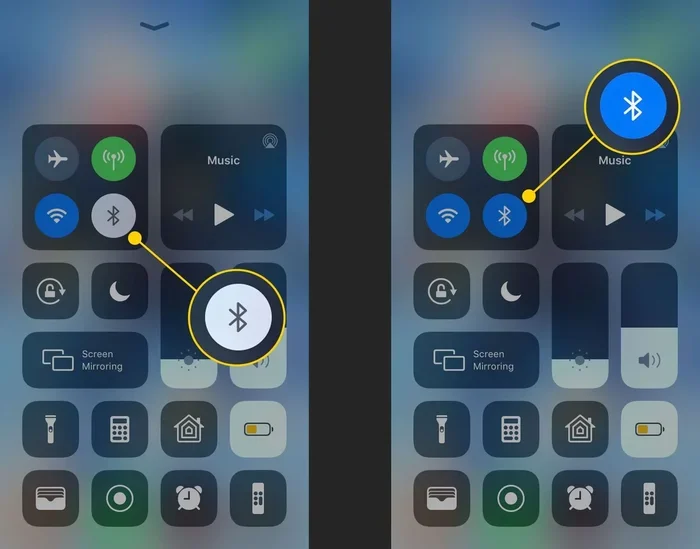
- You turn on Bluetooth on both devices.
- One device becomes visible and discoverable.
- The other device detects it and shows up on the list.
- You tap to pair, and the connection is made.
That is it. No internet required. The entire process happens through local radio signals. This is why you can still connect your Bluetooth headphones on an airplane or pair a speaker at a remote cabin.
Bluetooth Versions and Their Range
Different versions of Bluetooth offer different ranges and speeds. Here is a quick look at what you can expect:
- Bluetooth 4.0+: Introduced Bluetooth Low Energy, great for offline fitness trackers and smartwatches.
- Bluetooth 5.0: Doubled the range to about 800 feet in open space.
- Bluetooth 5.3: The latest version with improved stability and lower power use.
Even on older versions, Bluetooth works perfectly fine without internet. The signal is local and direct between devices.
What Can You Do With Bluetooth Without Internet?
There is a lot you can do with Bluetooth connectivity when you are offline. Let us walk through the most common uses.
Stream Audio to Wireless Speakers and Headphones
This is probably the most popular offline use. You can play music stored on your phone or laptop through Bluetooth speakers or headphones. Since the audio file is already on your device, you do not need the internet to play it.
Imagine you are camping in the woods. You have a portable Bluetooth speaker and some downloaded playlists. You can pair the speaker to your phone and enjoy music all day long with zero internet.
Transfer Files Between Devices
Bluetooth allows you to send photos, documents, and other files between two devices. This works great for offline file sharing. For example, you can beam a picture from one phone to another or send a PDF to a laptop in the same room.
The transfer speed is not as fast as Wi-Fi Direct, but it works reliably without any network. This makes Bluetooth a handy backup for offline device sharing.
Connect Peripherals and Accessories
Many peripherals work entirely offline through Bluetooth:
- Wireless keyboards and mice
- Game controllers for consoles or PCs
- Printers with Bluetooth support
- Smartwatches and fitness trackers
- Car audio systems for hands-free calls
None of these need an internet connection to function. They communicate directly with their paired device through Bluetooth signals.
Use Offline GPS and Navigation
Some GPS devices and apps use Bluetooth to connect to external sensors or speakers. You can pair a GPS unit with your phone and navigate without internet. The Bluetooth connection handles the audio output while the GPS chip handles the location data.
What You Cannot Do With Bluetooth Without Internet
While Bluetooth is great offline, there are some things it simply cannot do without a connection. Understanding these limits helps you set the right expectations.
Streaming Online Music or Video
If you want to stream from Spotify, YouTube, or Netflix, you need the internet. Bluetooth just moves the audio or video signal from your device to your speaker or headphones. It does not create the content for you. So if you are offline and try to stream, it will not work even if Bluetooth is connected.
Downloading Apps or Updates
Bluetooth cannot download anything from the web. If your smartwatch or fitness tracker needs a software update, you will need internet access. Bluetooth only transfers data between paired devices, not from the cloud.
Using Cloud-Based Services
Services like Google Drive, iCloud, or Spotify require internet. Bluetooth can sync some local data, but it cannot reach online servers. This is an important distinction when you are offline.
How Bluetooth Compares to Wi-Fi for Offline Use
People often confuse Bluetooth with Wi-Fi, but they are very different technologies. Let us compare them side by side for offline use.
Bluetooth vs Wi-Fi Without Internet
Here is a simple comparison of what each technology can do offline:
| Feature | Bluetooth | Wi-Fi (without internet) |
|---|---|---|
| Needs internet to work | No | No (but limited without a router) |
| Range | About 30 feet typically | Up to 150 feet indoors |
| Power use | Very low | Higher |
| Device pairing | Direct 1-to-1 connection | Can connect multiple devices |
| File transfer | Yes, between paired devices | Yes, on local networks |
| Audio streaming | Yes, from local files | Yes, from local files |
| Internet-dependent features | No | No, but more features fail without a router |
As you can see, Bluetooth is the clear winner for simple offline connections. It uses less power, pairs faster, and works without any network infrastructure at all.
Bluetooth Low Energy and Offline Devices
Bluetooth Low Energy (BLE) is a special mode designed for devices that need to run for months or even years on a small battery. Fitness trackers, smart locks, and health sensors all use BLE.
BLE works entirely offline. It sends small bursts of data between devices without needing any internet connection. This is why your fitness tracker can count your steps and sync to your phone later, even when you are in a dead zone with no signal.
Why BLE Is Perfect for Offline Use
- Ultra-low power consumption: Your device battery lasts much longer.
- Fast connection: Devices pair in seconds.
- Small data packets: Perfect for sensor data and basic commands.
- No network dependency: Works anywhere, anytime.
If you have ever wondered why your smartwatch still tracks your sleep without Wi-Fi, Bluetooth Low Energy is the answer. It keeps the connection alive with minimal battery drain.
Common Mistakes People Make With Bluetooth Offline
Even though Bluetooth is simple, people make mistakes that cause frustration. Here are some common ones to avoid.
Assuming Bluetooth Means Internet
Many people think if Bluetooth is on, they have some kind of connection to the internet. That is not true. Bluetooth and internet are separate things. You can have Bluetooth active with zero internet access, and it will still work for pairing and local transfers.
Forgetting to Make Devices Discoverable
When you try to pair offline, both devices need to be in discoverable mode. If one device is not visible, the other cannot find it. This is a common mistake that leads people to think Bluetooth is broken when it is just a settings issue.
Standing Too Far Apart
Bluetooth range is limited, usually around 30 feet for most devices. Walls, furniture, and even your body can weaken the signal. If your connection drops, try moving closer to the other device. This is not an internet problem; it is a range issue.
Not Clearing Old Pairings
If you are having trouble connecting, old pairings can interfere. Go into your Bluetooth settings and remove unused devices. Then try pairing fresh. This simple step solves many offline connection issues.
Expert Tips for Better Bluetooth Performance Offline
Want to get the most out of your Bluetooth when you are not connected to the internet? Here are some tips from the pros.
Keep Your Devices Updated
Even though you do not need internet to use Bluetooth, updating your device software can improve Bluetooth performance. Updates often include fixes for Bluetooth connectivity issues and better compatibility with new accessories.
Turn Off Bluetooth When Not in Use
Leaving Bluetooth on all the time drains your battery, even when you are not connected to anything. Turn it off when you are not using it, and you will save power and reduce interference with other devices.
Use the Right Bluetooth Profile
Different Bluetooth devices use different profiles. Audio devices use the A2DP profile for streaming. Keyboards and mice use HID. Make sure your devices support the same profile for the best experience.
Restart Devices if Connections Fail
A simple restart fixes most Bluetooth issues. Turn Bluetooth off, wait a few seconds, and turn it back on. If that does not work, restart the entire device. This clears temporary glitches and refreshes the connection.
Can You Use Bluetooth Without Internet on Every Device?
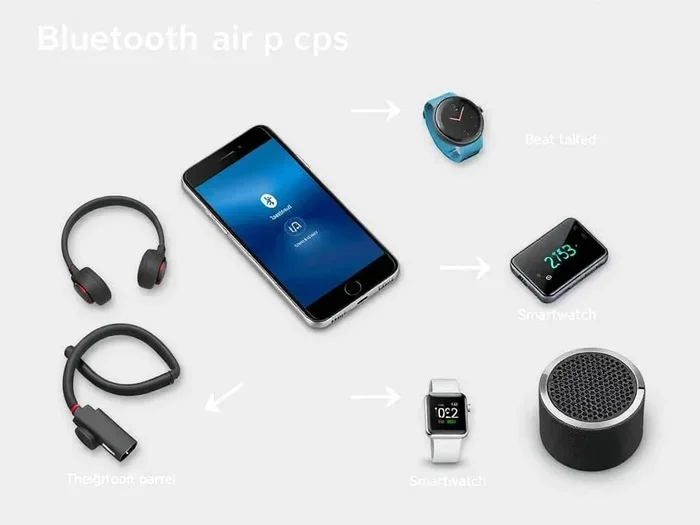
The short answer is yes. Most modern devices with Bluetooth capability can pair and connect without internet. Here is a quick look at different device types:
- Smartphones: Both Android and iPhone support offline Bluetooth fully.
- Tablets: iPad and Android tablets pair Bluetooth devices without Wi-Fi.
- Laptops: Windows and Mac computers can connect Bluetooth speakers, keyboards, and mice offline.
- Smart TVs: Many TVs let you pair Bluetooth headphones for private listening without internet.
- Cars: Bluetooth hands-free calling and audio streaming work without a data connection.
- Gaming consoles: Controllers connect via Bluetooth to consoles offline.
- Smart home devices: Many smart home gadgets use Bluetooth for local control without the cloud.
Almost any Bluetooth enabled device can connect to another Bluetooth device without internet. The only exception is when a specific app or service requires online access to function, but the Bluetooth connection itself will still work.
Conclusion
Can I Use Bluetooth Without Internet? Absolutely yes. Bluetooth is a self-contained wireless technology that does not rely on the internet to connect devices. You can stream local music, transfer files, connect peripherals, and pair accessories all without Wi-Fi or mobile data.
The key is understanding what Bluetooth can and cannot do offline. It excels at local connections and short-range data transfer. But it cannot replace the internet for streaming online content or downloading updates.
Next time you find yourself without Wi-Fi, do not worry. Turn on your Bluetooth and keep using your favorite devices. Whether you are on a road trip, in a remote cabin, or just in a spot with weak signal, your Bluetooth will keep working just fine. Embrace the freedom of wireless technology that works anywhere, anytime, with or without internet.
Frequently Asked Questions
Does Bluetooth need Wi-Fi to connect two devices?
No, Bluetooth does not need Wi-Fi at all. It uses its own radio frequency to connect devices directly. You can pair and use Bluetooth devices in complete isolation from any network.
Can I use Bluetooth headphones without internet?
Yes, you can use Bluetooth headphones without internet as long as you have audio files stored locally on your device. You can play downloaded music, podcasts, or offline playlists through your headphones without any Wi-Fi or data connection.
How far can Bluetooth reach without internet?
Bluetooth range is typically about 30 feet for most devices. Newer versions like Bluetooth 5.0 can reach up to 800 feet in open space. The range does not depend on internet access at all.
Can I transfer files between phones using Bluetooth offline?
Yes, file transfer between phones works perfectly offline using Bluetooth. Both phones just need Bluetooth turned on and be within range of each other. No internet connection is needed for the transfer.
Why does my Bluetooth keep disconnecting when I have no internet?
Bluetooth disconnections are usually not related to internet. They are caused by distance, interference from other devices, or outdated software. Try moving closer to the paired device or restarting Bluetooth to fix the issue.
Is Bluetooth safe to use without internet?
Yes, Bluetooth is safe to use without internet. The connection is local and encrypted between paired devices. Since there is no internet involved, there is less exposure to online security risks.