Can I Use A Game Camera For Home Security Monitoring
Yes, you can use a game camera for home security monitoring. Many homeowners are turning to trail cameras as a budget-friendly alternative to traditional security systems. These outdoor surveillance devices offer motion detection, night vision, and remote alerts that make them surprisingly effective for property protection.
Have you ever wondered if a game camera could double as a home security tool? It sounds a bit unusual at first. After all, these cameras were originally designed for hunters and wildlife photographers. But the truth is, more and more homeowners are discovering that a trail camera can be a powerful addition to their home security setup.
The idea is simple. A game camera for home security works by detecting motion and capturing photos or video clips of anything that moves in its range. Whether it is a deer wandering through your yard or an unfamiliar person near your front door, these cameras can alert you and capture the moment. And the best part? They are often much cheaper than traditional security cameras.
In this article, we will walk you through everything you need to know. We will cover how these cameras work, what features matter most, and how to set one up for your own property. By the end, you will have a clear answer to the question: can I use a game camera for home security monitoring?
Key Takeaways
- Game cameras work for home security: They offer motion detection, night vision, and remote photo alerts that help monitor your property.
- They are affordable and easy to set up: Most game cameras are battery-powered and require no professional installation.
- Weatherproof design is a big plus: Quality trail cameras handle rain, snow, and extreme temperatures for reliable outdoor use.
- Cellular models offer real-time alerts: You can receive instant notifications on your phone when motion is detected.
- They have limitations: Game cameras lack continuous recording and two-way audio found in traditional security cameras.
- Placement matters a lot: Strategic positioning near entry points and driveways maximizes their effectiveness.
- They are a great supplemental tool: Use game cameras alongside your main security system for extra coverage.
📑 Table of Contents
- What Is A Game Camera And How Does It Work?
- Why People Are Using Game Cameras For Home Security
- Key Features To Look For In A Game Camera For Security
- Game Camera vs Traditional Security Camera: Which Is Better?
- How To Set Up A Game Camera For Home Security
- Common Mistakes And Expert Tips For Best Results
- Final Verdict: Is A Game Camera Worth It For Home Security?
What Is A Game Camera And How Does It Work?
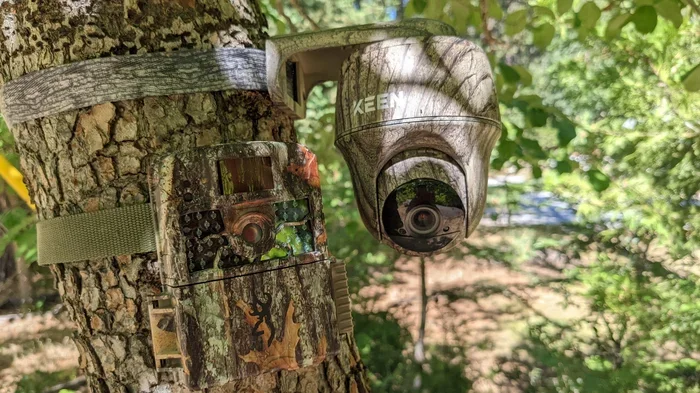
A game camera, also known as a trail camera or wildlife camera, is a rugged, weatherproof device built to capture images and videos of animals in their natural habitat. Hunters use them to scout for game. Wildlife photographers use them to capture stunning shots of nature. But the core technology behind these cameras makes them surprisingly useful for home security too.
Here is how a typical game camera works:
- Motion Detection: The camera uses a passive infrared (PIR) sensor to detect heat and movement. When something warm — like a person or animal — passes in front of the lens, the sensor triggers the camera to capture a photo or video clip.
- Night Vision: Most trail cameras come equipped with infrared LEDs for night vision. This means they can capture clear images even in complete darkness, which is essential for 24-hour property monitoring.
- Image Storage: Photos and videos are saved to an SD card inside the camera. Some models now offer cloud storage or cellular transmission for remote access.
- Battery Power: Unlike wired security cameras, most game cameras run on batteries. This makes them easy to place anywhere without needing a power outlet nearby.
The simplicity of how a game camera operates is actually one of its strengths. There are no complicated wiring jobs or subscription fees to worry about. You set it up, point it at the area you want to monitor, and it does the rest.
How Motion Detection Works In Detail
The infrared sensor on a game camera detects changes in heat signatures within its field of view. When the sensor picks up a warm object moving through its detection zone, it triggers the camera to take a photo or record a short video clip. The speed at which this happens is called the trigger speed.
Trigger speed matters a lot for home security. If a camera has a slow trigger speed, it might miss a fast-moving person. Most modern trail cameras have trigger speeds between 0.2 and 1.5 seconds. For home security purposes, you want a trigger speed under one second to make sure you do not miss anything.
Why People Are Using Game Cameras For Home Security
You might be surprised to learn how many homeowners are already using game cameras for home protection. There are several compelling reasons why this trend is growing rapidly.
Affordability is a huge factor. A decent game camera can cost anywhere from 30 to 150 dollars. Compare that to a full home security system with multiple cameras, which can easily run into hundreds or even thousands of dollars. For budget-conscious homeowners, a trail camera offers excellent value.
Easy and wireless setup is another major draw. You do not need to drill holes, run cables, or hire a professional. Most game cameras come with a simple mounting strap and can be set up in under 10 minutes. This makes them ideal for renters or anyone who wants a temporary security solution.
Battery independence means you can place cameras in remote areas of your property where there is no electrical outlet. Backyards, barns, gate entrances, and wooded areas around your home are all perfect spots for a battery-powered camera.
Low maintenance is yet another advantage. Once installed, a game camera can run for weeks or even months on a set of batteries. You simply walk out periodically, retrieve the SD card, and check your images.
Real-Life Uses For Game Cameras Around The Home
Here are some practical ways homeowners are putting game cameras to work for property surveillance:
- Front door monitoring: Place a camera near your entrance to capture anyone approaching your home.
- Driveway alerts: Get notified when a vehicle pulls into your driveway, even at night.
- Backyard security: Monitor sheds, garages, or pools for unauthorized access.
- Perimeter patrol: Set cameras along fences or property lines to detect intruders before they reach your home.
- Wildlife tracking: Keep an eye on deer, raccoons, or other animals that might damage your garden or property.
Key Features To Look For In A Game Camera For Security
Not all game cameras are created equal. If you plan to use one for home security monitoring, you need to know which features really matter.
Trigger Speed
Trigger speed is the time it takes for the camera to capture an image after motion is detected. For home security, you want a fast trigger speed — ideally under 0.5 seconds. A slow trigger means you could miss important moments, like someone approaching your door.
Night Vision Range
Night vision is non-negotiable for 24-hour monitoring. Most game cameras use infrared technology to capture images in the dark. Look for a camera with a night vision range of at least 50 feet. Some premium models offer up to 100 feet or more.
Detection Range
The detection range is how far the sensor can pick up motion. For home security, a detection range of 40 to 80 feet is ideal. This gives you good coverage of your yard, driveway, or entry points.
Photo and Video Quality
For capturing faces and details, you want a camera with at least 12 megapixels for photos and 1080p resolution for video. Higher quality images make it easier to identify people or vehicles in your footage.
Cellular Connectivity
A cellular trail camera sends images directly to your phone or email using a cellular network. This is a game-changer for remote monitoring. Instead of walking out to check the camera, you receive instant alerts the moment motion is detected.
Weatherproofing
Your camera will live outside, so it needs to handle all kinds of weather. Look for an IP65 or higher rating to ensure the camera is protected against rain, dust, and extreme temperatures.
Recovery Time
Recovery time is how quickly the camera is ready to take the next shot after capturing one. A fast recovery time of under two seconds prevents the camera from missing consecutive events, which is important if multiple people or animals pass by.
Game Camera vs Traditional Security Camera: Which Is Better?
It is natural to compare a game camera with a traditional security camera. Both serve the purpose of monitoring your property, but they do so in very different ways. Understanding these differences will help you decide which option fits your needs best.
| Feature | Game Camera | Traditional Security Camera |
|---|---|---|
| Price | 30 – 150 dollars | 50 – 500+ dollars per camera |
| Power Source | Battery-powered | Wired or battery |
| Installation | No tools needed | Often requires wiring |
| Continuous Recording | No (motion-triggered only) | Yes (24/7 recording) |
| Night Vision | Yes (infrared) | Yes (infrared or color) |
| Remote Alerts | Cellular models only | Most models include alerts |
| Two-Way Audio | No | Yes (on most models) |
| Weatherproof | Yes | Usually yes |
| Cloud Storage | Limited or none | Most models include cloud options |
| Ease of Setup | Very easy | Moderate to complex |
As you can see from the comparison table, a game camera shines in affordability and ease of setup. However, a traditional security camera offers continuous recording and two-way audio, which are valuable features for active monitoring.
The best approach for many homeowners is to use both. A game camera works great as a supplemental tool for areas where you do not want to run wires or pay for a full security system. You can place them at the edges of your property, near outbuildings, or in wooded areas where a traditional camera might look out of place.
When A Game Camera Is The Better Choice
A trail camera is the better choice when you need a simple, affordable, and discreet monitoring solution. If you just want to know who or what is moving around your property, a game camera gets the job done without the complexity of a full security setup.
When A Traditional Security Camera Is Better
Choose a traditional security camera when you need continuous recording, live streaming, or two-way audio. If you want to talk to someone on your property in real time or review hours of continuous footage, a traditional system is the way to go.
How To Set Up A Game Camera For Home Security
Setting up a game camera for home security is straightforward. Here is a step-by-step guide to get you started.
Step 1: Choose the Right Location
The location of your game camera is critical. Place it near entry points like your front door, back door, or garage. You can also position it along your driveway, near a gate, or at the edge of your property. Avoid placing the camera too high or too low. Aim for about 3 to 4 feet off the ground for the best field of view.
Step 2: Secure the Camera
Use the included mounting strap or bracket to attach the camera to a tree, post, or wall. Make sure the camera is stable and will not wobble in the wind. For added security, consider using a security box or cable lock to prevent theft.
Step 3: Adjust the Settings
Set the camera to photo and video mode for the best coverage. Adjust the sensitivity so it triggers for people and animals but ignores small creatures like squirrels. Set the burst mode to capture multiple shots in quick succession when motion is detected.
Step 4: Check the Battery and SD Card
Insert fresh batteries and a formatted SD card before walking away. Lithium batteries tend to last longer in extreme temperatures. Make sure the SD card has enough storage for the images and videos you plan to capture.
Step 5: Test the Camera
Walk in front of the camera and check if it triggers correctly. Review the images on your phone or computer to make sure the quality and framing are good. Adjust the angle if needed.
Quick Tips For Best Placement
- Point the camera north: This reduces false triggers from the rising and setting sun.
- Avoid direct sunlight: Glare can wash out your images during the day.
- Keep it away from busy roads: Passing cars can trigger the camera too often and drain the battery.
- Clean the lens regularly: Dirt and cobwebs can blur your images.
- Use a tree strap: This allows you to adjust the angle easily without damaging the tree.
Common Mistakes And Expert Tips For Best Results
Common Mistakes To Avoid
Placing the camera too close to a road. This will cause constant false triggers from passing cars and drain your battery quickly.
Ignoring the detection zone. Every game camera has a specific detection zone. If you place the camera too far from the area you want to monitor, it might not pick up movement.
Forgetting to check the camera regularly. Even with a cellular trail camera, it is good practice to physically check your cameras every few weeks to retrieve the SD card and replace batteries.
Using cheap batteries. Standard alkaline batteries drain quickly, especially in cold weather. Invest in lithium batteries for longer-lasting power.
Not securing the camera properly. A game camera left unsecured can be stolen or knocked down by animals. Use a lock box or cable tie for added protection.
Expert Insights From Security Professionals
Layer your security. Experts recommend using multiple game cameras at different points around your property. This creates overlapping coverage and ensures no blind spots.
Combine with a main security system. A game camera works best as a supplement to your primary home security system. Use it for areas that your main cameras do not cover.
Choose cellular models for remote properties. If your home is in a rural area without Wi-Fi, a cellular trail camera is the best option for real-time alerts and remote monitoring.
Pay attention to the flash type. Some game cameras use a white flash, which can startle animals and alert intruders that they are being watched. Infrared flash cameras are invisible and much better for discreet security monitoring.
Quick Tips For Maximizing Your Game Camera’s Security Potential
- Set up multiple cameras at different angles to cover all entry points.
- Use a cellular model if you want instant notifications on your phone.
- Choose infrared flash for discreet nighttime monitoring.
- Check your cameras monthly to ensure they are functioning properly.
- Use high-capacity SD cards to store more footage without frequent visits.
- Position cameras at waist height for the best facial capture of intruders.
Final Verdict: Is A Game Camera Worth It For Home Security?
So, can you use a game camera for home security monitoring? The answer is a clear yes. A trail camera is an affordable, easy-to-set-up, and effective tool for keeping an eye on your property. It may not replace a full home security system, but it is a fantastic supplement that adds an extra layer of home protection.
If you live in a rural area, own a vacation home, or simply want affordable coverage for your backyard and property lines, a game camera is a smart investment. The motion detection, night vision, and remote alert features make it a versatile tool for both wildlife enthusiasts and security-conscious homeowners.
The key is to choose the right model with the features that matter most for your situation. Focus on fast trigger speed, good night vision, weatherproofing, and — if budget allows — cellular connectivity for real-time alerts. With proper placement and regular maintenance, a game camera can serve your home security needs surprisingly well.
Start small. Try one game camera at your front door or back gate and see how it works for you. You might be surprised at how much peace of mind a simple trail camera can bring.
Frequently Asked Questions
Can a game camera replace a traditional security camera system?
A game camera can supplement your security setup but is not a full replacement for a traditional security camera system. It lacks continuous recording, two-way audio, and cloud storage. However, for budget-friendly and discreet monitoring, it works remarkably well.
How long does a game camera battery last for home security use?
Most game cameras last between 3 and 6 months on a set of batteries, depending on how often they are triggered. Using lithium batteries and lowering the trigger frequency can extend battery life significantly.
Can I access my game camera footage remotely?
Yes, if you choose a cellular trail camera. These models send images directly to your phone or email using a cellular network. Standard game cameras without cellular capability require you to physically retrieve the SD card to view footage.
Will a game camera work in all weather conditions?
Most quality game cameras are built to be weatherproof and can handle rain, snow, and extreme temperatures. Look for an IP65 or higher rating to ensure reliable outdoor performance year-round.
Do game cameras record audio?
Some game cameras do record audio along with video, but many models do not. Check the product specifications if audio recording is important to your home security needs.
Can game cameras be used to identify intruders?
Yes, especially models with high megapixel counts and 1080p video resolution. Placing the camera at waist height and using a fast trigger speed will help capture clear images of faces and license plates for identification purposes.
=== CONCLUSION ===
Using a game camera for home security monitoring is a practical, affordable, and surprisingly effective solution. Whether you want to protect your property, monitor wildlife activity, or simply keep an eye on what happens around your home after dark, a trail camera delivers real value.
The combination of motion detection, night vision, and battery-powered convenience makes these devices a versatile tool for any homeowner. While they may not offer every feature of a premium security camera system, they fill an important gap — especially for those who need coverage in remote areas or want a budget-friendly option.
Take the time to choose the right model, place it strategically, and maintain it regularly. A well-set-up game camera can give you the confidence and awareness you need to feel safer at home. Start today, and see how much easier property monitoring can be with a simple trail camera on your side.