Can I Connect Bluetooth to My Car Easy Guide for Beginners
Yes, you can connect Bluetooth to your car easily, even if your vehicle is older. This guide walks you through every method, from built-in systems to cheap adapters. You will learn how to pair your phone, fix common issues, and enjoy wireless audio on the road.
Can I connect Bluetooth to my car? The short answer is yes. Almost any car can use Bluetooth, whether it has a built-in system or not. You just need the right method and a little patience.
Bluetooth technology has changed how we listen to music and make calls while driving. It gives you wireless audio, hands-free calling, and a cleaner dashboard. No more tangled cords or fumbling with cables.
This guide is for beginners. We will cover every way to add Bluetooth to your car. You will learn how to pair devices, fix problems, and choose the best setup for your ride. Let us get started.
Key Takeaways
- Built-in Bluetooth: Most cars made after 2010 already have Bluetooth. You just need to pair your phone.
- Bluetooth adapters work for older cars: FM transmitters and USB adapters bring wireless tech to any stereo.
- Pairing is simple: Turn on Bluetooth, search for devices, and enter a PIN if needed.
- Troubleshooting is easy: Most connection problems come from distance, interference, or outdated software.
- Hands-free calling keeps you safe: Bluetooth lets you make and receive calls without touching your phone.
- Audio quality varies: Newer Bluetooth versions deliver much better sound than older ones.
- Multiple devices can pair: Many car systems support multipoint Bluetooth for switching between phones.
📑 Table of Contents
- Understanding Bluetooth in Cars
- How to Connect Bluetooth to Your Car Step by Step
- Bluetooth vs Aux Cord: Which Is Better?
- Troubleshooting Common Bluetooth Connection Issues
- Best Bluetooth Car Kits and Adapters for 2024
- Tips for a Better Bluetooth Driving Experience
- Common Mistakes to Avoid When Setting Up Bluetooth
- Expert Insights on Car Bluetooth Technology
- Key Takeaways
Understanding Bluetooth in Cars
Bluetooth is a short-range wireless technology. It connects devices without cables. In cars, it handles two main jobs: audio streaming and hands-free calling.
Audio streaming sends music from your phone to your car speakers. Hands-free calling lets you make and receive calls through your car microphone. Both features work through Bluetooth pairing.
How Bluetooth Connectivity Works
Bluetooth uses radio waves to send data between devices. The range is usually about 30 feet. Your phone and car stereo need to be within this distance to connect.
Modern Bluetooth versions offer better range and sound quality. Bluetooth 5.0 and newer provide stronger signals and higher audio quality. Older versions like Bluetooth 2.1 still work but with more limitations.
Most car entertainment systems support Bluetooth. If your car was made after 2010, there is a good chance it has built-in Bluetooth. Older cars can still get Bluetooth with the right accessories.
How to Connect Bluetooth to Your Car Step by Step
Connecting Bluetooth to your car is easier than you think. The process depends on what kind of car you have. Here are the main methods.
Method 1: Using Built-in Bluetooth
If your car has a built-in system, this is the easiest route. Follow these simple steps:
- Turn on your car and the stereo system.
- Go to the Settings menu on your car display.
- Select Bluetooth or Phone Settings.
- Choose Search for Devices or Add New Device.
- On your phone, turn on Bluetooth and make it visible.
- Select your car from the list of available devices.
- Enter the PIN if prompted. Common PINs are 0000 or 1234.
- Wait for the confirmation message. You are now connected!
Once paired, your car will remember your phone. Future connections happen automatically when you get in the car. This makes Bluetooth connectivity seamless every time.
Method 2: Using a Bluetooth Car Adapter
Older cars without built-in Bluetooth need an adapter. There are two popular types:
- FM Transmitter Bluetooth: Plugs into your cigarette lighter. It broadcasts music to an empty FM radio frequency. You tune your car radio to that frequency and listen.
- USB Bluetooth Adapter: Plugs into your car stereo USB port. It connects directly to the stereo system for better sound quality.
FM transmitters are cheap and easy to find. They cost between $10 and $30. USB adapters offer better audio quality but need a compatible stereo input.
Method 3: Using an AUX Bluetooth Adapter
If your car has an AUX input, you can use a Bluetooth AUX adapter. This small device plugs into the AUX port and receives Bluetooth signals. It then plays the audio through your car speakers.
This method gives you clean wireless audio without relying on FM radio signals. It is a great middle-ground option for older vehicles.
Method 4: Using a Replacement Stereo Head Unit
For the best experience, consider replacing your car stereo. Modern head units come with full Bluetooth support. Some even offer wireless Apple CarPlay and Android Auto.
This option costs more but gives you the most features. You get crisp sound, easy phone integration, and a modern interface. It is ideal if you want a complete car entertainment system upgrade.
Bluetooth vs Aux Cord: Which Is Better?
Many drivers wonder whether Bluetooth or an aux cord is the better choice. Both have pros and cons. Let us compare them.
| Feature | Bluetooth | Aux Cord |
|---|---|---|
| Wireless freedom | Yes | No |
| Sound quality | Good to excellent | Very good |
| Hands-free calling | Yes | No |
| Setup ease | Moderate | Very easy |
| Cable clutter | None | Yes |
| Cost | Free (built-in) or $10-$50 | $5-$15 |
| Phone battery use | Moderate | Low |
Bluetooth wins for convenience. You do not have to plug anything in. The wireless connection lets you move freely in your car.
An aux cord wins for pure sound quality. The wired connection delivers a direct, clean signal. But you lose the freedom of going wire-free.
For most drivers, Bluetooth is the better choice. It handles calls, music, and navigation all at once. The hands-free calling feature alone makes it worth it for safety.
Troubleshooting Common Bluetooth Connection Issues
Sometimes Bluetooth does not work right away. Do not worry. Most problems have simple fixes. Here are the most common issues and solutions.
Bluetooth Will Not Pair
If your phone will not connect to your car, try these steps:
- Turn Bluetooth off and on again on both devices.
- Make sure your phone is visible to other devices.
- Delete old pairings from both the phone and car.
- Restart both your phone and your car stereo.
- Check that your car stereo is in pairing mode.
Sometimes Bluetooth settings get stuck. A simple restart of both devices clears the issue. This is the fix that works most of the time.
Poor Audio Quality or Static
Static or choppy audio is a common complaint. Here is what causes it:
- Distance: You may be too far from the car system. Stay within 30 feet.
- Interference: Other wireless devices can cause static. Wi-Fi routers and microwaves are common culprits.
- Old Bluetooth version: Older Bluetooth versions have lower audio quality. Consider upgrading your adapter.
- FM frequency overlap: If using an FM transmitter, find a clearer frequency.
Switching to a USB Bluetooth adapter often fixes audio issues. The direct connection eliminates most interference problems.
Phone Disconnects Frequently
If your connection keeps dropping, check a few things:
- Make sure your phone software is up to date.
- Check if other devices are connected and causing conflicts.
- Clear the Bluetooth cache on your phone.
- Reset your car stereo Bluetooth settings.
- Check if your car battery is low. Low voltage can affect Bluetooth.
Many newer cars support multipoint pairing. This lets you connect two phones at once. It also reduces disconnection issues.
Best Bluetooth Car Kits and Adapters for 2024
Not all Bluetooth adapters are the same. Some deliver great sound. Others are frustrating to use. Here are some top options.
Top FM Transmitter Bluetooth Adapters
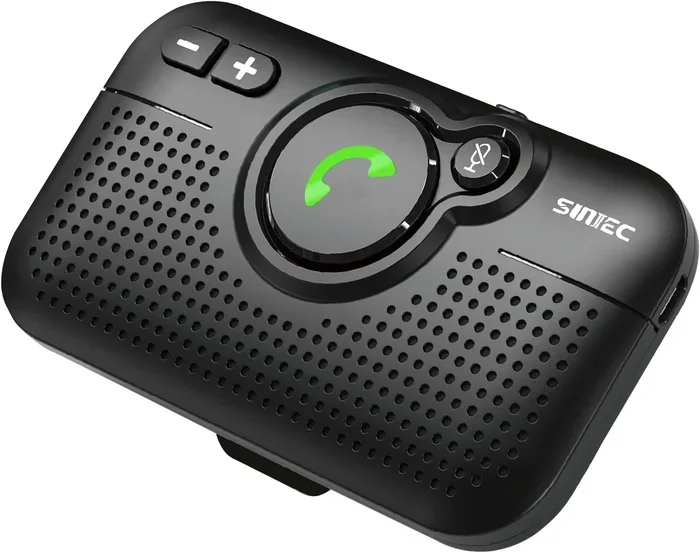
FM transmitters are the most affordable way to add Bluetooth. Look for models with USB charging ports and clear display screens. Popular brands include Nulaxy, VicTsing, and Aoxmu.
Choose a model that supports the latest Bluetooth version. Bluetooth 5.0 or newer gives you better range and sound. Avoid cheap no-name brands. They often have weak signals and poor audio quality.
Top USB Bluetooth Adapters
USB adapters plug directly into your stereo. They give you the best audio quality among external options. Look for adapters with aptX or LDAC codec support.
These codecs compress audio less, which means better sound. Brands like Belkin and 1Mii offer reliable USB Bluetooth adapters. They work with most factory stereos that have USB inputs.
Top Replacement Stereos with Bluetooth
If you want a full upgrade, consider a new head unit. Pioneer, Sony, and Kenwood all make excellent Bluetooth-ready stereos. Some models include touchscreens, GPS navigation, and smartphone integration.
Installation can be DIY if you are handy. Otherwise, a car audio shop can install it for you. The cost ranges from $100 to $400 depending on features.
Tips for a Better Bluetooth Driving Experience
Want to get the most out of your car Bluetooth setup? Follow these practical tips.
Keep Your Phone Software Updated
Phone updates often include Bluetooth improvements. New Bluetooth versions bring better range, faster pairing, and improved audio quality. Keep your phone on the latest software.
Charge Your Phone While Driving
Bluetooth uses phone battery. Streaming music and making calls drain power faster. Use a car charger to keep your phone powered. This prevents dropped connections and low-battery interruptions.
Minimize Interference
Other wireless devices can disrupt your Bluetooth signal. Turn off unnecessary Bluetooth devices in the car. Keep your phone away from Wi-Fi hotspots. This gives you a cleaner wireless connection.
Use Voice Commands for Safety
Most car Bluetooth systems support voice commands. You can make calls, change music, and get directions without touching your phone. This improves driving safety and keeps your hands on the wheel.
Unpair Old Devices
Too many paired devices can slow down your connection. Go through your Bluetooth settings and remove old devices you no longer use. This keeps your system running smoothly.
Test Your Audio Settings
Adjust the equalizer settings on both your phone and car stereo. Find the balance that sounds best in your vehicle. Some car systems have preset modes like “Bass Boost” or “Treble” that enhance sound.
Common Mistakes to Avoid When Setting Up Bluetooth
Avoid these mistakes to save time and frustration.
- Skipping the pairing mode: Your car stereo must be in pairing mode. Without it, your phone will not find the device.
- Ignoring firmware updates: Car stereos receive updates too. Check for firmware updates in your stereo settings.
- Pairing too many devices: Keep your primary phone as the main connection. Too many paired devices cause confusion.
- Using a damaged cable with USB adapters: A faulty USB cable can prevent proper charging and data transfer.
- Placing your phone too far away: Stay within Bluetooth range. The glove box or back seat can weaken the signal.
- Ignoring static on FM transmitters: In cities with crowded FM bands, find the clearest frequency. Use the auto-scan feature if available.
These small mistakes cause big problems. Taking a few extra minutes to set things up correctly saves headaches later.
Expert Insights on Car Bluetooth Technology
Automotive audio experts agree that Bluetooth has come a long way. Early Bluetooth versions had noticeable audio delays and lower quality. Today, Bluetooth 5.0 and codecs like aptX deliver near-CD quality sound.
“The biggest mistake drivers make is not updating their devices,” says audio specialist Mark Jennings. “Both the phone and the car stereo benefit from the latest software. A simple update can fix most connection issues.”
Experts also recommend investing in a quality adapter for older cars. Cheap FM transmitters often produce weak signals. A slightly better adapter makes a huge difference in audio quality and reliability.
For drivers who use navigation apps, Bluetooth is essential. It keeps your phone screen off and your eyes on the road. The hands-free calling feature ensures you stay legal and safe in most states.
Future car audio will likely move toward wireless everything. Wireless CarPlay and Android Auto are already becoming standard. Bluetooth will continue to evolve and improve the driving experience.
Key Takeaways
- Bluetooth works in almost any car: Whether your car has built-in Bluetooth or not, you can add wireless connectivity.
- Built-in systems are easiest: If your car supports it, just go to settings and pair your phone.
- Adapters bring Bluetooth to older cars: FM transmitters, USB adapters, and AUX adapters all work well.
- Troubleshooting is straightforward: Most issues resolve with a simple restart or re-pairing.
- Hands-free calling improves safety: Bluetooth keeps your hands on the wheel and eyes on the road.
- Audio quality keeps improving: Newer Bluetooth versions and codecs deliver excellent sound.
- Maintenance matters: Keep software updated and minimize interference for the best experience.
Connecting Bluetooth to your car is one of the simplest upgrades you can make. It transforms your driving experience. Music flows wirelessly, calls stay hands-free, and your dashboard stays clean.
Whether you have a brand-new car or a classic model, there is a Bluetooth solution for you. Built-in systems work right out of the box. Older cars just need a small adapter. Either way, the process is straightforward and affordable.
Start with the method that fits your car and budget. Follow the pairing steps carefully. If you run into issues, the troubleshooting tips above will help you fix them fast.
Once you experience wireless audio in your car, you will wonder how you ever drove without it. Can I connect Bluetooth to my car? Absolutely. And now you know exactly how to do it.
Get connected today. Enjoy your music, stay safe on calls, and make every drive more enjoyable with Bluetooth.